
การแนะนำ
ขอบคุณสำหรับการซื้อasing the DUNLOP Bluetooth Speaker with Light. This portable speaker combines high-quality audio playback with an integrated LED light show, designed to enhance your listening experience. This manual provides essential information for the safe and efficient operation of your device. Please read it thoroughly before use and retain it for future reference.
ข้อมูลด้านความปลอดภัย
- ห้ามให้ลำโพงสัมผัสกับอุณหภูมิที่สูงหรือต่ำเกินไป แสงแดดโดยตรง หรือความชื้นสูง
- หลีกเลี่ยงการทำตกหรือให้ลำโพงได้รับแรงกระแทกรุนแรง
- ห้ามถอดประกอบ ซ่อมแซม หรือดัดแปลงอุปกรณ์ด้วยตนเอง แนะนำให้ช่างผู้ชำนาญการเป็นผู้ดำเนินการซ่อมบำรุงทั้งหมด
- Keep the speaker away from water and liquids. While it is indicated as water-resistant, it is not designed for submersion.
- ใช้เฉพาะสายชาร์จที่ให้มาหรือสาย USB Type-C ที่ผ่านการรับรองสำหรับการชาร์จเท่านั้น
- กำจัดแบตเตอรี่และอุปกรณ์ตามระเบียบข้อบังคับท้องถิ่น
เนื้อหาแพ็คเกจ
ตรวจสอบให้แน่ใจว่ามีรายการทั้งหมดอยู่ในบรรจุภัณฑ์:
- 1 x DUNLOP Bluetooth Speaker with Light
- 1 x USB Type-C Charging Cable (50 cm)
- 1 x คู่มือผู้ใช้ (เอกสารนี้)
สินค้าเกินview
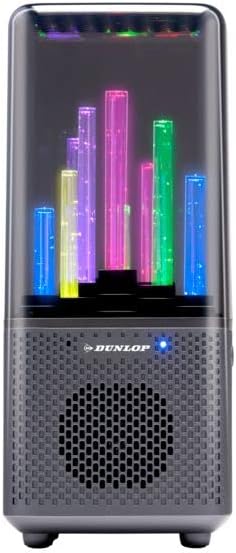
ด้านหน้า view of the DUNLOP Bluetooth Speaker with Light, showing the speaker grille and the transparent top housing with colorful LED light tubes.
การควบคุมและพอร์ต

สูงสุด view of the DUNLOP Bluetooth Speaker with Light, displaying the control buttons for power, mode, volume, and light functions.
- ปุ่มเปิด/ปิด: Press and hold to turn the speaker ON/OFF. Short press to play/pause music.
- ปุ่มโหมด: Short press to switch between Bluetooth, USB, and Micro SD card modes.
- ปุ่มลดระดับเสียง / ปุ่มเพลงก่อนหน้า: กดสั้นๆ เพื่อเล่นเพลงก่อนหน้า กดค้างไว้เพื่อลดระดับเสียง
- ปุ่มเพิ่มระดับเสียง / ปุ่มเพลงถัดไป: กดสั้นๆ เพื่อเล่นเพลงถัดไป กดค้างไว้เพื่อเพิ่มระดับเสียง
- ปุ่มโหมดแสง: Short press to cycle through different LED light patterns or turn lights off.

กลับ view of the DUNLOP Bluetooth Speaker with Light, showing the various input ports.
- พอร์ตชาร์จ USB-C: สำหรับชาร์จแบตเตอรี่ภายในลำโพง
- ช่องเสียบการ์ด Micro SD: Insert a Micro SD card for direct audio playback.
- พอร์ต USB-A: เสียบแฟลชไดรฟ์ USB เพื่อเล่นเสียงโดยตรง
- พอร์ต AUX-in: เชื่อมต่ออุปกรณ์เสียงภายนอกโดยใช้สายสัญญาณเสียงขนาด 3.5 มม. (ไม่ได้รวมอยู่ในชุด)
การชาร์จลำโพง
- หาพอร์ตชาร์จ USB-C ที่ด้านหลังของลำโพง
- เชื่อมต่อสาย USB Type-C ที่ให้มากับพอร์ตชาร์จของลำโพง
- Connect the other end of the USB cable to a USB power adapter (5V/1A recommended, not included) or a computer's USB port.
- ไฟแสดงสถานะการชาร์จจะสว่างขึ้นในระหว่างการชาร์จ และดับลงเมื่อชาร์จเต็ม
- A full charge takes approximately 2-3 hours and provides 2-3 hours of playback time, depending on volume and light usage.
Note: Charge the speaker fully before first use for optimal battery performance.
การตั้งค่าและการใช้งาน
การเปิด/ปิดเครื่อง
- To turn ON: Press and hold the Power button until you hear an audible prompt and the LED lights activate.
- To turn OFF: Press and hold the Power button again until the speaker powers down.
จับคู่บลูทู ธ
- Ensure the speaker is powered ON and in Bluetooth mode (indicated by a flashing blue LED). If not, short press the Mode button to switch to Bluetooth mode.
- เปิดใช้งานบลูทูธบนสมาร์ทโฟน แท็บเล็ต หรืออุปกรณ์เสียงอื่นๆ ของคุณ
- ค้นหา available Bluetooth devices. You should see "DUNLOP Speaker" or a similar name in the list.
- Select "DUNLOP Speaker" to connect. Once paired, you will hear a confirmation sound, and the blue LED will stop flashing and remain solid.
- ตอนนี้คุณสามารถเล่นเสียงจากอุปกรณ์ของคุณผ่านลำโพงได้
หมายเหตุ: ลำโพงจะพยายามเชื่อมต่อกับอุปกรณ์ที่จับคู่ไว้ล่าสุดโดยอัตโนมัติเมื่อเปิดเครื่อง
Playing Audio from USB/Micro SD Card
- Insert a USB flash drive or Micro SD card (with audio fileเสียบสาย (s) เข้ากับพอร์ตที่ตรงกันบนลำโพง
- The speaker should automatically switch to USB or Micro SD card mode and begin playing audio. If not, short press the Mode button to select the correct source.
- Use the Volume Up/Down and Previous/Next Track buttons on the speaker to control playback.
การควบคุมไฟ LED
- Short press the Light Mode button to cycle through various light patterns.
- Continue pressing the Light Mode button to find your preferred light effect or to turn the lights off.
การซ่อมบำรุง
- การทำความสะอาด: ใช้ผ้าแห้งนุ่มเช็ดทำความสะอาดภายนอกลำโพง ห้ามใช้สารทำความสะอาดที่มีฤทธิ์กัดกร่อนหรือตัวทำละลาย
- พื้นที่จัดเก็บ: เมื่อไม่ได้ใช้งานเป็นเวลานาน ควรเก็บลำโพงไว้ในที่แห้งและเย็น หลีกเลี่ยงแสงแดดโดยตรงและอุณหภูมิที่สูงหรือต่ำเกินไป
- การดูแลแบตเตอรี่ เพื่อยืดอายุการใช้งานแบตเตอรี่ ควรหลีกเลี่ยงการใช้แบตเตอรี่จนหมดบ่อยๆ ควรชาร์จลำโพงเป็นประจำ แม้จะไม่ได้ใช้งานก็ตาม
การแก้ไขปัญหา
| ปัญหา | สาเหตุที่เป็นไปได้ | สารละลาย |
|---|---|---|
| ลําโพงไม่เปิดขึ้น | แบตเตอรี่หมด | ชาร์จลำโพงให้เต็มโดยใช้สาย USB-C |
| ไม่สามารถจับคู่ผ่านบลูทูธได้ | ลำโพงไม่ได้อยู่ในโหมดจับคู่หรืออยู่ห่างจากอุปกรณ์มากเกินไป | Ensure speaker is in Bluetooth mode (flashing blue LED). Move speaker closer to your device (within 10m). Turn Bluetooth off and on again on your device. |
| ไม่มีเสียงในระหว่างการเล่น | ระดับเสียงต่ำเกินไปหรืออุปกรณ์ไม่ได้เชื่อมต่อ | Increase volume on both the speaker and your connected device. Ensure Bluetooth connection is established or correct source (USB/SD) is selected. |
| ไฟ LED ไม่ทำงาน. | Lights are turned off or in a static mode. | Press the Light Mode button to cycle through light patterns or turn them on. |
ข้อมูลจำเพาะ
| ชื่อรุ่น | BLT-Lautsprecher-mit-Licht |
| ยี่ห้อ | ดันลอป |
| ขนาด (กว้าง x ยาว x สูง) | 218 x 95 x 93 มม. |
| น้ำหนัก | 400 กรัม |
| สี | สีดำ |
| วัสดุ | พลาสติก |
| เทคโนโลยีการเชื่อมต่อ | บลูทูธ 5.0, USB, Micro SD, AUX |
| ช่วงสาย | สูงสุด 10 เมตร |
| แหล่งพลังงาน | ใช้พลังงานจากแบตเตอรี่ (1200 mAh) |
| พอร์ตชาร์จ | ยูเอสบี ไทป์ ซี |
| เวลาการเล่น | 2-3 hours (at moderate volume with lights) |
| กำลังขับของลำโพง | 8 วัตต์ |
| โหมดเอาต์พุตเสียง | สเตอริโอ |
| ไฟ LED | 9 LEDs with multiple light modes |
| ความต้านทานต่อน้ำ | Yes (Splash-resistant, not for submersion) |
| อุปกรณ์ที่รองรับ | Smartphones, Tablets, Laptops, USB drives, Micro SD cards |
การรับประกันและการสนับสนุน
This DUNLOP product comes with a limited warranty. Please refer to the warranty card included in your package for specific terms and conditions. For technical support or warranty claims, please contact your retailer or the DUNLOP customer service department through their official webเว็บไซต์.