
1. บทนำ
Thank you for choosing the MAGIC-REFINER K75 81 Keys Mechanical Gaming Keyboard. This compact, high-performance keyboard is designed for both gaming and office use, featuring a transparent body, customizable RGB backlighting, and hot-swappable switches. This manual provides detailed instructions to help you set up, operate, and maintain your new keyboard.
2. คุณสมบัติหลัก
- Customized Mechanical Design: Equipped with a high-performance RY 1060 single-chip microcomputer, full-speed USB communication protocol, and dual ISSP noise reduction for crisp key presses and reduced cavity sound.
- รูปแบบ 81 คีย์แบบกะทัดรัด: The K75 features an 81-key wired design with a highly transparent PC shell, independent direction keys, and all necessary F keys. Double bracket feet allow for adjustable typing angles, and it includes a detachable USB data cable.
- Full-Key Hot-Swappable Switches: Features PC transparent keycaps with pad printing + UV technology for clear, fade-resistant characters. Equipped with self-developed linear glass switches for fast feedback. Supports both 3-pin and 5-pin switches.
- เอฟเฟกต์แสงไฟ RGB สุดเท่: Independent monochrome lighting with 256-level PWM and 18 types of lighting effects. Customize and switch lighting effects based on scene, music, game, or microphone audio changes.
- ความเข้ากันได้กว้าง: Supports Windows 8/10, Android, iOS, and Mac operating systems.
- การออกแบบตามหลักสรีรศาสตร์: Engineered for comfortable use during extended periods.
3. เนื้อหาบรรจุภัณฑ์
- MAGIC-REFINER K75 Mechanical Gaming Keyboard
- สายเคเบิล USB Type-C
4. คำแนะนำในการตั้งค่า
4.1 การเชื่อมต่อคีย์บอร์ด
- Locate the USB Type-C port on the back of your K75 keyboard.
- เชื่อมต่อปลายด้านหนึ่งของสายเคเบิล USB Type-C ที่ให้มาเข้ากับแป้นพิมพ์
- Connect the other end of the USB cable to an available USB port on your computer (Windows, Mac) or compatible device (Android, iOS).
- แป้นพิมพ์จะถูกจดจำโดยระบบปฏิบัติการของคุณโดยอัตโนมัติ
4.2 การปรับมุมการพิมพ์
The K75 keyboard features double bracket feet on the underside. Flip these feet out to adjust the keyboard to a more ergonomic typing angle for improved comfort.

Image: The MAGIC-REFINER K75 keyboard showcasing its ergonomic design and adjustable feet for comfortable typing.
4.3 Driver Software Installation (Optional)
For advanced customization and features, you may need to install the dedicated driver software. Follow these steps:
- เยี่ยมชมอย่างเป็นทางการ webเว็บไซต์: www.manba-snake.com
- เลือกภาษาที่คุณต้องการบน webเว็บไซต์.
- Navigate to the 'SOFTWARE' section on the navigation bar.
- Locate and click on 'K75' to download the driver software.
- แตกไฟล์ที่ดาวน์โหลดมา file using a third-party software (e.g., WinRAR).
- Run the 'setup.exe' file และทำตามคำแนะนำบนหน้าจอเพื่อทำการติดตั้งให้เสร็จสมบูรณ์

Image: A screenshot illustrating the process of downloading the driver software for the keyboard from the official webเว็บไซต์.
5. คู่มือการใช้งาน
5.1 การควบคุมไฟแบ็คไลท์ RGB
The K75 keyboard offers 18 distinct RGB lighting effects. You can cycle through these effects and customize them to match your preference or environment.
- To cycle through the 18 lighting effects, press the FN + อินส์ คีย์พร้อมกัน
- Further customization options may be available through the dedicated driver software.

Image: The K75 keyboard illuminated with vibrant RGB backlighting, demonstrating its customizable lighting effects.
5.2 Media Control Knob
The metal knob located on the top right of the keyboard provides convenient media control:
- หมุนปุ่มเพื่อปรับระดับเสียง
- Press the knob to turn the keyboard's lighting on or off.
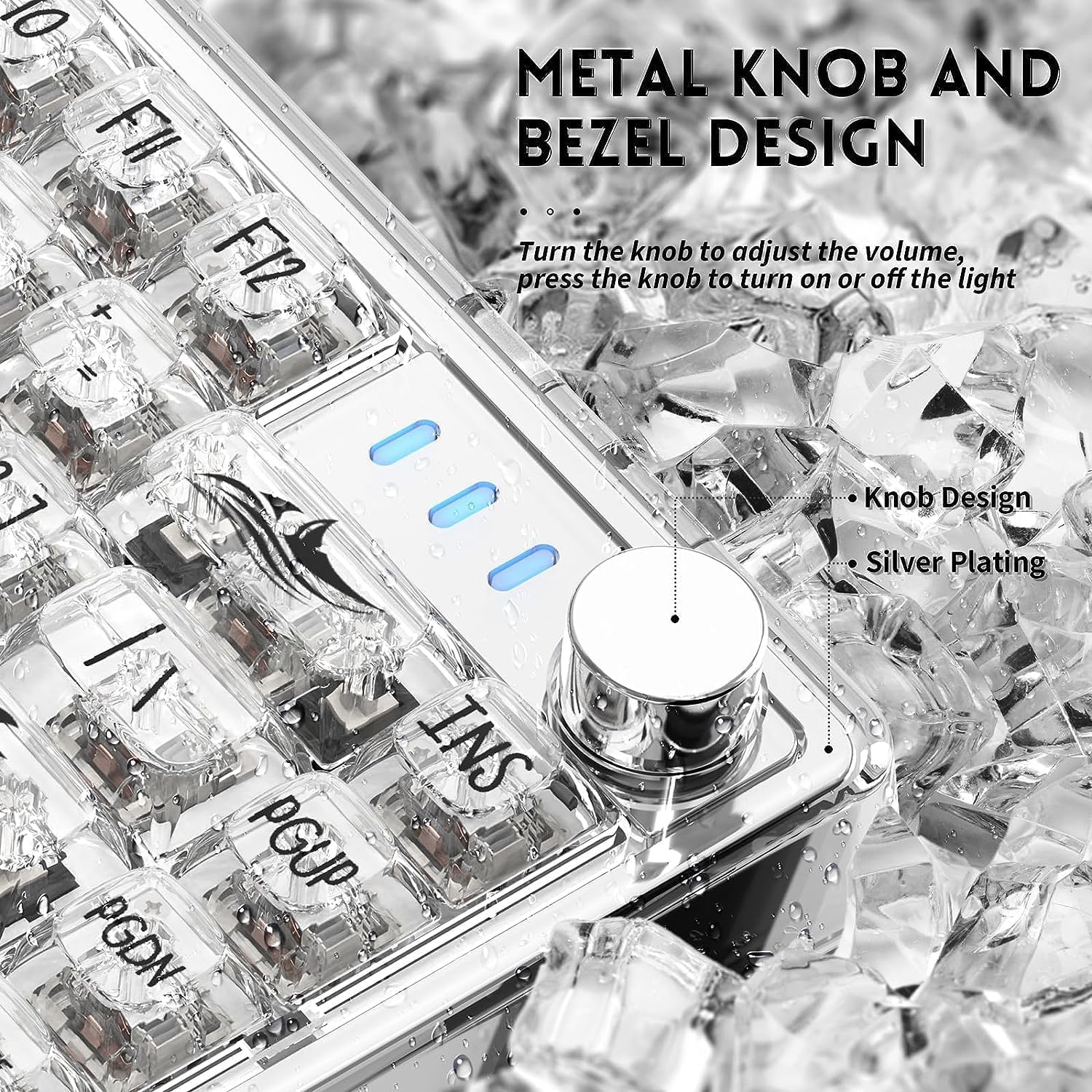
ภาพ: รายละเอียด view of the metal knob on the K75 keyboard, highlighting its function for volume and lighting control.
5.3 สวิตช์แบบ Hot-Swappable
The K75 keyboard features hot-swappable switch sockets, allowing you to easily change switches without soldering. This supports both 3-pin and 5-pin mechanical switches.
- Using a switch puller tool (not included), carefully grip the switch and pull it straight up to remove it.
- จัดตำแหน่งขาของสวิตช์ใหม่ให้ตรงกับรูบนแผงวงจรพิมพ์ ตรวจสอบให้แน่ใจว่าขาตั้งตรงเพื่อป้องกันการงอ
- ค่อยๆ กดสวิตช์ใหม่เข้าไปจนกว่าจะได้ยินเสียงคลิกและแน่นสนิท
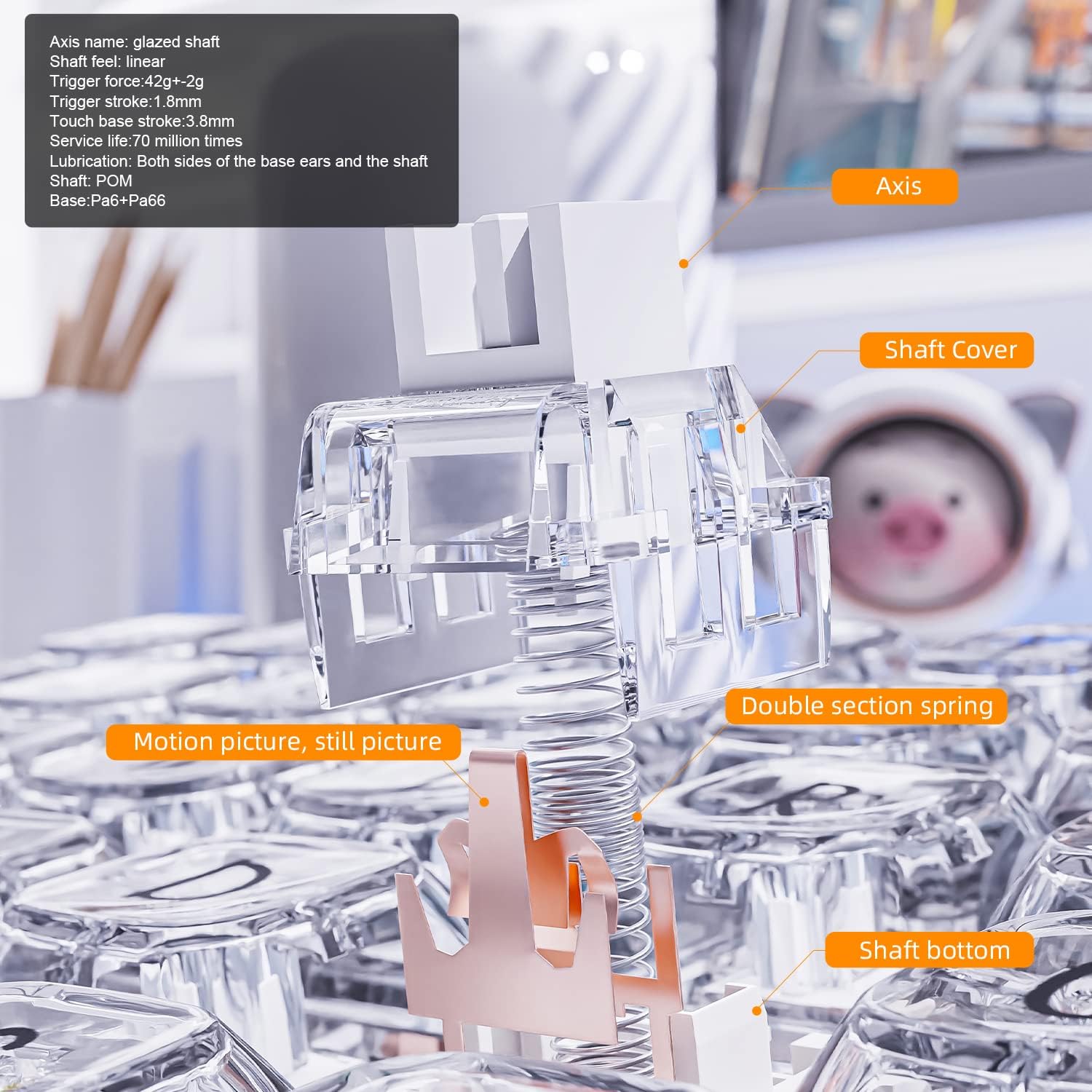
ภาพ: ระเบิด view diagram illustrating the components of a mechanical switch, including the axis, shaft cover, double section spring, and shaft bottom.
Image: A keycap puller tool, used for safely removing keycaps from the keyboard.
Image: A switch puller tool, essential for removing hot-swappable switches from the keyboard's PCB.
5.4 Transparent Keycaps
The K75 features highly transparent PC keycaps with characters applied using pad printing and UV technology, ensuring clarity and resistance to fading.

ภาพ: ภาพระยะใกล้ view of the K75's highly transparent keycaps, highlighting their clear characters and durable finish.
6. การบำรุงรักษา
- การทำความสะอาด: Use a soft, dry cloth to wipe the keyboard surface. For deeper cleaning, remove keycaps and use compressed air to clear debris. Avoid harsh chemicals.
- การดูแลรักษาคีย์แคป: The transparent PC keycaps are durable but can scratch. Handle with care when removing or installing.
- การดูแลสวิตช์: When hot-swapping switches, ensure proper alignment to prevent bending pins.
- การจัดการสายเคเบิล: Keep the USB cable untangled to prevent damage.
7 การแก้ไขปัญหา
- แป้นพิมพ์ไม่ตอบสนอง:
- ตรวจสอบให้แน่ใจว่าสาย USB เชื่อมต่อกับคีย์บอร์ดและคอมพิวเตอร์อย่างแน่นหนา
- ลองเชื่อมต่อคีย์บอร์ดกับพอร์ต USB อื่นบนคอมพิวเตอร์ของคุณ
- ทดสอบแป้นพิมพ์บนคอมพิวเตอร์เครื่องอื่นเพื่อตัดปัญหาเฉพาะระบบออกไป
- RGB Backlight Not Working/Changing:
- Press the media control knob to ensure the lighting is not turned off.
- Use the FN + INS key combination to cycle through lighting effects.
- หากใช้ซอฟต์แวร์ไดรเวอร์ โปรดตรวจสอบให้แน่ใจว่าได้ติดตั้งอย่างถูกต้องและตั้งค่าเรียบร้อยแล้ว
- กุญแจไม่ลงทะเบียน:
- For hot-swappable switches, ensure the switch is fully seated and its pins are not bent. Remove and re-insert the switch if necessary.
- Avoid using excessive force when operating the keyboard, as this can damage mechanical parts.
- ปัญหาด้านซอฟต์แวร์:
- Reinstall the driver software from the official webเว็บไซต์.
- ตรวจสอบให้แน่ใจว่าระบบปฏิบัติการของคุณเป็นเวอร์ชันล่าสุด
8. ข้อมูลจำเพาะ
| คุณสมบัติ | รายละเอียด |
|---|---|
| ยี่ห้อ | เมจิก-รีไฟเนอร์ |
| หมายเลขรุ่น | เค75 |
| จำนวนคีย์ | 81 |
| ประเภทสวิตซ์ | Magic-Refiner Linear Glass (Hot-Swappable) |
| เทคโนโลยีการเชื่อมต่อ | พอร์ต USB Type-C (แบบมีสาย) |
| การแบ็คไลท์ | RGB (18 effects, customizable) |
| วัสดุ | PC Transparent Body and Keycaps |
| อุปกรณ์ที่รองรับ | PC (Windows 8/10), Android, iOS, Mac |
| คุณสมบัติพิเศษ | Backlit, Ergonomic, Hot-Swappable, Media Control Knob |
9. วิดีโอผลิตภัณฑ์
9.1 MAGIC-REFINER K75 81 Keys Compact Gaming Keyboard Overview
วิดีโอ: เจ้าหน้าที่ผ่านview of the MAGIC-REFINER K75 81 Keys Compact Gaming Keyboard, highlighting its design and features.
9.2 MAGIC-REFINER 81 Keys Compact Gaming Keyboard Features
Video: A demonstration of various features of the MAGIC-REFINER 81 Keys Compact Gaming Keyboard, including its lighting and build.
10. การรับประกันและการสนับสนุน
No explicit warranty information is provided with this product. For any questions, technical support, or assistance, please contact the seller directly through the platform where you purchased the keyboard. They will be able to provide the most accurate and up-to-date support information.