
การแนะนำ
This manual provides comprehensive instructions for the ALLIMITY Replacement Remote Control, designed to operate various RCA and HKC LED TV models. This remote control functions as a direct replacement and requires no programming for immediate use. Please read this manual carefully to ensure proper operation and longevity of your remote control.
การตั้งค่า
การติดตั้งแบตเตอรี่
- ค้นหาช่องใส่แบตเตอรี่ที่ด้านหลังของรีโมทคอนโทรล
- เลื่อนฝาครอบแบตเตอรี่ลงหรือตามทิศทางที่ระบุด้วยลูกศรเพื่อเปิด
- Insert two AAA alkaline batteries, ensuring the positive (+) and negative (-) terminals align correctly with the markings inside the compartment.
- ปิดฝาครอบแบตเตอรี่กลับเข้าที่โดยเลื่อนกลับเข้าที่จนกระทั่งล็อคเข้าที่อย่างแน่นหนา
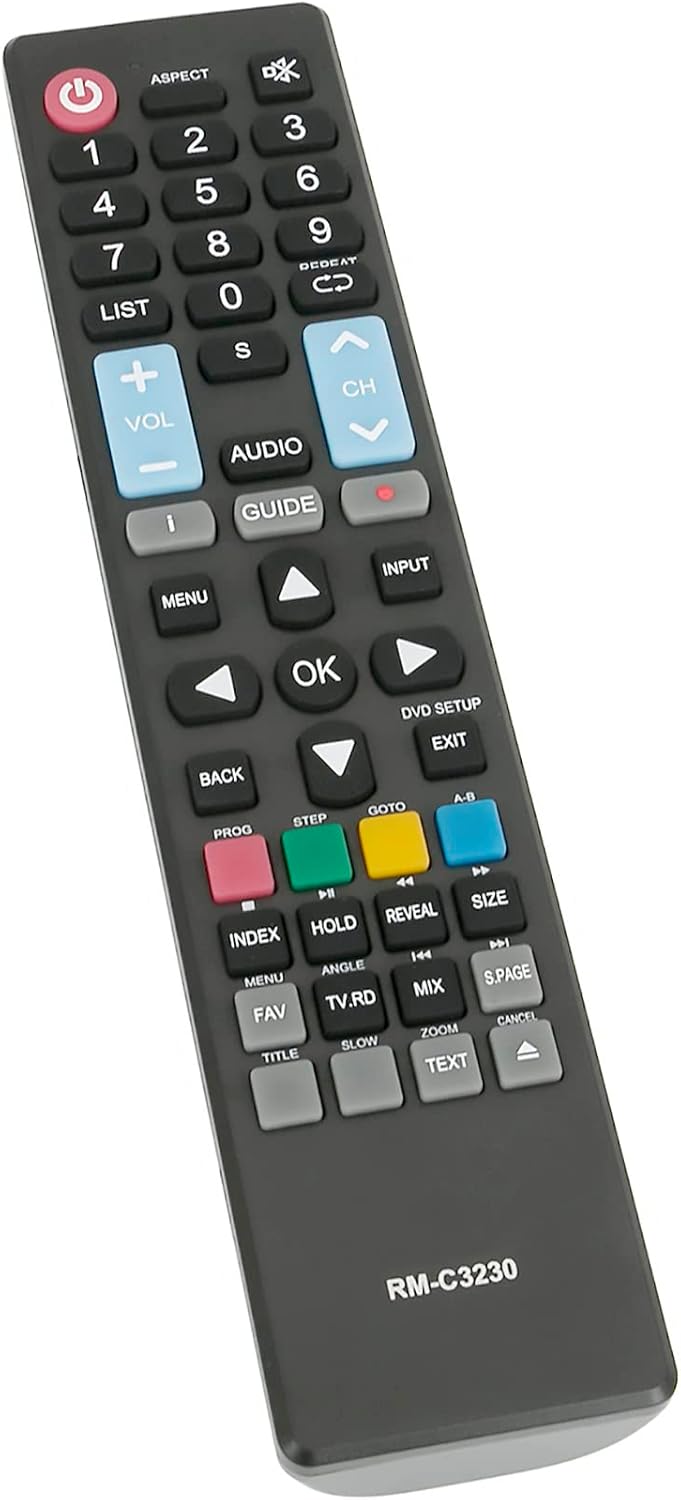
ภาพ: มุมเอียง view of the remote control. The battery compartment is located on the back of the device.
คำแนะนำการใช้งาน
This remote control is designed to replicate the functions of your original TV remote. Point the remote control directly at your TV's infrared receiver for optimal performance.
ฟังก์ชันหลักจบลงแล้วview

ภาพ: ด้านหน้า view ของรีโมทคอนโทรล โดยเน้นปุ่มฟังก์ชันต่างๆ
- ปุ่มเพาเวอร์ (U):เปิดหรือปิดทีวี
- ปุ่มตัวเลข (0-9): เลือกช่องทีวีได้โดยตรง
- ฉบับ +/-: ปรับระดับเสียง
- ช +/-: เปลี่ยนช่องทีวีขึ้นหรือลง
- เมนู: เข้าถึงเมนูหลักของทีวี
- ป้อนข้อมูล: เลือกแหล่งสัญญาณเข้า (เช่น HDMI, AV)
- ตกลง / ลูกศรนำทาง: Confirms selections and navigates through menus.
- กลับ / ออก: กลับไปยังหน้าจอก่อนหน้าหรือออกจากเมนูปัจจุบัน
- แนะนำ: Displays the electronic program guide (if supported by TV).
- ปุ่มสี (แดง, เขียว, เหลือง, น้ำเงิน): Provide access to specific functions within menus or applications, as indicated on your TV screen.
รุ่นที่รองรับ
This ALLIMITY remote control is compatible with a range of RCA and HKC LED TV models. No programming is required; simply insert batteries and use. Below is a list of some compatible models:
- RS50U1-EU
- RB40F1-EU
- RS43F1-EU
- RS65U1-EU
- 13M4C
- RB32H1-EU
- RS55U1-EU
- 50F1
- 40K7เอ
- 43F6
- 50A7520F
- 50A7540F
- 50A7560F
- 50AE7400F
- 50AE7410F
- 50AE7430F
- 50AE7450F
การซ่อมบำรุง
- การทำความสะอาด: Use a soft, dry cloth to clean the remote control. Do not use liquid cleaners or abrasive materials.
- การเปลี่ยนแบตเตอรี่: Replace batteries when the remote's response becomes sluggish or stops working. Always replace both batteries at the same time with new alkaline batteries.
- พื้นที่จัดเก็บหากไม่ได้ใช้งานรีโมทคอนโทรลเป็นเวลานาน ควรถอดแบตเตอรี่ออกเพื่อป้องกันการรั่วไหลและความเสียหาย
- หลีกเลี่ยงความเสียหาย:อย่าทำรีโมทคอนโทรลตกหรือสัมผัสกับอุณหภูมิที่สูงหรือความชื้นสูงหรือแสงแดดโดยตรง
การแก้ไขปัญหา
- รีโมทไม่ตอบสนอง: Check if the batteries are inserted correctly with the correct polarity (+/-). Replace old batteries with new ones. Ensure there is a clear line of sight between the remote and the TV's infrared receiver.
- ฟังก์ชันการทำงานจำกัด: Verify that your TV model is listed in the compatible models section. While this remote is a direct replacement, some advanced or smart TV specific functions might require the original remote or specific TV settings.
- การรบกวน: Ensure no other devices are blocking the infrared signal or causing interference.
ข้อมูลจำเพาะ
| คุณสมบัติ | รายละเอียด |
|---|---|
| ยี่ห้อ | ความเสมอภาค |
| ชื่อรุ่น | QYSY-PSGA-QYSY |
| เทคโนโลยีการเชื่อมต่อ | อินฟราเรด |
| อุปกรณ์ที่รองรับ | RCA, HKC LED TVs (specific models listed above) |
| จำนวนอุปกรณ์ที่รองรับสูงสุด | 1 |
| ประเภทตัวควบคุม | ปุ่มควบคุม |
| จำนวนปุ่ม | 25 |
| ระยะสูงสุด | 10 เมตร |
| ประเภทแบตเตอรี่ | AAA อัลคาไลน์ (ต้องการ 2 รายการ) |
| สี | สีดำ |
| น้ำหนักสินค้า | 0.08 กิโลกรัม |
| คุณสมบัติพิเศษ | การออกแบบตามหลักสรีรศาสตร์ |
การรับประกันและการสนับสนุน
For warranty information or technical support, please refer to the seller's policies on the platform where the product was purchased. Keep your purchase receipt as proof of purchase. If you encounter any issues not covered in this manual, please contact the seller directly for assistance.