
DOOGEE T30PRO
DOOGEE T30 PRO 11 Inch Tablet
คู่มือการใช้งาน
1. สินค้าหมดview
The DOOGEE T30 PRO is an 11-inch Android tablet designed for high performance and an immersive visual experience. It features a 2.5K display, a powerful MediaTek Helio G99 octa-core processor, and ample memory for multitasking and storage. This manual provides essential information to help you get the most out of your device.

รูปที่ 1.1: ด้านหน้าและด้านหลัง view of the DOOGEE T30 PRO tablet, showcasing its key specifications.
2. คู่มือการติดตั้ง
2.1 การชาร์จเริ่มต้น
Before first use, fully charge the tablet using the provided 33W fast charger. The tablet is equipped with an 8580mAh battery for extended usage.
2.2 เปิด/ปิดเครื่อง
- การเปิดเครื่อง: กดปุ่มเปิด/ปิดค้างไว้จนกว่าโลโก้ DOOGEE จะปรากฏขึ้น
- วิธีปิดเครื่อง: กดปุ่มเปิด/ปิดค้างไว้ จากนั้นเลือก 'ปิดเครื่อง' จากตัวเลือก
2.3 การติดตั้งซิมการ์ดและการ์ด TF
The DOOGEE T30 PRO supports dual 4G LTE and TF card expansion up to 2TB. Locate the SIM/TF card tray on the side of the tablet. Use the provided ejector tool to open the tray. Insert your Nano-SIM cards and/or TF card into the designated slots, ensuring correct orientation. Close the tray securely.
2.4 การตั้งค่าครั้งแรก
Upon first power-on, follow the on-screen prompts to complete the initial setup. This includes selecting your language, connecting to a Wi-Fi network, and signing in with your Google account. The tablet is GMS certified, ensuring full access to the Google Play Store and Google services.
Video 2.1: An unboxing video of the DOOGEE T30 PRO tablet, demonstrating the initial setup and contents.
3. การใช้งานแท็บเล็ตของคุณ
3.1 การแสดงผลและภาพ
Experience stunning visuals on the 11-inch 2.5K (2560x1600) display. The tablet features TÜV SÜD Eye Safety Certification for low blue light, reducing eye strain during prolonged use.

Figure 3.1: The tablet's display capabilities, emphasizing its high resolution and immersive viewการสร้างประสบการณ์
3.2 ประสิทธิภาพและการจัดเก็บ
Powered by the MediaTek Helio G99 octa-core processor, the T30 PRO delivers smooth performance for gaming, multitasking, and demanding applications. It comes with 15GB RAM (8GB physical + 7GB virtual) and 256GB of internal storage, expandable up to 2TB via TF card.
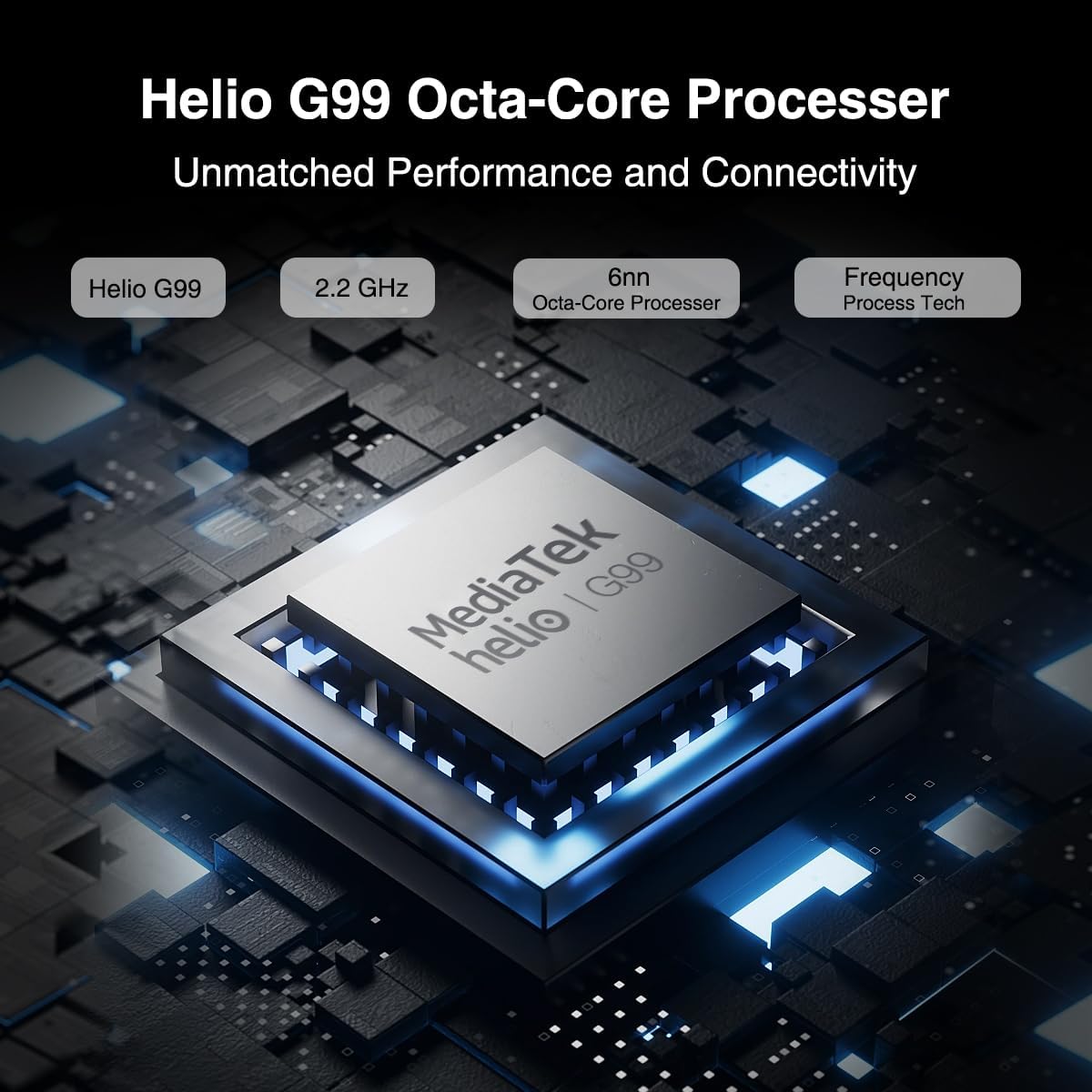
Figure 3.2: Illustration of the MediaTek Helio G99 processor, highlighting its core specifications.
3.3 ฟังก์ชันกล้อง
The tablet features a 20MP main camera, an 8MP front camera, and a 2MP macro camera. These cameras are suitable for capturing photos, video conferencing, and e-learning.

Figure 3.3: The tablet's camera capabilities, ideal for video calls and capturing moments.
3.4 ระบบเสียง
Enjoy rich audio with the tablet's four Hi-res Stereo Speakers, providing an enhanced sound experience for media consumption.
3.5 การเชื่อมต่อ
Stay connected with dual 4G LTE support, dual-band Wi-Fi (2.4G/5G), and Bluetooth 5.0. The tablet also supports Widevine L1 for high-quality streaming from services like Prime Video, Disney+, and Hulu.

Figure 3.4: The tablet's robust connectivity options for seamless work and entertainment.
3.6 การทำงานหลายอย่างพร้อมกันและประสิทธิภาพการทำงาน
The Android 13 operating system allows for efficient multitasking, including split-screen functionality, enabling you to run multiple applications simultaneously.

Figure 3.5: The tablet's split-screen feature for enhanced productivity.
4. การบำรุงรักษาและการดูแล
4.1 การดูแลแบตเตอรี่
- หลีกเลี่ยงอุณหภูมิที่สูงเกินไป เพราะอาจทำให้แบตเตอรี่มีอายุการใช้งานลดลง
- เพื่อให้แบตเตอรี่มีอายุการใช้งานยาวนานที่สุด ควรหลีกเลี่ยงการปล่อยแบตเตอรี่จนหมดบ่อยครั้ง
- ใช้เฉพาะเครื่องชาร์จดั้งเดิมหรือเครื่องชาร์จที่ได้รับการรับรองว่าใช้งานร่วมกันได้เท่านั้น
4.2 การทำความสะอาดแท็บเล็ตของคุณ
- ใช้ผ้านุ่มไม่เป็นขุยทำความสะอาดหน้าจอและตัวเครื่อง
- สำหรับรอยเปื้อนฝังแน่น ให้เช็ดออกเล็กน้อยampชุบผ้าด้วยน้ำหรือน้ำยาทำความสะอาดหน้าจอ
- หลีกเลี่ยงการใช้สารเคมีรุนแรง วัสดุที่มีฤทธิ์กัดกร่อน หรือสเปรย์กระป๋องโดยตรงกับยาเม็ด
5 การแก้ไขปัญหา
This section addresses common issues you might encounter with your DOOGEE T30 PRO tablet.
| ปัญหา | สาเหตุที่เป็นไปได้ | สารละลาย |
|---|---|---|
| แท็บเล็ตไม่สามารถเปิดเครื่องได้ | แบตเตอรี่ต่ำ ระบบขัดข้อง | Charge the tablet for at least 30 minutes. If still unresponsive, press and hold the Power button for 10-15 seconds to force restart. |
| ประสิทธิภาพการทำงานช้า | Too many apps running in background; Low storage space | Close unnecessary applications. Clear cache and data for frequently used apps. Free up storage by deleting unused files หรือแอพ |
| ปัญหาการเชื่อมต่อ Wi-Fi | รหัสผ่านไม่ถูกต้อง; ปัญหาเกี่ยวกับเราเตอร์; อยู่นอกช่วงสัญญาณ | Ensure correct Wi-Fi password. Restart your Wi-Fi router. Move closer to the Wi-Fi router. |
| แบตเตอรี่หมดเร็ว | High screen brightness; Background apps; Frequent network usage | Reduce screen brightness. Disable Wi-Fi/Bluetooth when not in use. Close background apps. Check battery usage in settings to identify power-hungry apps. |
6. ข้อมูลจำเพาะ
| คุณสมบัติ | รายละเอียด |
|---|---|
| ชื่อรุ่น | ที30โปร |
| ระบบปฏิบัติการ | แอนดรอยด์ 13 |
| โปรเซสเซอร์ | MediaTek Helio G99 Octa-core (2.2 GHz) |
| แรม | 15GB (8GB + 7GB เสมือน) |
| การจัดเก็บข้อมูลภายใน | 256GB |
| พื้นที่เก็บข้อมูลแบบขยายได้ | ความจุสูงสุด 2TB (การ์ด TF) |
| ขนาดหน้าจอ | 11 นิ้ว |
| ความละเอียดหน้าจอ | 2.5K (2560x1600) |
| กล้องหลัง | 20 MP |
| กล้องหน้า | 8 MP |
| ความจุของแบตเตอรี่ | 8580mAh |
| การชาร์จไฟ | ชาร์จเร็ว 33W |
| การเชื่อมต่อแบบไร้สาย | 802.11a/b/g/n/ac (2.4G/5G Wi-Fi), Bluetooth 5.0 |
| การเชื่อมต่อเซลลูล่าร์ | Dual 4G LTE (TD-LTE, FDD-LTE) |
| ขนาด (กxยxส) | 10.11 x 0.3 x 6.64 นิ้ว |
| น้ำหนักสินค้า | 11.1 ออนซ์ |
7. การรับประกันและการสนับสนุน
The DOOGEE T30 PRO comes with a 2-year warranty. DOOGEE provides lifetime technical support and full 24/7 customer service to assist you with any inquiries or issues you may encounter. For support, please refer to the contact information provided on the official DOOGEE webเว็บไซต์หรือเอกสารการซื้อของคุณ
Ask a question about this manual
Ask about setup, troubleshooting, compatibility, parts, safety, or missing instructions. Manuals+ will review the question and use this page’s manual context to help answer it.