
1. บทนำ
This manual provides comprehensive instructions for the Vrabocry LM091 RGBCCT 4 Zone Touch RF Remote Control. This remote is designed to control RGBCCT LED strips and bulbs, offering intuitive control over color, brightness, and color temperature. Please read this manual thoroughly before use to ensure proper operation and to maximize the product's lifespan.
2. สินค้าหมดview
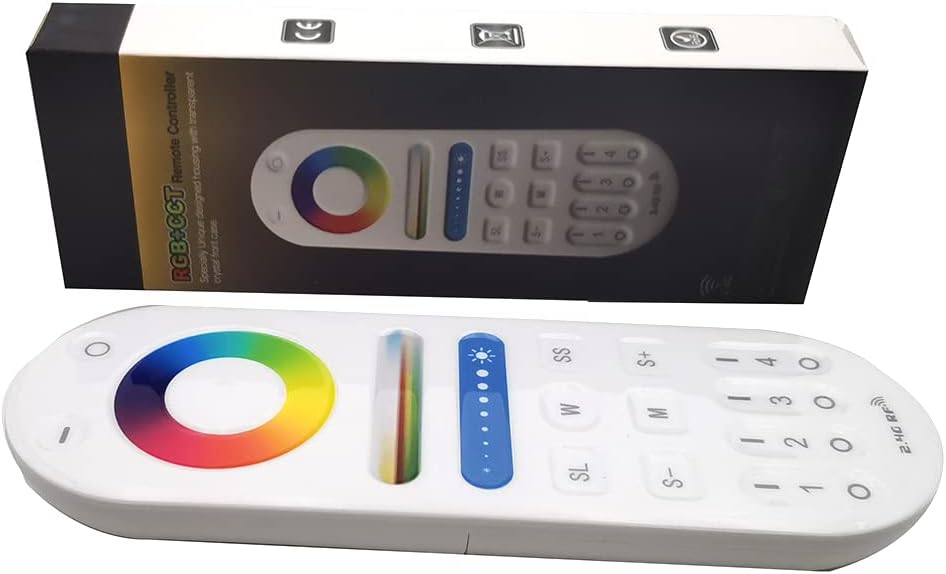
Image 1: The Vrabocry LM091 RGBCCT remote control shown alongside its product packaging.
2.1 คุณสมบัติหลัก
- RGBCCT Control: Capable of controlling RGBCCT 6-pin (V+, R, G, B, WW, CW) LED strips and bulbs.
- การควบคุม 4 โซน: Manage up to four distinct lighting zones independently or simultaneously.
- วงแหวนเปลี่ยนสีแบบสัมผัส: Intuitive color selection via a sensitive touch color ring.
- การปรับความสว่างและอุณหภูมิสี: Fine-tune lighting intensity and white light temperature (warm white to cool white).
- 2.4GHz RF Transmission: Reliable wireless control with a range of up to 98 feet (30 meters).
- ความเข้ากันได้: Works with various Mi-Boxer/Mi-Light RGBCCT series controllers such as WL5, LS2, FUT045, FUT039, and others.
- การออกแบบตามหลักสรีรศาสตร์: Comfortable to hold and operate.
2.2 เค้าโครงรีโมทคอนโทรล

ภาพที่ 2: ด้านหน้า view of the LM091 remote control, showing the touch color ring, brightness slider, and various control buttons.
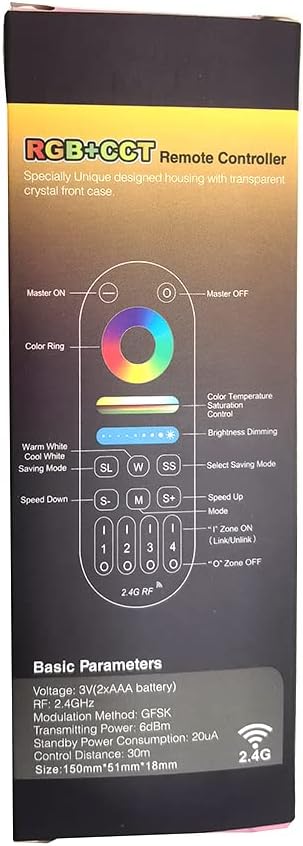
Image 3: A detailed diagram illustrating the functions of each button on the LM091 remote control, as depicted on its packaging.
3. การตั้งค่า
3.1 การติดตั้งแบตเตอรี่
- ค้นหาฝาปิดช่องใส่แบตเตอรี่ที่ด้านหลังของรีโมทคอนโทรล
- เลื่อนฝาเปิดออก
- ใส่แบตเตอรี่ AAA สองก้อน โดยตรวจสอบให้แน่ใจว่าขั้ว (+ และ -) ถูกต้อง
- เปลี่ยนฝาครอบช่องใส่แบตเตอรี่

Image 4: The back of the LM091 remote control with the battery compartment open, showing where to insert AAA batteries.
3.2 การจับคู่รีโมทคอนโทรล
To control your LED lights, the remote control must be paired with a compatible RGBCCT controller (e.g., Mi-Boxer/Mi-Light series). The pairing process typically involves the following steps:
- Ensure your LED controller is powered off.
- Power on the LED controller. Within 3 seconds of powering on, press the desired zone number button (1, 2, 3, or 4) on the LM091 remote control three times.
- The connected LED lights should flash three times to indicate successful pairing.
- If pairing fails, power off the controller and repeat the process.
เลิกจับคู่: To unpair, power on the LED controller. Within 3 seconds, press the desired zone number button five times. The lights should flash six times to confirm unpairing.
4. คู่มือการใช้งาน
The LM091 remote control allows for precise adjustment of your RGBCCT LED lighting. Refer to Image 3 for button identification.
- เปิด/ปิดมาสเตอร์: Press the 'Master ON' button (top right) to turn all paired lights on. Press the 'Master OFF' button (top left) to turn all paired lights off.
- การเลือกโซน: Press buttons '1', '2', '3', or '4' to select a specific lighting zone. Once a zone is selected, all subsequent commands will apply only to that zone. To control all zones simultaneously, press the 'Master ON' button.
- แหวนสี: Touch the color ring to select any static color.
- การควบคุมอุณหภูมิสี: Use the 'W' (Warm White) and 'SS' (Cool White) buttons to adjust the color temperature of the white light. This function requires a CCT (Dual White) 3-wire LED strip (V+, WW, CW) or an RGBCCT strip.
- การหรี่ความสว่าง: Use the brightness slider to increase or decrease the light intensity. The 'S+' and 'S-' buttons can also be used for fine-tuning brightness.
- การเลือกโหมด (M): Press the 'M' button to cycle through various dynamic lighting modes.
- Speed Adjustment (S+/S-): When a dynamic mode is active, use the 'S+' and 'S-' buttons to increase or decrease the speed of the mode.
- Saving Mode (SL): The 'SL' button may be used to save or recall custom lighting settings, depending on the connected controller's capabilities.
5. การบำรุงรักษา
- การทำความสะอาด: เช็ดรีโมทคอนโทรลด้วยผ้านุ่มและแห้ง ห้ามใช้น้ำยาทำความสะอาดหรือสารละลายที่มีฤทธิ์กัดกร่อน
- การเปลี่ยนแบตเตอรี่: Replace batteries when the remote's response becomes sluggish or inconsistent. Always use new AAA batteries and dispose of old batteries responsibly.
- พื้นที่จัดเก็บ: เก็บรีโมทไว้ในที่แห้ง หลีกเลี่ยงแสงแดดโดยตรงและอุณหภูมิที่สูงหรือต่ำเกินไป
6 การแก้ไขปัญหา
| ปัญหา | สาเหตุที่เป็นไปได้ | สารละลาย |
|---|---|---|
| รีโมทไม่ตอบสนอง | Low or dead batteries. Remote is out of range. Not paired correctly. | Replace batteries. Move closer to the LED controller. Re-pair the remote control with the LED controller (refer to Section 3.2). |
| ไฟไม่เปลี่ยนสี/ความสว่าง | Incorrect zone selected. Controller not compatible with RGBCCT. | Ensure the correct zone is selected or press 'Master ON'. Verify that your LED controller and strip are RGBCCT compatible. |
| Color temperature adjustment not working | LED strip is not CCT or RGBCCT. | This function requires a CCT (Dual White) 3-wire LED strip (V+, WW, CW) or an RGBCCT strip. Ensure your strip supports this feature. |
7. ข้อมูลจำเพาะ
- แบบอย่าง: LM091
- เล่มที่tage: 3V (2 x AAA Batteries)
- ความถี่ในการส่งสัญญาณ: 2.4กิกะเฮิรตซ์
- วิธีการมอดูเลต: GFSK
- กำลังส่ง: 6dBm
- การใช้พลังงานขณะสแตนด์บาย: 20uA
- ระยะการควบคุม: สูงถึง 98 ฟุต (30 เมตร)
- อุณหภูมิในการทำงาน: -20°C ถึง 60°C (-4°F ถึง 140°F)
- จำนวนสูงสุดของอุปกรณ์ที่รองรับ: 1 (per remote, but one controller can be controlled by four remotes)
- จำนวนปุ่ม: 4 (zone buttons) + other control buttons
- ประเภทตัวควบคุม: Remote control, Touch
8. การรับประกันและการสนับสนุน
For warranty information and technical support, please refer to the documentation provided with your purchase or contact Vrabocry customer service through the retailer where the product was purchased. Keep your proof of purchase for any warranty claims.