
1. บทนำ
This manual provides essential information for the safe and efficient operation of your Acekool Portable Air Conditioner. This 3-in-1 unit offers cooling, fan, and dehumidification functions, designed to provide comfort in various indoor environments. Please read this manual thoroughly before installation and use, and retain it for future reference.
2. ข้อมูลด้านความปลอดภัย
เพื่อป้องกันการบาดเจ็บของผู้ใช้หรือบุคคลอื่น และความเสียหายต่อทรัพย์สิน ต้องปฏิบัติตามคำแนะนำต่อไปนี้ การดำเนินการที่ไม่ถูกต้องเนื่องจากการเพิกเฉยต่อคำแนะนำอาจทำให้เกิดอันตรายหรือเสียหายได้
- ความปลอดภัยทางไฟฟ้า: Ensure the power supply matches the unit's requirements (220 Volts). Do not operate with a damaged power cord or plug. Do not share the electrical outlet with other appliances. Always unplug the unit before cleaning or servicing.
- สารทำความเย็น (R290): This appliance contains R290 refrigerant, which is flammable. Keep the unit away from open flames, heat sources, and ignition sources. Do not puncture or burn the refrigerant circuit.
- การจัดวาง: Place the unit on a flat, stable surface. Maintain a minimum distance of 20 cm from walls or other objects to ensure proper airflow. Do not block air inlets or outlets.
- เด็กและสัตว์เลี้ยง: Keep children and pets away from the unit. Do not allow children to play with the appliance or its controls.
- การระบายน้ำ: Ensure proper drainage of condensed water, especially during dehumidification mode, to prevent water overflow and damage.
- การซ่อมบำรุง: ควรทำการบำรุงรักษาตามที่ระบุไว้ในคู่มือนี้เท่านั้น หากต้องการซ่อมแซม โปรดติดต่อช่างผู้ชำนาญการ
3. อะไรอยู่ในกล่อง
แกะกล่องอย่างระมัดระวังและตรวจสอบให้แน่ใจว่าสินค้าทุกชิ้นอยู่ในสภาพสมบูรณ์และไม่มีความเสียหาย หากมีสินค้าใดสูญหายหรือเสียหาย โปรดติดต่อฝ่ายสนับสนุนลูกค้า
- Portable Air Conditioner Unit (x1)
- รีโมทคอนโทรล (x1)
- Exhaust Hose (x1)
- Window Sealing Kit (x1)
- Drain Hose (x1)
- คู่มือผู้ใช้ (x1)

Image: All components included in the product package, clearly labeled with numbers for identification.
4. การตั้งค่า
ทำตามขั้นตอนเหล่านี้เพื่อตั้งค่าเครื่องปรับอากาศแบบพกพาของคุณให้ทำงานได้อย่างมีประสิทธิภาพสูงสุด
4.1 การจัดวางหน่วย
- วางเครื่องบนพื้นผิวที่มั่นคงและเรียบในห้องที่ต้องการ
- Ensure there is at least 20 cm of space around the unit for proper air circulation.
- วางเครื่องไว้ใกล้หน้าต่างหรือประตูเพื่อติดตั้งท่อระบายอากาศ
4.2 การติดตั้งท่อไอเสีย
- Attach the exhaust hose connector to the back of the air conditioner unit.
- ต่อท่อไอเสียให้ยาวออก แล้วติดอะแดปเตอร์ชุดติดตั้งกระจกเข้ากับปลายอีกด้านหนึ่ง
- ปรับแผ่นปิดขอบหน้าต่างให้พอดีกับช่องหน้าต่าง แล้วยึดให้แน่น
- Insert the window kit adapter into the opening of the window sealing plate.
- Ensure the exhaust hose is as straight and short as possible to maximize efficiency. Avoid kinks or sharp bends.

Image: Visual instructions demonstrating the process of connecting the exhaust hose to the unit and installing it in a window.

ภาพ: รายละเอียด view of the exhaust hose connection points, highlighting the ease of installation.
4.3 การเชื่อมต่อสายไฟ
Plug the power cord into a grounded electrical outlet (220V). Do not use extension cords or adapters.
5. คู่มือการใช้งาน
Your Acekool Portable Air Conditioner can be operated using the control panel on the unit or the included remote control.
5.1 แผงควบคุมโอเวอร์view
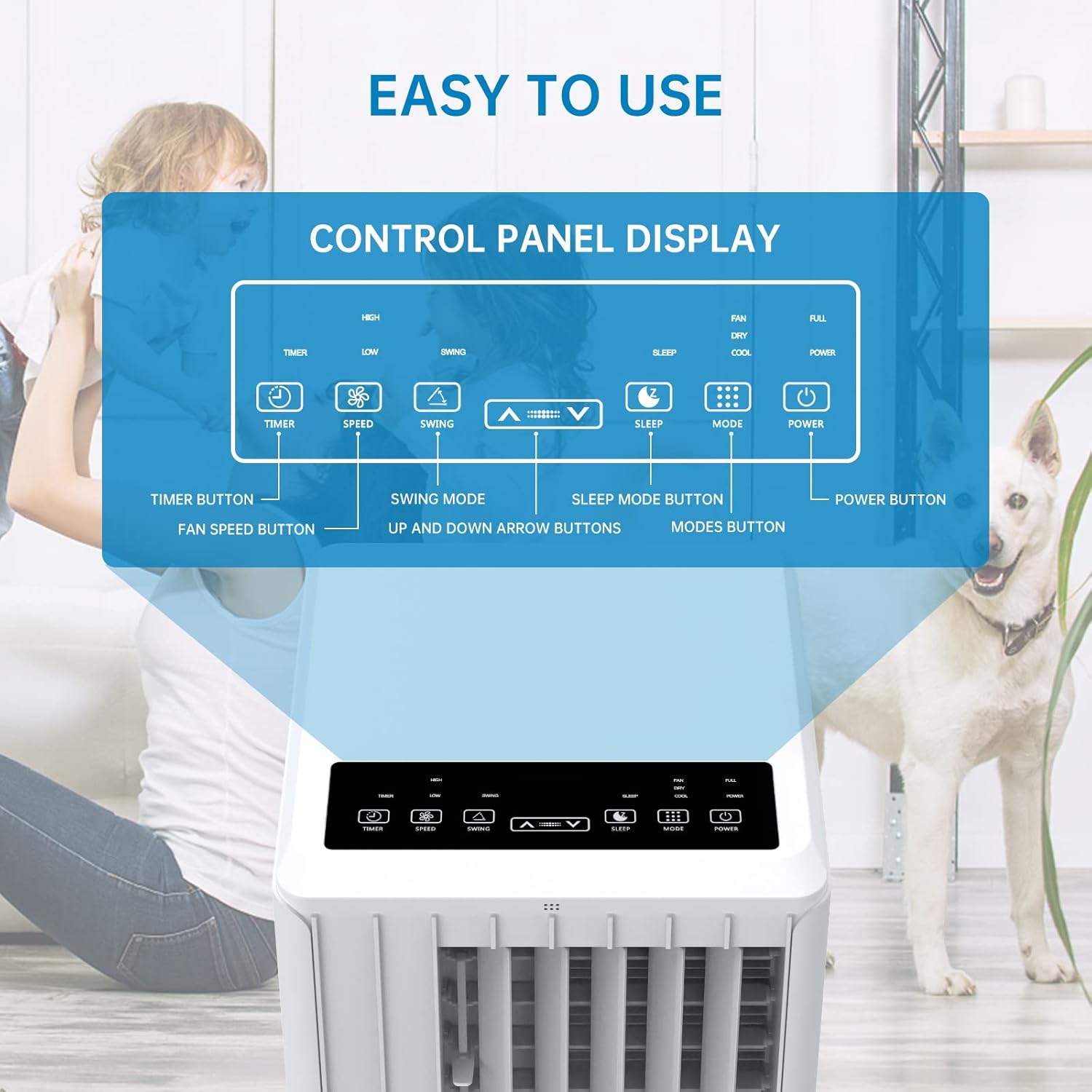
Image: A detailed diagram illustrating the control panel buttons and their functions, including Timer, Speed, Swing, Sleep, Mode, and Power.

Image: A user interacting with the touch-sensitive control panel, demonstrating its intuitive design.
- ปุ่มเปิด/ปิด: เปิดหรือปิดเครื่อง
- ปุ่มโหมด: สลับโหมดการทำงานระหว่างโหมดทำความเย็น โหมดพัดลม และโหมดลดความชื้น
- ปุ่มความเร็ว: ปรับความเร็วพัดลม (ต่ำ, กลาง, สูง)
- ปุ่มตั้งเวลา: Sets the auto ON/OFF timer (up to 24 hours).
- ปุ่มสวิง: เปิดหรือปิดการทำงานของบานเกล็ดอัตโนมัติเพื่อกระจายลมได้กว้างขึ้น
- ลูกศรขึ้น/ลง: ปรับการตั้งค่าอุณหภูมิหรือระยะเวลาการจับเวลา
- ปุ่มนอน: Activates Sleep Mode for quiet operation and energy saving during sleep.
5.2 การควบคุมระยะไกล
The remote control provides convenient operation from a distance. Ensure there are no obstructions between the remote and the unit's receiver.

Image: The portable air conditioner unit alongside its remote control, demonstrating the convenience of remote operation and the air swing feature.
5.3 โหมดการทำงาน
The unit offers three primary operating modes:

Image: A graphic illustrating the three distinct modes of operation: Cooling, Dehumidifying, and Fan, with their respective visual effects.
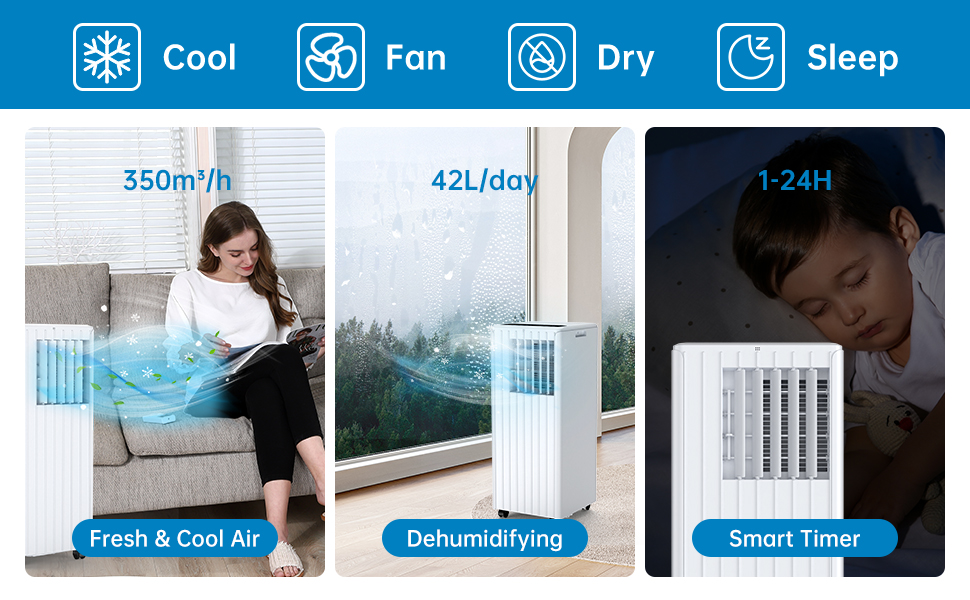
Image: A comprehensive display of the unit's modes, including cooling, fan, dry (dehumidifying), and sleep, along with performance metrics.
- โหมดทำความเย็น: Provides powerful cooling. Set your desired temperature using the Up/Down arrows. The unit will cool until the room reaches the set temperature.
- โหมดพัดลม: Circulates air without cooling. Choose from Low, Medium, or High fan speeds.
- โหมดลดความชื้น: Removes excess moisture from the air. The unit will operate at a low fan speed. Ensure the continuous drainage hose is connected for prolonged use in this mode.
5.4 โหมดสลีป
Activate Sleep Mode for quiet operation and energy efficiency during nighttime. In this mode, the fan speed is reduced, and the temperature may gradually increase to ensure comfortable sleep.

Image: The portable air conditioner in a bedroom setting, illustrating its quiet operation and features like automatic shut-off and 24-hour smart timer for undisturbed sleep.

Image: A graph depicting the temperature adjustment curve in Sleep Mode, showing how the temperature gradually rises over several hours to maintain comfort.
6. การบำรุงรักษา
การบำรุงรักษาตามปกติจะช่วยให้เครื่องปรับอากาศของคุณมีอายุการใช้งานยาวนานและมีประสิทธิภาพ
6.1 การทำความสะอาดตัวกรองอากาศ
ควรทำความสะอาดแผ่นกรองอากาศทุกสองสัปดาห์ หรือบ่อยกว่านั้นขึ้นอยู่กับการใช้งานและคุณภาพอากาศ แผ่นกรองที่สกปรกจะลดประสิทธิภาพการทำความเย็นและการไหลเวียนของอากาศ
- ถอดปลั๊กเครื่องออกจากเต้ารับไฟฟ้า
- ค้นหาและถอดตัวกรองอากาศออกจากด้านหลังหรือด้านข้างของเครื่อง
- ล้างตัวกรองใต้ก๊อกน้ำไหล (น้ำอุ่น ไม่ใช่น้ำร้อน) หรือใช้เครื่องดูดฝุ่นเพื่อดูดฝุ่นออก
- ปล่อยให้แผ่นกรองแห้งสนิทก่อนใส่กลับเข้าไปในตัวเครื่อง อย่าให้โดนแสงแดดโดยตรง

ภาพ: ภาพระยะใกล้ view of the washable filter being easily removed from the unit for maintenance.
6.2 การระบายน้ำ
The unit has an internal water collection tank. When the tank is full, the unit will stop operating and display an indicator. You will need to drain the water manually.
- ถอดปลั๊กเครื่อง
- Place a shallow pan or bucket under the drainage outlet at the bottom rear of the unit.
- Remove the drainage plug and allow the water to drain completely.
- Replace the drainage plug firmly.
For continuous drainage in dehumidification mode, connect the provided drain hose to the continuous drainage outlet.
6.3 การทำความสะอาดทั่วไป
เช็ดด้านนอกของตัวเครื่องด้วยผ้านุ่มdamp ใช้ผ้าเช็ดทำความสะอาดเท่านั้น ห้ามใช้สารเคมีรุนแรง สารขัดถู หรือตัวทำละลาย
6.4 พื้นที่จัดเก็บ
ก่อนจัดเก็บเครื่องเป็นระยะเวลานาน:
- ระบายน้ำกลั่นทั้งหมดออก
- ทำความสะอาดตัวกรองอากาศ
- ถอดปลั๊กสายไฟและม้วนให้เรียบร้อย
- เก็บอุปกรณ์ไว้ในที่แห้งและเย็น หลีกเลี่ยงแสงแดดโดยตรงและอุณหภูมิที่สูงหรือต่ำเกินไป
7 การแก้ไขปัญหา
หากคุณประสบปัญหาเกี่ยวกับเครื่องปรับอากาศ โปรดดูตารางด้านล่างเพื่อดูปัญหาทั่วไปและวิธีแก้ไข
| ปัญหา | สาเหตุที่เป็นไปได้ | สารละลาย |
|---|---|---|
| เครื่องไม่เปิด | ไม่มีแหล่งจ่ายไฟ ถังน้ำเต็ม เปิดใช้งานการป้องกันความร้อนสูงเกินไป | ตรวจสอบปลั๊กไฟและเต้ารับ เทถังเก็บน้ำ Allow unit to cool down for 30 minutes |
| การระบายความร้อนไม่เพียงพอ | กรองอากาศสกปรก Exhaust hose blocked or kinked ขนาดห้องใหญ่เกินไป หน้าต่าง/ประตูเปิด ตั้งอุณหภูมิไว้สูงเกินไป | ทำความสะอาดตัวกรองอากาศ ตรวจสอบและทำความสะอาดท่อไอเสีย ตรวจสอบให้แน่ใจว่าเครื่องมีขนาดเหมาะสมกับขนาดห้อง ปิดหน้าต่างและประตูทั้งหมด ลดอุณหภูมิที่ตั้งไว้ |
| การรั่วซึมของน้ำ | ปลั๊กท่อระบายน้ำหลวม หน่วยไม่ระดับ Continuous drain hose improperly connected | Secure drain plug วางหน่วยบนพื้นผิวเรียบ Ensure drain hose is properly attached and sloped downwards |
| หน่วยมีเสียงดัง | หน่วยไม่อยู่บนพื้นผิวระดับ ส่วนประกอบภายในสั่นสะเทือน | วางหน่วยบนพื้นผิวที่เรียบและมั่นคง This may be normal operation noise, especially at high fan speeds. Ensure no obstructions. |
| รีโมตคอนโทรลไม่ทำงาน | แบตเตอรี่หมดหรือใส่ไม่ถูกต้อง สิ่งกีดขวางระหว่างรีโมทและตัวเครื่อง | เปลี่ยนแบตเตอรี่ ตรวจสอบขั้ว Remove any obstructions, ensure direct line of sight |
8. ข้อมูลจำเพาะ
Technical specifications for the Acekool Portable Air Conditioner Model PAC-M09.
| คุณสมบัติ | ข้อมูลจำเพาะ |
|---|---|
| หมายเลขรุ่น | PAC-M09 |
| ยี่ห้อ | เอซคูล |
| ความสามารถในการทำความเย็น | 9000 บีทียู |
| สารทำความเย็น | R290 |
| แหล่งจ่ายไฟ | 220 โวลต์ |
| ระดับเสียงรบกวนสูงสุด | 55 เดซิเบล(เอ) |
| ขนาดสินค้า (กว้าง x ยาว x สูง) | 38.2 x 35 x 88.5 ซม. |
| น้ำหนักผลิตภัณฑ์ | 26 กก. |
| ลดความชื้นความจุ | 42 ลิตร/วัน |
| การจัดอันดับประสิทธิภาพการใช้พลังงาน | ชั้นเอ |
| ผู้ทำนาย | 2.8 |
| พื้นที่ให้บริการที่แนะนำ | 30-40 ตรม. |
9. การรับประกันและการสนับสนุน
For warranty information, technical support, or service inquiries, please refer to the warranty card included with your product or contact Acekool customer service through their official website or the retailer where the product was purchased. Please have your model number (PAC-M09) and purchase date ready when contacting support.