
1. บทนำ
ขอบคุณสำหรับการซื้อasing the Audizio Adria DAB/Internet Radio Tuner. This device offers a versatile audio experience, combining Internet Radio, DAB+, FM radio, Bluetooth connectivity, and Spotify Connect. This manual provides essential information for setting up, operating, and maintaining your tuner to ensure optimal performance and longevity.
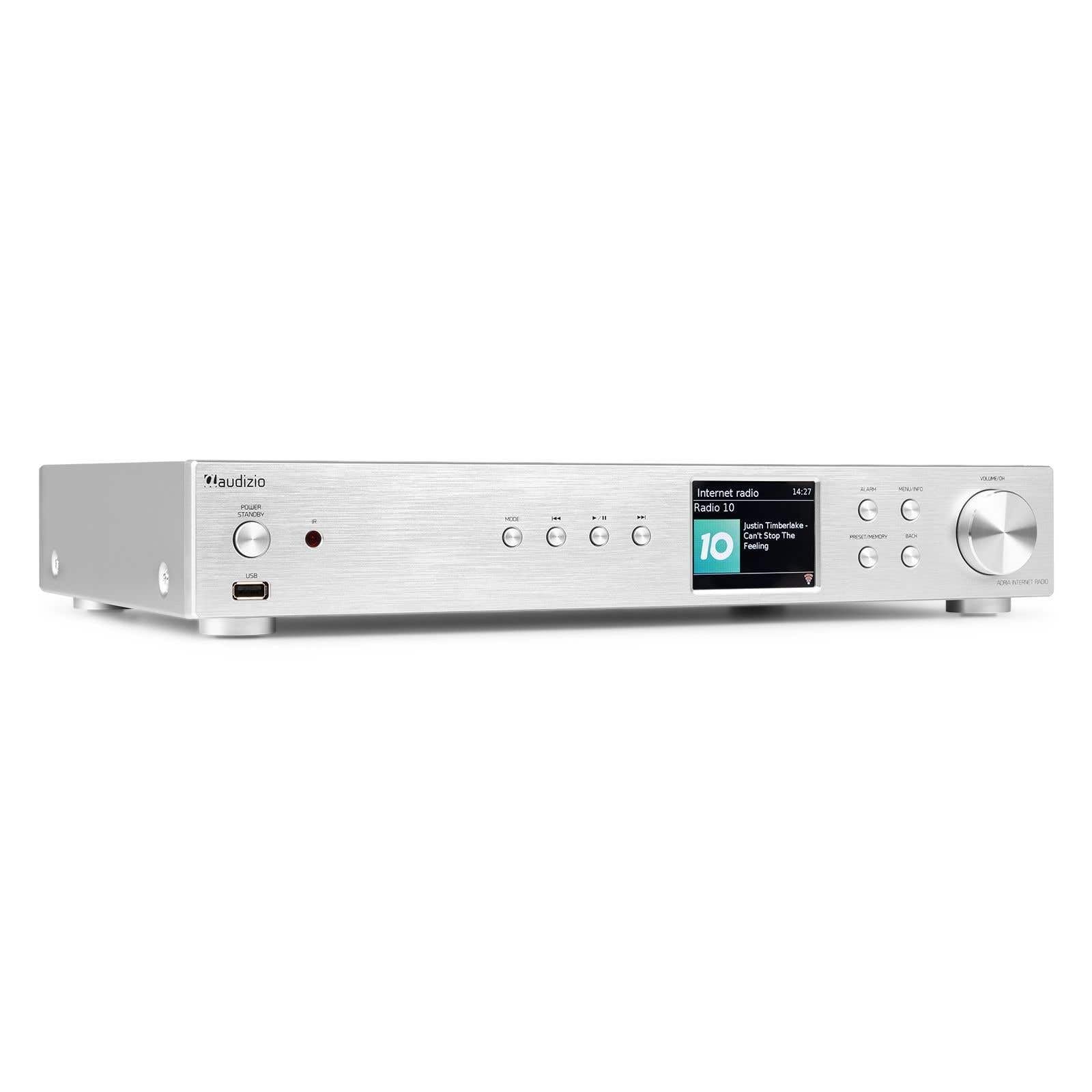
Figure 1.1: Audizio Adria DAB/Internet Radio Tuner with included remote control and antenna.
2. ข้อมูลด้านความปลอดภัย
- อ่านคำแนะนำทั้งหมดอย่างละเอียดก่อนใช้งาน
- Keep the unit away from water, moisture, and direct heat sources.
- อย่าปิดกั้นช่องระบายอากาศ ควรมีพื้นที่รอบเครื่องเพียงพอเพื่อให้อากาศถ่ายเทได้สะดวก
- ใช้เฉพาะอะแดปเตอร์ไฟฟ้าที่มาพร้อมกับเครื่องเท่านั้น
- อย่าพยายามซ่อมแซมหรือดัดแปลงอุปกรณ์ด้วยตนเอง แนะนำให้ส่งช่างผู้ชำนาญเข้ารับบริการทั้งหมด
- Dispose of batteries responsibly. The remote control uses 1 AAA battery.
3. เนื้อหาบรรจุภัณฑ์
ตรวจสอบว่ามีรายการทั้งหมดอยู่ในแพ็คเกจ:
- Audizio Adria DAB/Internet Radio Tuner Unit
- Remote Control (requires 1x AAA battery, included)
- อะแดปเตอร์แปลงไฟ
- เสาอากาศ DAB/FM
- คู่มือการใช้งาน
4. สินค้าหมดview
4.1 แผงด้านหน้า

รูปที่ 4.1: แผงควบคุมด้านหน้าและจอแสดงผล
- Power / Standby Button: เปิดหรือปิดเครื่อง
- พอร์ต USB: สำหรับการเล่นสื่อจากอุปกรณ์จัดเก็บข้อมูล USB
- ปุ่มโหมด: Switches between Internet Radio, DAB+, FM, Bluetooth, and Media Player modes.
- ปุ่มเล่น/หยุดชั่วคราว: ควบคุมการเล่นในโหมดสื่อ
- ปุ่มข้าม/ปรับเสียง: นำทางเพลงหรือปรับคลื่นความถี่วิทยุ
- หน้าจอแสดงผล: Shows station information, menus, and settings.
- ปุ่มปลุก: เข้าถึงการตั้งค่าระบบเตือนภัย
- ปุ่มเมนู/ข้อมูล: Enters menu or displays information.
- Preset/Memory Button: Saves or recalls favorite stations.
- ปุ่มย้อนกลับ: กลับไปยังเมนูหรือหน้าจอก่อนหน้า
- Volume / OK Knob: Rotates to adjust volume or navigate menus; presses to confirm selections.
4.2 แผงด้านหลัง

รูปที่ 4.2: การเชื่อมต่อแผงด้านหลัง
- กำลังไฟเข้า: เชื่อมต่ออะแดปเตอร์จ่ายไฟที่ให้มาที่นี่
- DAB/FM Antenna Input: Connect the included DAB/FM antenna.
- เอาต์พุตแบบอนาล็อก (RCA): เชื่อมต่อกับ amplifier or active speakers using RCA cables.
- อินพุต AUX: Connect external audio sources via a 3.5mm jack.
- พอร์ตชาร์จ USB: สำหรับชาร์จอุปกรณ์ภายนอก
- ออปติคอลดิจิตอลเอาท์พุต: เชื่อมต่อกับ amplifier or DAC with an optical cable.
- Coaxial Digital Output: เชื่อมต่อกับ amplifier or DAC with a coaxial cable.
5. การตั้งค่า
5.1 Connecting Power and Antennas
- Connect the supplied DAB/FM antenna to the DAB/FM Antenna Input on the rear panel. Extend the antenna fully for best reception.
- Connect the power adapter to the Power Input on the rear panel, then plug it into a wall outlet.
5.2 การเชื่อมต่อกับระบบเสียง
Choose one of the following methods to connect the Adria tuner to your ampเครื่องขยายเสียงหรือลำโพงแอคทีฟ:
- เอาต์พุตแบบอนาล็อก (RCA): Use RCA cables to connect the Analog Output ports on the Adria to the corresponding input on your ampชีวิต.
- ออปติคอลดิจิตอลเอาท์พุต: Use an optical cable to connect the Optical Digital Output to an optical input on your ampไลไฟเออร์หรือ DAC
- Coaxial Digital Output: Use a coaxial cable to connect the Coaxial Digital Output to a coaxial input on your ampไลไฟเออร์หรือ DAC
5.3 การเปิดเครื่องครั้งแรกและการตั้งค่าเครือข่าย
- Press the Power/Standby button on the front panel or remote control to turn on the unit.
- The display will show the Audizio logo, then guide you through the initial setup wizard.
- Follow the on-screen prompts to select your language, time zone, and connect to your Wi-Fi network. You will need your Wi-Fi network name (SSID) and password.
- Use the Volume/OK knob to navigate menus and confirm selections.
6. คู่มือการใช้งาน
การเลือกโหมด 6.1
กดปุ่ม โหมด button on the front panel or remote control to cycle through available modes: Internet Radio, DAB+, FM, Bluetooth, and Media Player (USB).
6.2 วิทยุอินเทอร์เน็ต
Figure 6.1: Internet Radio Mode Display
- เลือกโหมดวิทยุอินเทอร์เน็ต
- Use the Volume/OK knob to browse stations by location, genre, or search.
- Press the Volume/OK knob to select a station.
- หากต้องการบันทึกสถานีเป็นสถานีโปรด ให้กดปุ่มค้างไว้ ที่ตั้งไว้ล่วงหน้า/หน่วยความจำ button. Select a preset number and confirm.
- หากต้องการเรียกใช้ค่าที่ตั้งไว้ล่วงหน้า ให้กดปุ่ม ที่ตั้งไว้ล่วงหน้า/หน่วยความจำ button briefly, then select the desired preset.
6.3 วิทยุ DAB/DAB+

Figure 6.2: DAB Radio Mode Display
- Select DAB+ mode. The unit will automatically scan for available stations on first use.
- Use the Volume/OK knob to scroll through the list of stations.
- Press the Volume/OK knob to select a station.
- Saving and recalling presets works the same as for Internet Radio.
6.4 วิทยุ FM
In FM mode, use the Skip/Tune buttons to manually tune frequencies or press and hold to auto-scan. Saving and recalling presets works the same as for Internet Radio.
6.5 การเชื่อมต่อบลูทูธ
- Select Bluetooth mode. The unit will enter pairing mode automatically.
- On your smartphone, tablet, or other Bluetooth device, search for available devices and select "Audizio Adria".
- Once paired, you can stream audio from your device to the tuner.
6.6 การเชื่อมต่อ Spotify
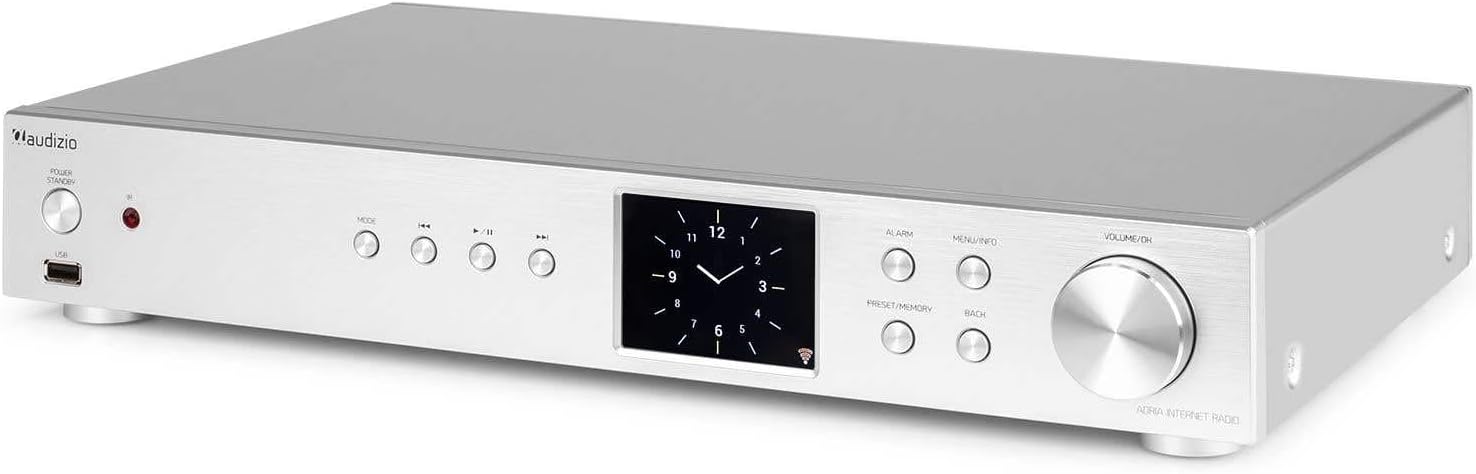
Figure 6.3: Spotify Connect Display
To use Spotify Connect:
- Ensure your Audizio Adria is connected to the same Wi-Fi network as your smartphone or tablet running the Spotify app.
- Open the Spotify app on your device and play a song.
- Tap the "Devices Available" icon (usually a speaker or computer icon) at the bottom of the screen.
- Select "Audizio Adria" from the list of available devices. The music will now play through your tuner.
6.7 ฟังก์ชั่นปลุก

Figure 6.4: Clock and Alarm Display
กดปุ่ม เตือน button to access and set up alarms. You can configure alarm time, source (buzzer, Internet Radio, DAB, FM), and frequency (daily, once, weekends, weekdays).
7. รีโมทคอนโทรล

รูปที่ 7.1: เค้าโครงรีโมทคอนโทรล
The remote control provides full functionality for operating your Audizio Adria tuner. Ensure the included AAA battery is correctly inserted. Point the remote control directly at the unit's front panel for optimal response.
- เลื่อน: ปิดเสียงเตือนชั่วคราว
- ปุ่มเปิด/ปิด: เปิดหรือปิดเครื่อง
- ปุ่มนำทาง (ขึ้น, ลง, ซ้าย, ขวา, ตกลง): สำหรับการนำทางและเลือกเมนู
- ฉบับ+/-: ปรับระดับเสียง
- เส้นทาง: หมุนเวียนผ่านโหมดอินพุต
- เมนู: เข้าสู่เมนูหลัก
- กลับ: กลับไปยังหน้าจอที่แล้ว
- ข้อมูล: Displays detailed information about the current station or track.
- สแกน: เริ่มการสแกนหาคลื่นวิทยุ
- EQ: เข้าถึงการตั้งค่าอีควอไลเซอร์
- แผงปุ่มกดตัวเลข (0-9): For direct input or selecting presets.
- ตั้งค่าล่วงหน้า: Saves or recalls favorite stations.
8. การบำรุงรักษา
To ensure the longevity and optimal performance of your Audizio Adria tuner, follow these maintenance guidelines:
- การทำความสะอาด: ใช้ผ้าแห้งเนื้อนุ่มเช็ดทำความสะอาดภายนอกตัวเครื่อง ห้ามใช้สารทำความสะอาดที่มีฤทธิ์กัดกร่อน แว็กซ์ หรือตัวทำละลาย
- การระบายอากาศ : Ensure that the ventilation openings are not blocked. Dust accumulation can be removed with a soft brush or vacuum cleaner.
- พื้นที่จัดเก็บ: หากต้องเก็บรักษาเครื่องไว้เป็นเวลานาน ควรตัดการเชื่อมต่อจากแหล่งจ่ายไฟและเก็บไว้ในที่แห้งและเย็น
- การดูแลเสาอากาศ: Handle the antenna gently to avoid damage.
9 การแก้ไขปัญหา
If you encounter issues with your Audizio Adria tuner, consult the following table for common problems and solutions:
| ปัญหา | สาเหตุที่เป็นไปได้ | สารละลาย |
|---|---|---|
| ไม่มีไฟฟ้า | สายไฟไม่ได้เชื่อมต่อ เต้าเสียบไฟฟ้าชำรุด | ตรวจสอบการเชื่อมต่อสายไฟ ลองใช้เต้ารับอื่น |
| ไม่มีเสียง | Volume too low; incorrect audio output selected; ampปิดเครื่องขยายเสียง/ลำโพง หรือถอดสายออก | Increase volume; check audio cable connections; ensure amplifier/speakers are on and set to correct input. |
| ไม่สามารถเชื่อมต่อ Wi-Fi ได้ | Incorrect password; weak signal; router issue. | ตรวจสอบรหัสผ่าน Wi-Fi ย้ายอุปกรณ์เข้าใกล้เราเตอร์มากขึ้น รีสตาร์ทเราเตอร์ |
| การรับสัญญาณวิทยุ DAB/FM ไม่ดี | เสาอากาศไม่ยืดออก พื้นที่สัญญาณอ่อน | Fully extend and reposition the antenna; consider an external antenna if available. |
| การจับคู่บลูทูธล้มเหลว | อุปกรณ์ไม่ได้อยู่ในโหมดจับคู่; อุปกรณ์อยู่ไกลเกินไป; มีสัญญาณรบกวน | Ensure both devices are in pairing mode; move devices closer; turn off other Bluetooth devices. |
10. ข้อมูลจำเพาะ
| คุณสมบัติ | ข้อมูลจำเพาะ |
|---|---|
| ยี่ห้อ | ออดิซิโอ |
| หมายเลขรุ่น | Adria |
| สี | เงิน |
| ขนาดจอแสดงผล | 3.2 นิ้ว |
| เทคโนโลยีการเชื่อมต่อ | Optical, Coaxial, Bluetooth |
| คุณสมบัติพิเศษ | Bluetooth, Internet Radio, DAB+, FM, Spotify Connect |
| แถบความถี่วิทยุที่รองรับ | แดบ, แดบ+, เอฟเอ็ม |
| แหล่งพลังงาน | สายไฟ |
| ขนาดสินค้า (กว้าง x ยาว x สูง) | 43.4 x 7.5 x 31 ซม. |
| น้ำหนักสินค้า | 3.2 กิโลกรัม |
| ส่วนประกอบที่รวมอยู่ | รีโมทคอนโทรล |
| อุปกรณ์ที่รองรับ | สมาร์ทโฟน, แท็บเล็ต, แล็ปท็อป |
11. ข้อมูลการรับประกัน
This product is covered by a manufacturer's warranty. Please refer to the warranty card included in your package or contact your retailer for specific terms and conditions. Keep your proof of purchase for warranty claims.
12. การสนับสนุน
For technical assistance, troubleshooting beyond this manual, or service inquiries, please contact Audizio customer support or your local dealer. Contact information can typically be found on the manufacturer's webเว็บไซต์หรือเอกสารการซื้อของคุณ