
LeeKooLuu LeeKooLuu-A3221A4AM47EU
คู่มือผู้ใช้วิทยุติดรถยนต์ Bluetooth LeeKooLuu 1 Din
Model: LeeKooLuu-A3221A4AM47EU
การแนะนำ
This manual provides detailed instructions for the installation, operation, and maintenance of your LeeKooLuu 1 Din Bluetooth Car Radio. This device features a 7-inch manual flip-out screen, wireless Apple CarPlay, Android Auto, Bluetooth 5.1, FM radio, Mirror Link, SWC (Steering Wheel Control) support, AUX, TF card, and USB connectivity, along with a rear camera input. Please read this manual thoroughly before using the product to ensure proper functionality and safety.
คุณสมบัติผลิตภัณฑ์
- 7-inch HD digital LCD folding touch screen with manual flip-out mechanism.
- Wireless and wired Apple CarPlay compatibility for seamless iPhone integration.
- Wireless and wired Android Auto compatibility for Android smartphone integration.
- Mirror Link function to synchronize smartphone display to the car stereo screen (compatible with latest iPhones and most Android phones, excluding Samsung).
- Bluetooth 5.1 for stable wireless music streaming and hands-free calling.
- Integrated FM radio tuner (87.5-108.0MHZ) for live broadcasts.
- Multiple playback modes: Bluetooth, USB, AUX, TF card.
- High-speed USB 2.0 interface compatible with various U disks and removable hard drives.
- Support for Steering Wheel Control (SWC) for convenient operation while driving.
- Includes a waterproof night vision rear camera and a 6-meter video cable for reverse input.
- Built-in microphone and support for external microphone for clearer hands-free calls.
- Customizable colorful button lights (7 key light color changes).
- เสียง amplifier: 7388, Output power: 4*45W.
- Supported audio formats: MP3/WMA/WAV/APE/FLAC.
- Supported video formats: MKV/AVI/TS/TP/MP4/M4V (Max transmission speed 50Mbps-80Mbps).
เนื้อหาแพ็คเกจ
เมื่อเปิดบรรจุภัณฑ์ โปรดตรวจสอบว่าอุปกรณ์ทุกชิ้นครบถ้วนและอยู่ในสภาพดี:
- 1 x 1 Din Single Play Car Radio Unit
- 1 x กล้องสำรอง
- สายไฟ 1 เส้น
- 1 x รีโมทคอนโทรล
- กุญแจถอดประกอบ 2 ดอก
- 1 x คู่มือผู้ใช้
ภาพ: เหนือview of the package contents, showing the main head unit, AHD rear camera, power cable, speaker cable, remote control, and mounting brackets.
การติดตั้งและการตั้งค่า
ขนาดและความพอดี
The car radio unit has an installation size of 188mm x 58mm (7.4 x 2.28 inches). The 7-inch screen measures 175mm in width and 113mm in height when extended. Please ensure your vehicle's dashboard opening is compatible with these dimensions before proceeding with installation.
Image: Detailed dimensions of the car radio unit, including the main body and the 7-inch flip-out screen.
การเชื่อมต่อสายไฟ
Refer to the included wiring diagram for proper connection of the power cable, speaker cable, and other accessories. Incorrect wiring can damage the unit or your vehicle's electrical system. It is recommended to have this unit installed by a professional.
- สายไฟ: Connect to the vehicle's power supply according to the diagram.
- สายลำโพง: เชื่อมต่อกับลำโพงในรถยนต์ของคุณ ตรวจสอบให้แน่ใจว่าขั้วถูกต้อง
- Rear Camera Input (CVBS): Connect the provided backup camera to this input. The screen will automatically display the camera feed when the vehicle is in reverse gear.
- ไมโครโฟนภายนอก: Connect the external microphone for improved call clarity.
- อินเทอร์เฟซ USB: Use for media playback or charging.
- อินพุต AUX: สำหรับเชื่อมต่ออุปกรณ์เสียงภายนอก
- ช่องเสียบการ์ด TF: เสียบการ์ด TF เพื่อเล่นสื่อ
คำแนะนำการใช้งาน
การดำเนินงานทั่วไป
The unit operates via its 7-inch touch screen and physical buttons. The screen is manually flipped out for use. Navigate through menus by touching the icons on the screen. Adjust volume using the rotary knob or remote control.

Image: The main interface of the car radio, showing the 7-inch manual flip-out screen with various application icons, and the physical controls below.
Apple CarPlay แบบไร้สาย
To use Wireless Apple CarPlay, pair your iPhone with the car stereo via Bluetooth. Once connected, CarPlay will automatically launch, allowing you to access navigation, music, calls, and messages directly from the car stereo screen. Siri voice control is supported.

Image: Illustration of the car radio screen displaying the Apple CarPlay interface, with icons for various applications like iHeartRadio, Telegram, SiriusXM, NPR One, Waze, Spotify, MLB, and WhatsApp.
แอนดรอยด์ออโต้ไร้สาย
For Wireless Android Auto, connect your Android smartphone to the car stereo via Bluetooth. This enables true wireless screen projection, providing access to music, GPS navigation, calls, and messages. Google Assistant voice control is supported.

Image: Illustration of the car radio screen displaying the Android Auto interface, with icons for applications such as Exit, Map, Phone, Messages, NetEase Music, Spotify, TikTok, and YouTube.
ฟังก์ชั่นการเชื่อมโยงกระจก
The Mirror Link function allows you to synchronize your smartphone's display with the 7-inch HD screen of the car stereo. This enables you to view and interact with your phone's content, such as maps, movies, and music. This feature is compatible with the latest iPhones (14 Pro or below) and most Android phones (Samsung not supported).
บลูทูธ 5.1
The unit features Bluetooth 5.1 for stable and efficient wireless connectivity. Use Bluetooth for hands-free calling and audio streaming. The system supports auto-pairing and offers lower power consumption. An external microphone is included for clearer call quality.

Image: The car radio screen showing the Bluetooth interface, including options for music playback and hands-free calling, with a visual representation of stable signal and auto-pairing.
วิทยุเอฟเอ็ม
Access the FM radio function to listen to your favorite stations. The radio frequency range is 87.5-108.0MHZ (Europe). Use the touch screen or physical buttons to tune to stations and save presets.
Multimedia Playback (USB/TF/AUX)
The car radio supports various multimedia playback options:
- ยูเอสบี: Insert a USB drive into the USB 2.0 port for audio and video playback.
- บัตร TF: เสียบการ์ด TF (microSD) ลงในช่องที่กำหนดสำหรับการเล่นสื่อ
- ช่องเสริม: Connect external audio devices using the AUX input.

Image: The car radio screen displaying icons for different media sources such as Radio, PhoneLink, USB, USB2, AV IN, CCD, and Calculator, along with visual representations of Type-C, TF, AUX, and USB inputs.
ระบบควบคุมพวงมาลัย (SWC)
If your vehicle supports Steering Wheel Control, you can connect the unit to your vehicle's SWC system. This allows you to control various functions of the radio, such as changing music tracks, adjusting volume, and switching modes, directly from your steering wheel for enhanced convenience and safety.

Image: The car radio screen showing the Steering Wheel Control setup interface, with options to map steering wheel buttons to various functions like volume, track skip, and mode selection.
ฟังก์ชันกล้องถอยหลัง
The included waterproof night vision rear camera connects to the unit's CVBS reverse input. When the vehicle is shifted into reverse gear, the car radio screen will automatically display the rear view, assisting with parking and maneuvering. The camera provides an HD image with a wide-angle view.
Image: The car radio screen showing a simulated backup camera view with parking guidelines, along with icons indicating night vision, waterproof, HD image, and wide angle features of the camera.
Colorful Button Lights
The unit features customizable button backlighting. You can select from 7 different key light colors to match your vehicle's interior or personal preference, enhancing the aesthetic appeal of the car radio.
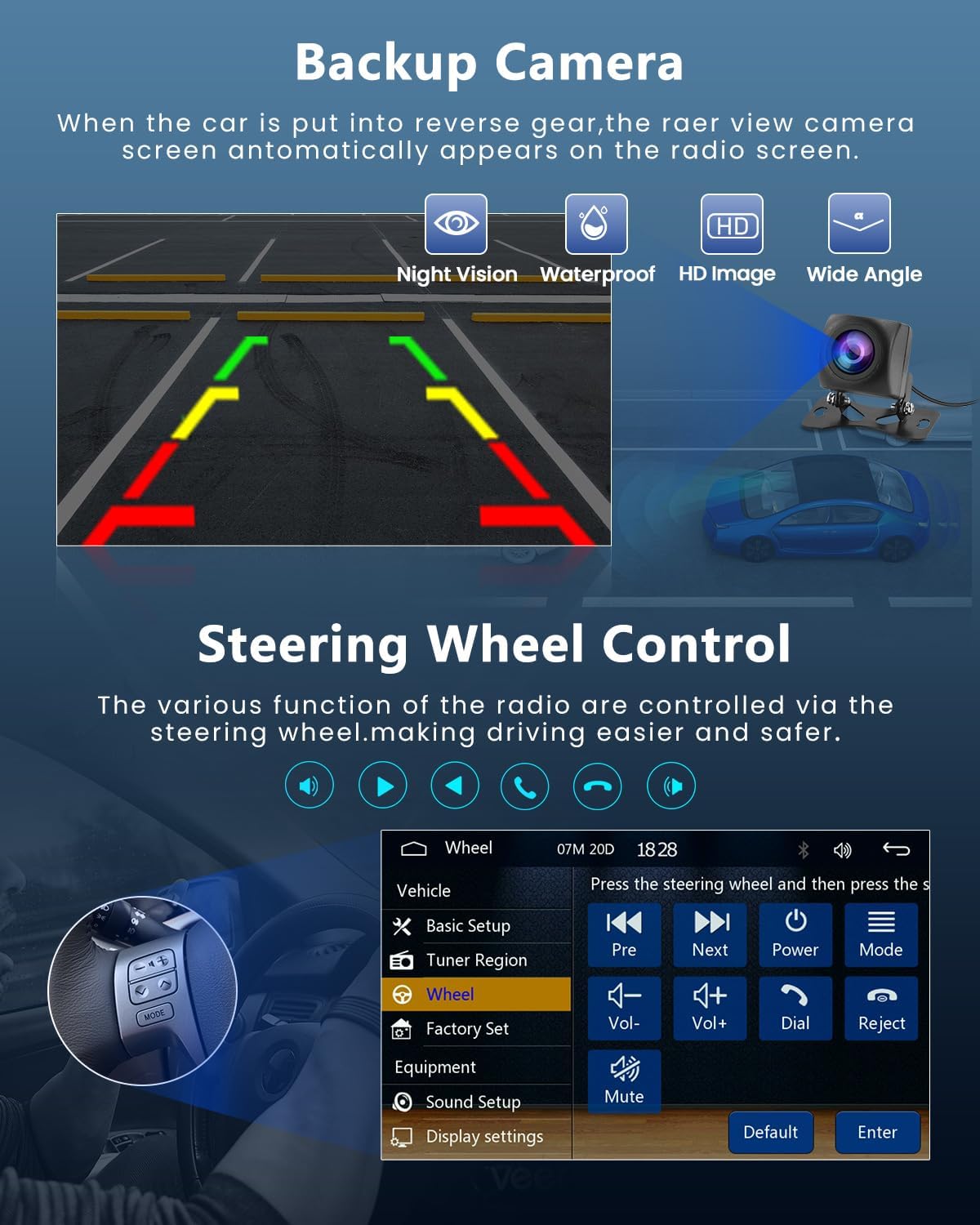
Image: The car radio's physical buttons illuminated in various colors, demonstrating the customizable colorful button lights feature.
การซ่อมบำรุง
- การทำความสะอาด: ใช้ผ้านุ่มและแห้งเช็ดทำความสะอาดหน้าจอและตัวเครื่อง ห้ามใช้น้ำยาทำความสะอาดที่มีฤทธิ์กัดกร่อนหรือตัวทำละลาย
- การดูแลหน้าจอ: Avoid pressing the screen with sharp objects. When flipping the screen out or in, do so gently.
- อุณหภูมิ: Operate the unit within the specified working temperature range of -20°C to 70°C.
- อัพเดตเฟิร์มแวร์: ตรวจสอบของผู้ผลิต webไซต์สำหรับการอัปเดตเฟิร์มแวร์ที่มีอยู่เพื่อให้มั่นใจถึงประสิทธิภาพและความเข้ากันได้ที่เหมาะสมที่สุด
การแก้ไขปัญหา
| ปัญหา | สาเหตุที่เป็นไปได้ | สารละลาย |
|---|---|---|
| เครื่องไม่เปิด | การเดินสายไฟไม่ถูกต้อง; ฟิวส์ขาด; ปัญหาเกี่ยวกับแบตเตอรี่รถยนต์ | Check power cable connections. Verify vehicle's fuse box and battery. Consult a professional for wiring inspection. |
| ไม่มีเสียงออกจากลำโพง | สายลำโพงไม่ถูกต้อง ระดับเสียงต่ำเกินไป ฟังก์ชันปิดเสียงทำงานอยู่ | Check speaker connections and polarity. Increase volume. Deactivate mute. |
| ปัญหาการเชื่อมต่อบลูทูธ | Device not in pairing mode; Interference; Out of range. | Ensure both devices are in pairing mode. Move closer to the unit. Restart Bluetooth on both devices. |
| CarPlay/Android Auto ไม่สามารถเชื่อมต่อได้ | Incorrect phone settings; Incompatible phone model; Bluetooth not connected. | Ensure Bluetooth is connected. Check phone settings for CarPlay/Android Auto permissions. Verify phone compatibility (Samsung not supported for Mirror Link). |
| กล้องหลังไม่แสดงผล | Camera not connected; Incorrect wiring; Vehicle not in reverse. | Check camera cable connection to the CVBS input. Ensure reverse gear is engaged. Verify camera power supply. |
| การรับสัญญาณวิทยุ FM ไม่ดี | ไม่ได้เชื่อมต่อเสาอากาศ; พื้นที่สัญญาณอ่อน; สัญญาณรบกวน | Ensure car antenna is properly connected. Try tuning to a stronger station. |
If the problem persists after attempting these solutions, please contact LeeKooLuu customer support or a qualified technician.
ข้อมูลจำเพาะ
| คุณสมบัติ | รายละเอียด |
|---|---|
| ระบบ | เอฟ133 |
| แบบอย่าง | 9601 องศาเซลเซียส |
| ขนาดหน้าจอ | 7.0 นิ้ว |
| ความละเอียดหน้าจอ | 1024*600 |
| เล่มที่tage | 12โวลต์ |
| เสียง Ampชีวิต | 7388 |
| เวอร์ชันบลูทูธ | 5.1 |
| กำลังขับ | 4*45วัตต์ |
| อินเทอร์เฟซ USB | USB2.0 |
| อินพุตย้อนกลับ | ซีวีบีเอส |
| ช่วงวิทยุ | FM 87.5-108.0MHZ (ยุโรป) |
| ไมโครโฟนภายนอก | รองรับ |
| ไฟหลากสีสัน | รองรับ |
| อุณหภูมิในการทำงาน | -20°C ~ 70°C |
| ปุ่มการตั้งค่าโรงงาน | 113266 |
| รองรับรูปแบบเสียง | MP3 / WMA / WAV / APE / FLAC |
| รองรับรูปแบบวิดีโอ | MKV/AVI/TS/TP/MP4/M4V (Max 50-80Mbps) |
| ขนาดสินค้า | 9.5 x 21.5 x 26 ซม. ; 1.58 กก. |
| หมายเลขรุ่นสินค้า | LeeKooLuu-A3221A4AM47EU |
การรับประกันและการสนับสนุน
For warranty information and technical support, please refer to the contact details provided with your purchase or visit the official LeeKooLuu webไซต์นี้ โปรดเก็บหลักฐานการซื้อไว้เพื่อใช้ยืนยันการรับประกัน
ผู้ผลิต: ลีคูลู่
ASIN: B0C3XMC45P
Ask a question about this manual
Ask about setup, troubleshooting, compatibility, parts, safety, or missing instructions. Manuals+ will review the question and use this page’s manual context to help answer it.