
1. บทนำ
This manual provides detailed instructions for the PTHTECHUS S80K Smart Watch. Please read this manual thoroughly before using the device to ensure proper operation and to maximize its features. This smartwatch is designed to assist in activity tracking, communication, and health monitoring for young users.

Image 1.1: The PTHTECHUS S80K Smart Watch, showcasing จอแสดงผลและสายรัดสีชมพู
2. อะไรอยู่ในกล่อง
Upon unpacking your PTHTECHUS S80K Smart Watch, please verify that all the following items are included:
- 1 x PTHTECHUS S80K Smart Watch
- 1 x สายชาร์จ
- 1 x คู่มือผู้ใช้ (เอกสารนี้)

Image 2.1: Contents of the PTHTECHUS S80K Smart Watch package, including the watch and its charging cable, with dimensions.
3. การตั้งค่า
3.1. การชาร์จสมาร์ทวอทช์
Before initial use, fully charge the smartwatch. Connect the magnetic charging cable to the charging contacts on the back of the watch and plug the USB end into a compatible power adapter (not included) or a computer's USB port. The watch display will indicate charging status.
3.2. การติดตั้งแอพ
To utilize all features of your smartwatch, download and install the companion application, โค-ฟิต, on your smartphone. The app is compatible with Android 4.4 and above, and iOS 8.0 and above.
- Scan the QR code provided in the quick start guide or search for "CO-FIT" in your smartphone's app store (Google Play Store for Android, Apple App Store for iOS).
- ดาวน์โหลดและติดตั้งแอปพลิเคชัน
- ทำตามคำแนะนำบนหน้าจอเพื่อสร้างบัญชีและตั้งค่าบัญชีโปรของคุณfile.
3.3. การจับคู่อุปกรณ์
Pair your smartwatch with the CO-FIT app via Bluetooth:
- ตรวจสอบให้แน่ใจว่าได้เปิดใช้งาน Bluetooth บนสมาร์ทโฟนของคุณแล้ว
- Open the CO-FIT app and navigate to the "Device" or "Add Device" section.
- The app will search for available devices. Select "S80K" or the corresponding device name from the list.
- ยืนยันคำขอจับคู่บนสมาร์ทโฟนและสมาร์ทวอทช์ของคุณทั้งคู่
- เมื่อจับคู่แล้ว นาฬิกาจะซิงโครไนซ์ข้อมูลกับแอป
4. คู่มือการใช้งาน
4.1. การนำทางพื้นฐาน
- หน้าจอสัมผัส: ปัดไปทางซ้าย ขวา ขึ้น หรือลง เพื่อเลื่อนดูเมนูและฟีเจอร์ต่างๆ แตะเพื่อเลือกตัวเลือก
- ปุ่มด้านข้าง: กดเพื่อกลับไปยังหน้าจอหลักหรือปลุกอุปกรณ์
4.2. การโทรออกและรับสาย
After connecting the smartwatch to your phone via Bluetooth, you can manage calls directly from your wrist.
- โทรออก: Access the dial pad or synchronized contacts on the watch to initiate a call.
- การรับสาย: เมื่อมีสายเรียกเข้า นาฬิกาจะแสดงหมายเลขผู้โทร แตะไอคอนสีเขียวเพื่อรับสาย หรือไอคอนสีแดงเพื่อปฏิเสธสาย
- ไมโครโฟนและลำโพงในตัวช่วยให้สามารถสื่อสารแบบแฮนด์ฟรี

Image 4.1: The smartwatch displaying an incoming call, demonstrating its communication capabilities.

Image 4.2: Visual representation of making and answering calls directly from the smartwatch interface.
4.3. การแจ้งเตือน
Receive SMS and app notifications directly on your smartwatch. Ensure notification permissions are granted in the CO-FIT app and your phone's settings.
- The watch supports notifications from various applications such as WhatsApp, Facebook, Instagram, Twitter, and more.
- บันทึก: Replying to messages directly from the watch is not supported.

Image 4.3: The smartwatch showing incoming message notifications and the voice assistant interface.

Image 4.4: Illustration of smart notifications being displayed on the watch, keeping the user informed.
4.4. การติดตามสุขภาพ
The smartwatch offers 24-hour health monitoring features to help track well-being. บันทึก: This data is for reference only and cannot be used for medical diagnosis or treatment.
- การตรวจสอบอัตราการเต้นของหัวใจ: นาฬิกาจะตรวจสอบอัตราการเต้นของหัวใจของคุณอย่างต่อเนื่อง View real-time data on the watch or in the CO-FIT app.
- การตรวจวัดออกซิเจนในเลือด (SpO2): วัดระดับความอิ่มตัวของออกซิเจนในเลือดของคุณ
- การติดตามการนอนหลับ: Tracks sleep patterns, including deep sleep, light sleep, and awake times, providing a comprehensive analysis of sleep quality.
- การตรวจวัดความดันโลหิต: ให้ค่าความดันโลหิตโดยประมาณ

Image 4.5: The smartwatch interface showing continuous heart rate monitoring.

Image 4.6: The smartwatch displaying blood oxygen monitoring results.

Image 4.7: The smartwatch showing sleep tracking data, encouraging healthy sleep habits.
4.5. โหมดกีฬา
The watch supports 37 different sports modes to track various physical activities. It records steps, distance, and calorie consumption.
- Select your desired sport mode (e.g., mountaineering, running, cycling, yoga) from the watch menu.
- The watch will display real-time statistics during your workout.
- Review your activity data in the CO-FIT app for detailed analysis.

Image 4.8: Visual representation of the 37 available sport modes, including skiing, running, and cycling.

Image 4.9: The smartwatch interface showing a list of sports modes for selection.
4.6. การปรับแต่งหน้าปัดนาฬิกา
Personalize your smartwatch with over 120 available watch face styles or create custom dials using your own photos.
- Access the watch face gallery through the CO-FIT app.
- Select from various online styles or upload a personal photo to create a unique watch face.
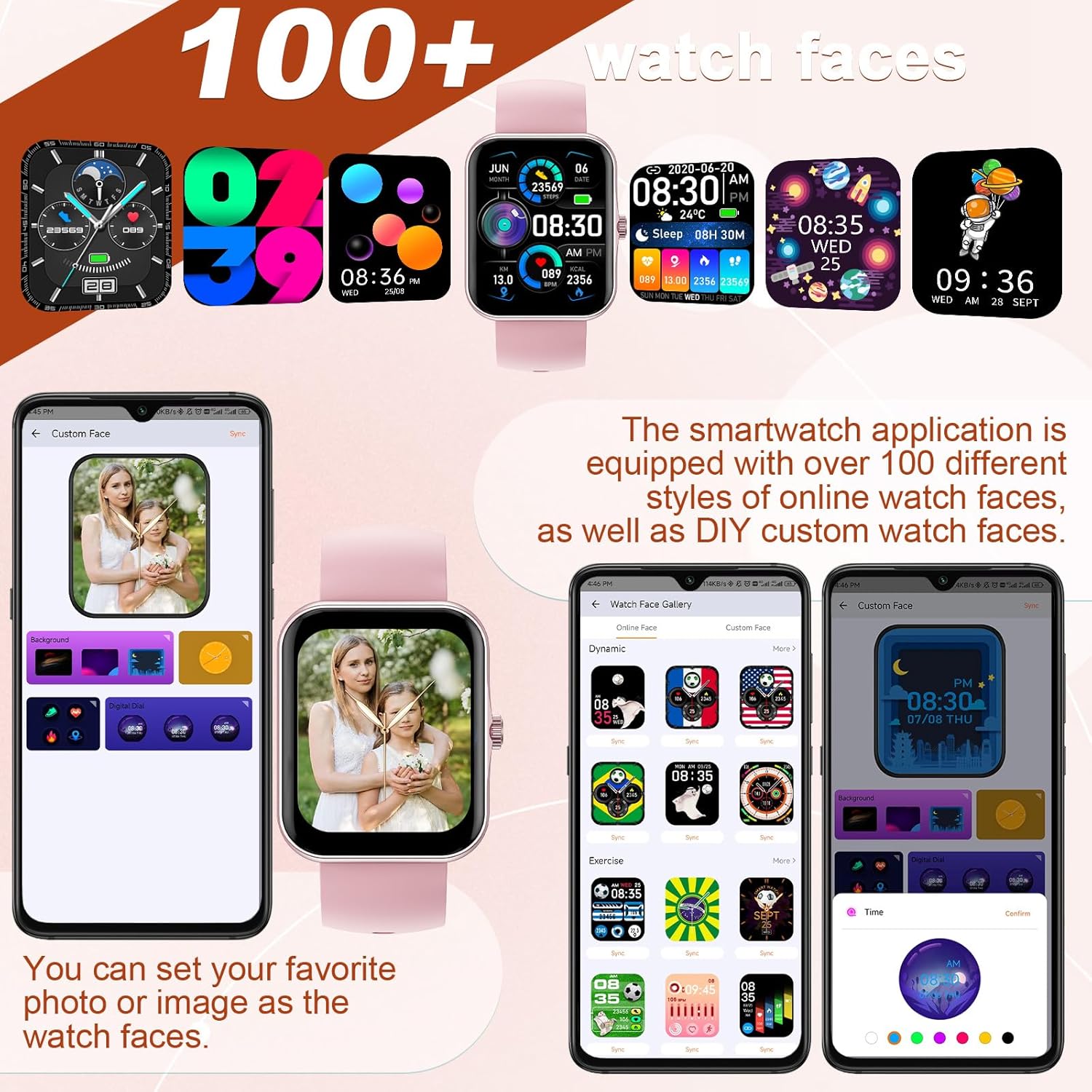
Image 4.10: A selection of watch faces and the interface for customizing them with personal photos.

Image 4.11: A collage of diverse watch faces and custom dial options available for the smartwatch.
4.7. การควบคุมเพลง
Control your smartphone's music playback directly from the smartwatch.
- Play, pause, skip tracks, and adjust volume without needing to access your phone.

Image 4.12: The smartwatch interface for music control and remote camera operation.
4.8. การควบคุมกล้อง
Use your smartwatch as a remote shutter for your smartphone's camera.
- Open the camera function in the CO-FIT app and then use the watch to trigger photos.
4.9. ผู้ช่วยเสียง
The integrated voice assistant allows for hands-free control and information retrieval.
- Activate the voice assistant on the watch to make calls, check weather forecasts, play music, and more.

Image 4.13: A user engaging with the AI voice assistant feature on the smartwatch.
4.10. การแสดงสภาพอากาศ
View current weather conditions and forecasts directly on your watch.
- Ensure the watch is connected to your smartphone and location services are enabled for accurate weather updates.

Image 4.14: The smartwatch showing a multi-day weather forecast.
5. การบำรุงรักษา
5.1. การทำความสะอาด
- ควรเช็ดหน้าจอนาฬิกาและสายนาฬิกาเป็นประจำด้วยผ้าแห้งเนื้อนุ่ม
- สำหรับสิ่งสกปรกที่ฝังแน่น ให้ใช้ d เล็กน้อยamp ผ้าแล้วเช็ดให้แห้งสนิท
- หลีกเลี่ยงการใช้สารเคมีรุนแรงหรือวัสดุที่มีฤทธิ์กัดกร่อน เพราะอาจทำให้นาฬิกาเสียหายได้
5.2. การดูแลแบตเตอรี่
- ควรชาร์จนาฬิกาเป็นประจำ แม้ว่าจะไม่ได้ใช้งานบ่อย เพื่อรักษาอายุการใช้งานของแบตเตอรี่
- ควรหลีกเลี่ยงอุณหภูมิที่สูงหรือต่ำเกินไป เนื่องจากอาจส่งผลต่อประสิทธิภาพและอายุการใช้งานของแบตเตอรี่
5.3. ความทนทานต่อน้ำ
Important: This smartwatch is NOT waterproof. It is not suitable for swimming, showering, or submersion in water. Exposure to water may cause damage not covered by warranty.
6 การแก้ไขปัญหา
If you encounter issues with your PTHTECHUS S80K Smart Watch, please refer to the following common solutions:
- นาฬิกาไม่เปิด: ตรวจสอบให้แน่ใจว่านาฬิกาชาร์จเต็มแล้ว เสียบนาฬิกาเข้ากับเครื่องชาร์จอย่างน้อย 30 นาที
- ไม่สามารถจับคู่กับโทรศัพท์ได้:
- ตรวจสอบให้แน่ใจว่าได้เปิดใช้งานบลูทูธบนโทรศัพท์และนาฬิกาของคุณแล้ว
- Make sure the watch is within the Bluetooth range of your phone (typically 10 meters).
- รีสตาร์ททั้งโทรศัพท์และนาฬิกาของคุณ
- Clear the Bluetooth cache on your phone and try pairing again.
- การแจ้งเตือนไม่ปรากฏ:
- Check notification permissions in the CO-FIT app and your phone's system settings.
- Ensure the watch is properly connected to the app.
- ข้อมูลสุขภาพที่ไม่ถูกต้อง: Ensure the watch is worn snugly on your wrist, not too tight or too loose. Clean the sensor on the back of the watch. Remember that health data is for reference and not medical use.
- อายุการใช้งานแบตเตอรี่สั้น: Reduce screen brightness, disable unnecessary notifications, and close background apps on the watch if available.
หากปัญหายังคงมีอยู่ โปรดติดต่อฝ่ายสนับสนุนลูกค้าเพื่อขอความช่วยเหลือเพิ่มเติม
7. ข้อมูลจำเพาะ
| คุณสมบัติ | รายละเอียด |
|---|---|
| ชื่อรุ่น | S80K |
| ยี่ห้อ | พีทีเอชเทคทัส |
| ขนาดหน้าจอ | 1.83 นิ้ว |
| เทคโนโลยีการแสดงผล | จอแอลซีดี |
| ปณิธาน | 240 x 284 |
| การเชื่อมต่อ | บลูทูธ |
| ระบบปฏิบัติการ | แอสโตรโดรมิโนโอเอส |
| ประเภทแบตเตอรี่ | ลิเธียมโพลีเมอร์ (รวม 1 ชิ้น) |
| ขนาดสินค้า | 8.66 x 1.57 x 0.79 นิ้ว |
| น้ำหนักสินค้า | 1.76 ออนซ์ (50 กรัม) |
| คุณสมบัติพิเศษ | Activity Tracker, Heart Rate Monitor, Notifications, Oxymeter (SpO2), Phone Call |
| อินพุตอินเทอร์เฟซมนุษย์ | Buttons, Dial, Touchscreen |
8. การรับประกันและการสนับสนุน
For warranty information and customer support, please refer to the documentation provided with your purchase or visit the official PTHTECHUS website. If you require technical assistance or have questions regarding your S80K Smart Watch, please contact the seller or manufacturer directly.