
1. บทนำ
The REUMAR AH-WiFi HaLow Extender is designed to expand the range of your existing wireless network. This device acts as a relay, boosting the Wi-Fi signal to areas with weak or no coverage. It is particularly useful for extending network access for devices such as IP cameras and other IoT devices over long distances and through obstacles.
Operating on the 902-928MHz frequency band, the AH-WiFi HaLow Extender offers enhanced wall penetration capabilities and a significant transmission range, surpassing the capabilities of standard Wi-Fi extenders. It supports a maximum of 8 connected devices with a data rate of up to 16Mbps.
2. เนื้อหาบรรจุภัณฑ์
โปรดตรวจสอบว่าสินค้าทั้งหมดมีอยู่ในแพ็คเกจของคุณ:
- 1 x AH-WiFi HaLow Transmitter Unit
- 1 x AH-WiFi HaLow Extender Unit
- อะแดปเตอร์ AC 2 ตัว
- 1 x สายเคเบิลเครือข่าย (อีเธอร์เน็ต)
- 2 x USB Type-C Connection Cables

3. คำแนะนำในการตั้งค่า
Follow these steps to set up your REUMAR AH-WiFi HaLow Extender:
- เชื่อมต่อเครื่องส่งสัญญาณ: Plug one USB Type-C cable into the Transmitter unit and connect the other end to an AC adapter. Plug the AC adapter into a power outlet. Connect one end of the network cable to the LAN port of the Transmitter unit and the other end to an available LAN port on your existing wireless router.
- เชื่อมต่อตัวขยายสัญญาณ: Plug the second USB Type-C cable into the Extender unit and connect the other end to its AC adapter. Plug the AC adapter into a power outlet in the area where you need extended Wi-Fi coverage.
- เปิดเครื่อง: Ensure both the Transmitter and Extender units are powered on. The indicator lights on both units should illuminate, indicating they are receiving power and attempting to establish a connection.
- การเชื่อมต่ออัตโนมัติ: The Transmitter and Extender units are designed to automatically connect to each other. Once connected, the Extender unit will broadcast a new Wi-Fi network (or extend your existing one, depending on configuration).
- เชื่อมต่ออุปกรณ์: On your wireless devices (e.g., smartphone, laptop, IP camera), search for available Wi-Fi networks. Connect to the network broadcasted by the REUMAR AH-WiFi HaLow Extender. The network name (SSID) and password will typically be the same as your main router's Wi-Fi network, or a new one if configured.

4. คู่มือการใช้งาน
Once set up, the REUMAR AH-WiFi HaLow Extender operates automatically to provide extended wireless coverage. Here are some key operational aspects:
- การขยายสัญญาณ: The extender creates a new Wi-Fi access point, allowing devices to connect to it for improved signal strength and range.
- ตำแหน่งที่เหมาะสมที่สุด: For best performance, place the Extender unit in a location that receives a good signal from the Transmitter unit, but is also closer to the areas where you need improved Wi-Fi. Avoid placing it near large metal objects or other sources of interference.
- Wall Penetration: The HaLow technology is designed for superior wall penetration. This allows the extender to provide reliable connectivity even through multiple walls or floors.
- ความจุอุปกรณ์: The extender can support a maximum of 8 connected devices simultaneously.
- อัตราข้อมูล: The maximum transmission rate is 16Mbps. Actual speeds may vary based on environmental factors, interference, and distance.


5. การบำรุงรักษา
To ensure the longevity and optimal performance of your REUMAR AH-WiFi HaLow Extender, consider the following maintenance tips:
- รักษาความสะอาด: Regularly wipe the units with a soft, dry cloth to remove dust. Do not use liquid cleaners or aerosols.
- การระบายอากาศ : Ensure the units are placed in well-ventilated areas to prevent overheating. Do not block any ventilation openings.
- อัพเดตเฟิร์มแวร์: ตรวจสอบของผู้ผลิต website periodically for any available firmware updates. Keeping the firmware updated can improve performance, security, and stability.
- วงจรไฟฟ้า: If you experience connectivity issues, try power cycling both the Transmitter and Extender units (unplug from power, wait 10 seconds, then plug back in).
6 การแก้ไขปัญหา
If you encounter issues with your REUMAR AH-WiFi HaLow Extender, refer to the following common problems and solutions:
- ไม่มีไฟ/ไฟแสดงสถานะดับ:
- Ensure the AC adapters are securely plugged into both the units and a working power outlet.
- ตรวจสอบว่าเต้ารับไฟฟ้าใช้งานได้หรือไม่โดยเสียบอุปกรณ์อื่นเข้าไป
- No Internet Connection via Extender:
- ตรวจสอบว่าเราเตอร์หลักของคุณมีการเชื่อมต่ออินเทอร์เน็ตที่ใช้งานได้
- Ensure the network cable is securely connected between the Transmitter unit and your router.
- Confirm that the Transmitter and Extender units are successfully linked (check indicator lights).
- Try repositioning the Extender unit closer to the Transmitter unit to improve signal strength between them.
- Slow Speed or Frequent Disconnections:
- Interference from other wireless devices (e.g., cordless phones, microwaves) can affect performance. Try moving the units away from such devices.
- Physical obstructions like thick walls or metal objects can degrade signal quality. Adjust the placement of the Extender unit.
- Ensure the Extender unit is within the optimal range of the Transmitter unit. While HaLow offers long range, extreme distances or numerous obstacles can still impact performance.
- Reduce the number of connected devices if you are experiencing slowdowns, as the extender supports a maximum of 8 devices.
- Difficulty Connecting Devices to Extender's Wi-Fi:
- ตรวจสอบชื่อเครือข่าย Wi-Fi (SSID) และรหัสผ่านอีกครั้ง
- รีสตาร์ทอุปกรณ์ของคุณแล้วลองเชื่อมต่ออีกครั้ง
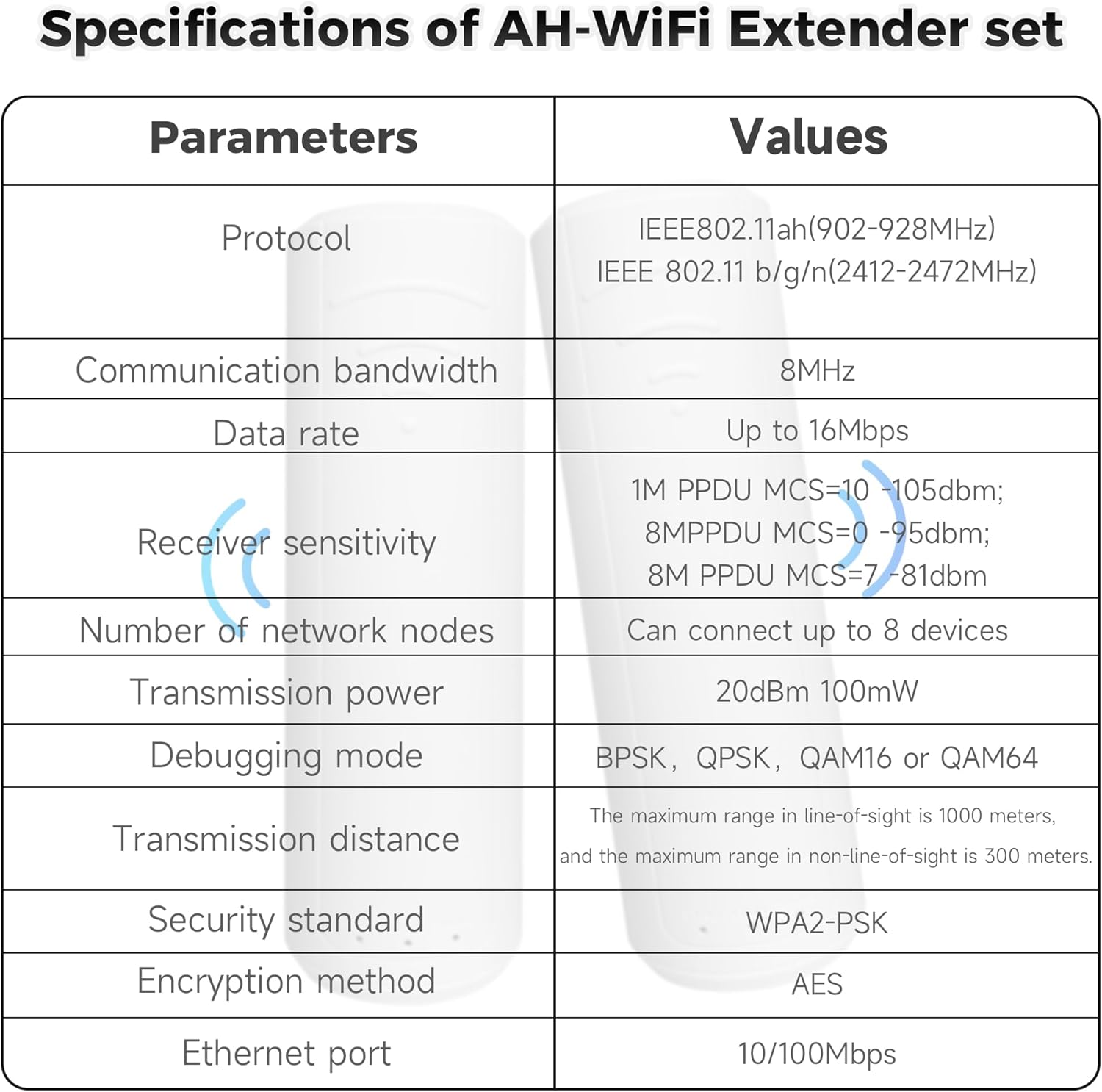
7. ข้อมูลจำเพาะ
| พารามิเตอร์ | ค่า |
|---|---|
| ยี่ห้อ | เรอูมาร์ |
| มาตรฐานการสื่อสารไร้สาย | 802.11ah (902-928MHz), 802.11bgn (2412-2472MHz) |
| อัตราการถ่ายโอนข้อมูล | สูงสุด 16 เมกะบิตต่อวินาที |
| คุณสมบัติพิเศษ | Long transmission distance, wall penetration capability, support for 8 connected devices |
| สี | สีขาว |
| ประเภทขั้วต่อ | RJ45 |
| อุปกรณ์ที่รองรับ | เราเตอร์ |
| รองรับแบนด์ความถี่ | 902-928 เมกะเฮิรตซ์ |
| พิสัย | 1000 meters (visual range) |
| มาตรฐานความปลอดภัย | WPA2-PSK |
| วิธีการเข้ารหัส | เออีเอส |
| พอร์ตอีเทอร์เน็ต | 10/100 เมกะบิตต่อวินาที |
8. การรับประกันและการสนับสนุน
REUMAR products are designed for reliability and performance. For warranty information and technical support, please refer to the following:
- การรับประกัน: This product comes with a 1-year limited warranty from the date of purchase. Please retain your proof of purchase for warranty claims. The warranty covers manufacturing defects but does not cover damage caused by misuse, accidents, unauthorized modifications, or natural disasters.
- การสนับสนุนด้านเทคนิค: For technical assistance, troubleshooting, or inquiries about your product, please visit the official REUMAR website or contact their customer support team. Contact details can typically be found on the product packaging or the official webเว็บไซต์.