
1. สินค้าหมดview
The Cudy GS108D is an 8-port Gigabit Ethernet Network Switch designed for expanding your network connectivity. It offers high-speed data transfer for devices such as computers, IPTVs, printers, NAS, game consoles, and routers. Featuring a plug-and-play design, fanless operation, and energy-efficient technology, this switch provides a reliable and quiet solution for both home and office networks.

ภาพ: ด้านหน้า view of the Cudy GS108D switch, highlighting its 8 Gigabit Ethernet ports and LED indicators.
คุณสมบัติหลัก:
- พอร์ตอีเธอร์เน็ต 8 กิกะบิต: ให้การเชื่อมต่อแบบใช้สายความเร็วสูงสำหรับอุปกรณ์หลายเครื่อง
- ปลั๊กแอนด์เพลย์: Requires no software installation or configuration for immediate use.
- การออกแบบที่ไม่มีพัดลม: Ensures quiet operation, suitable for any environment.
- ประหยัดพลังงาน: Compliant with IEEE802.3az standard, saving power when ports are idle.
- การติดตั้งอเนกประสงค์: รองรับทั้งการวางบนโต๊ะและการติดตั้งบนผนัง
2. เนื้อหาบรรจุภัณฑ์
ตรวจสอบว่าแพ็คเกจของคุณมีรายการต่อไปนี้:
- Cudy GS108D 8-Port Gigabit Ethernet Network Switch
- อะแดปเตอร์แปลงไฟ
- คู่มือการใช้งาน (เอกสารนี้)
- Ethernet Cable (may vary by region/package)

Image: Contents of the Cudy GS108D package, showing the switch, power adapter, and an Ethernet cable.
3. คำอธิบายทางกายภาพ
แผงด้านหน้า:
The front panel features eight 10/100/1000 Mbps RJ45 ports. Each port has an associated LED indicator to show link/activity status.
- กำลังไฟ LED: ระบุสถานะพลังงานของสวิตช์
- ไฟ LED แสดงสถานะการเชื่อมต่อ/การทำงาน (1-8):
- สีเขียวทึบ: A device is connected and the link is active.
- ไฟกระพริบสีเขียว: Data is being transmitted or received on the port.
- ปิด: No device is connected or the link is inactive.

ภาพ: รายละเอียด view of the Cudy GS108D's front panel, showing the 8 RJ45 ports and their corresponding LED indicators.
แผงด้านหลัง:
โดยทั่วไปแล้ว แผงด้านหลังจะมีพอร์ตสำหรับเสียบสายไฟ
ขนาด :
The compact design of the GS108D allows for flexible placement. Approximate dimensions are 138mm (5.43") L x 61.5mm (2.42") W x 24mm (0.94") H.
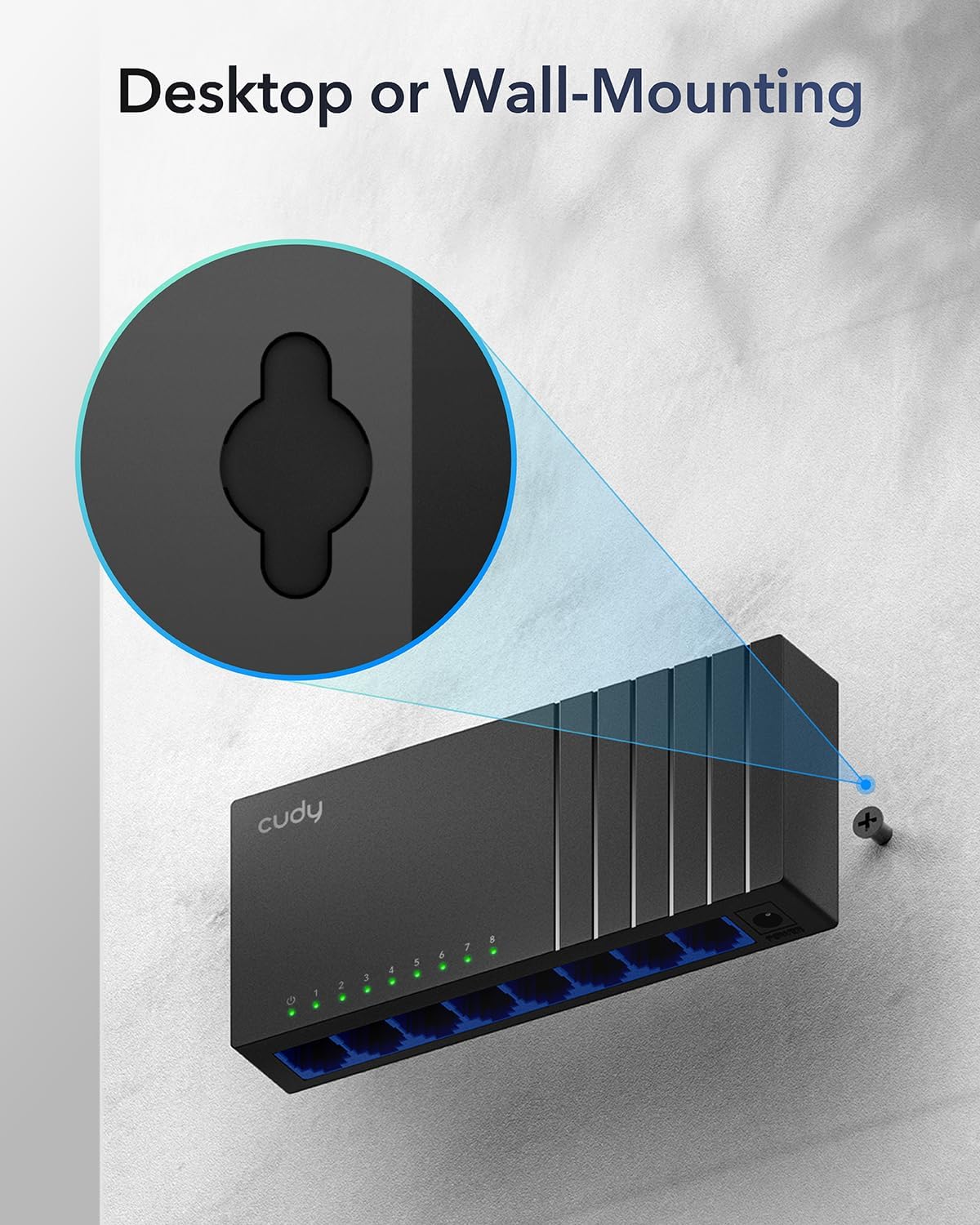
Image: The Cudy GS108D switch with its compact dimensions clearly indicated.
4. คำแนะนำในการตั้งค่า
The Cudy GS108D switch is designed for simple plug-and-play installation. No complex configuration is required.
ขั้นตอนที่ 1: การเชื่อมต่อไฟฟ้า
- Connect one end of the provided power adapter to the power port on the rear panel of the GS108D switch.
- เสียบปลายอีกด้านของอะแดปเตอร์แปลงไฟเข้ากับเต้ารับไฟฟ้าทั่วไป
- Verify that the Power LED on the front panel illuminates, indicating the switch is receiving power.

Image: The Cudy GS108D switch with its power adapter connected and ready for use.
ขั้นตอนที่ 2: การเชื่อมต่ออุปกรณ์
- Connect your network devices (e.g., computer, router, NAS, game console) to any of the 8 RJ45 ports on the front panel using standard Ethernet cables (Cat5e or higher recommended for Gigabit speeds).
- Ensure the Link/Act LED for each connected port illuminates, indicating a successful connection. If the LED is flashing, data is being transmitted.

Image: A laptop being connected to the Cudy GS108D switch with an Ethernet cable, demonstrating a typical setup.
ขั้นตอนที่ 3: ตัวเลือกการติดตั้ง
The GS108D supports both desktop placement and wall mounting.
- ตำแหน่งเดสก์ท็อป: Simply place the switch on a flat, stable surface.
- การติดตั้งบนผนัง: The switch features mounting slots on its underside. Use appropriate screws (not included) to secure the switch to a wall.

Image: The Cudy GS108D switch shown with its wall-mounting slots, illustrating how it can be securely attached to a wall.
5. คู่มือการใช้งาน
Once connected, the Cudy GS108D operates automatically without further user intervention.
การเจรจาอัตโนมัติ
Each port on the switch automatically detects the network speed (10/100/1000 Mbps) and duplex mode (Half/Full Duplex) of the connected device and adjusts accordingly for optimal performance.
การเพิ่มประสิทธิภาพการรับส่งข้อมูล
The switch features a 4 Mbit packet buffer to ensure stable and efficient data forwarding, reducing packet loss and improving overall network performance, especially during high traffic loads.
Energy Efficiency (IEEE 802.3az)
The GS108D incorporates energy-efficient Ethernet technology. It automatically adjusts power consumption based on cable length and network traffic, reducing energy usage when ports are idle or when connected devices are turned off.

Image: Visual representation of the power-saving feature, showing reduced energy consumption when ports are idle.
การส่งข้อมูลระยะไกล
The switch supports long-distance Ethernet cable runs, allowing for reliable data transmission up to 170 meters (557 feet) with Cat5e or higher Ethernet cables.

Image: Illustration of the Cudy GS108D's capability for long-distance transmission, up to 170 meters, requiring Cat5e or higher cables.
6. การบำรุงรักษา
To ensure optimal performance and longevity of your Cudy GS108D switch, follow these maintenance guidelines:
- การจัดวาง: วางสวิตช์ไว้ในที่แห้งและเย็น หลีกเลี่ยงแสงแดดโดยตรง แหล่งความร้อน และความชื้นมากเกินไป ตรวจสอบให้แน่ใจว่ามีการระบายอากาศที่ดีรอบๆ อุปกรณ์
- การทำความสะอาด: ใช้ผ้านุ่มและแห้งเช็ดทำความสะอาดภายนอกสวิตช์ ห้ามใช้น้ำยาทำความสะอาดชนิดน้ำหรือสเปรย์
- พลัง: ใช้เฉพาะอะแดปเตอร์แปลงไฟที่ให้มาเท่านั้น ถอดอะแดปเตอร์แปลงไฟออกขณะเกิดพายุฝนฟ้าคะนองหรือเมื่อไม่ได้ใช้งานเป็นเวลานาน
- สาย: Ensure all Ethernet cables are securely connected and free from damage.
7 การแก้ไขปัญหา
If you encounter issues with your Cudy GS108D switch, refer to the following common troubleshooting steps:
ไม่มีไฟฟ้า
- ตรวจสอบให้แน่ใจว่าได้เสียบอะแดปเตอร์แปลงไฟเข้ากับสวิตช์และเต้ารับไฟฟ้าที่ใช้งานได้สนิทแล้ว
- ตรวจสอบว่าเต้ารับไฟฟ้าใช้งานได้หรือไม่โดยเสียบอุปกรณ์อื่นเข้าไป
- Verify that the Power LED on the switch is illuminated. If not, try a different power outlet.
ไม่มีลิงค์/กิจกรรมบนพอร์ต
- ตรวจสอบให้แน่ใจว่าเสียบสายอีเธอร์เน็ตเข้ากับพอร์ตของสวิตช์และอุปกรณ์ที่เชื่อมต่ออย่างแน่นหนาแล้ว
- ลองใช้สายอีเธอร์เน็ตเส้นอื่นเพื่อตรวจสอบว่าสายเสียหายหรือไม่
- เชื่อมต่ออุปกรณ์เข้ากับพอร์ตอื่นบนสวิตช์
- Verify that the connected device (e.g., computer, router) is powered on and its network adapter is enabled.
- If connecting to a router, ensure the router's port is active.
ความเร็วเครือข่ายช้า
- Ensure you are using Cat5e or higher Ethernet cables for Gigabit speeds. Older Cat5 cables may limit speed.
- Check the Link/Act LED for the port. A solid green light indicates a Gigabit connection. If it's amber or off, there might be a speed mismatch or connection issue.
- Verify that the connected devices also support Gigabit Ethernet.
- ลดความแออัดของเครือข่ายโดยการจำกัดกิจกรรมที่ใช้แบนด์วิดท์สูงพร้อมกัน
8. ข้อมูลจำเพาะ
| คุณสมบัติ | คำอธิบาย |
|---|---|
| ยี่ห้อ | คูดี้ |
| หมายเลขรุ่น | GS108D |
| จำนวนพอร์ต | 8 |
| อินเทอร์เฟซ | RJ45 |
| อัตราการถ่ายโอนข้อมูล | 1000 เมกะบิตต่อวินาที (กิกะบิต) |
| ประเภทสวิตซ์ | สวิตช์อีเธอร์เน็ต |
| อุปกรณ์ที่รองรับ | Camera, Desktop, Laptop, Router |
| เล่มที่tage | 28 โวลต์ (แรงดันไฟฟ้าขาเข้าสำหรับอะแดปเตอร์แปลงไฟ) |
| อุณหภูมิในการทำงาน | 40°F ถึง 104°F (4.4°C ถึง 40°C) |
| ประเภทวัสดุตัวเรือน | พลาสติก |
| ขนาดรายการ (ยาว x กว้าง x สูง) | 7.87" x 5.91" x 5.91" (Product packaging dimensions, actual device is smaller) |
| น้ำหนักสินค้า | 200 กรัม |
9. การรับประกันและการสนับสนุน
ข้อมูลการรับประกัน:
The Cudy GS108D 8-Port Gigabit Ethernet Network Switch comes with a รับประกัน 2 ปี นับจากวันที่ซื้อ โปรดเก็บหลักฐานการซื้อไว้เพื่อใช้ในการเรียกร้องการรับประกัน การรับประกันนี้ครอบคลุมถึงข้อบกพร่องในวัสดุและฝีมือการผลิตภายใต้การใช้งานปกติ
การสนับสนุนด้านเทคนิค:
For technical assistance, troubleshooting, or further inquiries, please visit the official Cudy website or contact Cudy customer support. Cudy is committed to delivering high-performance, user-friendly communication technology and provides resources to help you with your product.
คุณมักจะพบแหล่งข้อมูลสนับสนุน คำถามที่พบบ่อย และข้อมูลติดต่อได้ที่ Cudy Store on Amazon or the main Cudy webเว็บไซต์.