การแนะนำ
Thank you for choosing the Faber 34L Double Glazed 1600W Oven Toaster Grill (OTG). This manual provides essential information for the safe and efficient operation, maintenance, and troubleshooting of your appliance. Please read these instructions thoroughly before first use and retain them for future reference.

ภาพ: ด้านหน้า view of the Faber 34L OTG with its control panel and glass door.
คำแนะนำด้านความปลอดภัยที่สำคัญ
ปฏิบัติตามข้อควรระวังด้านความปลอดภัยขั้นพื้นฐานเสมอเมื่อใช้เครื่องใช้ไฟฟ้า เพื่อลดความเสี่ยงต่อการเกิดไฟไหม้ ไฟฟ้าช็อต และการบาดเจ็บต่อบุคคล
- Read all instructions before operating the OTG.
- อย่าสัมผัสพื้นผิวที่ร้อน ให้ใช้ที่จับหรือลูกบิดแทน และควรสวมถุงมือกันความร้อนหรือถุงมือธรรมดาเสมอเมื่อต้องจับวัสดุที่ร้อน
- To protect against electrical shock, do not immerse cord, plug, or any non-removable parts of the oven in water or other liquid.
- จำเป็นต้องมีการดูแลอย่างใกล้ชิดเมื่อมีเด็กหรือใช้งานเครื่องใช้ไฟฟ้าใดๆ ใกล้เด็ก
- ถอดปลั๊กออกเมื่อไม่ได้ใช้งานและก่อนทำความสะอาด ปล่อยให้เย็นลงก่อนใส่หรือถอดชิ้นส่วน
- ห้ามใช้งานเครื่องใช้ไฟฟ้าที่มีสายไฟหรือปลั๊กชำรุด หรือหลังจากที่เครื่องใช้ไฟฟ้าทำงานผิดปกติหรือได้รับความเสียหายในลักษณะใดๆ
- ห้ามใช้กลางแจ้ง
- อย่าให้สายไฟห้อยออกจากขอบโต๊ะหรือเคาน์เตอร์ หรือสัมผัสพื้นผิวที่ร้อน
- ห้ามวางบนหรือใกล้เตาแก๊สหรือเตาไฟฟ้าที่ร้อน หรือในเตาอบที่อุ่น
- ต้องใช้ความระมัดระวังเป็นพิเศษเมื่อเคลื่อนย้ายเครื่องใช้ไฟฟ้าที่มีน้ำมันร้อนหรือของเหลวร้อนอื่นๆ
- ห้ามใช้อุปกรณ์เพื่อวัตถุประสงค์อื่นนอกเหนือจากที่กำหนดไว้
- ห้ามใส่อาหารขนาดใหญ่หรือเครื่องใช้ที่เป็นโลหะลงในเตาอบเครื่องปิ้งขนมปัง เนื่องจากอาจก่อให้เกิดไฟไหม้หรือเสี่ยงต่อการเกิดไฟฟ้าช็อตได้
- เพลิงไหม้อาจเกิดขึ้นได้หากเตาอบถูกปิดหรือสัมผัสวัสดุที่ติดไฟได้ รวมทั้งผ้าม่าน ผ้าม่าน ผนัง และอื่นๆ ในทำนองเดียวกัน เมื่อใช้งาน
- ห้ามนำวัสดุต่อไปนี้ใส่ในเตาอบ: กระดาษ กระดาษแข็ง พลาสติก หรือวัสดุที่คล้ายกัน
- อย่าเก็บวัสดุใดๆ นอกเหนือจากอุปกรณ์เสริมที่ผู้ผลิตแนะนำในเตาอบนี้เมื่อไม่ได้ใช้งาน
- Always wear protective, heat-resistant gloves when inserting or removing items from the hot oven.
- ตรวจสอบให้แน่ใจว่ามีการระบายอากาศที่เหมาะสมรอบๆ เครื่องระหว่างการใช้งาน
ส่วนประกอบและอุปกรณ์เสริมของผลิตภัณฑ์
Your Faber OTG comes with the following components and accessories:
- Faber 34L OTG Unit
- Enamelled Bake Tray
- ถาดย่าง
- ถาดรองเศษขนมปัง
- Pizza Plate (9-inch)
- โรตีสายไหม
- Rotisserie Handle (Tongs)
- SS Wire Tray
- Silicon Heat Guard Glove

Image: All included accessories for the Faber 34L OTG, laid out for clear identification.
การตั้งค่าและการใช้งานครั้งแรก
การแกะกล่อง
- นำ OTG และอุปกรณ์เสริมทั้งหมดออกจากบรรจุภัณฑ์อย่างระมัดระวัง
- Remove any protective films, stickers, or packaging materials from the appliance and accessories.
- ตรวจสอบเครื่องใช้ไฟฟ้าว่าชำรุดเสียหายหรือไม่ ห้ามใช้หากชำรุด
การจัดวาง
- วาง OTG บนพื้นผิวที่มั่นคง เรียบ และทนความร้อน
- Ensure there is adequate space (at least 10-15 cm) around all sides of the oven for proper ventilation. Do not place it directly against a wall or under cabinets.
- Keep the appliance away from flammable materials like curtains, tablecloths, and paper.
การทำความสะอาดเบื้องต้น
- ก่อนใช้งานครั้งแรก ให้เช็ดทำความสะอาดภายในและภายนอกเตาอบด้วยผ้าamp ผ้า.
- Wash all accessories (bake tray, grill tray, rotisserie rod, etc.) in warm, soapy water, rinse thoroughly, and dry completely.
- วางถาดรองเศษอาหารไว้ที่ด้านล่างของเตาอบ
First Use Burn-in
It is recommended to run the oven empty for about 15 minutes on its highest temperature setting (250°C) with the Function Selector set to 'Top + Bottom Heating' to burn off any manufacturing residues. A slight odor or smoke may be present during this process; this is normal. Ensure the area is well-ventilated.
คำแนะนำการใช้งาน
The Faber OTG features intuitive controls for various cooking functions.

ภาพ: ระยะใกล้ view of the control knobs on the Faber 34L OTG, indicating their respective functions.
แผงควบคุมโอเวอร์view
- ปุ่มฟังก์ชั่น: Selects the cooking function (Off, Rotisserie, Convection, Rotisserie + Convection).
- ปุ่มควบคุมอุณหภูมิ: ปรับอุณหภูมิในการปรุงอาหารได้ตั้งแต่ 100°C ถึง 250°C
- ปุ่มเลือก: Chooses the heating mode (Defrost, Top Heating, Bottom Heating, Top + Bottom Heating).
- ปุ่มตั้งเวลา: Sets the cooking time up to 60 minutes. Includes an auto-cutoff feature.
Cooking Functions and Modes
Your OTG supports 6 cooking functions and various heating modes:

Image: Visual representation of the various cooking modes available with the Faber 34L OTG, including baking, roasting, and grilling.
- การอบ: Ideal for cakes, cookies, and bread. Use Top + Bottom Heating with or without Convection.
- การคั่ว: Perfect for meats and vegetables. Use Top + Bottom Heating, often with Convection.
- การย่าง: For browning and crisping. Use Top Heating.
- ขนมปังปิ้ง: For bread and similar items. Use Top Heating.
- ละลายน้ำแข็ง: Thaws frozen foods. Use the Defrost setting on the Selector Knob.
- การอุ่นซ้ำ: Warms up cooked food. Use Top + Bottom Heating at a lower temperature.
ฟังก์ชั่นการย่าง
The auto motorized rotisserie allows for even grilling of whole chickens or large cuts of meat.
- Skewer the food onto the rotisserie rod, securing it with the forks.
- Place the rotisserie rod into the designated slots inside the oven.
- Set the Function Knob to 'Rotisserie' or 'Rotisserie + Convection'.
- Adjust Temperature and Timer as required for your recipe.
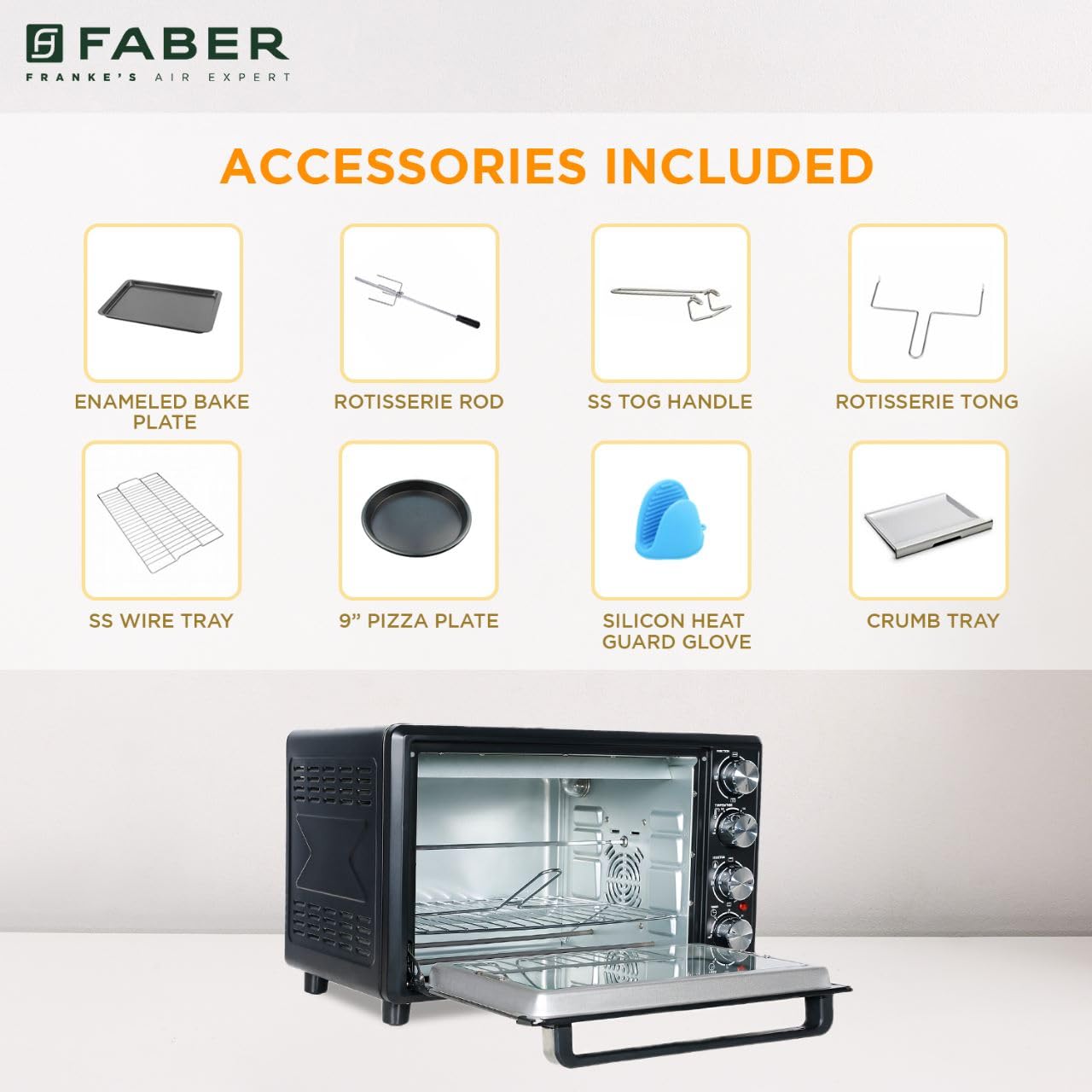
Image: The auto motorized rotisserie feature of the OTG, demonstrating two chickens being evenly grilled.
360° Convection Technology
The 360° Convection Technology ensures uniform cooking by circulating hot air throughout the oven chamber. This results in optimum browning, better crispiness, and higher nutrient retention.
- To activate convection, turn the Function Knob to 'Convection' or 'Rotisserie + Convection'.
- Convection cooking often requires slightly lower temperatures and shorter cooking times compared to conventional baking.

Image: Diagram illustrating the 360° convection technology, showing hot air circulating inside the oven for even cooking.
Timer with Auto Cut-off
The mechanical timer can be set for up to 60 minutes. Once the set time elapses, the oven will automatically switch off, indicated by a bell sound.
- Turn the Timer Knob clockwise to set the desired cooking duration.
- For shorter times (less than 10 minutes), turn the knob past 10 minutes and then back to the desired time for better accuracy.
การบำรุงรักษาและการทำความสะอาด
การทำความสะอาดและบำรุงรักษาอย่างสม่ำเสมอจะช่วยให้ OTG ของคุณมีอายุการใช้งานยาวนานและทำงานได้อย่างมีประสิทธิภาพสูงสุด
การทำความสะอาดทั่วไป
- ควรถอดปลั๊กเตาอบออกจากเต้ารับไฟฟ้าทุกครั้ง และปล่อยให้เย็นลงสนิทก่อนทำความสะอาด
- เช็ดพื้นผิวภายนอกด้วยผ้านุ่ม damp ผ้า. ห้ามใช้น้ำยาทำความสะอาดที่มีฤทธิ์กัดกร่อนหรือแผ่นใยขัด
- Clean the interior walls, floor, and ceiling with a damp cloth and mild detergent. For stubborn stains, a non-abrasive oven cleaner designed for OTGs can be used, following the product instructions carefully.
- The double glazed glass door can be cleaned with a glass cleaner. The double glazing helps retain heat and prevents burns from touching the outer glass.
- Remove and empty the crumb tray regularly. Wash it in warm, soapy water, rinse, and dry thoroughly.
การทำความสะอาดอุปกรณ์เสริม
- All removable accessories (bake tray, grill tray, wire rack, rotisserie rod, pizza plate, tongs, silicon glove) can be washed in warm, soapy water. Rinse well and dry completely before storing or reusing.
- Do not use metal scouring pads or abrasive cleaners on non-stick surfaces (if applicable) to avoid damage.

ภาพ: ภายใน view of the Faber 34L OTG with the chamber light on, highlighting the clean racks and crumb tray, ready for use or after cleaning.
การแก้ไขปัญหา
If you encounter any issues with your Faber OTG, refer to the following table for common problems and solutions.
| ปัญหา | สาเหตุที่เป็นไปได้ | สารละลาย |
|---|---|---|
| เตาอบไม่เปิด | ไม่ได้เสียบปลั๊ก; ไม่มีไฟtage; faulty outlet; timer not set. | Ensure the power cord is securely plugged into a working outlet. Check your household's circuit breaker. Set the timer knob to the desired cooking duration. |
| อาหารไม่สุกทั่วถึง | Incorrect temperature/mode; overcrowding; improper rack position; convection fan issue. | Verify temperature and heating mode settings. Avoid overcrowding the oven. Use the appropriate rack position. Ensure the convection fan is not obstructed (if using convection). |
| มีควันมากเกินไปในระหว่างการดำเนินการ | Food spills; grease buildup; initial burn-off. | Clean the oven interior and accessories thoroughly. Ensure the crumb tray is clean. If it's the first use, some smoke is normal. |
| เครื่องย่างไม่หมุน | Rotisserie rod not properly seated; Function Knob not set to Rotisserie. | Ensure the rotisserie rod is correctly inserted into the drive socket and support. Set the Function Knob to 'Rotisserie' or 'Rotisserie + Convection'. |
| ตัวจับเวลาไม่ทำงาน | Knob not turned past 10 minutes for short times; mechanical issue. | For times under 10 minutes, turn the knob past 10 and then back to the desired time. If the issue persists, contact customer support. |
หากปัญหายังคงอยู่หลังจากลองวิธีแก้ปัญหาเหล่านี้แล้ว โปรดติดต่อฝ่ายบริการลูกค้าของ Faber
ข้อมูลจำเพาะ
Detailed technical specifications for the Faber 34L OTG:
- ยี่ห้อ: ฟาเบอร์
- หมายเลขรุ่น: 131.0676.817
- ความจุ: 34 ลิตร
- วัดtage: 1600 วัตต์
- สี: สีดำ
- คุณสมบัติพิเศษ: Temperature Control, 360° Convection, Rotisserie, Double Glazed Glass
- ประเภทการควบคุม: ลูกบิด
- สไตล์ประตู: ประตูแบบเลื่อนลง
- ประเภทวัสดุประตู: กระจกนิรภัย
- แหล่งพลังงาน: สายไฟ
- น้ำหนักสินค้า: 10 กก. 900 ก.
- ขนาดสินค้า (กว้าง x ยาว x สูง) : 51 x 39 x 32 เซนติเมตร
- ประเทศต้นกำเนิด: จีน

Image: Diagram showing the physical dimensions (Length, Width, Height) of the Faber 34L OTG.
การรับประกันและการสนับสนุน
ข้อมูลการรับประกัน
Your Faber OTG is covered by a manufacturer's warranty. Please refer to the warranty card included with your product for specific terms, conditions, and duration of the warranty. Keep your purchase receipt as proof of purchase for warranty claims.
การสนับสนุนลูกค้า
For any service, repair, or technical assistance, please contact Faber customer support. You can find contact details on the warranty card or the official Faber webเว็บไซต์.
- การสนับสนุนทางออนไลน์: Visit the official Faber webไซต์สำหรับคำถามที่พบบ่อยและทรัพยากรสนับสนุน
- ศูนย์บริการ: Locate authorized service centers in your region.