
1. บทนำ
The Shanrya GFQ3-80/4P Dual Power Automatic Transfer Switch (ATS) is a miniature household power switch designed for automatic switching between a main power source and a backup power source. It is primarily used to ensure continuous power supply by automatically transferring the load to the backup source when the main power fails, and back to the main source when it is restored. This device is suitable for PZ30 distribution boxes and is ideal for emergency power systems in various settings such as factories, shopping centers, and nurseries, operating at 50 or 60Hz AC rated 220V.
2. ข้อมูลด้านความปลอดภัย
- บุคลากรที่มีคุณสมบัติเท่านั้น: การติดตั้งและบำรุงรักษาควรทำโดยช่างไฟฟ้าที่ผ่านการรับรองเท่านั้น
- ตัดการเชื่อมต่อไฟฟ้า: Always disconnect all power sources before installing, wiring, or servicing the switch to prevent electric shock.
- การเดินสายไฟที่ถูกต้อง: Ensure all wiring connections are secure and comply with local electrical codes and standards. Incorrect wiring can lead to malfunction or hazards.
- สภาพแวดล้อม : อย่าวางอุปกรณ์ไว้ในที่ที่มีความชื้นสูง ฝุ่นละออง หรืออุณหภูมิที่สูงเกินไป
- การตรวจสอบ: Regularly inspect the switch for any signs of damage or wear. Do not operate a damaged device.
3. สินค้าหมดview
The GFQ3-80/4P ATS is engineered for reliability and ease of use. It features a compact design and robust construction using PC flame-retardant plastic material and silver contacts, ensuring high insulation, temperature resistance, and anti-aging properties.
คุณสมบัติหลัก:
- Millisecond-Level Switching: Ensures a non-stop power supply by transferring to backup power almost instantaneously when the main power is abnormal.
- โครงสร้างทนทาน: Made from PC flame-retardant plastic with high insulation and silver contacts for enhanced safety and reliability.
- โหมดการทำงานแบบคู่: Supports both automatic and manual switching for flexible control.
- ติดตั้งง่าย: Designed for 35mm standard DIN rail mounting with snap-on installation.
การระบุส่วนประกอบ:
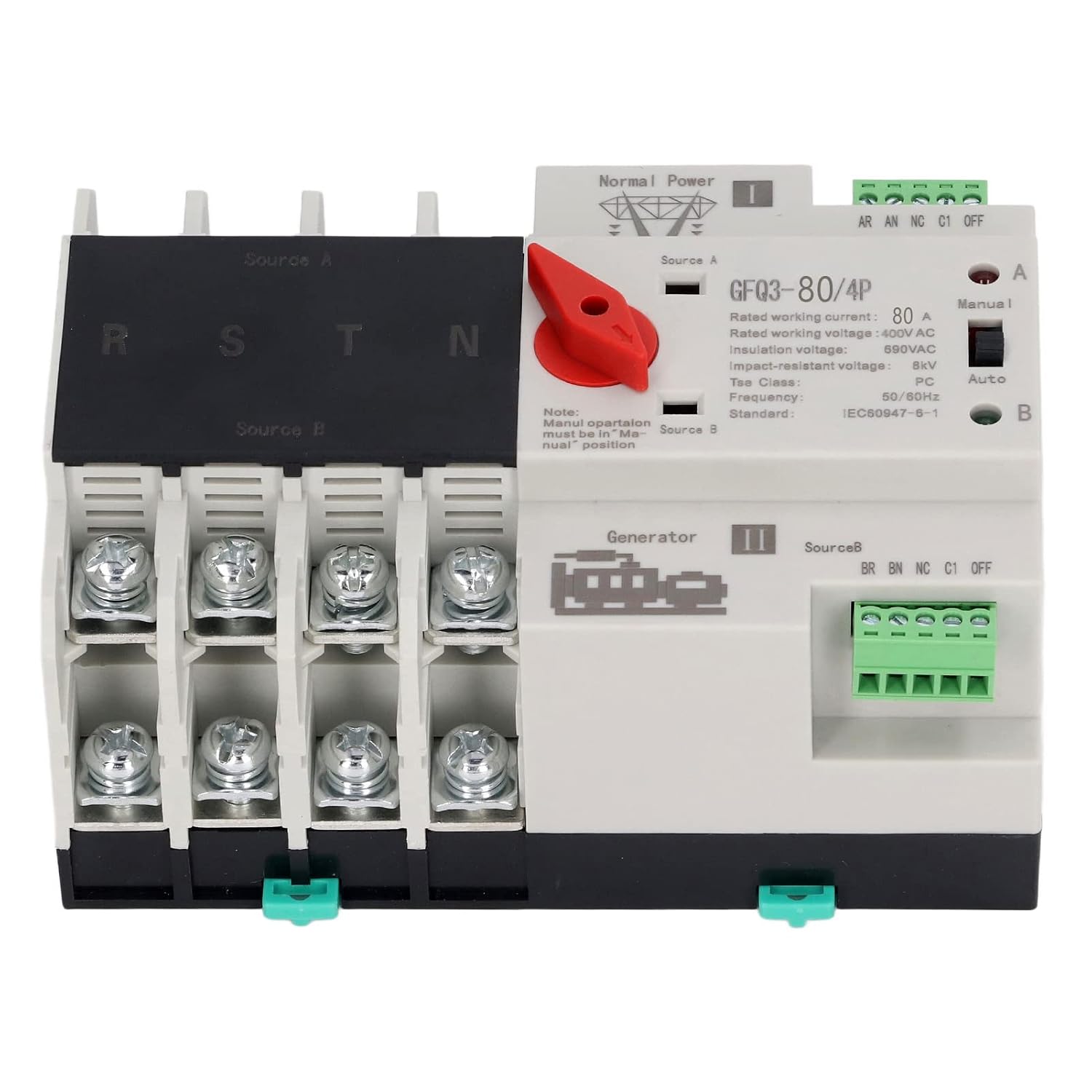
รูปที่ 1: ด้านหน้า view of the GFQ3-80/4P ATS, showing terminals for Source A (Normal Power) and Source B (Generator), output terminals (R, S, T, N), and the Manual/Auto selector switch.

รูปที่ 2: มุม view of the GFQ3-80/4P ATS, highlighting the red manual selector handle and control terminals.
4. ข้อมูลจำเพาะ
| พารามิเตอร์ | ค่า |
|---|---|
| ประเภทสินค้า | สวิตช์ถ่ายโอนอัตโนมัติแบบ Dual Power |
| แบบอย่าง | GFQ3-80/4P |
| วัสดุ | PC, Silver |
| Rated Current (Le) | 80เอ |
| ฉนวน Voltagอี (อุ้ย) | ไฟ AC690V |
| จัดอันดับVoltagอี (เอ่อ) | ไฟ AC400V |
| ความถี่ | 50/60เฮิรตซ์ |
| จัดอันดับการควบคุมVoltage (Us) | 220VAC (85%Us-110%Us) |
| ระดับ | PC Grade |
| เสา | 4P |
5. การตั้งค่าและการติดตั้ง
The GFQ3-80/4P ATS is designed for easy installation on a standard 35mm DIN rail. Ensure all power is disconnected before proceeding with installation.
5.1 การติดตั้ง
- Locate a suitable 35mm DIN rail within your PZ30 distribution box or electrical panel.
- Align the ATS with the DIN rail. The device features a snap-on mechanism for secure attachment.
- Press the ATS firmly onto the DIN rail until it clicks into place. Ensure it is stable and does not wobble.

รูปที่ 3: Illustration of the 35mm standard guide rail and snap installation method for the ATS.
5.2 การเดินสายไฟ
Refer to the wiring diagram on the device and the following instructions for proper connection. Ensure all connections are tight and secure.
- Source A (Normal Power): Connect the main power supply (e.g., utility grid) to the 'Source A' input terminals. These are typically labeled R, S, T, N for a 4-pole system.
- Source B (Backup Power): Connect the backup power supply (e.g., generator, UPS) to the 'Source B' input terminals. These are also typically labeled R, S, T, N.
- โหลดเอาต์พุต: Connect the electrical load (e.g., building's electrical system) to the output terminals of the ATS.
- ขั้วควบคุม: Connect the control wiring as per your system requirements. The device has terminals for 'Normal Power' and 'Generator' status monitoring and control.

รูปที่ 4: Example of the ATS wired into an electrical panel, demonstrating connections to power sources and load.
6. คู่มือการใช้งาน
The GFQ3-80/4P ATS offers both automatic and manual operation modes.
6.1 โหมดอัตโนมัติ
- Ensure the 'Manual/Auto' switch on the front panel is set to the 'Auto' position.
- In this mode, the switch will automatically monitor the main power supply (Source A).
- If Source A fails or its voltage drops below acceptable levels, the ATS will automatically switch the load to Source B (backup power) within milliseconds.
- When Source A is restored and stable, the ATS will automatically switch the load back to Source A.
6.2 โหมดแมนนวล
- Set the 'Manual/Auto' switch on the front panel to the 'Manual' position.
- To manually switch between Source A and Source B, use the red selector handle.
- Rotate the red handle to position 'I' to connect to Source A.
- Rotate the red handle to position 'II' to connect to Source B.
- บันทึก: Manual operation overrides automatic functions. Always ensure the desired power source is available and stable before manual switching.
7. การบำรุงรักษา
การบำรุงรักษาอย่างสม่ำเสมอจะช่วยให้ระบบ ATS ของคุณมีอายุการใช้งานยาวนานและทำงานได้อย่างน่าเชื่อถือ
- การตรวจสอบภาพ: Periodically inspect the device for any signs of physical damage, loose connections, or overheating.
- การทำความสะอาด: รักษาอุปกรณ์ให้ปราศจากฝุ่นและสิ่งสกปรก ใช้ผ้าแห้งนุ่มในการทำความสะอาด ห้ามใช้น้ำยาทำความสะอาด
- การตรวจสอบการเชื่อมต่อ: Ensure all terminal connections remain tight and secure. Loose connections can cause arcing and overheating.
- การทดสอบฟังก์ชัน: Periodically test the automatic transfer function by temporarily disconnecting the main power source to ensure the switch transfers to backup power correctly.
8 การแก้ไขปัญหา
If you encounter issues with your ATS, refer to the following troubleshooting guide:
| ปัญหา | สาเหตุที่เป็นไปได้ | สารละลาย |
|---|---|---|
| Device does not switch automatically | Switch is in Manual mode; No power from backup source; Faulty control circuit. | Set switch to 'Auto' mode; Check backup power supply; Consult a qualified electrician. |
| ไม่มีกำลังขับออก | Both power sources are off; Loose wiring connections; Internal fault. | Verify both power sources are active; Check all wiring connections; Contact support. |
| ความร้อนสูงเกินไป | Loose connections; Overload; Insufficient ventilation. | Tighten all connections; Ensure load does not exceed rated current; Improve ventilation around the device. |
หากปัญหายังคงมีอยู่หลังจากพยายามแก้ไขปัญหาเหล่านี้แล้ว โปรดติดต่อฝ่ายสนับสนุนลูกค้า
9. การรับประกันและการสนับสนุน
สำหรับข้อมูลการรับประกัน การสนับสนุนทางเทคนิค หรือสอบถามเกี่ยวกับบริการ โปรดดูเอกสารที่แนบมากับสินค้าที่ซื้อ หรือติดต่อผู้ขายโดยตรง โปรดเก็บใบเสร็จรับเงินไว้เป็นหลักฐานการซื้อ