
WE-VIBE Sync Lite
WE-VIBE Sync Lite Couples Vibrator Instruction Manual
Model: Sync Lite
1. สินค้าหมดview
The WE-VIBE Sync Lite is a wearable couples vibrator designed to provide shared vibrations. Its ergonomic C-shape and slim insertable arm ensure comfort and dual stimulation. The device features app control, multiple intensity levels, and is made from body-safe silicone.

Image: WE-VIBE Sync Lite with its companion app.
คุณสมบัติหลัก:
- C-Shape Design: Engineered for comfortable, hands-free wear during intimate moments.
- การกระตุ้นสองทาง: Provides vibrations for both partners simultaneously.
- การควบคุมแอพ: Connects to the free We-Vibe app for remote control and customizable patterns.
- ระดับความเข้มข้น 10 ระดับ: Offers a range of vibration strengths for personalized experiences.
- Body-Safe Silicone: Constructed from phthalate-free, BPA-free, and latex-free silicone for safety and comfort.
- Splashproof (IPX4): Designed to withstand splashes, making it easy to clean.
- ชาร์จไฟได้: Equipped with a USB rechargeable battery.
2. เนื้อหาบรรจุภัณฑ์
Verify that all items are present in your WE-VIBE Sync Lite package:
- WE-VIBE Sync Lite device
- สายชาร์จ USB
- กระเป๋าเก็บของ
- คู่มือเริ่มต้นอย่างรวดเร็ว
- Compliance & Safety Information
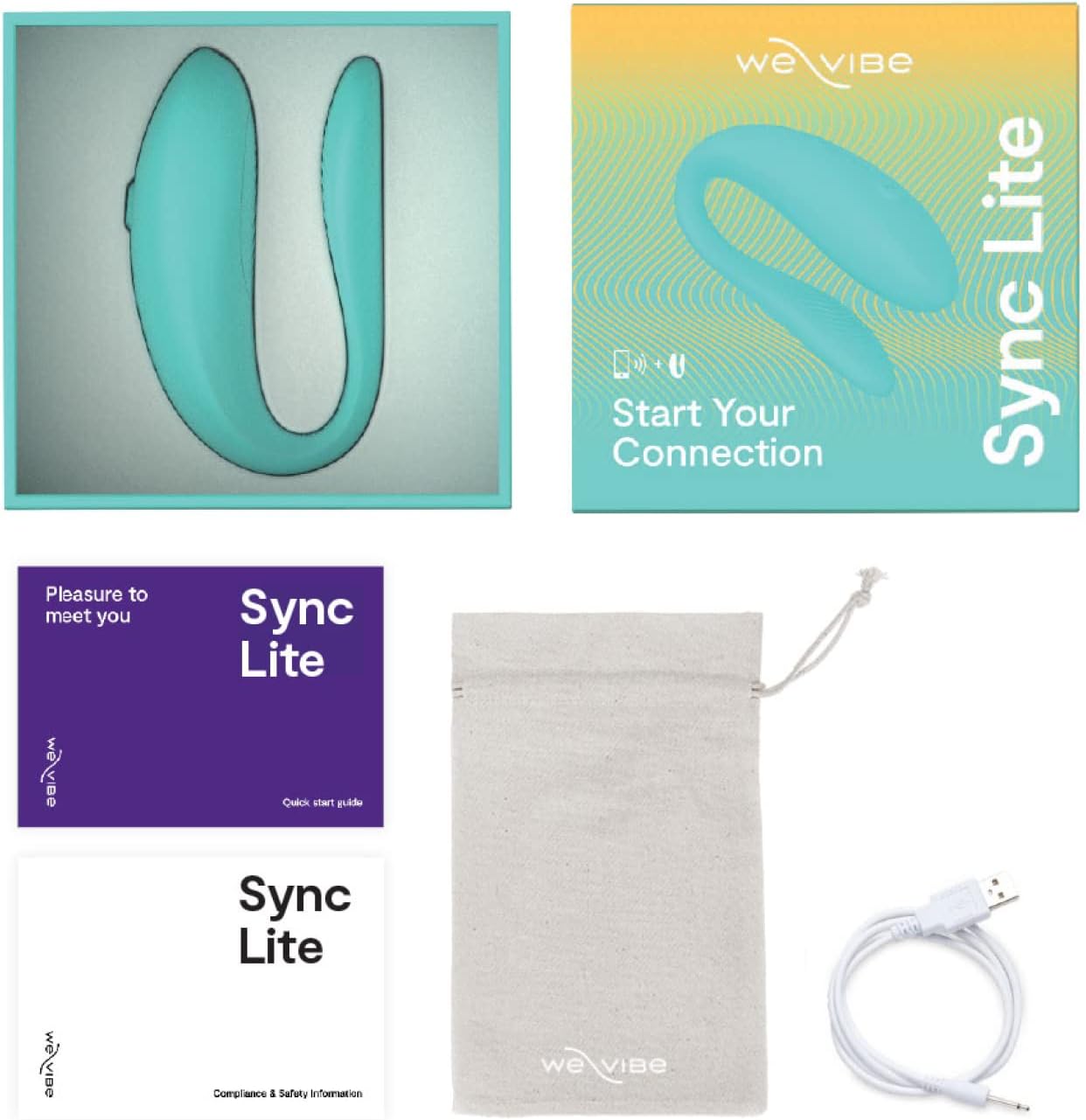
Image: WE-VIBE Sync Lite package contents.
3. ข้อมูลด้านความปลอดภัย
Please read all safety instructions before using your WE-VIBE Sync Lite. Keep this manual for future reference.
- ความปลอดภัยของวัสดุ: The Sync Lite is made from body-safe silicone. If you experience any irritation, discontinue use immediately.
- การทำความสะอาด: Always clean the device before and after each use as described in the Maintenance section.
- การหล่อลื่น: Use only water-based lubricants with your Sync Lite. Oil-based lubricants can damage the silicone material.
- การชาร์จ: Use only the provided USB charging cable. Do not use the device while it is charging.
- พื้นที่จัดเก็บ: เก็บอุปกรณ์ไว้ในที่แห้งและเย็น หลีกเลี่ยงแสงแดดโดยตรงและอุณหภูมิที่สูงหรือต่ำเกินไป
- เงื่อนไขทางการแพทย์: ควรปรึกษาผู้เชี่ยวชาญด้านสุขภาพหากคุณมีปัญหาสุขภาพหรือข้อกังวลใดๆ ก่อนใช้ผลิตภัณฑ์นี้
4. การตั้งค่า
4.1 ค่าบริการเริ่มต้น
Before first use, fully charge your Sync Lite. Connect the USB charging cable to the device's charging port and plug the other end into a USB power source (e.g., computer, wall adapter). The indicator light will show charging status and turn solid when fully charged.
4.2 การดาวน์โหลดแอปและการเชื่อมต่อ
The WE-VIBE Sync Lite can be controlled via the We-Vibe app, available for free on iOS and Android devices.
- Download the 'We-Vibe' app from your device's app store.
- Ensure your Sync Lite is charged and turned on (press and hold the power button).
- Open the We-Vibe app and follow the on-screen instructions to pair your device via Bluetooth.

Image: App and single-button controls for Sync Lite.
5. คู่มือการใช้งาน
5.1 การควบคุมขั้นพื้นฐาน
The Sync Lite features a single control button for basic operation:
- เปิด/ปิดเครื่อง: กดปุ่มค้างไว้ 2 วินาที
- เปลี่ยนโหมด/ความแรงของการสั่น: Press the button briefly to cycle through the available modes and intensity levels.
5.2 Wearing and Usage
The Sync Lite is designed to be worn comfortably during use.

Image: How to use the Sync Lite.
- Apply a water-based lubricant to the internal arm of the device.
- Gently insert the slim arm into position.
- Turn on the device using the control button or the We-Vibe app.
- Adjust intensity and patterns as desired for shared vibrations.

Image: Couple using the Sync Lite.
การควบคุมแอพ 5.3 ตัว
The We-Vibe app offers enhanced control and customization:
- รีโมทคอนโทรล: Control the Sync Lite from a distance.
- ลวดลายแบบกำหนดเอง: Create and save personalized vibration patterns.
- โหมดที่ตั้งไว้ล่วงหน้า: Explore various pre-programmed vibration modes.
- การเล่นระยะไกล: Connect with a partner remotely through the app.
6. การบำรุงรักษาและการดูแล
6.1 การทำความสะอาด
The Sync Lite is splashproof (IPX4) for easy cleaning.

Image: Sync Lite on a sink, demonstrating splashproof feature.
- Wash the device thoroughly with warm water and mild soap.
- ล้างออกให้สะอาดหมดจดเพื่อขจัดคราบสบู่ทั้งหมด
- Dry with a lint-free cloth or air dry.
- ห้ามใช้น้ำยาทำความสะอาดที่มีส่วนผสมของแอลกอฮอล์ ปิโตรเลียม หรืออะซิโตน เนื่องจากสารเหล่านี้อาจทำให้ซิลิโคนเสียหายได้
6.2 พื้นที่จัดเก็บ
Store your Sync Lite in its provided storage pouch in a clean, dry place, away from direct sunlight and extreme temperatures. Avoid storing it with other toys made of different materials to prevent material degradation.

Image: Sync Lite made from silky-smooth silicone.
7 การแก้ไขปัญหา
If you encounter issues with your WE-VIBE Sync Lite, refer to the following common solutions:
| ปัญหา | สาเหตุที่เป็นไปได้ | สารละลาย |
|---|---|---|
| เปิดเครื่องไม่ติด | แบตเตอรี่อ่อน อุปกรณ์ไม่ได้ชาร์จ | ชาร์จอุปกรณ์ให้เต็มโดยใช้สาย USB ที่ให้มา |
| ไม่สามารถเชื่อมต่อกับแอพได้ | Bluetooth off; Device not in pairing mode; App issue | Ensure Bluetooth is enabled on your phone. Turn the Sync Lite off and on again. Restart the We-Vibe app. Ensure the device is fully charged. |
| การสั่นสะเทือนอ่อนหรือไม่สม่ำเสมอ | แบตเตอรี่เหลือน้อย; อุปกรณ์ทำงานผิดปกติ | Charge the device fully. If the problem persists, contact customer support. |
| อุปกรณ์ไม่ตอบสนองต่อการกดปุ่ม | อุปกรณ์ค้าง; แบตเตอรี่อ่อน | Charge the device. Try resetting by holding the button for an extended period (e.g., 10-15 seconds) or allowing the battery to fully drain and then recharging. |
8. ข้อมูลจำเพาะ
| คุณสมบัติ | รายละเอียด |
|---|---|
| ชื่อรุ่น | Sync Lite |
| ขนาดสินค้า | 3.54 x 3.54 x 1.85 นิ้ว |
| น้ำหนัก | 2.47 ออนซ์ |
| วัสดุ | ซิลิโคน |
| สี | อควา |
| แบตเตอรี่ | แบตเตอรี่ลิเธียมไอออน 1 ก้อน (รวมอยู่ด้วย) |
| ความต้านทานต่อน้ำ | กันน้ำกระเซ็น (IPX4) |
| ผู้ผลิต | WOW Tech |
| วันที่พร้อมใช้งานครั้งแรก | 4 พฤษภาคม 2023 |
9. ข้อมูลการรับประกัน
The WE-VIBE Sync Lite is covered by a manufacturer's warranty. Please refer to the warranty card included in your package or visit the official WE-VIBE webเข้าชมเว็บไซต์เพื่อดูข้อมูลโดยละเอียดเกี่ยวกับข้อกำหนดและเงื่อนไขการรับประกัน
10. การสนับสนุน
For further assistance, product inquiries, or technical support, please visit the official WE-VIBE website or contact their customer service department. Contact information can typically be found on the product packaging or the brand's webเว็บไซต์.
WE-VIBE Official Webเว็บไซต์: www.we-vibe.com
Ask a question about this manual
Ask about setup, troubleshooting, compatibility, parts, safety, or missing instructions. Manuals+ will review the question and use this page’s manual context to help answer it.