
FXTUL FXTUL M3-A
คู่มือการใช้งานเครื่องมือวินิจฉัยรถจักรยานยนต์ FXTUL M3-A
รุ่น: FXTUL M3-A
การแนะนำ
เครื่องมือวินิจฉัยรถจักรยานยนต์ FXTUL M3-A เป็นเครื่องสแกน OBD2 อเนกประสงค์ที่ออกแบบมาเพื่อการวินิจฉัยอย่างครอบคลุมสำหรับรถจักรยานยนต์และรถยนต์ที่รองรับ OBD2 ทั่วไป เครื่องมือนี้ช่วยให้ผู้ใช้สามารถอ่านและล้างรหัสข้อผิดพลาด เข้าถึงข้อมูลแบบเรียลไทม์ ทำการทดสอบการทำงาน และทำการทดสอบแรงดันไฟฟ้าได้tagเครื่องมือนี้ใช้สำหรับทดสอบระบบอิเล็กทรอนิกส์ (e-tests) ซึ่งให้ข้อมูลที่จำเป็นสำหรับการบำรุงรักษาและซ่อมแซมรถจักรยานยนต์ รองรับรถจักรยานยนต์หลายยี่ห้อ รวมถึง Yamaha, Honda และ Kawasaki นอกเหนือจากโปรโตคอล OBD2 มาตรฐานทั่วไป
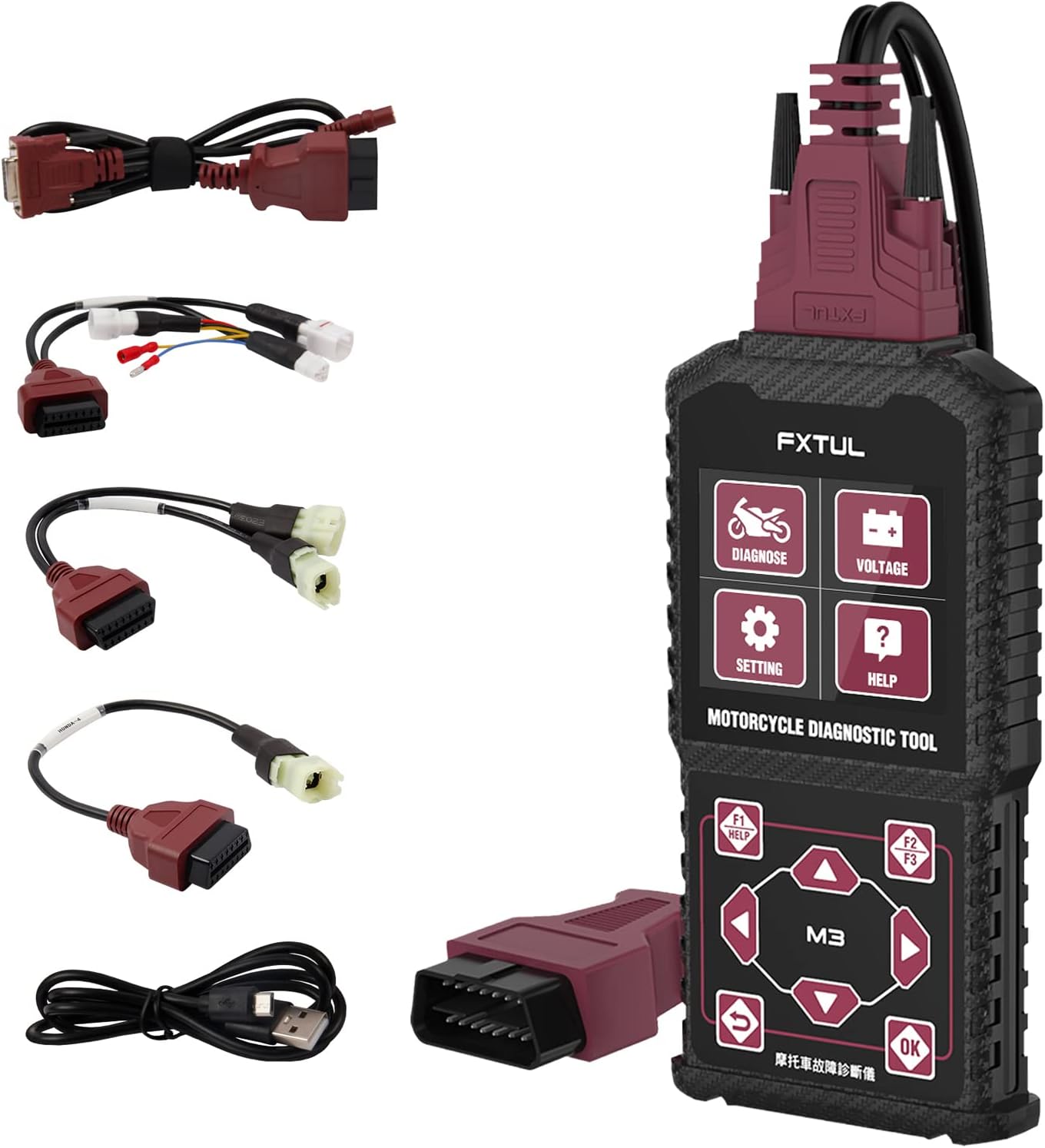
ภาพ: เครื่องมือวินิจฉัย FXTUL M3-A แสดงพร้อมตัวเครื่องหลักและสายเคเบิลวินิจฉัยต่างๆ สำหรับรถจักรยานยนต์รุ่นต่างๆ และการเชื่อมต่อ OBD2
การตั้งค่าและการใช้งานเบื้องต้น
เนื้อหาแพ็คเกจ
เมื่อเปิดบรรจุภัณฑ์ ให้แน่ใจว่ามีส่วนประกอบทั้งหมดครบถ้วน:
- FXTUL M3-A เครื่องมือวินิจฉัยหลัก
- สายวินิจฉัย OBD2
- สายอะแดปเตอร์สำหรับรถจักรยานยนต์แต่ละรุ่น (เช่น Yamaha, Honda, Kawasaki)
- สายเคเบิลข้อมูล USB สำหรับอัปเกรดซอฟต์แวร์
- คู่มือการใช้งาน (เอกสารนี้)
การเชื่อมต่ออุปกรณ์
เพื่อเริ่มต้นการวินิจฉัย ให้เชื่อมต่อสายเคเบิลที่เหมาะสมเข้ากับพอร์ตวินิจฉัยของรถจักรยานยนต์หรือรถยนต์ของคุณ สำหรับรถจักรยานยนต์ คุณอาจต้องใช้สายอะแดปเตอร์ที่ให้มา สำหรับรถยนต์ที่รองรับ OBD2 ให้ใช้สาย OBD2 มาตรฐาน

ภาพ: เครื่องมือ M3-A ที่แสดงคุณสมบัติหลัก ได้แก่ การล้างรหัสข้อผิดพลาด, สตรีมข้อมูล, การทดสอบการทำงาน และระดับเสียงtagการทดสอบอิเล็กทรอนิกส์, การวินิจฉัยหลายระบบ และรองรับ 11 ภาษา
เมื่อเชื่อมต่ออุปกรณ์แล้ว อุปกรณ์จะได้รับพลังงานโดยตรงจากพอร์ตวินิจฉัยของรถยนต์ หน้าจอจะสว่างขึ้นเพื่อแสดงว่ามีพลังงานไหลเข้า
คำแนะนำการใช้งาน
อินเทอร์เฟซ Overview และการนำทาง

ภาพ: รายละเอียด view เกี่ยวกับขนาดและการจัดวางปุ่มของเครื่องมือ M3-A รวมถึงปุ่ม 'วินิจฉัย' และ 'ปรับระดับเสียง'tagปุ่ม 'ทดสอบ', 'การตั้งค่า', 'ช่วยเหลือ' และปุ่มควบคุมการนำทาง
M3-A มีหน้าจอแสดงผลที่คมชัดและปุ่มควบคุมที่จัดวางอย่างใช้งานง่าย ช่วยให้ใช้งานได้อย่างสะดวก:
- วินิจฉัย: เข้าสู่เมนูการวินิจฉัยหลัก
- เล่มที่tagอี ทดสอบ: เริ่มการตรวจสอบระดับแบตเตอรี่แบบเรียลไทม์tagอีทดสอบ
- การตั้งค่า: เข้าถึงการตั้งค่าอุปกรณ์ รวมถึงการเลือกภาษา
- ช่วย: ให้ความช่วยเหลือบนหน้าจอ
- ปุ่มควบคุมการนำทาง (ขึ้น/ลง, ซ้าย/ขวา): ใช้สำหรับเลื่อนดูเมนูและเลือกตัวเลือกต่างๆ
- ปุ่มตกลง: ยืนยันการเลือก
- ปุ่มย้อนกลับ: กลับไปยังหน้าจอที่แล้ว
- ปุ่ม F1/F2/F3: ปุ่มเฉพาะฟังก์ชัน มักจะเป็นปุ่ม 'ช่วยเหลือ' 'ด่วน' หรือ 'หยุดชั่วคราว' ตามที่แสดงบนหน้าจอ
ฟังก์ชันการวินิจฉัยหลัก
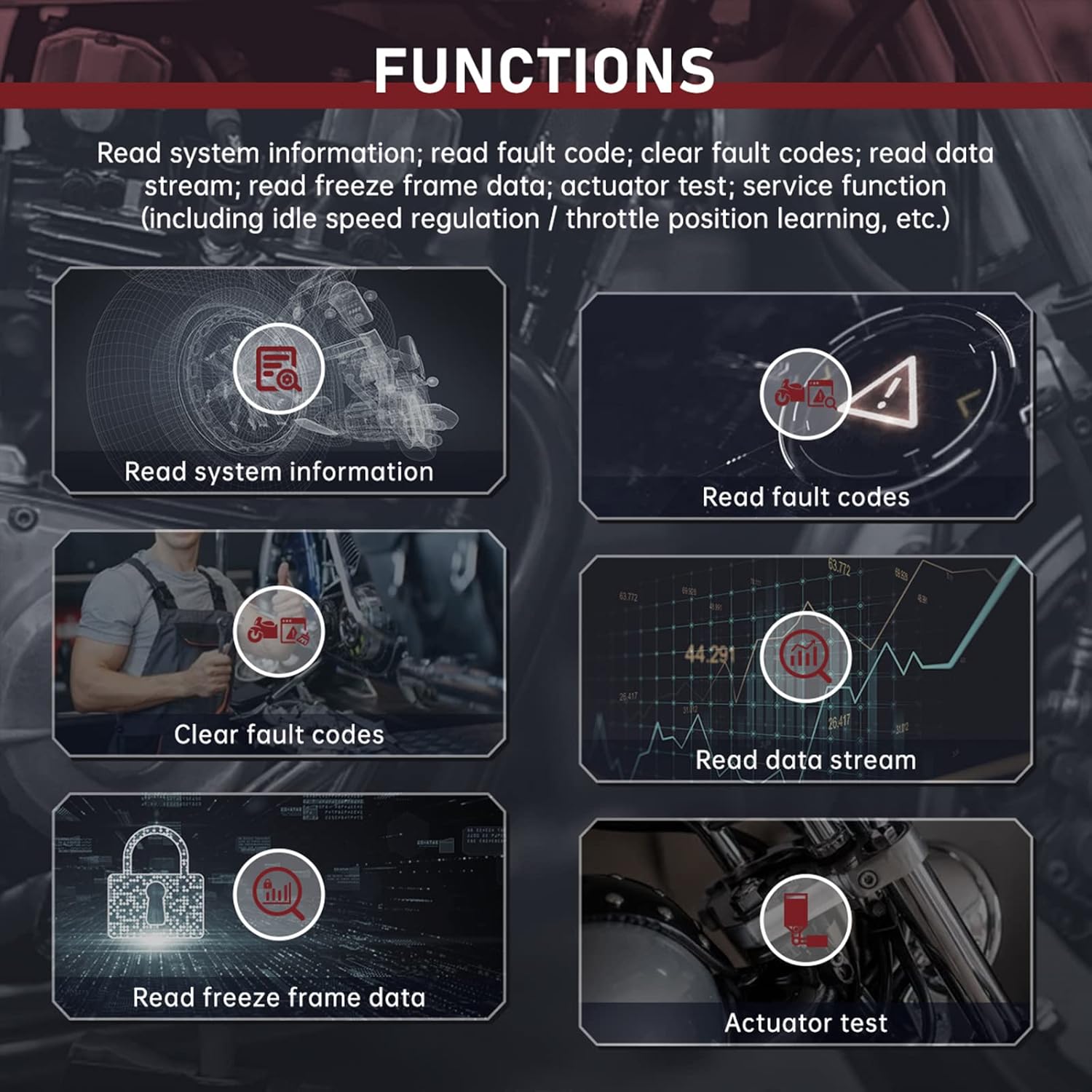
ภาพ: เหนือview ฟังก์ชันการวินิจฉัยประกอบด้วย: อ่านข้อมูลระบบ, อ่านรหัสข้อผิดพลาด, ล้างรหัสข้อผิดพลาด, อ่านกระแสข้อมูล, อ่านข้อมูลเฟรมหยุดนิ่ง และทดสอบแอคชูเอเตอร์
- อ่านข้อมูลระบบ: แสดงข้อมูลยานยนต์ เช่น หมายเลขตัวถัง (VIN), รหัสการปรับเทียบ และข้อมูลโมดูล
- อ่านรหัสข้อผิดพลาด: ดึงข้อมูลรหัสปัญหาการวินิจฉัย (DTC) ปัจจุบัน ที่รอการแก้ไข และในอดีตจากหน่วยควบคุมอิเล็กทรอนิกส์ (ECU) ของรถยนต์
- ล้างรหัสข้อผิดพลาด: ลบ DTC ออกจากหน่วยความจำของรถยนต์ โปรดตรวจสอบให้แน่ใจว่าได้แก้ไขปัญหาที่ต้นเหตุแล้วก่อนที่จะลบรหัส
- อ่านสตรีมข้อมูล: แสดงค่าพารามิเตอร์แบบเรียลไทม์จากเซ็นเซอร์และส่วนประกอบต่างๆ (เช่น ความเร็วรอบเครื่องยนต์ อุณหภูมิ ปริมาตร)tagจ).
- อ่านข้อมูลเฟรมหยุดนิ่ง: บันทึกภาพข้อมูลเซ็นเซอร์ ณ ขณะที่เกิดรหัสข้อผิดพลาด เพื่อช่วยในการวินิจฉัยปัญหา
- การทดสอบแอคชูเอเตอร์: ช่วยให้สามารถทดสอบอุปกรณ์ควบคุมเฉพาะ (เช่น ปั๊มเชื้อเพลิง พัดลมระบายความร้อน) เพื่อตรวจสอบการทำงานของอุปกรณ์เหล่านั้นได้
- ฟังก์ชันการบริการ: รวมถึงฟังก์ชันพิเศษต่างๆ เช่น การควบคุมความเร็วรอบเดินเบาและการเรียนรู้ตำแหน่งคันเร่ง หากรถยนต์รองรับฟังก์ชันเหล่านั้น
ทดสอบด่วน
ฟังก์ชัน Quick Test จะสแกนระบบทั้งหมดที่สามารถเข้าถึงได้ของรถยนต์รุ่นนั้นโดยอัตโนมัติและอ่านรหัสข้อผิดพลาดที่เกี่ยวข้อง ซึ่งช่วยให้ตรวจสอบได้อย่างรวดเร็วview เกี่ยวกับสถานะการวินิจฉัยของรถยนต์

ภาพ: อดีตampส่วนต่างๆ ของหน้าจอแสดงผลอินเทอร์เฟซของ M3-A รวมถึงผลการทดสอบด่วน การวินิจฉัยระบบเดี่ยว ข้อมูลโมดูล การอ่านรหัสข้อผิดพลาด สตรีมข้อมูล ข้อมูลเฟรมหยุดนิ่ง และหน้าจอการทดสอบการทำงาน
เล่มที่tage ทดสอบ
ฉบับที่tagฟังก์ชัน eTest ช่วยให้สามารถตรวจจับแรงดันไฟฟ้าของแบตเตอรี่ OBD ได้แบบเรียลไทม์tagเช่น มักแสดงควบคู่กับรูปคลื่นเพื่อการวิเคราะห์ปริมาตรอย่างละเอียดtagความผันผวนของอี
การเลือกหลายภาษา
อุปกรณ์นี้รองรับหลายภาษา ซึ่งสามารถเลือกได้ผ่านเมนู 'การตั้งค่า' ภาษาที่รองรับ ได้แก่ อังกฤษ สเปน โปรตุเกส ฝรั่งเศส จีน จีนดั้งเดิม ตุรกี เวียดนาม เขมร ไทย และอินโดนีเซีย

ภาพ: หน้าจอเลือกภาษาหลายภาษาของเครื่องมือ M3-A แสดงสัญลักษณ์สำหรับภาษาต่างๆ ที่รองรับ
การซ่อมบำรุง
การทำความสะอาด
เช็ดทำความสะอาดอุปกรณ์และสายเคเบิลด้วยผ้าเนื้อนุ่มและแห้งamp ผ้า ห้ามใช้น้ำยาทำความสะอาดหรือสารละลายที่มีฤทธิ์กัดกร่อน ตรวจสอบให้แน่ใจว่าได้ถอดปลั๊กอุปกรณ์ออกจากแหล่งจ่ายไฟก่อนทำความสะอาด
พื้นที่จัดเก็บ
เก็บเครื่องมือวินิจฉัยไว้ในที่แห้งและเย็น หลีกเลี่ยงแสงแดดโดยตรงและอุณหภูมิที่สูงหรือต่ำเกินไป ม้วนสายไฟให้เรียบร้อยเพื่อป้องกันความเสียหาย
การอัพเกรดซอฟต์แวร์
สามารถอัปเกรดซอฟต์แวร์ของอุปกรณ์ได้โดยเชื่อมต่อกับคอมพิวเตอร์ผ่านสายเคเบิลข้อมูล USB ที่ให้มา เยี่ยมชมเว็บไซต์อย่างเป็นทางการของ FXTUL webเว็บไซต์สำหรับอัปเดตซอฟต์แวร์ล่าสุดและคำแนะนำ

ภาพ: เครื่องมือวินิจฉัย M3-A เชื่อมต่อกับแล็ปท็อปผ่านสาย USB เพื่อแสดงขั้นตอนการอัปเกรดซอฟต์แวร์
การแก้ไขปัญหา
หากคุณพบปัญหาในการใช้งานเครื่องมือวินิจฉัย FXTUL M3-A โปรดดูปัญหาและวิธีแก้ไขทั่วไปต่อไปนี้:
- อุปกรณ์ไม่เปิดเครื่อง:
- ตรวจสอบให้แน่ใจว่าสายเคเบิลวินิจฉัยเชื่อมต่อเข้ากับทั้งเครื่องมือและพอร์ตวินิจฉัยของรถยนต์อย่างแน่นหนา
- ตรวจสอบให้แน่ใจว่าแบตเตอรี่รถยนต์มีประจุไฟเพียงพอ
- ตรวจสอบดูว่าสายเคเบิลวินิจฉัยหรือพอร์ตของเครื่องมือเสียหายหรือไม่
- ไม่มีการสื่อสารกับยานพาหนะ:
- โปรดตรวจสอบให้แน่ใจว่าคุณใช้สายอะแดปเตอร์ที่ถูกต้องสำหรับรถจักรยานยนต์รุ่นเฉพาะของคุณ หรือสาย OBD2 มาตรฐานสำหรับรถยนต์
- ตรวจสอบให้แน่ใจว่าสวิตช์กุญแจรถอยู่ในตำแหน่ง 'เปิด' (เครื่องยนต์ดับหรือทำงานอยู่ ตามที่ขั้นตอนการวินิจฉัยกำหนด)
- ตรวจสอบฟิวส์ที่ขาดในวงจรพอร์ตวินิจฉัยของรถยนต์
- รถยนต์รุ่นเก่าหรือรถยนต์ที่ไม่เป็นไปตามมาตรฐานบางรุ่นอาจไม่สามารถใช้งานร่วมกันได้อย่างสมบูรณ์ โปรดตรวจสอบรายการความเข้ากันได้
- แสดงรหัสข้อผิดพลาดไม่ถูกต้องหรือไม่แสดงรหัสข้อผิดพลาด:
- ตรวจสอบให้แน่ใจว่าซอฟต์แวร์ของเครื่องมือเป็นเวอร์ชันล่าสุด ซอฟต์แวร์ที่ล้าสมัยอาจไม่สามารถจดจำโปรโตคอลของรถยนต์รุ่นใหม่หรือรหัสข้อผิดพลาดเฉพาะได้
- ตรวจสอบว่า ECU ของรถยนต์ทำงานได้อย่างถูกต้องหรือไม่
- หน้าจออ่านไม่ออกหรือค้าง:
- ถอดอุปกรณ์ออกจากรถ แล้วเสียบกลับเข้าไปใหม่
- หากปัญหายังคงอยู่ ให้ทำการอัปเกรดซอฟต์แวร์
- ปัญหาความเข้ากันได้ (เช่น "ใช้ไม่ได้กับ Honda CBR600RR ปี 09" หรือ "ใช้ไม่ได้กับรถจักรยานยนต์ Kawasaki" ตามที่ผู้ใช้บางรายรายงาน):
- แม้ว่าผลิตภัณฑ์จะโฆษณาว่าใช้งานได้กับ Yamaha, Honda และ Kawasaki แต่รุ่นหรือปีที่เฉพาะเจาะจงอาจมีความแตกต่างกันไป โปรดตรวจสอบความเข้ากันได้กับผู้ผลิตเสมอหากพบปัญหา
- ตรวจสอบให้แน่ใจว่าคุณมีสายอะแดปเตอร์ที่ถูกต้องสำหรับรุ่นของคุณ
- ตรวจสอบการอัปเดตซอฟต์แวร์ เนื่องจากมักจะมีการขยายขอบเขตการรองรับรถยนต์เพิ่มเติม
หากขั้นตอนเหล่านี้ไม่สามารถแก้ไขปัญหาได้ โปรดติดต่อฝ่ายบริการลูกค้าของ FXTUL เพื่อขอความช่วยเหลือเพิ่มเติม
ข้อมูลจำเพาะ
| หมายเลขรุ่น | FXTUL M3-A |
| ผู้ผลิต | เอฟเอ็กซ์ทูล |
| ขนาดสินค้า | 6.4 x 3.3 x 0.9 นิ้ว (ประมาณ 163 มม. x 85 มม. x 23 มม.) |
| น้ำหนักสินค้า | 1.43 ปอนด์ |
| ระบบปฏิบัติการ (สำหรับการอัปเดตซอฟต์แวร์) | ระบบปฏิบัติการ Windows XP (และอาจรวมถึง Windows เวอร์ชันใหม่กว่า) |
| โปรโตคอลที่รองรับ | OBD2, โปรโตคอลเฉพาะสำหรับรถจักรยานยนต์ (ยามาฮ่า, ฮอนด้า, คาวาซากิ) |
| แสดง | จอ LCD ขาวดำ (อิงจากภาพนิ่ง) |
การรับประกันและการสนับสนุน
สำหรับข้อมูลการรับประกัน การสนับสนุนทางเทคนิค หรือข้อสงสัยใดๆ เกี่ยวกับเครื่องมือวินิจฉัยรถจักรยานยนต์ FXTUL M3-A โปรดติดต่อฝ่ายบริการลูกค้าของ FXTUL โดยตรง โปรดดูที่บรรจุภัณฑ์ของผลิตภัณฑ์หรือเอกสารอย่างเป็นทางการของ FXTUL webเว็บไซต์สำหรับรายละเอียดการติดต่อและเงื่อนไขการรับประกันล่าสุด
ร้านค้าอย่างเป็นทางการของ FXTUL: เยี่ยมชมร้านค้า FXTUL บน Amazon
เอกสารที่เกี่ยวข้อง - FXTUL M3-A
 |
FXTUL M3 Motorcycle Diagnostic Tool User Manual - Diagnose and Repair Motorcycles Comprehensive user manual for the FXTUL M3 handheld motorcycle diagnostic tool. Learn how to diagnose issues, detect voltage, clear fault codes, and perform system checks on various motorcycle brands. Includes multi-language support. |
 |
คู่มือผู้ใช้เครื่องมือวินิจฉัยรถจักรยานยนต์ FXTUL M3 คู่มือผู้ใช้สำหรับเครื่องมือวินิจฉัยรถจักรยานยนต์แบบพกพา FXTUL M3 ครอบคลุมผลิตภัณฑ์มากกว่าview, ฟังก์ชั่น ขั้นตอนการวินิจฉัย แนวทางการใช้งาน การตั้งค่า การอัปเกรดซอฟต์แวร์ และข้อมูลการรับประกันสำหรับการบำรุงรักษาและซ่อมแซมรถจักรยานยนต์ |
 |
คู่มือผู้ใช้เครื่องมือวินิจฉัยรถจักรยานยนต์ FXTUL M4 คู่มือผู้ใช้ที่ครอบคลุมสำหรับเครื่องมือวินิจฉัยรถจักรยานยนต์แบบพกพา FXTUL M4 ครอบคลุมผลิตภัณฑ์มากกว่าview, ฟังก์ชั่น, แนวทางการใช้งาน, การวินิจฉัย, การตั้งค่า, การอัพเกรดซอฟต์แวร์ และข้อมูลการรับประกัน |
 |
คู่มือผู้ใช้เครื่องมือวินิจฉัยรถจักรยานยนต์ FXTUL M7 คู่มือผู้ใช้ฉบับสมบูรณ์สำหรับเครื่องมือวินิจฉัยรถจักรยานยนต์ FXTUL M7 ครอบคลุมความปลอดภัย ฟังก์ชัน การใช้งาน และการบำรุงรักษา เรียนรู้วิธีการวินิจฉัยและแก้ไขปัญหาระบบรถจักรยานยนต์ |
 |
FXTUL UNT60 Fuel Injector Diagnostic & Cleaning Equipment User Manual Comprehensive user manual for the FXTUL UNT60, detailing its functions, operation, maintenance, and specifications for diagnosing and cleaning motorcycle fuel injectors. Includes step-by-step guides for ultrasonic cleaning and various diagnostic tests. |
Ask a question about this manual
Ask about setup, troubleshooting, compatibility, parts, safety, or missing instructions. Manuals+ will review the question and use this page’s manual context to help answer it.