
การแนะนำ
This manual provides detailed instructions for the assembly, operation, and maintenance of your Sytas Ergonomic Desk Chair. Please read this manual thoroughly before assembly and use to ensure proper function and safety. Retain this manual for future reference.

ภาพ: ด้านหน้า view of the Sytas Ergonomic Desk Chair in black, showcasing its mesh backrest and padded flip-up arms.
ข้อมูลด้านความปลอดภัย
- ความจุน้ำหนักสูงสุด: Do not exceed the maximum weight recommendation of 250 pounds (113 kg). Exceeding this limit may result in damage to the chair or personal injury.
- การประกอบ: Assembly may require tools and careful handling. Ensure all parts are securely fastened before use.
- ความเสถียร: Do not stand on the chair. Avoid leaning excessively to one side or backward to prevent tipping.
- เด็ก: Keep children away from the chair during assembly. This chair is designed for adult use.
- ชิ้นส่วนที่เคลื่อนไหว: Be cautious of moving parts during adjustment to avoid pinching.
ส่วนประกอบของผลิตภัณฑ์
ก่อนเริ่มประกอบ โปรดตรวจสอบให้แน่ใจว่าชิ้นส่วนทั้งหมดที่ระบุไว้ด้านล่างครบถ้วนและไม่เสียหาย หากมีชิ้นส่วนใดขาดหายหรือเสียหาย โปรดติดต่อฝ่ายบริการลูกค้า
- ชุดพนักพิง
- ชุดประกอบเบาะนั่ง
- ที่วางแขน (2)
- กระบอกยกแก๊ส
- ฐาน (ฐานดาว)
- ลูกล้อ (5)
- แผ่นกลไก
- สกรูและประแจอัลเลน
- คู่มือการใช้งาน (เอกสารนี้)
คำแนะนำในการประกอบ
โดยทั่วไปการประกอบจะใช้เวลา 15-20 นาที โปรดทำตามขั้นตอนเหล่านี้อย่างระมัดระวัง:
- ติดล้อเข้ากับฐาน: ใส่ล้อทั้งห้าล้อลงในรูที่ปลายแต่ละขาของฐานรูปดาว ดันให้แน่นจนกระทั่งได้ยินเสียงคลิกเข้าที่
- ใส่แก๊สยก: วางกระบอกไฮดรอลิกสำหรับยกด้วยแก๊สลงในรูตรงกลางของฐานรูปดาวที่ประกอบเสร็จแล้ว
- ติดแผ่นกลไกเข้ากับที่นั่ง: จัดวางแผ่นกลไกให้ตรงกับรูที่เจาะไว้ล่วงหน้าบนด้านล่างของเบาะรองนั่ง ยึดให้แน่นโดยใช้สกรูและประแจหกเหลี่ยมที่ให้มา ตรวจสอบให้แน่ใจว่าด้านหน้าของกลไกหันเข้าหาด้านหน้าของเบาะนั่ง
- ติดตั้งที่วางแขนเข้ากับที่นั่ง: Attach the armrests to the sides of the seat cushion using the designated screws. Ensure they are oriented correctly for the flip-up function.
- ติดพนักพิงเข้ากับที่นั่ง: Align the backrest with the mounting points on the seat cushion and armrests. Secure it with the remaining screws.
- เชื่อมต่อชุดเบาะนั่งเข้ากับระบบแก๊สลิฟท์: วางเบาะและพนักพิงที่ประกอบเสร็จแล้วลงบนกระบอกไฮดรอลิกอย่างระมัดระวัง ตรวจสอบให้แน่ใจว่ารูตรงกลางของแผ่นกลไกตรงกับด้านบนของกระบอกไฮดรอลิก กดลงให้แน่นเพื่อยึดให้เข้าที่

Image: Illustration depicting various product durability tests, including 60,000 armrest adjustments, 120,000 gas lift cycles, 120,000 swivel rotations, 120,000 backrest pressure checks, 1300 KGS base bearing test, and 10,000 caster rolling checks.
คำแนะนำการใช้งาน
Your Sytas Ergonomic Desk Chair offers several adjustment features for personalized comfort:
- การปรับความสูงของที่นั่ง: Locate the lever on the right side beneath the seat. To raise the seat, lift the lever while taking your weight off the chair. To lower the seat, lift the lever while seated. Release the lever at the desired height.
- การปรับความตึงเอียง: The knob located under the front-center of the seat controls the tilt tension. Turn clockwise to increase tension (making it harder to recline) or counter-clockwise to decrease tension (making it easier to recline). The chair supports a 90°-120° tilt range.
- การล็อก/ปลดล็อกการเอียง: The same lever used for seat height adjustment can also lock or unlock the tilt function. Push the lever inwards to lock the backrest in an upright position (90°). Pull the lever outwards to allow the chair to recline (up to 120°).
- ที่วางแขนแบบพับได้: The armrests can be flipped up 90 degrees. This feature allows the chair to be pushed further under a desk, saving space. Simply lift the armrests upwards until they lock into the vertical position. To lower, gently pull them down.
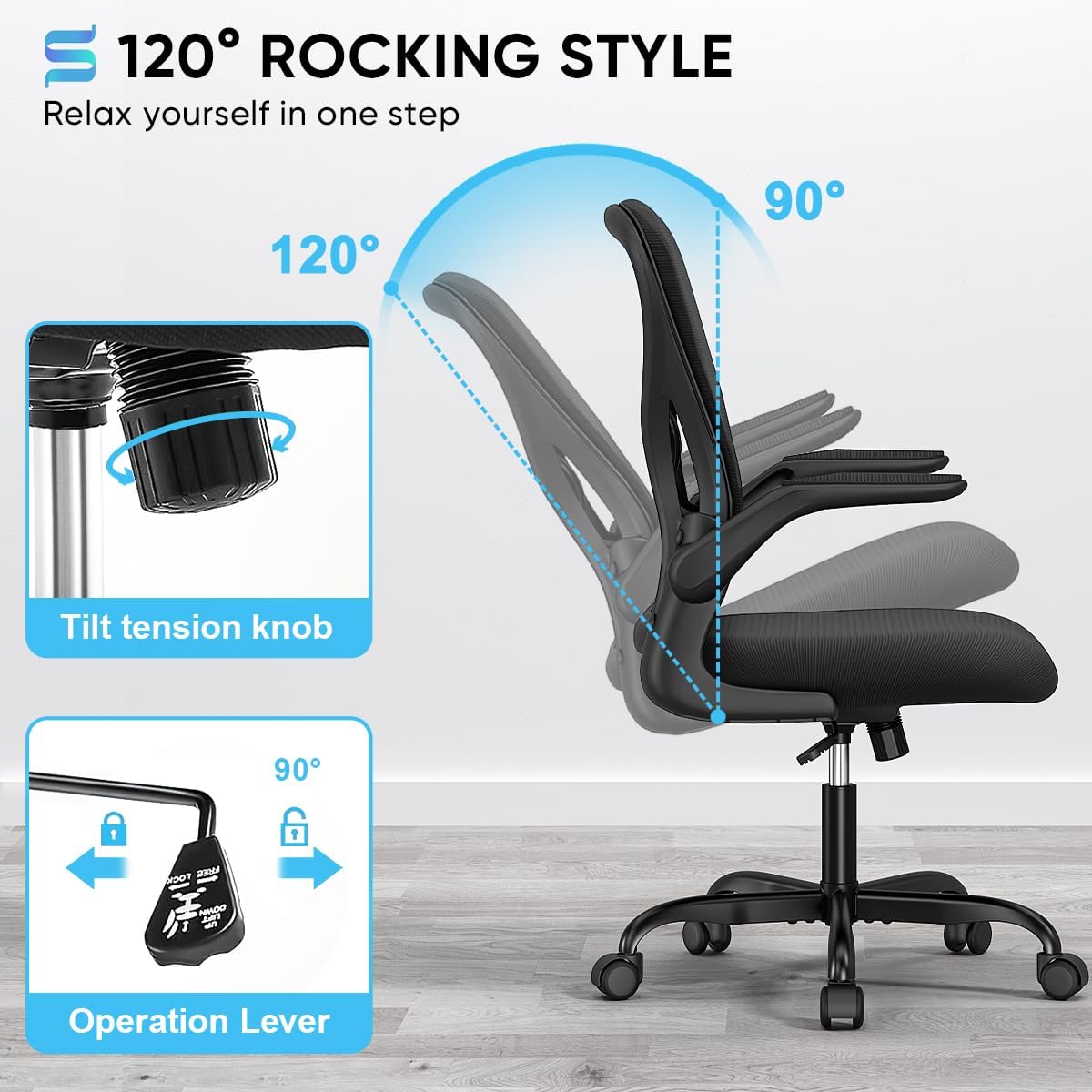
Image: Diagram illustrating the 90-120 degree rocking function of the chair, highlighting the tilt tension knob and the operation lever for tilt lock/unlock.

Image: Visual explanation of the 90-degree flip-up armrests, demonstrating how they can be raised to save space.
คุณสมบัติตามหลักสรีรศาสตร์
The Sytas Ergonomic Desk Chair is designed to support a healthy posture and provide comfort during extended use.
- S-Shaped Backrest: The backrest is contoured to align with the natural curve of your spine, providing support to the lumbar region and reducing muscle fatigue.
- การรองรับส่วนหลัง: Integrated lumbar support helps maintain the natural inward curve of the lower back.
- ตาข่ายระบายอากาศ: The high-density double-layer mesh back allows for air circulation, preventing heat buildup and promoting comfort.
- Padded Seat Cushion: The thick, high-resilience foam seat cushion is designed to effectively relieve hip pressure for all-day comfort.
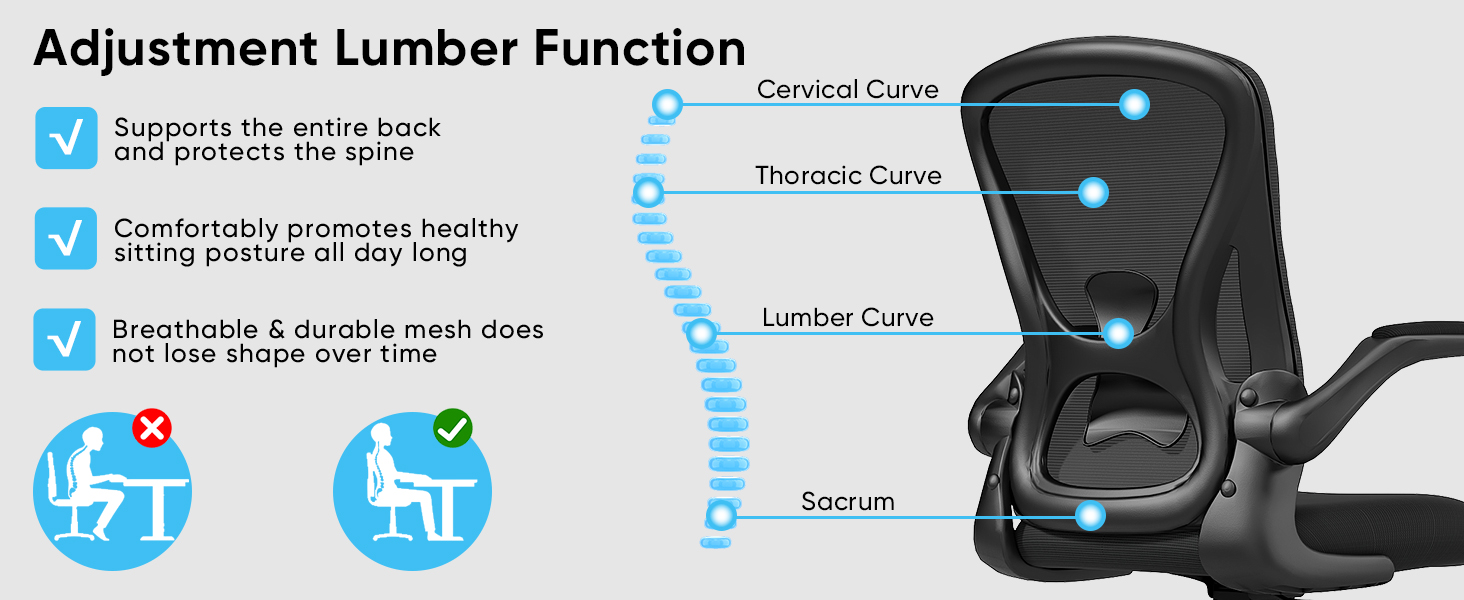
Image: Diagram illustrating the ergonomic lumbar support and S-shaped backrest, showing how it supports the cervical, thoracic, lumbar, and sacrum curves of the spine for healthy sitting posture.

ภาพ: ระยะใกล้ view of the breathable and strong mesh material used for the chair's backrest, highlighting its properties for effective sweat evaporation and durability.

Image: Cross-section diagram of the high-density foam cushion, showing layers of premium mesh material, high-quality sponge, and a durable sturdy board for optimal comfort and support.
การซ่อมบำรุง
Proper care will extend the life of your Sytas Ergonomic Desk Chair:
- การทำความสะอาด: เช็ดทำความสะอาดด้วยโฆษณาamp cloth. Avoid harsh chemicals or abrasive cleaners, which can damage the mesh or fabric.
- การตรวจสอบ: ตรวจสอบสกรูและสลักเกลียวทั้งหมดเป็นระยะเพื่อให้แน่ใจว่าขันแน่นดี ขันให้แน่นอีกครั้งหากจำเป็น
- ล้อ: ควรทำความสะอาดล้อเลื่อนให้ปราศจากเส้นผมและเศษสิ่งสกปรก เพื่อให้ล้อเลื่อนได้อย่างราบรื่น
- หลีกเลี่ยงแสงแดดโดยตรง: Prolonged exposure to direct sunlight can cause fading of materials.
การแก้ไขปัญหา
| ปัญหา | สาเหตุที่เป็นไปได้ | สารละลาย |
|---|---|---|
| เก้าอี้ปรับความสูงไม่ได้ | Gas lift not engaged or faulty. | Ensure the height adjustment lever is fully pulled. If issue persists, contact customer support. |
| เก้าอี้โยกเยก | สกรูหลวมหรือพื้นไม่เรียบ | ตรวจสอบและขันสกรูประกอบทั้งหมดให้แน่น ตรวจสอบให้แน่ใจว่าเก้าอี้วางอยู่บนพื้นผิวเรียบ |
| ล้อหมุนไม่ราบรื่น | เศษสิ่งสกปรกติดอยู่ในล้อเลื่อน | พลิกเก้าอี้คว่ำลง แล้วนำเส้นผม ฝุ่น หรือเศษสิ่งสกปรกออกจากล้อเลื่อน |
| Backrest does not recline | Tilt lock engaged. | Pull the tilt adjustment lever outwards to unlock the recline function. Adjust tilt tension knob if recline is too stiff. |
ข้อมูลจำเพาะ
| ยี่ห้อ | Sytas |
| ชื่อรุ่น | TJ-SBGY001BP |
| สี | สีดำ |
| ขนาดสินค้า (ลึก x กว้าง x สูง) | ลึก 18.9 นิ้ว x กว้าง 19.69 นิ้ว x สูง 36.22 นิ้ว |
| คำแนะนำน้ำหนักสูงสุด | 250 ปอนด์ (113 กก.) |
| น้ำหนักสินค้า | 27.7 ปอนด์ (12.5 กก.) |
| สไตล์ด้านหลัง | Solid Back, Ergonomic S-shaped |
| สไตล์แขน | With 90° Flip-up Arms |
| วัสดุ | Mesh, Foam |
| คุณสมบัติพิเศษ | Space Saving, Lumbar Support, Breathable Mesh |
| การเอียง | Yes (90°-120° rocking) |
| ฐานเฟอร์นิเจอร์เคลื่อนที่ | ล้อหมุนได้ |
| ยูพีซี | 717765843819 |
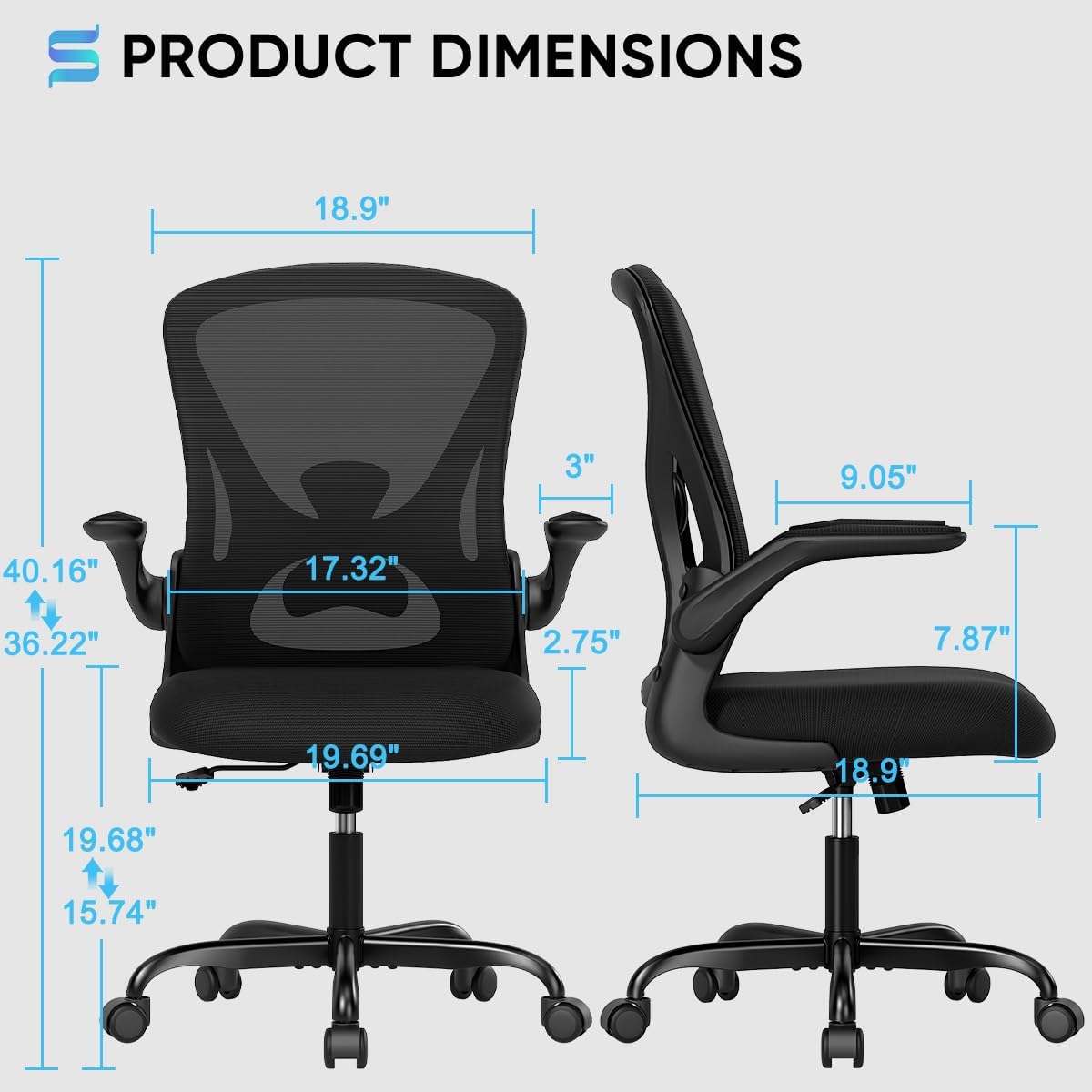
Image: Detailed diagram showing the product dimensions of the Sytas Ergonomic Desk Chair, including height, width, depth, and armrest measurements.

Image: Illustration of the chair's sturdy base, indicating a weight capacity of 300 LBS.

Image: Close-up of the SGS certified gas lift cylinder, indicating its quality and safety certification.

Image: Illustration of the chair's casters, emphasizing their 360-degree smooth and quiet movement.
การรับประกันและการสนับสนุน
Sytas provides a รับประกัน 1 ปี for this product, covering manufacturing defects. Additionally, a 30-day money-back guarantee is offered for any reason.
For any questions, issues, or warranty claims, please contact Sytas customer service. We aim to provide effective assistance within 24 hours.
Refer to your purchase documentation for specific contact details or visit the official Sytas store on Amazon: Sytas Amazon Store