
VIGORWORK B500W
VIGORWORK Portable Car MP5 Player User Manual
รุ่น: B500W
การแนะนำ
This manual provides detailed instructions for the installation, operation, and maintenance of your VIGORWORK Portable Car MP5 Player, Model B500W. This device is designed to enhance your in-car entertainment and connectivity with features like Apple CarPlay, Android Auto, Bluetooth 5.1, FM transmission, and multimedia playback.
เนื้อหาแพ็คเกจ
กรุณาตรวจสอบแพ็คเกจสำหรับรายการต่อไปนี้:
- 1 x Main Unit (Portable Car MP5 Player)
- 1 x คู่มือผู้ใช้
- 1 x สายไฟที่จุดบุหรี่
- ที่วางแบบดูดติดผนัง 1 ชิ้น
- 1 x 2-Key Silicone Remote Control
- 1 x Reversing Video Cable (for optional backup camera)

Image: The VIGORWORK Portable Car MP5 Player main unit, suction cup holder, remote control, cigarette lighter power cable, and reversing video cable.
คุณสมบัติหลัก
- Wired and Wireless Apple CarPlay & Android Auto: การผสานการทำงานกับสมาร์ทโฟนอย่างราบรื่นสำหรับการนำทาง การโทร ข้อความ และเพลง
- การส่งสัญญาณ FM: Transmit audio to your original car speakers via FM radio.
- การเชื่อมต่อที่หลากหลาย: USB, TF Card, Bluetooth 5.1, AUX, Type-C Port.
- ลิงค์มิเรอร์โทรศัพท์: Mirror your smartphone screen to the 7-inch HD display.
- Bluetooth 5.1: Stable and fast wireless connection for hands-free calls and audio streaming.
- พลังงานที่จุดบุหรี่: Easy plug-and-play installation without modifying car wiring.
- การรองรับกล้องสำรอง: Compatible with optional rear cameras for safer reversing.
- ลำโพงในตัว: สำหรับการส่งสัญญาณเสียงโดยตรง
ข้อมูลด้านความปลอดภัย
Please read and understand all safety instructions before using the device. Failure to follow these instructions may result in injury or damage to the device or vehicle.
- อย่าใช้งานอุปกรณ์ในลักษณะที่รบกวนสมาธิในการขับขี่ ให้ความสำคัญกับความปลอดภัยบนท้องถนนเสมอ
- ตรวจสอบให้แน่ใจว่าอุปกรณ์ติดตั้งอย่างแน่นหนาและไม่กีดขวางทางเดินของคุณ view หรือรบกวนการควบคุมรถ
- Use only the provided power cable. Using incompatible power sources may damage the device.
- หลีกเลี่ยงการให้เครื่องสัมผัสกับอุณหภูมิที่สูงหรือต่ำเกินไป แสงแดดโดยตรงเป็นเวลานาน หรือความชื้น
- อย่าพยายามถอดประกอบหรือซ่อมแซมอุปกรณ์ด้วยตนเอง โปรดติดต่อช่างผู้ชำนาญการ
คู่มือการติดตั้ง
1. การติดตั้งอุปกรณ์
Attach the suction cup holder to a clean, smooth surface on your dashboard or windshield. Ensure it does not obstruct your view or interfere with airbags. Securely attach the main unit to the holder.
2. การเชื่อมต่อไฟฟ้า
Insert the cigarette lighter power cable into your vehicle's 12V-24V cigarette lighter socket. The device will power on automatically.

Image: The cigarette lighter power plug inserted into a vehicle's power outlet, demonstrating the plug-and-play power connection.
3. Backup Camera Connection (Optional)
If you have an optional backup camera, connect its video output to the "Reverse Video Input" port on the MP5 player using the provided reversing video cable. The system will automatically switch to the camera view เมื่อรถอยู่ในโหมดถอยหลัง

Image: The device screen showing a wide-angle view from a backup camera with green, yellow, and red customizable guidelines for parking assistance.
คำแนะนำการใช้งาน
1. Bluetooth Connection (Version 5.1)
ในการเชื่อมต่อสมาร์ทโฟนของคุณผ่านบลูทูธ:
- บนเครื่องเล่น MP5 ให้ไปที่การตั้งค่าบลูทูธ
- เปิดใช้งาน Bluetooth บนสมาร์ทโฟนของคุณและค้นหาอุปกรณ์ที่มีอยู่
- Select "CarPlay" (default name) from the list on your phone.
- ยืนยันรหัสการจับคู่หากได้รับแจ้ง
Bluetooth 5.1 offers improved connection range, signal reception, and transfer speed compared to previous versions.

Image: A visual representation of Bluetooth 5.1 technology, highlighting a 50% increase in connection range, 75% improvement in signal reception, and 150% faster transfer speed.
2. Apple CarPlay
Connect your iPhone to the MP5 player via wired USB or wirelessly via Bluetooth/Wi-Fi. CarPlay allows you to access iPhone features like navigation, calls, messages, and music directly on the car's display.

Image: The device screen showing the Apple CarPlay interface, which includes common iOS app icons for in-car use. It indicates both wireless and wired connection options.
การควบคุมด้วยเสียง Siri: Use Siri for hands-free operation. Simply say "Hey Siri" or press the voice command button to activate Siri and control functions like making calls or sending messages.
3. แอนดรอยด์ออโต้
Connect your Android phone to the MP5 player via wired USB or wirelessly via Bluetooth/Wi-Fi. Android Auto mirrors your phone's essential apps to the display, enabling navigation, communication, and entertainment.

Image: The device screen showing the Android Auto interface, displaying app icons like Google Maps, YouTube Music, and Spotify. It also indicates both wireless and wired connection options.
ผู้ช่วย Google: Use Google Assistant for voice commands. Say "Hey Google" to control functions hands-free.
Note: For Android Auto, your phone needs Android 6.0 or higher and an active data cable for wired connection.
4. FM Signal Transmission
This feature allows the MP5 player's audio to be played through your car's original speakers by transmitting it over an FM frequency.
- Adjust your original car radio to an empty FM channel (e.g., 92.3MHz) with no strong broadcast signal.
- On the MP5 player, navigate to the FM transmission settings.
- Set the MP5 player's FM transmission frequency to match the empty channel you selected on your car radio.
- The audio from the MP5 player will now be transmitted and played through your car's speakers.
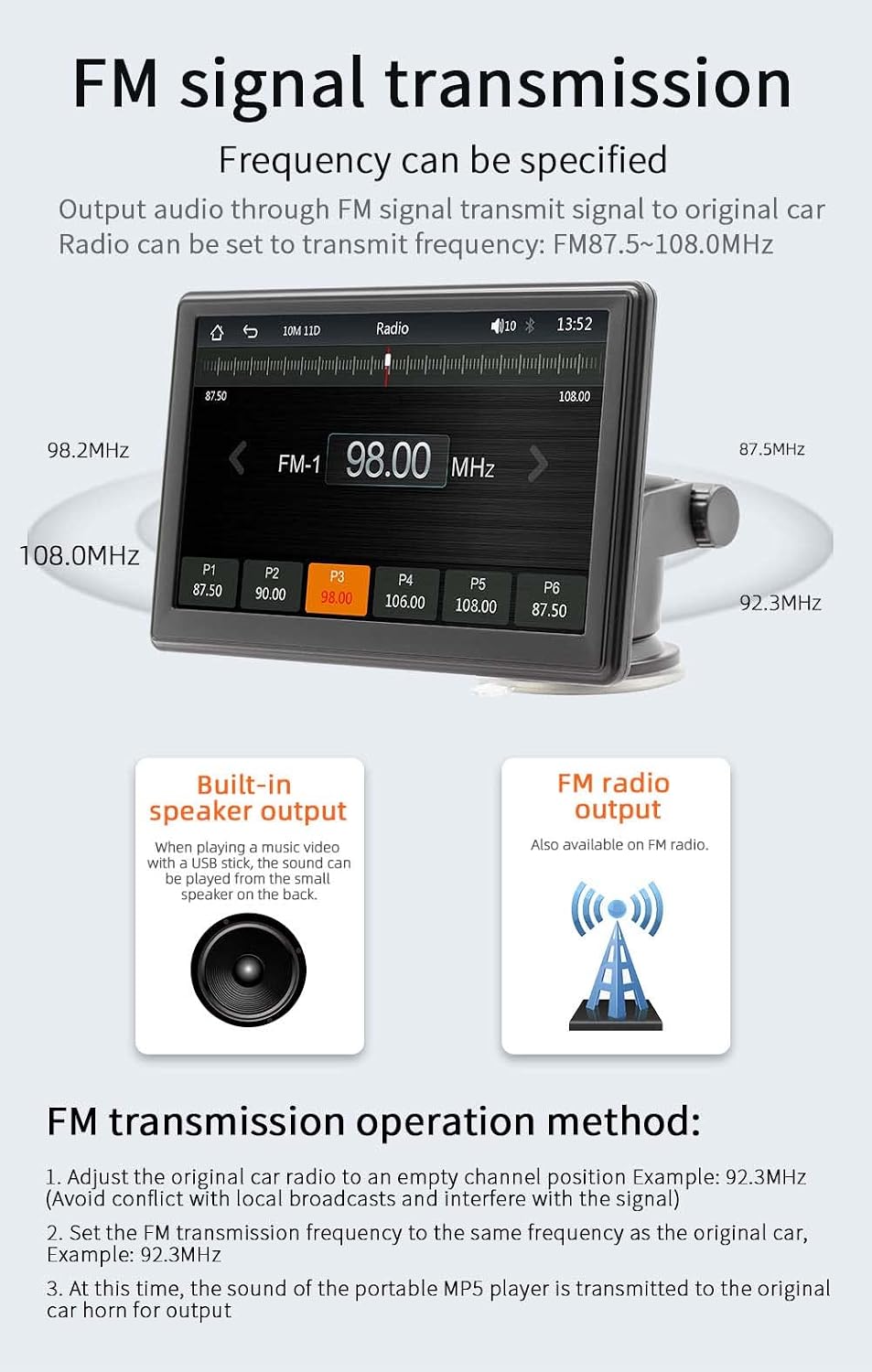
Image: The device screen showing the FM radio interface, demonstrating how to select a frequency for FM signal transmission. It also illustrates the concept of transmitting audio to the car's original speakers.
5. การเล่นมัลติมีเดีย (USB/การ์ด TF)
Insert a USB drive or TF card into the respective ports on the device. The MP5 player supports various audio (MP3/AAC/APE/OGG/M4A/RA/WAV), video (MP4/AVI/MKV/ASF/H264), and picture (JPG/PNG/BMP) formats for direct playback.

Image: The device screen showing options for multimedia playback, including music, video, and pictures. It highlights the use of a TF card and USB drive for media input.
6. การเชื่อมต่อมิเรอร์โทรศัพท์
The mirror link function allows you to display your smartphone's screen directly onto the MP5 player's 7-inch HD screen. This is useful for viewing content not directly supported by CarPlay or Android Auto.
7. การตั้งค่าภาษา
The device supports multiple languages including English, Chinese, Spanish, Portuguese, Russian, German, French, Polish, Turkish, Arabic, Hebrew, Italian, Czech, and Japanese. Navigate to the system settings to change the display language.
8. Factory Reset Password
The factory set password for system settings is 113266. Use this password if prompted for advanced configurations or a factory reset.
การซ่อมบำรุง
To ensure the longevity and optimal performance of your MP5 player:
- เช็ดทำความสะอาดหน้าจอและภายนอกด้วยผ้าแห้งเนื้อนุ่ม ห้ามใช้สารทำความสะอาดที่มีฤทธิ์กัดกร่อนหรือตัวทำละลาย
- รักษาอุปกรณ์ให้ปราศจากฝุ่นและเศษซาก
- หลีกเลี่ยงการวางของหนักบนอุปกรณ์
- ถอดสายไฟออกเมื่อไม่ได้ใช้งานอุปกรณ์เป็นเวลานาน
การแก้ไขปัญหา
| ปัญหา | สาเหตุที่เป็นไปได้ | สารละลาย |
|---|---|---|
| อุปกรณ์ไม่เปิดเครื่อง | Cigarette lighter cable not properly connected or no power from socket. | Ensure the cigarette lighter cable is securely plugged in. Check if the car's cigarette lighter socket is working. |
| ไม่มีเสียงออกจากลำโพงรถยนต์ | FM transmission not set correctly or car radio not tuned to the correct frequency. | Verify FM transmission settings on the MP5 player and ensure your car radio is tuned to the same empty frequency. Increase volume on both devices. |
| การเชื่อมต่อบลูทูธไม่เสถียร | Interference or device too far from the MP5 player. | Ensure your phone is within range. Restart Bluetooth on both devices. Clear previous pairings and re-pair. |
| CarPlay/Android Auto ไม่สามารถเชื่อมต่อได้ | Incorrect cable, phone settings, or software incompatibility. | For wired connection, use a high-quality data cable. Ensure CarPlay/Android Auto is enabled on your phone. Check phone's operating system version. Restart both devices. |
| Backup camera image not displayed. | Camera not connected, faulty cable, or camera not powered. | Ensure the reversing video cable is securely connected. Check the camera's power supply. (Note: Camera is optional and sold separately). |
ข้อมูลจำเพาะ
| พารามิเตอร์ | รายละเอียด |
|---|---|
| แบบอย่าง | B500W |
| พิมพ์ | เครื่องเล่น MP5 พกพาในรถยนต์ |
| ระบบ | Allwinner Melis System |
| ความถี่วิทยุ | เอฟเอ็ม 87.5~108.0MHz |
| กำลังขับ | ลำโพงในตัว 1W |
| ปฏิบัติการฉบับที่tage | 12~24โวลต์ |
| อุณหภูมิในการทำงาน | -10~60℃ |
| เวอร์ชันบลูทูธ | 5.1 (Default Name: CarPlay) |
| ความถี่ไวไฟ | 2.4G/5G Dual Band |
| ความละเอียดการแสดงผล | ขนาด 1024x600 |
| ขนาดหน้าจอ | 7" เอชดี |
| ขนาดการติดตั้ง | 65x65มม. |
| Faceplate Size | 178x98มม. |
| Mainframe Depth | 17มม. |
| น้ำหนักต่อหน่วย | 0.56กก. (1.23ปอนด์) |
| อินเทอร์เฟซ USB | ยูเอสบี 2.0 |
| รองรับการ์ด TF | ใช่ |
| ภาษาที่รองรับ | English, Chinese, Spanish, Portuguese, Russian, German, French, Polish, Turkish, Arabic, Hebrew, Italian, Czech, Japanese |
| ตั้งรหัสผ่านโรงงาน | 113266 |
การรับประกันและการสนับสนุน
For warranty information and technical support, please refer to the contact details provided with your purchase or visit the official VIGORWORK webไซต์ โปรดเก็บใบเสร็จรับเงินไว้เป็นหลักฐานการซื้อ
Ask a question about this manual
Ask about setup, troubleshooting, compatibility, parts, safety, or missing instructions. Manuals+ will review the question and use this page’s manual context to help answer it.