
1. บทนำ
Thank you for choosing the VIGORWORK Portable Car MP5 Player. This device is designed to enhance your driving experience with features such as Android Auto, Apple CarPlay, Mirror Link, Bluetooth 5.1, FM signal transmission, and multimedia playback. This manual provides detailed instructions for installation, operation, maintenance, and troubleshooting to ensure safe and effective use of your product.
2. ข้อมูลด้านความปลอดภัย
- อย่าใช้งานอุปกรณ์ในลักษณะที่รบกวนสมาธิในการขับขี่ ให้ความสำคัญกับความปลอดภัยบนท้องถนนเสมอ
- Ensure all connections are secure before operating the device.
- หลีกเลี่ยงการให้เครื่องสัมผัสกับอุณหภูมิที่สูงหรือต่ำเกินไป แสงแดดโดยตรงเป็นเวลานาน หรือความชื้นที่มากเกินไป
- อย่าพยายามถอดประกอบหรือดัดแปลงอุปกรณ์ แนะนำให้ส่งช่างผู้ชำนาญเข้ารับบริการทั้งหมด
- เก็บอุปกรณ์และอุปกรณ์เสริมให้พ้นมือเด็ก
3. เนื้อหาบรรจุภัณฑ์
กรุณาตรวจสอบแพ็คเกจสำหรับรายการต่อไปนี้:
- Portable Car MP5 Player Unit
- ถ้วยคัพดูด
- สายไฟที่จุดบุหรี่
- AV Input Cable (2.0mm to RCA)
- รีโมทคอนโทรล
- คู่มือการใช้งาน

Image: The Portable Car MP5 Player unit, suction cup mount, cigarette lighter power cable, AV input cable, and remote control.
4. สินค้าหมดview และคุณสมบัติ
The VIGORWORK Portable Car MP5 Player offers a range of features for in-car entertainment and connectivity:
- หน้าจอสัมผัส HD ขนาด 7 นิ้ว: มีอินเทอร์เฟซที่ชัดเจนและตอบสนองได้ดี
- Android Auto & Apple CarPlay: เชื่อมต่อกับสมาร์ทโฟนของคุณได้อย่างราบรื่น ทั้งการนำทาง ฟังเพลง โทร และส่งข้อความ รองรับทั้งการเชื่อมต่อแบบมีสายและไร้สาย
- ลิงค์มิเรอร์: Display your phone's screen directly on the player.
- Bluetooth 5.1: Stable and fast wireless connection for hands-free calls and audio streaming.
- การส่งสัญญาณ FM: Transmit audio to your car's original stereo system via FM radio.
- การเล่นมัลติมีเดีย: Supports USB and TF card for audio and video playback.
- อินพุตกล้องด้านหลัง: แสดงภาพด้านหลังโดยอัตโนมัติview when reversing (camera sold separately).
- พลังงานที่จุดบุหรี่: Easy plug-and-play installation without modifying your car's wiring.

ภาพ: โอเวอร์view highlighting the portable car audio and video system, CarPlay MP5 player, and the convenience of cigarette lighter power supply.
5. การตั้งค่า
5.1 การติดตั้งอุปกรณ์
The device comes with a multi-angle suction cup bracket for flexible placement on your dashboard or windshield.
- ทำความสะอาดพื้นผิวที่ต้องการติดตั้งให้สะอาดหมดจด
- Attach the suction cup mount to the back of the MP5 player.
- Press the suction cup firmly against the surface and engage the lever to secure it.
- Adjust the angle of the screen using the adjustable joints on the bracket for optimal viewing. The bracket allows for stretching, 270-degree rotation, and spherical angle adjustment.

Image: Details of the multi-angle bracket, illustrating its stretchable arm, 270-degree rotation capability, spherical angle adjuster, and silicone suction cup for secure mounting.
5.2 การเชื่อมต่อสายไฟ
The device is powered via your car's cigarette lighter socket.
- Insert the cigarette lighter power plug into your car's 12-24V cigarette lighter socket.
- อุปกรณ์จะเปิดเครื่องโดยอัตโนมัติ

Image: The cigarette lighter power plug inserted into a car's power socket, demonstrating the direct plug-and-play power supply method.
5.3 Connecting External Devices (Ports Overview)
The player features various ports for connectivity:
- AUX OUT (3.5mm Aux output): For wired audio output to your car's AUX input.
- AV IN (Reverse video input): For connecting an optional rear camera.
- ยูเอสบี: For playing USB music or connecting your phone for wired CarPlay/Android Auto/Mirror Link.
- บัตร TF: For playing TF card music.
- Power Plug (2.0mm plug 12-36V): Main power input from the cigarette lighter adapter.

Image: A diagram illustrating the various input/output ports on the device, including AUX OUT, AV IN, USB, TF card slot, and the power plug connection.
6. คู่มือการใช้งาน
6.1 Basic Operation & UI Interface
The device features an intuitive user interface. Navigate through functions using the touch screen.
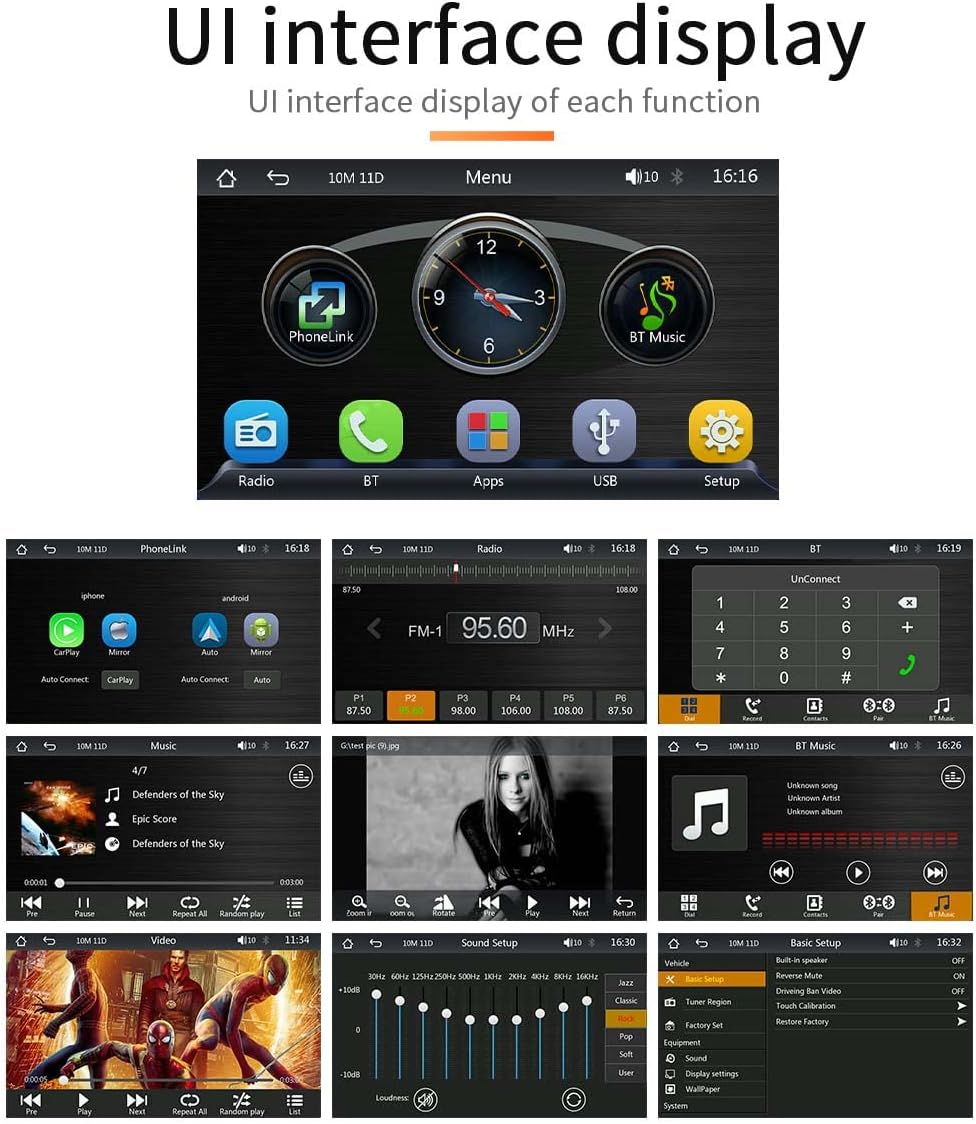
Image: A collage of screenshots demonstrating the various UI interfaces of the car MP5 player, including the main menu, radio tuner, Bluetooth connection, music playback, video playback, sound settings, and basic setup options.
6.2 FM Signal Transmission
Transmit the audio from the MP5 player to your car's original radio via FM signal.
- Adjust your original car radio to an empty FM frequency (e.g., 92.3 MHz) to avoid conflict with local broadcasts.
- Set the FM transmission frequency on the MP5 player to the same frequency as your car radio. The frequency range can be set between 87.5 MHz and 108.0 MHz.
- The sound from the portable MP5 player will now be transmitted and played through your car's original speakers.

Image: A visual guide to setting up FM signal transmission, showing the frequency selection interface on the player and indicating the range of FM frequencies available for transmission.
6.3 Bluetooth Connection (Version 5.1)
Connect your smartphone via Bluetooth for hands-free calls and music streaming.
- ในเครื่องเล่น MP5 ให้ไปที่เมนู Bluetooth
- เปิดใช้งาน Bluetooth บนสมาร์ทโฟนของคุณและค้นหาอุปกรณ์ที่มีอยู่
- Select "VIGORWORK" or a similar device name from the list on your phone to pair.
- Once paired, you can make/receive calls and play music through the car speakers. Bluetooth 5.1 offers improved connection range, signal reception, and transfer speed compared to previous versions.

Image: A graphic illustrating the Bluetooth 5.1 chip and its benefits, including a 50% promotion in connection range, 75% in signal reception, and 150% in transfer speed compared to previous generations.
6.4 Mirror Link (Wired Projection)
Mirror your smartphone screen onto the MP5 player's display.
- Connect your iPhone or Android phone to the MP5 player using a high-quality USB data cable.
- For Android phones, you may be prompted to install a specific app on your mobile phone to enable mirroring.
- Once connected, your phone's screen content will be displayed on the MP5 player.
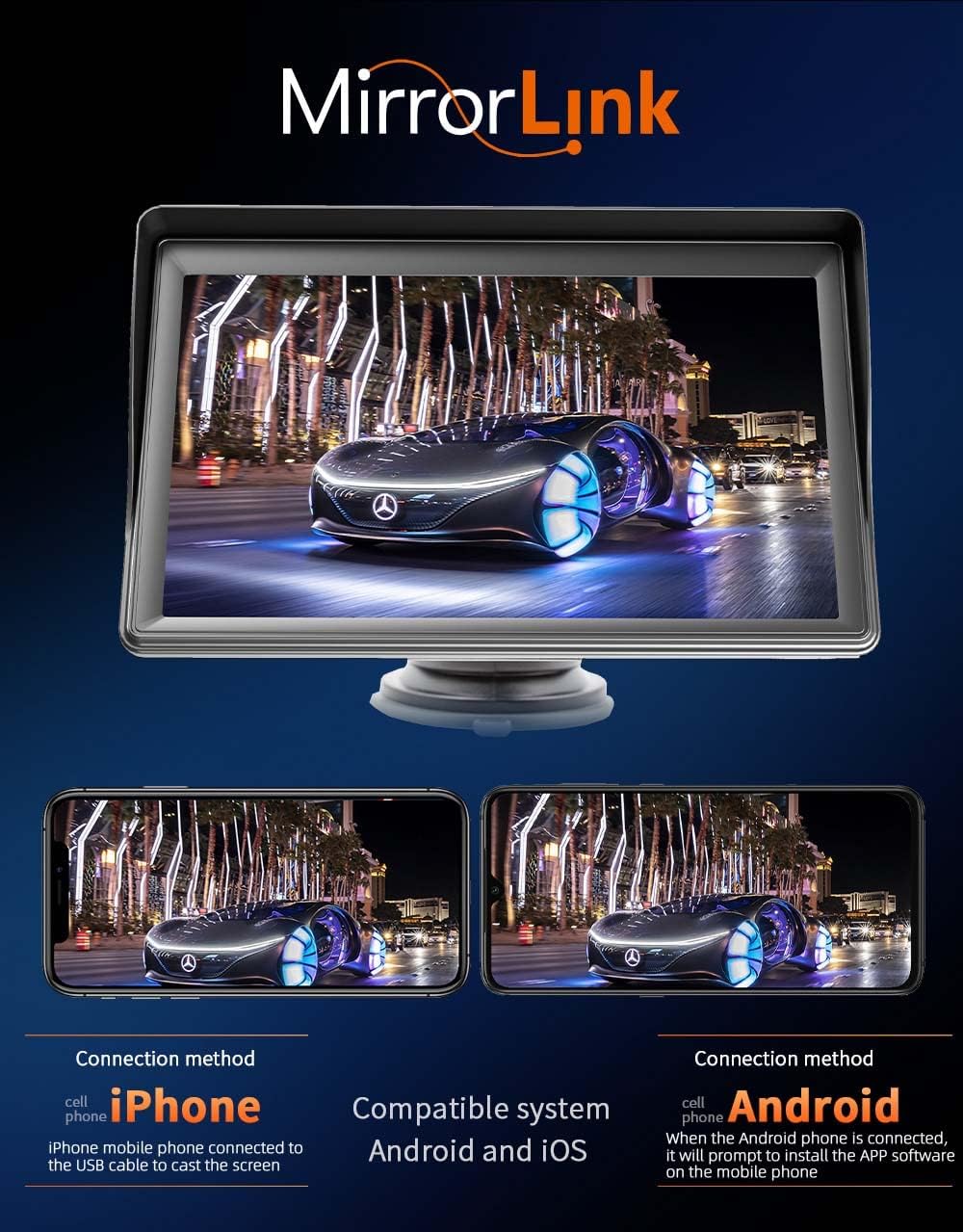
Image: A visual representation of the MirrorLink function, demonstrating how both iPhone and Android phone screens can be projected onto the car MP5 player's display.
6.5 Android Auto (Wired/Wireless)
Access Android Auto features for navigation, communication, and entertainment.
- Connect your Android phone to the MP5 player via USB cable for wired Android Auto, or wirelessly if supported by your phone and the player.
- The Android Auto interface will appear on the screen, allowing access to Google Maps, music apps, calls, and messages.
- Use voice commands (e.g., "Hey Google") for hands-free operation.
- Requires Android 6.0 or higher and Google Play services.

Image: The Android Auto interface displayed on the car MP5 player, showing icons for Google Maps, YouTube Music, Spotify, Phone, and other compatible applications, along with indicators for wireless and wired connections.
6.6 Apple CarPlay (Wired/Wireless)
Access Apple CarPlay features for intelligent and safe use of iPhone functions while driving.
- Connect your iPhone to the MP5 player via USB cable for wired CarPlay, or wirelessly if supported.
- The CarPlay interface will appear, allowing you to use navigation, make calls, send/receive messages, and listen to music.
- Utilize Siri for voice commands to control functions hands-free.
- Compatible with all iPhones.

Image: The Apple CarPlay interface shown on the car MP5 player, featuring icons for Phone, Music, Maps, Messages, and other iPhone applications, along with indicators for wireless and wired connections.
6.7 ฟังก์ชั่นกล้องหลัง
If an optional rear camera is connected to the AV IN port, the display will automatically switch to the reverse video screen when the vehicle is put into reverse gear.
- Ensure the rear camera (purchased separately) is properly installed and connected to the AV IN port using the provided 2.0mm to RCA video adapter.
- When reversing, the screen will automatically show the rear view, ช่วยเหลือในการจอดรถและการเคลื่อนที่

Image: A depiction of the reversing video feature, showing the car MP5 player displaying a rear camera view with parking guidelines. It also highlights the optional camera and the included 2.0mm to RCA video adapter.
7. การบำรุงรักษา
- การทำความสะอาด: ใช้ผ้าแห้งนุ่มเช็ดทำความสะอาดหน้าจอและภายนอกตัวเครื่อง ห้ามใช้สารทำความสะอาดที่มีฤทธิ์กัดกร่อนหรือตัวทำละลาย
- พื้นที่จัดเก็บ: หากต้องเก็บรักษาอุปกรณ์เป็นเวลานาน ควรตัดการเชื่อมต่อจากแหล่งจ่ายไฟและเก็บไว้ในที่แห้งและเย็น
- การดูแลสายเคเบิล: Handle all cables gently to prevent damage. Avoid sharp bends or kinks.
8 การแก้ไขปัญหา
| ปัญหา | สาเหตุที่เป็นไปได้ | สารละลาย |
|---|---|---|
| อุปกรณ์ไม่เปิดเครื่อง | ไม่มีไฟจากที่จุดบุหรี่; การเชื่อมต่อหลวม | Ensure cigarette lighter socket has power. Check power cable connection. |
| ไม่มีเสียงออกจากลำโพงรถยนต์ | Incorrect FM frequency; car radio volume too low; AUX cable not connected. | Verify FM frequency matches on both devices. Increase car radio volume. Ensure AUX cable is securely connected if using wired output. |
| การเชื่อมต่อบลูทูธไม่เสถียร | Interference; device too far; phone Bluetooth off. | Move phone closer to the player. Restart Bluetooth on both devices. Avoid other strong wireless signals. |
| CarPlay/Android Auto ไม่สามารถเชื่อมต่อได้ | Faulty USB cable; phone software issue; incorrect settings. | Use original or certified USB cable. Restart phone and player. Check phone settings for CarPlay/Android Auto permissions. |
| หน้าจอไม่ตอบสนอง | ซอฟต์แวร์มีปัญหาชั่วคราว | Disconnect power for 10 seconds, then reconnect to restart the device. |
9. ข้อมูลจำเพาะ
| คุณสมบัติ | ข้อมูลจำเพาะ |
|---|---|
| หมายเลขรุ่น | เอเอฟ1313 |
| ขนาดหน้าจอ | 7 นิ้ว เอชดี |
| เทคโนโลยีการเชื่อมต่อ | Bluetooth 5.1, RCA, USB, Wi-Fi (for wireless CarPlay/Android Auto) |
| ประเภทตัวควบคุม | แอนดรอยด์, ไอโอเอส |
| อุปกรณ์ที่รองรับ | Smartphone, Car Speakers |
| ประเภทขั้วต่อ | อาร์ซีเอ, ยูเอสบี |
| โหมดเอาต์พุตเสียง | สเตอริโอ |
| กำลังขับ | 1 วัตต์ |
| น้ำหนักสินค้า | 1.3 ปอนด์ |
| ขนาดแพ็คเกจ | 8.11 x 6.57 x 4.37 นิ้ว |
| สี | สีดำ |

Image: A diagram illustrating the physical dimensions of the car MP5 player unit, including height, width, and depth measurements.
10. การรับประกันและการสนับสนุน
VIGORWORK products are designed for reliability and performance. For warranty information and technical support, please refer to the contact details provided on the product packaging or the official VIGORWORK webไซต์ โปรดเก็บใบเสร็จรับเงินไว้เป็นหลักฐานการซื้อสำหรับการเรียกร้องการรับประกัน