
KSE-Lights KS-5400-IX
คู่มือการใช้งานเครื่องชาร์จ KSE-Lights KS-5400-IX
Model: KS-5400-IX | Brand: KSE-Lights
การแนะนำ
Thank you for choosing the KSE-Lights KS-5400-IX Charger. This manual provides essential information for the safe and efficient operation of your charger. It is designed to charge compatible KSE-Lights devices, specifically the KS-7840-IX Power and KS-7830-IX Performance models. Please read this manual thoroughly before use and keep it for future reference.
ข้อมูลด้านความปลอดภัย
เพื่อให้มั่นใจถึงการทำงานที่ปลอดภัยและป้องกันความเสียหาย โปรดปฏิบัติตามข้อควรระวังด้านความปลอดภัยต่อไปนี้:
- อย่าให้เครื่องชาร์จโดนฝน ความชื้น หรืออุณหภูมิที่สูงหรือต่ำเกินไป
- Use only the provided power adapter or a compatible KSE-Lights approved adapter.
- ห้ามถอดประกอบหรือดัดแปลงเครื่องชาร์จด้วยตนเอง โปรดส่งเครื่องไปให้ช่างผู้ชำนาญการเป็นผู้ดำเนินการซ่อมบำรุง
- Keep the charger away from flammable materials and heat sources.
- ตรวจสอบให้แน่ใจว่ามีการระบายอากาศที่เหมาะสมรอบๆ เครื่องชาร์จในระหว่างการทำงาน
- ถอดปลั๊กเครื่องชาร์จออกจากเต้าเสียบเมื่อไม่ได้ใช้งานหรือก่อนทำความสะอาด
- This charger is designed for specific KSE-Lights devices. Do not attempt to charge incompatible batteries or devices.
เนื้อหาแพ็คเกจ
ตรวจสอบว่ามีรายการทั้งหมดอยู่ในแพ็คเกจของคุณ:
- 1 x KSE-Lights KS-5400-IX Charger Unit
- อะแดปเตอร์ไฟฟ้า 1 ตัว
สินค้าเกินview
The KSE-Lights KS-5400-IX is a compact and robust charger designed for efficient power delivery to your KSE-Lights devices. Below is an image illustrating the charger unit and its accompanying power adapter.
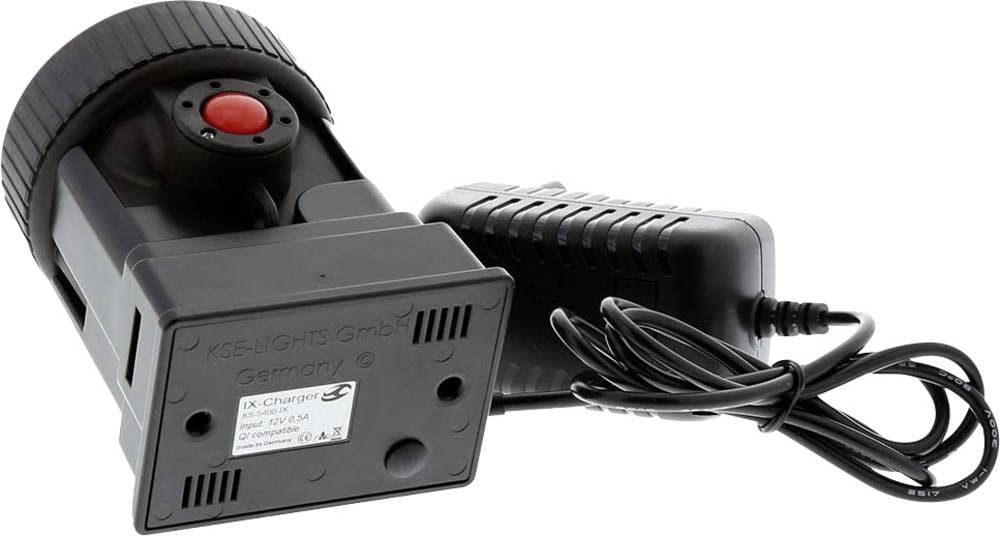
ภาพ: The KSE-Lights KS-5400-IX charger unit (left) and its power adapter with cable (right). The charger unit is black, with a red button on top and a label on the bottom indicating "IX-Charger KS-5400-IX Input: 12V 0.5A Qi compatible" and "KSE-LIGHTS GmbH Germany". The power adapter is also black and features a ribbed design.
The charger unit features a dedicated slot for compatible KSE-Lights batteries or devices. The red button visible on the top of the charger unit is typically used for releasing the device or indicating charging status, depending on the specific device being charged. The bottom label confirms its model and input specifications, indicating it is a 12V 0.5A charger and is Qi compatible, suggesting wireless charging capabilities for compatible devices.
การตั้งค่า
Follow these steps to set up your KSE-Lights KS-5400-IX Charger:
- Place the charger unit on a stable, flat, and dry surface.
- Connect the power adapter cable to the designated input port on the KSE-Lights KS-5400-IX charger unit.
- Plug the power adapter into a standard electrical outlet (100-240V AC, 50/60Hz).
- ตรวจสอบให้แน่ใจว่าการเชื่อมต่อทั้งหมดปลอดภัยก่อนดำเนินการต่อ
คำแนะนำการใช้งาน
To charge your KSE-Lights device:
- Ensure the charger is properly set up and connected to a power source.
- Carefully insert your compatible KSE-Lights device (e.g., KS-7840-IX Power or KS-7830-IX Performance) into the charging slot of the KS-5400-IX charger unit. Ensure it clicks securely into place.
- The charger will typically indicate the charging status via an LED indicator (refer to your device's manual for specific LED behavior).
- Allow the device to charge until fully charged. Avoid overcharging by disconnecting the device once charging is complete.
- To remove the device, press the red release button (if applicable) and gently pull the device out of the charging slot.
บันทึก: Charging times may vary depending on the battery level and model of the device being charged.
การซ่อมบำรุง
การบำรุงรักษาอย่างเหมาะสมจะช่วยให้เครื่องชาร์จของคุณมีอายุการใช้งานยาวนาน:
- การทำความสะอาด: ถอดปลั๊กที่ชาร์จออกจากเต้ารับก่อนทำความสะอาด ใช้ผ้าแห้งนุ่มๆ เช็ดทำความสะอาดภายนอกที่ชาร์จ ห้ามใช้น้ำยาทำความสะอาดหรือวัสดุที่มีฤทธิ์กัดกร่อน
- พื้นที่จัดเก็บ: เก็บเครื่องชาร์จไว้ในที่แห้งและเย็น หลีกเลี่ยงแสงแดดโดยตรงและอุณหภูมิที่สูงหรือต่ำมากเมื่อไม่ได้ใช้งาน
- การตรวจสอบ: Periodically inspect the power cord and charger unit for any signs of damage. If damage is found, discontinue use and contact KSE-Lights support.
การแก้ไขปัญหา
If you encounter issues with your charger, refer to the table below:
| ปัญหา | สาเหตุที่เป็นไปได้ | สารละลาย |
|---|---|---|
| เครื่องชาร์จไม่เปิดเครื่อง | No power from outlet; loose connection; faulty adapter. | Check power outlet with another device; ensure all cables are securely connected; try a different outlet. |
| อุปกรณ์ไม่ชาร์จ | Device not properly seated; incompatible device; faulty device battery. | Ensure device is fully inserted into the charging slot; confirm device compatibility with KS-5400-IX; test device with another charger if possible. |
| ชาร์จช้า | Using a non-standard power source; high ambient temperature. | Ensure you are using the original power adapter; move charger to a cooler environment. |
If the problem persists after trying these solutions, please contact KSE-Lights customer support.
ข้อมูลจำเพาะ
| คุณสมบัติ | รายละเอียด |
|---|---|
| หมายเลขรุ่น | KS-5400-IX |
| ยี่ห้อ | KSE-Lights |
| หมายเลขชิ้นส่วน | KS-5400-IX |
| ขนาดสินค้า | 13 x 13 x 9 ซม. |
| น้ำหนัก | 270 กรัม |
| สี | สีดำ |
| วัสดุ | โลหะ |
| แหล่งพลังงาน | Battery Powered (charger itself is powered by AC adapter to charge batteries) |
| อินพุต Voltage (from OCR) | 12V 0.5A |
| Qi Compatible (from OCR) | ใช่ |
| ส่วนประกอบที่รวมอยู่ | Installation hardware (as per product data, likely referring to the charger unit and adapter) |
| รวมแบตเตอรี่ด้วยมั้ย? | เลขที่ |
| จำเป็นต้องใช้แบตเตอรี่หรือไม่? | No (for the charger itself to operate) |
| ยูพีซี | 779205829913 |
| ความพร้อมจำหน่ายอะไหล่ของสหภาพยุโรป | 1 ปี |
การรับประกันและการสนับสนุน
KSE-Lights products are manufactured to high quality standards. While specific warranty details are not provided in this manual, please retain your proof of purchase for any warranty claims. For technical support, troubleshooting assistance, or information regarding spare parts availability, please contact KSE-Lights customer service through their official webเว็บไซต์หรือตัวแทนจำหน่ายที่ได้รับอนุญาต
Information regarding spare parts availability in the EU is guaranteed for 1 year from the date of first availability.
Ask a question about this manual
Ask about setup, troubleshooting, compatibility, parts, safety, or missing instructions. Manuals+ will review the question and use this page’s manual context to help answer it.