
การแนะนำ
Thank you for choosing the Jyving DC 36V 1000W Brushed Motor Controller. This controller is designed to provide stable speed and sensitive control for electric bicycles and scooters. This manual provides essential information for the safe and efficient installation, operation, and maintenance of your motor controller. Please read it thoroughly before use.
ข้อมูลด้านความปลอดภัย
- Always disconnect power before installing or performing maintenance on the controller.
- Ensure all connections are secure and correctly wired according to the diagram to prevent damage to the controller or motor.
- ควรหลีกเลี่ยงการให้ตัวควบคุมสัมผัสกับน้ำหรือความชื้นมากเกินไป
- ห้ามพยายามเปิดหรือแก้ไขตัวควบคุม casing, as this may void the warranty and pose a safety risk.
- Keep children and unauthorized personnel away from the electrical components during installation and operation.
- Wear appropriate personal protective equipment (PPE) when handling electrical components.
สินค้าเกินview
The Jyving DC Brushed Motor Controller features a durable aluminum alloy shell for effective heat dissipation, protecting internal circuits from thermal overloading. It ensures steady speed control and responsive braking and direction changes. The wires and interfaces are designed for durability and labeled for easy installation.
คุณสมบัติหลัก:
- Aluminum alloy shell for heat dissipation.
- Provides steady speed control.
- Sensitive control for braking and direction changes.
- Durable, labeled wires and interfaces for easy installation.
- Suitable for electric bicycles and scooters.

Image: The Jyving DC Brushed Motor Controller, showing its compact design and multiple wire connections.
Setup and Wiring
Carefully follow the wiring diagram below to connect the motor controller to your electric bicycle or scooter components. Ensure all connections are firm and correctly matched.
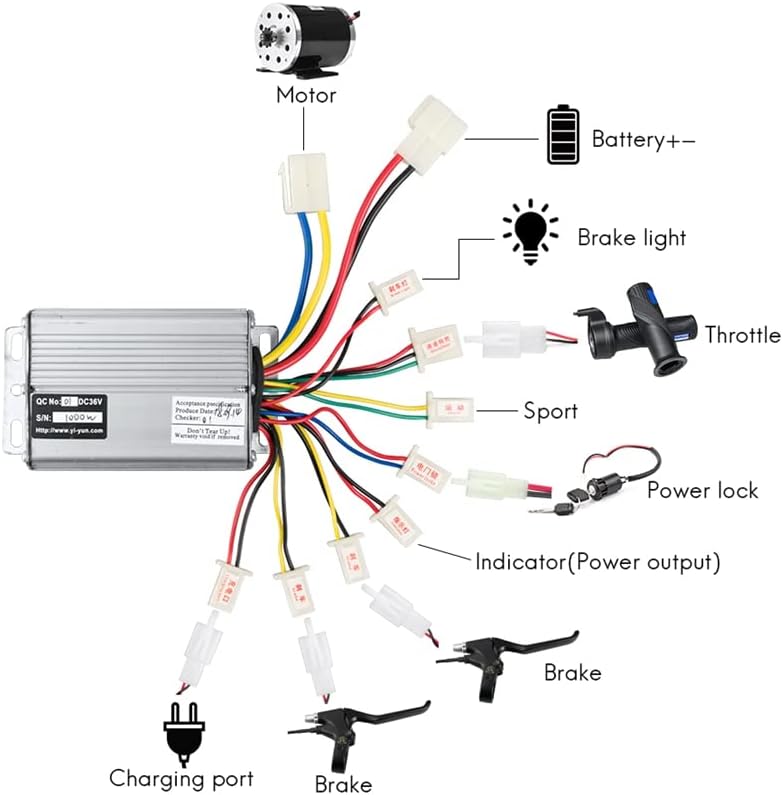
Image: Detailed wiring diagram illustrating connections for the motor, battery, throttle, brakes, and other components.
คู่มือการเชื่อมต่อ:
- การเชื่อมต่อมอเตอร์: Connect the motor wires (typically yellow, blue, green) from the controller to the corresponding motor wires.
- Battery Connection (Battery+-): Connect the main power wires (red for positive, black for negative) from the controller to your 36V DC battery pack.
- คันเร่ง: Connect the throttle unit to the designated throttle connector on the controller. This controls speed.
- คันเบรก: Connect the brake lever wires to the brake connectors. These signals will cut power to the motor when brakes are applied.
- ไฟเบรค: If applicable, connect the brake light wire to the brake light output.
- Power Lock: Connect the power lock (ignition) switch. This acts as the main on/off switch for the system.
- พอร์ตชาร์จ: Connect the charging port if your system includes one for direct charging through the controller.
- Indicator (Power Output): Connect any power indicator lights or displays to this output.
- Sport Mode (Optional): If your system supports a sport mode, connect the corresponding switch here.
After making all connections, double-check them for correctness and security before applying power.
คำแนะนำการใช้งาน
- เปิดเครื่อง: Turn the power lock (ignition) switch to the "ON" position. The system indicator should light up.
- ควบคุมคันเร่ง: Gently twist the throttle to engage the motor. The speed will increase proportionally with the throttle input.
- การเบรก: Apply the brake levers to slow down or stop. The controller is designed to cut motor power when brakes are engaged.
- หมดแรง: Turn the power lock switch to the "OFF" position when you are finished operating the vehicle.
Always operate your electric bicycle or scooter responsibly and in accordance with local regulations.
การซ่อมบำรุง
- การตรวจสอบปกติ: Periodically check all wire connections to ensure they are tight and free from corrosion.
- การทำความสะอาด: Keep the controller clean and free from dust and debris. Use a dry, soft cloth for cleaning. Do not use liquids.
- การปกป้องสิ่งแวดล้อม: เก็บตัวควบคุมไว้ในที่แห้ง หลีกเลี่ยงแสงแดดโดยตรงและอุณหภูมิที่สูงหรือต่ำเกินไป
- การตรวจสอบความเสียหาย: Inspect the controller casing for any signs of physical damage. If damage is found, discontinue use and seek professional advice.
การแก้ไขปัญหา
| ปัญหา | สาเหตุที่เป็นไปได้ | สารละลาย |
|---|---|---|
| มอเตอร์ไม่ทำงาน | No power to controller; loose connections; faulty throttle; faulty motor. | Check battery charge; verify all wire connections; test throttle functionality; inspect motor. |
| Inconsistent speed or jerky operation. | Loose motor or throttle connections; damaged wires; faulty controller. | Inspect and secure all connections; check wires for damage; if problem persists, controller may need replacement. |
| Brakes not cutting motor power. | Brake lever switch not connected or faulty. | Ensure brake lever wires are correctly connected and functioning. |
| Controller gets excessively hot. | โอเวอร์โหลด, การระบายอากาศไม่ดี, ความผิดปกติภายใน | Reduce load; ensure controller is in a well-ventilated area; if problem persists, discontinue use. |
สำหรับปัญหาที่ไม่ได้ระบุไว้ในที่นี้ หรือหากขั้นตอนการแก้ไขปัญหาไม่สามารถแก้ปัญหาได้ โปรดติดต่อฝ่ายบริการลูกค้า
ข้อมูลจำเพาะ
- เล่มที่tage: 36V DC (Compatible with 48V systems, check specific model)
- พลัง: 1000W (This model is 36V 1000W, other variants available)
- กระแสไฟที่กำหนด: 30A (For 1000W model, 26A for 800W model)
- ประเภทตัวควบคุม: ปัด
- วัสดุ: โลหะผสมอลูมิเนียม casing, copper wiring
- ขนาด : Approximately 94mm (Length) x 62mm (Width) x 31mm (Height)
- หมายเลขรุ่น: JY-2251832707307436-3

Image: Physical dimensions of the 1000W DC Motor Controller, showing length, width, and height measurements.
ข้อมูลการรับประกัน
Specific warranty details for this product are not provided in the available information. Please refer to the seller's return policy or contact the seller directly for warranty terms and conditions at the time of purchase.
การสนับสนุนลูกค้า
If you have any questions, require technical assistance, or encounter issues not covered in this manual, please contact the seller directly through the platform where you purchased the product. Provide your order number and a detailed description of the issue for prompt assistance.