
1. บทนำ
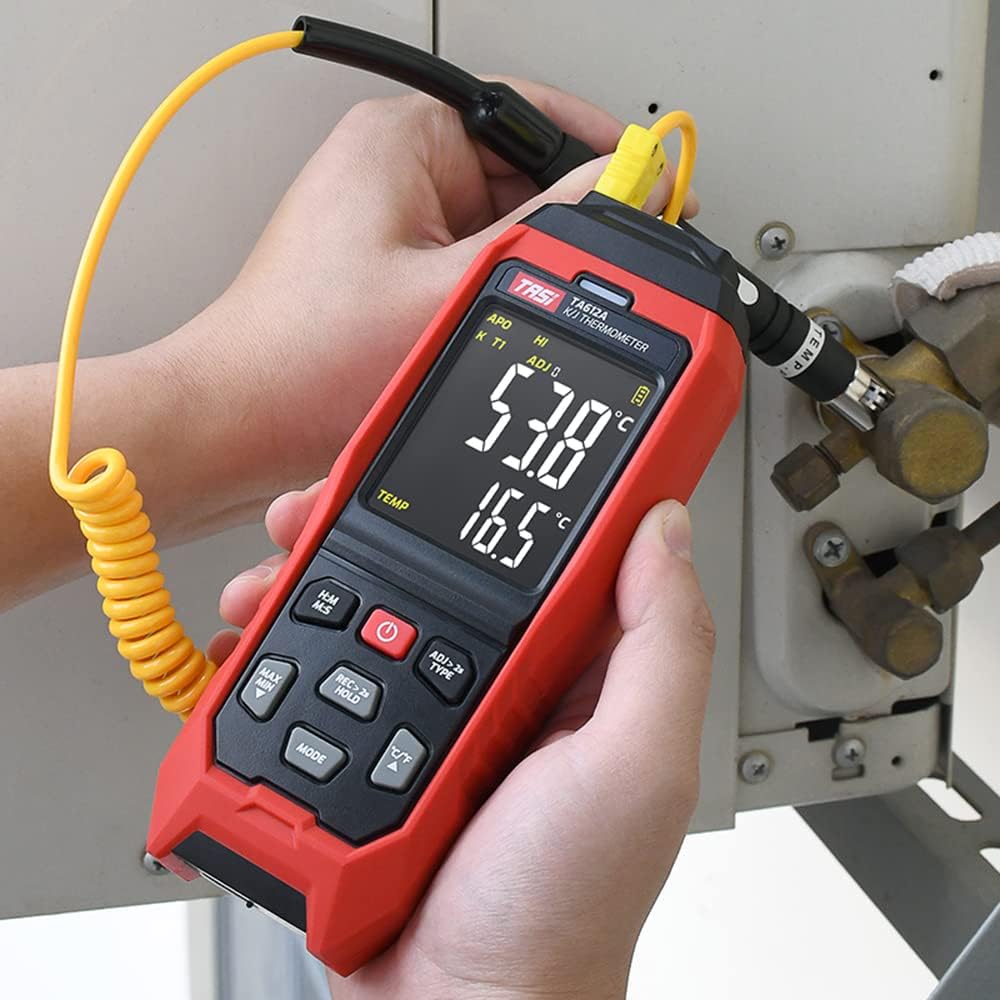
The TASI TA612C is a portable digital thermometer designed for precise temperature measurement using K/J type thermocouples. This model supports four channels, allowing simultaneous measurement of multiple points. It features a VA digital color display, data hold function, MAX/MIN value tracking, extensive data storage capabilities, an alarm buzzer, and automatic shutdown for convenient and efficient operation. The TA612C also includes a USB interface for data upload and real-time measurement.
2. เนื้อหาบรรจุภัณฑ์
โปรดตรวจสอบสิ่งของภายในกล่องทันทีที่เปิด เพื่อให้แน่ใจว่าสินค้าทุกชิ้นครบถ้วนและไม่เสียหาย
- 1 x TASI TA612C Thermometer
- 4 x K-type Thermocouple Probes
- สาย USB 1 เส้น
- 1 x กระเป๋าเก็บของ
- 1 x คู่มือผู้ใช้ (ภาษาอังกฤษ)

3. คุณสมบัติของผลิตภัณฑ์
- 4-Channel Measurement: Simultaneously monitor temperatures from up to four different locations using K/J type thermocouples.
- ช่วงอุณหภูมิที่กว้าง: สามารถวัดอุณหภูมิได้ตั้งแต่ -200℃ ถึง 1372℃ (-328℉ ถึง 2501℉)
- VA Digital Color Display: Provides clear and easy-to-read temperature values and operational status.
- ฟังก์ชั่นการเก็บข้อมูล: ฟังก์ชันนี้จะหยุดการแสดงอุณหภูมิปัจจุบันบนหน้าจอ
- MAX/MIN Value Tracking: Records and displays the maximum and minimum temperatures measured during a session.
- พื้นที่จัดเก็บข้อมูลขนาดใหญ่: Stores up to 5000 groups of temperature data.
- USB Data Logger: Allows data upload to a computer and real-time measurement monitoring via USB connection.
- Adjustable Probe Error Compensation (ADJ): Compensates for probe inaccuracies within a range of -9℃ to 9℃.
- ปลุกอุณหภูมิสูง/ต่ำ: Configurable alarm limits (default 1300℃/-200℃) with dual sound and light alerts.
- ปิดเครื่องอัตโนมัติ: ประหยัดอายุการใช้งานแบตเตอรี่โดยการปิดเครื่องโดยอัตโนมัติหลังจากไม่มีการใช้งานเป็นระยะเวลาหนึ่ง

4. การตั้งค่า
4.1 แหล่งจ่ายไฟ
The TA612C thermometer can be powered by three AA/LR06 batteries (not included) or via a 5V 1A USB power source. Ensure batteries are inserted with correct polarity. For continuous operation or data transfer, connect the device using the provided USB cable.
4.2 การเชื่อมต่อโพรบเทอร์โมคัปเปิล
The device supports K/J type thermocouples. Four K-type probes are included in the package. Connect the thermocouple probes to the corresponding input jacks (T1, T2, T3, T4) at the top of the device. Ensure a secure connection for accurate readings.
5. คู่มือการใช้งาน
5.1 เปิด/ปิดเครื่อง
- กดปุ่ม ปุ่มเปิดปิด (
 ) เพื่อเปิดอุปกรณ์
 - กดปุ่มค้างไว้ ปุ่มเปิดปิด for approximately 2 seconds to turn the device off.
5.2 แสดงผลเกินview
The VA color display provides comprehensive information. Refer to the diagram below for key indicators:

5.3 การวัดพื้นฐาน
Once powered on and probes are connected, the device will automatically begin displaying temperature readings for each active channel. The sampling rate is approximately 1 time per second.
5.4 การเก็บข้อมูล
กดปุ่ม REC > 2s HOLD button briefly to activate/deactivate the data hold function. The 'HOLD' indicator will appear on the display when active.
5.5 MAX/MIN Value
กดปุ่ม MAX นาที button to cycle through current, maximum (MAX), and minimum (MIN) temperature readings. The corresponding indicator will show on the display.
5.6 การสลับหน่วย (°C/°F)
กดปุ่ม ° C / ° F ปุ่มสำหรับสลับระหว่างหน่วยอุณหภูมิเซลเซียสและฟาเรนไฮต์
5.7 การจัดเก็บข้อมูล
The TA612C can store up to 5000 groups of temperature data. To manually record data, press and hold the REC > 2s HOLD button for more than 2 seconds. The 'REC' indicator will flash, and the data group number will increment. The device stores the temperature values of the thermocouple channels, not ambient temperature.

5.8 การตั้งค่าสัญญาณเตือน
The device has default high/low alarm limits of 1300℃ and -200℃. Consult the full user manual for detailed instructions on how to adjust these alarm thresholds. When an alarm condition is met, the device will provide both sound and light alerts.
5.9 Probe Error Compensation (ADJ)
The TA612C allows for probe error compensation (ADJ) within a range of -9℃ to 9℃. This feature helps to fine-tune the accuracy of readings for specific probes. Refer to the detailed user manual for steps on how to access and adjust this setting.
6. Data Management (USB)
The TA612C model features a USB interface for data connectivity. Connect the thermometer to a computer using the provided USB cable. This allows for:
- การอัปโหลดข้อมูล: Transfer stored temperature data from the device to your computer for analysis and record-keeping.
- การวัดแบบเรียลไทม์: Monitor live temperature readings on your computer screen, which can be useful for long-term logging or detailed observation.
Software for data management is typically available from the manufacturer's website, as indicated in the included user manual.
7. การบำรุงรักษา
7.1 การทำความสะอาด
ในการทำความสะอาดเครื่อง ให้ใช้ผ้านุ่ม damp cloth. Do not use abrasive cleaners, solvents, or immerse the device in water. Ensure the device is powered off and disconnected from any power source before cleaning.
7.2 พื้นที่จัดเก็บ
When not in use, store the thermometer and its probes in the provided storage bag in a cool, dry place, away from direct sunlight and extreme temperatures. Remove batteries if the device will not be used for an extended period to prevent leakage.
7.3 การเปลี่ยนแบตเตอรี่
When the battery indicator shows low power, replace the three AA/LR06 batteries. Ensure the device is powered off before opening the battery compartment and observe correct polarity when inserting new batteries.
8 การแก้ไขปัญหา
- อุปกรณ์ไม่เปิดเครื่อง: Check battery installation and ensure batteries are not depleted. If using USB power, verify the cable and power source.
- การอ่านค่าที่ไม่ถูกต้อง: Ensure thermocouple probes are correctly and securely connected. Check for any visible damage to the probes. Consider using the ADJ compensation feature if a known offset exists.
- จอแสดงผลว่างเปล่าหรือกะพริบ: Replace batteries or connect to USB power. If the issue persists, contact customer support.
- ปัญหาการถ่ายโอนข้อมูล: Ensure the USB cable is properly connected to both the device and the computer. Verify that the correct software/drivers are installed on your computer.
- สัญญาณเตือนไม่ทำงาน: Check alarm settings to ensure limits are correctly configured and the alarm function is enabled.
For issues not covered here, please refer to the comprehensive user manual or contact KKnoon customer support.
9. ข้อมูลจำเพาะทางเทคนิค
| พารามิเตอร์ | ข้อมูลจำเพาะ |
|---|---|
| แบบอย่าง | TA612C |
| ช่อง | 4 ช่อง |
| การจัดเก็บข้อมูล | 5000 กลุ่ม |
| Data Upload & Real-time Measurement | Supported (USB) |
| วัสดุ | ABS (Acrylonitrile Butadiene Styrene), PC (Polycarbonate) |
| K/J Type Measurement Range | -200~1372°C / -328~2501°F |
| ความแม่นยำ | ±0.2% + 0.7℃ |
| High/Low Alarm Limit (Default) | 1300℃ / -200℃ |
| ADJ Compensation Range | -9℃ ~ 9℃ |
| Sampลิงอัตรา | Approx. 1 time/s |
| แหล่งจ่ายไฟ | 3 x AA/LR06 Batteries (not included) or USB 5V 1A |
| ขนาดสินค้า | 177 x 70 x 35 มม. (6.97 x 2.76 x 1.38 นิ้ว) |
| น้ำหนักสินค้า | 565 กรัม (1.25 ปอนด์) |
| ประเภทจอภาพ | Digital VA Color Display |
| เทคโนโลยีการเชื่อมต่อ | ยูเอสบี |
10. ข้อมูลด้านความปลอดภัย
Please read and understand all safety instructions before using this device. Failure to follow these instructions may result in electric shock, fire, or personal injury.
- ห้ามใช้งานอุปกรณ์หากพบว่าชำรุดเสียหายหรือทำงานผิดปกติ
- ห้ามซ่อมแซมหรือดัดแปลงอุปกรณ์ด้วยตนเอง โปรดส่งต่ออุปกรณ์ดังกล่าวให้ช่างผู้ชำนาญการเป็นผู้ดำเนินการซ่อมแซม
- Ensure the correct type of thermocouple probes (K or J) are used and properly connected.
- หลีกเลี่ยงการให้อุปกรณ์สัมผัสกับอุณหภูมิ ความชื้น หรือแสงแดดโดยตรง
- เก็บอุปกรณ์ให้ห่างจากสนามแม่เหล็กไฟฟ้าที่มีความแรง
- Remove batteries if the device is not used for a long period to prevent battery leakage.
- กำจัดแบตเตอรี่และอุปกรณ์ตามกฎระเบียบท้องถิ่น
11. การรับประกันและการสนับสนุน
For warranty information, technical support, or service inquiries, please refer to the contact details provided in the original product packaging or visit the official KKnoon webไซต์ โปรดเก็บใบเสร็จรับเงินไว้เป็นหลักฐานการซื้อสำหรับการเรียกร้องการรับประกัน