
การแนะนำ
This manual provides detailed instructions for the safe and proper installation, operation, and maintenance of your Atlantic Full-Motion Wall Mount. Please read all instructions carefully before beginning installation and retain this manual for future reference.
The Atlantic Full-Motion Wall Mount is designed to securely hold televisions ranging from 47 to 86 inches, with a maximum weight capacity of 121 lbs (55 kg). It offers versatile viewing options including tilt, swivel, and extension capabilities to optimize your viewการสร้างประสบการณ์
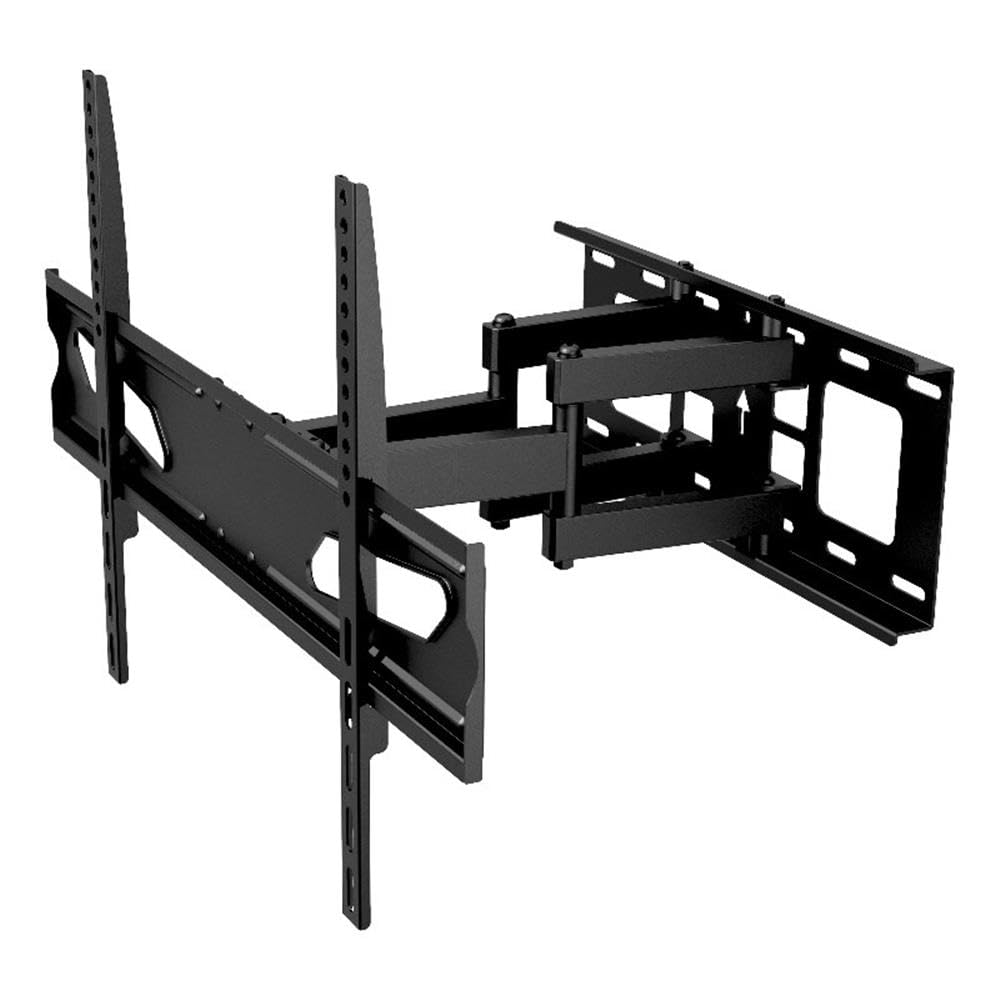
Image: The Atlantic Full-Motion TV Wall Mount, highlighting its ability to tilt ±20°, swivel ±45°, and extend up to 15.5 inches from the wall. It is suitable for TVs from 47 to 86 inches, supporting up to 121 lbs (55 kg).
ข้อมูลด้านความปลอดภัย
คำเตือน: การไม่อ่านและปฏิบัติตามคำแนะนำเหล่านี้อาจส่งผลให้เกิดการบาดเจ็บร้ายแรง ความเสียหายต่อทรัพย์สิน หรือทำให้การรับประกันเป็นโมฆะ
- ความจุน้ำหนัก: ห้ามใช้เกินน้ำหนักสูงสุดที่ 121 ปอนด์ (55 กิโลกรัม) ขาตั้งนี้ออกแบบมาเพื่อใช้กับน้ำหนักสูงสุดที่ระบุไว้เท่านั้น การใช้งานกับผลิตภัณฑ์ที่หนักกว่าน้ำหนักสูงสุดที่ระบุไว้อาจทำให้เกิดความไม่เสถียรและอาจก่อให้เกิดอันตรายได้
- ขนาดทีวี: This mount is designed for TVs between 47 and 86 inches. Ensure your TV falls within this range.
- โครงสร้างผนัง: The wall mount must be securely fastened to a solid wall stud (wood or metal) or concrete/brick wall. Do not install on drywall alone. If unsure about your wall structure, consult a qualified professional.
- เครื่องมือ: Use appropriate tools for installation. Ensure all screws are tightened securely but do not overtighten.
- เด็ก: ควรกันเด็กให้ออกห่างขณะติดตั้ง ชิ้นส่วนเล็กๆ อาจเป็นอันตรายจากการสำลักได้
- การติดตั้งโดยมืออาชีพ: If you have any doubts about installing this product, please contact a professional installer.
เนื้อหาแพ็คเกจ
Please verify that all components are present and undamaged before installation. Refer to the parts list included in your product packaging for a complete inventory. If any parts are missing or damaged, do not proceed with installation and contact customer support.
การติดตั้งและการตั้งค่า
Proper installation is critical for the safety and stability of your TV. Follow these steps carefully.
1. Prepare the Wall and Locate Studs
Identify the exact location on your wall where you intend to mount the TV. Use a stud finder to locate the center of the wall studs. Mark these locations clearly. For concrete or brick walls, use a masonry drill bit and appropriate anchors (not always included, check your package).
2. ติดตั้งแผ่นปิดผนังเข้ากับผนัง
Position the wall plate against the wall, aligning the mounting holes with the marked stud centers. Use a level to ensure the plate is perfectly horizontal. Drill pilot holes as recommended in your specific hardware kit, then secure the wall plate using the provided lag bolts and washers. Ensure it is firmly attached.
3. ติดตั้งขาตั้งทีวีเข้ากับทีวี
Lay your TV face down on a soft, clean surface to prevent scratches. Identify the VESA mounting holes on the back of your TV. Select the appropriate screws, washers, and spacers from the hardware kit that fit your TV's VESA pattern. Attach the two vertical TV brackets to the back of your TV. Ensure they are securely fastened and evenly spaced.

Image: A diagram illustrating the TV mounting pattern (VESA compatibility) ranging from minimum 75mm/3 inches to maximum 600mm/23.6 inches horizontally and 410mm/16.1 inches vertically. Also shows overall mount dimensions.
4. ติดตั้งทีวีบนแผ่นยึดผนัง
With assistance, carefully lift the TV and hook the attached TV brackets onto the wall plate. Ensure the brackets are properly seated and locked into place. Most mounts include safety screws or locking mechanisms to prevent accidental dislodgement. Secure these as per the instructions in your hardware kit.

ภาพ: ด้านหนึ่ง view of the wall mount, illustrating its extension capabilities. The mount can extend from 2.7 inches (profile from wall) to 15.5 inches from the wall.
คำแนะนำการใช้งาน
Once installed, your full-motion mount allows for flexible TV positioning.
- ส่วนขยาย: Gently pull the TV away from the wall to extend the arm. The mount can extend up to 15.5 inches from the wall.
- หมุน: Carefully push or pull the TV horizontally to swivel it left or right. The mount offers a ±45° swivel range.
- เอียง: Adjust the vertical angle of the TV by gently pushing the top or bottom of the TV. The mount allows for a ±20° tilt (20° downward and upward). This can help reduce glare.
- การปรับระดับหน้าจอ: The mounting plate allows for a ±3° rotation for last-minute level adjustments after installation.

Image: An illustration demonstrating the ±45° swivel range of the TV wall mount, allowing for flexible viewมุมการเอียง

Image: A living room setting demonstrating the full-motion capability, specifically the swivel range, to find the perfect viewมุมอิง

Image: A living room scene showing a TV mounted on the wall, tilted ±20° to avoid unwanted glare and improve viewความสะดวกสบาย

Image: This image indicates the mount fits TVs up to a maximum of 86 inches (47-86 inches) and highlights the ±3° screen level adjustment feature.
การซ่อมบำรุง
การบำรุงรักษาอย่างสม่ำเสมอจะช่วยให้ขาตั้งทีวีของคุณใช้งานได้ยาวนานและปลอดภัย
- การทำความสะอาด: เช็ดฐานยึดด้วยผ้าแห้งเนื้อนุ่ม หลีกเลี่ยงน้ำยาทำความสะอาดที่มีฤทธิ์กัดกร่อนหรือตัวทำละลายที่อาจทำให้พื้นผิวเสียหายได้
- ตรวจสอบการเชื่อมต่อ: Periodically check all screws and bolts to ensure they remain tight. Over time, vibrations or adjustments can cause them to loosen. Do not overtighten.
- ตรวจสอบการสึกหรอ: ตรวจสอบฐานยึดว่ามีร่องรอยการสึกหรอ ความเสียหาย หรือการกัดกร่อนหรือไม่ หากพบปัญหาใด ๆ ให้หยุดใช้งานและติดต่อฝ่ายบริการลูกค้า
การแก้ไขปัญหา
If you encounter issues with your TV mount, refer to the following common solutions.
- ทีวีไม่ตั้งตรง: Use the ±3° screen level adjustment feature to fine-tune the horizontal alignment. If this does not resolve the issue, re-check the wall plate installation to ensure it was level.
- Difficulty moving the TV (tilt/swivel/extend): Ensure no cables are snagged or obstructing movement. Check if any adjustment knobs or bolts are overtightened. Loosen slightly if necessary, but ensure the TV remains secure.
- ฐานยึดดูไม่มั่นคง: Immediately remove the TV from the mount. Re-check all wall plate and TV bracket connections. Ensure the mount is securely fastened to wall studs or appropriate concrete/brick anchors. Verify that your TV's weight and size are within the mount's specifications. If instability persists, contact a professional installer.
ข้อมูลจำเพาะ
| คุณสมบัติ | ข้อมูลจำเพาะ |
|---|---|
| หมายเลขรุ่น | 63607415 |
| ความเข้ากันได้ของขนาดทีวี | 47" – 86" |
| ความจุน้ำหนัก | 121 ปอนด์ (55 กก.) |
| โปรfile จากกำแพง | 2.7 นิ้ว |
| ส่วนต่อเติมจากผนัง | สูงสุด 15.5 นิ้ว |
| ช่วงความเอียง | ±20° (20° downward and upward) |
| ช่วงหมุน | ±45° |
| การปรับระดับหน้าจอ | ±3° |
| ความเข้ากันได้ของ VESA | 200x100 ถึง 600x400 มม. |
| วัสดุ | การก่อสร้างเหล็กที่ทนทาน |
| น้ำหนักสินค้า | 10.8 ปอนด์ |
| ขนาดสินค้า | 15.43 x 25.98 x 16.93 นิ้ว |
| ยูพีซี | 031742074158 |
ข้อมูลการรับประกัน
This Atlantic Full-Motion Wall Mount comes with a การรับประกันแบบจำกัด 1 ปีจากผู้ผลิต. This warranty covers defects in materials and workmanship under normal use. It does not cover damage resulting from improper installation, misuse, abuse, accident, or unauthorized modifications. Please retain your proof of purchase for warranty claims.
การสนับสนุนลูกค้า
For technical assistance, missing parts, or warranty inquiries, please contact Atlantic customer support. You can typically find contact information on the manufacturer's official webไซต์หรือบนบรรจุภัณฑ์ผลิตภัณฑ์ของคุณ
Webเว็บไซต์: www.atlantic-inc.com (กรุณาตรวจสอบจากเจ้าหน้าที่ web(โปรดดูเว็บไซต์เพื่อดูรายละเอียดการติดต่อล่าสุด)