
1. บทนำ
Thank you for choosing the AKAMATE Marine Boat Radio Receiver. This manual provides detailed instructions for the proper installation, operation, and maintenance of your new marine stereo. Please read this manual thoroughly before using the product to ensure optimal performance and safety. Keep this manual for future reference.

ภาพ: ด้านหน้า view of the AKAMATE Marine Boat Radio Receiver, showcasing หน้าจอแสดงผลและปุ่มควบคุม
2. ข้อมูลด้านความปลอดภัย
โปรดปฏิบัติตามข้อควรระวังด้านความปลอดภัยต่อไปนี้เสมอ เพื่อหลีกเลี่ยงการบาดเจ็บหรือความเสียหายต่ออุปกรณ์:
- Ensure proper wiring and connections to prevent electrical short circuits.
- ห้ามใช้งานเครื่องหากชำรุดหรือทำงานผิดปกติ
- ควรเก็บเครื่องให้ห่างจากอุณหภูมิที่สูงจัดและแสงแดดโดยตรงเป็นเวลานาน
- This unit is IPX5 water-resistant, meaning it can withstand water jets. However, it is not designed for submersion.
- ควรตัดกระแสไฟก่อนทำการบำรุงรักษาหรือติดตั้งใดๆ เสมอ

Image: The marine radio unit shown with water and mud splashes, highlighting its IPX5 water and mudproof capabilities, which also helps prevent display fogging.
3. อะไรอยู่ในกล่อง
ตรวจสอบว่าส่วนประกอบทั้งหมดมีอยู่ก่อนเริ่มการติดตั้ง:
- AKAMATE Marine Bluetooth Audio Receiver
- Installation Kits (mounting hardware)
- ISO Harness (wiring harness)
- คู่มือการใช้งาน (เอกสารนี้)

Image: Visual representation of the product packaging contents, including the marine radio, installation hardware, wiring harness, and user manual.
4. สินค้าหมดview
The AKAMATE Marine Boat Radio Receiver features a user-friendly design with a clear display and intuitive controls.
คุณสมบัติหลัก:
- 2.8'' LCD Display: Sunlight-viewable screen for clear visibility in various conditions.
- 7-Color Backlight Buttons: Customizable button illumination for enhanced aesthetics and visibility.
- ลูกบิดมัลติฟังก์ชั่น: Central rotary knob for volume control and menu navigation.
- ความต้านทานน้ำ IPX5: Designed to withstand water jets and harsh marine environments.
- วิทยุ AM/FM: Store up to 30 preset stations (12 AM / 18 FM).
- การสตรีมเสียงบลูทูธ: Wireless music playback from compatible devices.
- พอร์ต USB 2.0: Supports thumb drives up to 64GB for MP3, WMA, FLAC playback.
- RCA Aux Input: เชื่อมต่ออุปกรณ์เสียงภายนอก
- อาร์ซีเอเอาท์พุท: สำหรับการเชื่อมต่อภายนอก ampเครื่องขยายเสียงและซับวูฟเฟอร์
- 5-Band Preset EQ: Audio customization options.

Image: The marine radio unit mounted on an ATV, highlighting its 2.8-inch clear LCD display, 7-color backlight buttons, and crisp knob for easy use in various lighting conditions.
5. คู่มือการติดตั้ง
Proper installation is crucial for the performance and longevity of your marine stereo. It is recommended to have this unit installed by a qualified professional.
5.1 การติดตั้งตัวเครื่อง:
- Choose a suitable location on your boat or vehicle dashboard that is protected from direct water spray and excessive heat.
- Ensure there is sufficient depth behind the mounting surface for the unit (2.84 inches / 7.2 cm).
- Use a hole saw to create a circular opening of approximately 2.89 inches (7.34 cm) in diameter.
- Insert the unit into the opening and secure it using the provided installation kits.
5.2 การเชื่อมต่อสายไฟ:
Refer to the wiring diagram below for correct connections. Always ensure the power source is disconnected before making any wiring connections.
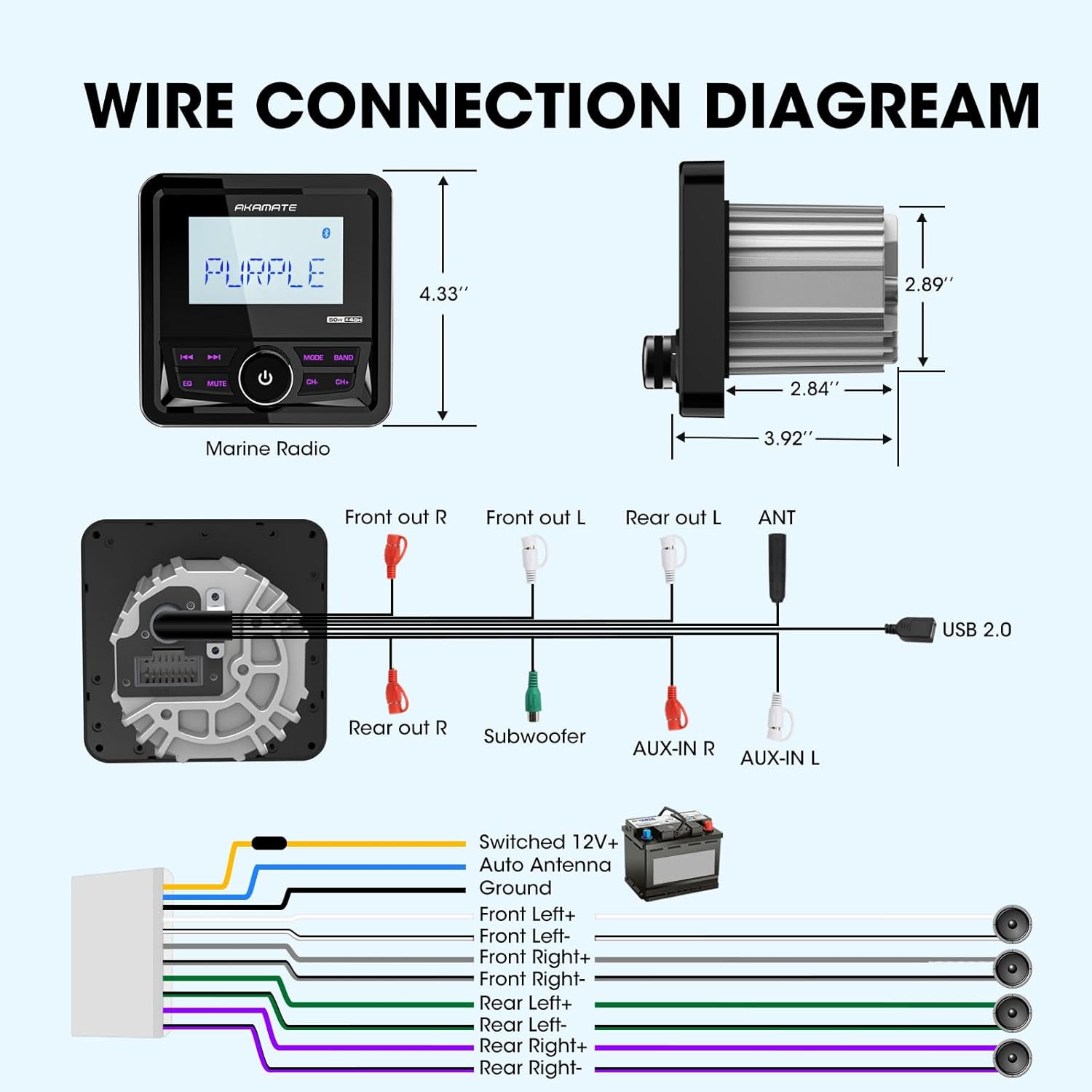
Image: A comprehensive wiring diagram illustrating connections for power, ground, speakers (Front Left/Right, Rear Left/Right), subwoofer, AUX-in, and USB 2.0.
- พาวเวอร์ (สีเหลือง): Connect to Switched 12V+ (Ignition).
- พื้น(สีดำ): เชื่อมต่อกับจุดต่อลงดินที่แข็งแรงของตัวถังรถ
- Auto Antenna (Blue): เชื่อมต่อกับเสาอากาศไฟฟ้าหรือ ampสายเปิดเครื่องระยะไกลของ Lifier
- Speaker Outputs (White, Gray, Green, Purple pairs): Connect to your boat's speakers. Ensure correct polarity (+/-).
- RCA Outputs (Red/White): เชื่อมต่อกับภายนอก amplifiers for front, rear, and subwoofer channels.
- AUX-IN (Red/White): เชื่อมต่อแหล่งสัญญาณเสียงภายนอก
- ยูเอสบี 2.0: เชื่อมต่ออุปกรณ์เก็บข้อมูล USB
6. คู่มือการใช้งาน
6.1 เปิด/ปิดเครื่อง:
Press the central knob to turn the unit ON or OFF.
6.2 Source Selection:
Press the "MODE" button to cycle through available sources: FM, AM, Bluetooth, USB, AUX.
6.3 การใช้งานวิทยุ (AM/FM):
- จูน: Use the "CH-" and "CH+" buttons to manually tune or seek stations.
- การเลือกวงดนตรี: Press the "BAND" button to switch between FM1, FM2, FM3, AM1, AM2.
- สถานีที่ตั้งไว้ล่วงหน้า: The unit can store 18 FM and 12 AM preset stations. To save a station, tune to the desired frequency, then press and hold one of the numeric preset buttons (if available, or use the "EQ" button for auto-store if applicable, manual does not specify).

Image: The marine radio unit showing its AM/FM radio function and demonstrating Bluetooth audio streaming connectivity with a smartphone.
6.4 การใช้งานบลูทูธ:
- การจับคู่: Select "Bluetooth" mode. On your mobile device, search for "AKAMATE" (or similar name) in the Bluetooth settings and pair.
- การสตรีมเสียง: Once paired, you can stream audio from your device to the stereo. Use the "CH-" and "CH+" buttons for track navigation (previous/next).
6.5 USB/AUX Operation:
- ยูเอสบี: Insert a USB flash drive (up to 64GB) into the USB port. The unit will automatically switch to USB mode and begin playback of supported audio files (MP3, WMA, FLAC). Use "CH-" and "CH+" for track navigation.
- ช่องเสริม: Connect an external audio device to the AUX-IN ports using an appropriate cable. Select "AUX" mode to play audio from the connected device.

Image: The marine radio unit highlighting its input capabilities, including USB (up to 64GB), AUX-IN, and compatibility with MP3 players and smartphones, along with its 200 watts peak power output.
6.6 Audio Settings (EQ & Time Set):
- EQ ที่ตั้งไว้ล่วงหน้า: Press the "EQ" button to cycle through preset equalizer modes (e.g., Rock, Pop, Classic, Flat). The unit features a 5-band preset EQ.
- ตั้งเวลา: The unit allows for time setting in 12-hour format. Refer to the on-screen prompts or specific button combinations (often involving holding the "EQ" or "MUTE" button) to enter time setting mode.

Image: The marine radio unit displaying its 5-band preset EQ function and time setting capability. Below, examples of compatible vehicles like motorcycles, yachts, golf carts, and ATVs are shown.
7. การบำรุงรักษา
To ensure the longevity and optimal performance of your AKAMATE Marine Boat Radio Receiver, follow these maintenance guidelines:
- การทำความสะอาด: ใช้แบบนุ่มๆamp cloth to wipe the unit's surface. Do not use abrasive cleaners or solvents.
- การเชื่อมต่อ: ตรวจสอบการเชื่อมต่อสายไฟทั้งหมดเป็นระยะๆ เพื่อให้แน่ใจว่ามีความปลอดภัยและไม่มีการกัดกร่อน
- พื้นที่จัดเก็บ: If the unit will not be used for an extended period, store it in a cool, dry place.
- การสัมผัสน้ำ: While IPX5 rated, avoid prolonged exposure to direct high-pressure water jets. After exposure to saltwater, gently rinse with fresh water and dry thoroughly.
8 การแก้ไขปัญหา
If you encounter issues with your unit, refer to the table below for common problems and solutions.
| ปัญหา | สาเหตุที่เป็นไปได้ | สารละลาย |
|---|---|---|
| ไม่มีไฟฟ้า | สายไฟหลวม; ฟิวส์ขาด; แบตเตอรี่รถยนต์อ่อน. | Check power and ground wires; Replace fuse; Charge vehicle battery. |
| ไม่มีเสียง | สายลำโพงหลุดออก ระดับเสียงเบาเกินไป ฟังก์ชันปิดเสียงทำงานอยู่ | ตรวจสอบการเชื่อมต่อลำโพง; เพิ่มระดับเสียง; ปิดใช้งานโหมดปิดเสียง |
| ไม่ได้เชื่อมต่อบลูทูธ | อุปกรณ์ไม่อยู่ในโหมดจับคู่; เครื่องไม่อยู่ในโหมดบลูทูธ; มีสัญญาณรบกวน | Ensure device is discoverable; Select Bluetooth mode on unit; Move closer to unit. |
| ข้อผิดพลาดในการเล่น USB | ไม่ได้รับการสนับสนุน file ฟอร์แมต; ไดรฟ์ USB เสียหาย; ไดรฟ์ USB ใหญ่เกินไป | ทำให้มั่นใจ files are MP3/WMA/FLAC; Reformat USB drive; Use a drive up to 64GB. |
| Display Foggy | การควบแน่นเนื่องจากการเปลี่ยนแปลงของอุณหภูมิ | This unit has anti-foggy features, but in extreme conditions, minor condensation may occur. It should clear up as temperatures equalize. Ensure proper sealing during installation. |
9. ข้อมูลจำเพาะ
| คุณสมบัติ | ข้อมูลจำเพาะ |
|---|---|
| หมายเลขรุ่น | Marine Boats Radio |
| กำลังขับ | Up to 200 Watts Peak Power (4 channels) |
| ปฏิบัติการฉบับที่tage | กระแสตรง 12 โวลต์ |
| ประเภทจอภาพ | 2.8'' LCD Display |
| ระดับการต้านทานน้ำ | IPX5 |
| สนับสนุน USB | USB 2.0, up to 64GB |
| รูปแบบเสียงที่รองรับ | MP3, WMA, FLAC, etc. |
| เวอร์ชันบลูทูธ | บลูทูธ 5.0 |
| ขนาด (กว้าง x ยาว x สูง) | 4.33'' (length) x 2.89'' (body diameter) x 2.84'' (depth) |
| น้ำหนักสินค้า | 1.2 ปอนด์ |
10. การรับประกันและการสนับสนุน
AKAMATE products are designed for reliability and performance. For warranty information, please refer to the warranty card included with your product or contact AKAMATE customer support.
If you require technical assistance or have questions regarding your product, please contact our customer support team through the official AKAMATE website or the retailer where you purchased the product. Please have your model number and purchase date ready when contacting support.
หมายเหตุ: ข้อมูลจำเพาะและคุณสมบัติของผลิตภัณฑ์อาจมีการเปลี่ยนแปลงโดยไม่ต้องแจ้งให้ทราบล่วงหน้า