
0010402886อาร์
คู่มือการใช้งานรีโมทคอนโทรลสำรอง
ยี่ห้อ: ทั่วไป | แบบอย่าง: 0010402886อาร์
1. บทนำ
This manual provides instructions for the Generic Replacement Remote Control, model 0010402886R, designed for use with Haier AC Air Conditioners (model 0010402886) and compatible TV/Audio/Projector units. This is an aftermarket replacement remote control and may not replicate all functions of the original device's remote. It is engineered for ease of use, requiring no complex programming or setup.
For optimal performance, it is recommended to verify compatibility with your specific unit model or original remote part number.
2. การตั้งค่า
2.1 การติดตั้งแบตเตอรี่
The remote control requires two (2) AAA batteries for operation. Batteries are not included with the remote.
- ค้นหาฝาปิดช่องใส่แบตเตอรี่ที่ด้านหลังของรีโมทคอนโทรล
- เลื่อนฝาครอบลงหรือกดที่สลัก (ถ้ามี) เพื่อเปิดช่อง
- ใส่แบตเตอรี่ AAA สองก้อน โดยตรวจสอบให้แน่ใจว่าขั้วบวก (+) และขั้วลบ (-) ตรงกับเครื่องหมายภายในช่อง
- ปิดฝาช่องใส่แบตเตอรี่โดยเลื่อนกลับเข้าที่จนกระทั่งล็อคเข้าที่
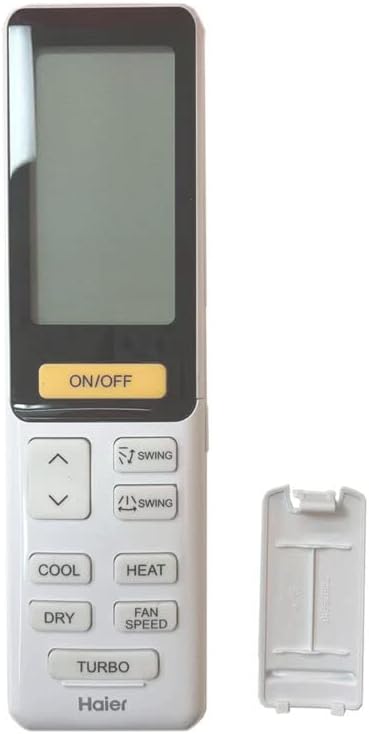
ภาพ: ด้านหลัง view ภาพแสดงรีโมทคอนโทรลที่ถอดฝาปิดแบตเตอรี่ออกแล้ว เพื่อแสดงขั้นตอนการใส่แบตเตอรี่
2.2 การใช้งานเบื้องต้น
This replacement remote control is designed for immediate use. No programming or complex setup procedures are required. Once batteries are correctly installed, the remote is ready to operate compatible devices.
3. คู่มือการใช้งาน
The remote control features an ergonomic design with clearly labeled buttons for various functions. Point the remote directly at the infrared receiver of your device (e.g., AC unit, TV) for optimal signal transmission.

ภาพ: ด้านหน้า view ของรีโมทคอนโทรล แสดงหน้าจอ LCD และปุ่มฟังก์ชั่นทั้งหมด
3.1 ฟังก์ชั่นทั่วไป
- เปิด/ปิด: เปิดหรือปิดอุปกรณ์
- เย็น: Activates the cooling mode for air conditioners.
- ความร้อน: Activates the heating mode for air conditioners.
- แห้ง: เปิดใช้งานโหมดลดความชื้น
- ความเร็วของพัดลม: Adjusts the fan speed (e.g., low, medium, high, auto).
- แกว่ง: ควบคุมการปรับบานเกล็ดเพื่อกระจายอากาศ
- เทอร์โบ: Activates a rapid cooling or heating function.
- ปุ่มลูกศร (ขึ้น/ลง): Used for temperature adjustment or menu navigation.
หมายเหตุสำคัญ: As this is a replacement remote control, some advanced or specific functions of your original device's remote may not be supported or may operate differently. This is not indicative of a defective product.
4. การบำรุงรักษา
- การทำความสะอาด: เช็ดรีโมทคอนโทรลด้วยผ้านุ่มและแห้ง ห้ามใช้น้ำยาทำความสะอาดหรือสารละลายที่มีฤทธิ์กัดกร่อน
- การดูแลแบตเตอรี่ If the remote will not be used for an extended period, remove the batteries to prevent leakage and potential damage to the remote.
- การเปลี่ยนแบตเตอรี่: Do not mix old and new batteries, or different types of batteries (e.g., alkaline and rechargeable). Always replace all batteries with new ones of the same type.
- พื้นที่จัดเก็บ: เก็บรีโมทไว้ในที่แห้งและเย็น ห่างจากแสงแดดโดยตรงและอุณหภูมิที่สูงหรือต่ำมาก
5 การแก้ไขปัญหา
- รีโมตไม่ตอบสนอง:
- ตรวจสอบว่าใส่แบตเตอรี่ถูกต้องและขั้วถูกต้องหรือไม่
- เปลี่ยนแบตเตอรี่เก่าด้วยแบตเตอรี่ใหม่
- ตรวจสอบให้แน่ใจว่าไม่มีสิ่งกีดขวางระหว่างรีโมทและตัวรับสัญญาณอินฟราเรดของอุปกรณ์
- ตรวจสอบให้แน่ใจว่ารีโมทชี้ไปที่อุปกรณ์โดยตรง
- ฟังก์ชันบางอย่างใช้งานไม่ได้:
- This is a replacement remote. It may not support all functions present on the original remote control for your specific device. This is normal for aftermarket replacement units.
- ตรวจสอบให้แน่ใจว่าฟังก์ชันที่คุณพยายามใช้นั้นรองรับโดยรุ่นอะไหล่ทดแทนนี้
- ระยะการส่งข้อมูลสั้น:
- Replace the batteries. Low battery power can reduce the effective range.
- Ensure there are no strong light sources (like direct sunlight) interfering with the infrared signal.
6. ข้อมูลจำเพาะ
| คุณสมบัติ | รายละเอียด |
|---|---|
| ยี่ห้อ | ทั่วไป |
| ผู้ผลิต | รีโมทคอนโทรลอิเล็กทรอนิกส์ |
| การสื่อสารแบบไร้สาย | IR (อินฟราเรด) |
| แหล่งพลังงาน | แบตเตอรี่ AAA จำนวน 2 ก้อน (ไม่รวม) |
| วัสดุ | ABS/พลาสติก |
| สี | Black or white (sent randomly) |
| คุณสมบัติพิเศษ | การยศาสตร์ |
| จำนวนอุปกรณ์ที่รองรับสูงสุด | 1 |
| อุปกรณ์ที่รองรับ | Television, Set Top Box, Stereo System, DVD/Blu-ray Player, Home Theater, AC |
7. การรับประกันและการสนับสนุน
This product is an aftermarket replacement remote control. For any issues not covered in this manual, or for specific warranty information, please contact the seller directly through your purchase platform. It is recommended to provide your remote part number or the model of your unit when seeking support to ensure accurate assistance.
Ask a question about this manual
Ask about setup, troubleshooting, compatibility, parts, safety, or missing instructions. Manuals+ will review the question and use this page’s manual context to help answer it.