
1. บทนำ
The WORKPRO W159025 is a versatile cordless 3.6V grass and hedge trimmer designed for efficient garden maintenance. This tool features a dual-purpose design, allowing for quick conversion between a grass shear and a hedge trimmer. Its lightweight and compact design, combined with Type-C USB charging, makes it convenient for various trimming tasks around your garden.
This manual provides essential information for the safe and effective use, maintenance, and troubleshooting of your WORKPRO W159025 trimmer. Please read it thoroughly before first use and keep it for future reference.
2. คำแนะนำด้านความปลอดภัยที่สำคัญ
ปฏิบัติตามข้อควรระวังด้านความปลอดภัยขั้นพื้นฐานเสมอเมื่อใช้เครื่องใช้ไฟฟ้า เพื่อลดความเสี่ยงต่อการเกิดไฟไหม้ ไฟฟ้าช็อต และการบาดเจ็บส่วนบุคคล
- อ่านคำแนะนำทั้งหมด: ทำความคุ้นเคยกับการควบคุมและการใช้เครื่องมืออย่างถูกต้อง
- สวมอุปกรณ์ป้องกันดวงตา: ควรสวมแว่นตานิรภัยหรือแว่นกันลมทุกครั้งขณะใช้งานเครื่องตัดหญ้า
- รักษาพื้นที่ให้โล่ง: Ensure the work area is free of debris, children, and pets.
- หลีกเลี่ยงการสตาร์ทโดยไม่ได้ตั้งใจ: Ensure the safety lock button and operating switch are not engaged unintentionally.
- ใช้เครื่องชาร์จที่ถูกต้อง: Only use a 5V/2A adapter for charging. Using a 5V/1A adapter may trigger overvoltage protection and prevent charging.
- ตรวจสอบใบมีด: Before each use, check blades for damage or wear. Replace if necessary.
- ใบมีดที่ปลอดภัย: Ensure blades are correctly installed and secured before operation.
- Keep Hands Away: Never touch the blades while the tool is operating or connected to power.
- เก็บรักษาอย่างปลอดภัย: เก็บเครื่องมือไว้ในที่แห้งและปลอดภัยให้พ้นมือเด็ก
3. เนื้อหาบรรจุภัณฑ์
ตรวจสอบว่ามีสิ่งของทั้งหมดอยู่ครบเมื่อแกะกล่อง:
- WORKPRO W159025 Main Unit
- Grass Shear Blade (75mm cutting width)
- Hedge Trimmer Blade (120mm cutting width, 7.8mm max cutting diameter)
- สาย USB Type-C (1 เมตร)
- คู่มือการใช้งาน
4. สินค้าหมดview
The WORKPRO W159025 features a compact and ergonomic design for comfortable use. Key components include:
- TPR Handle: ให้การยึดเกาะที่สบายและมั่นคง
- ปุ่มล็อคเพื่อความปลอดภัย: ป้องกันการเปิดใช้งานโดยไม่ได้ตั้งใจ
- สวิตช์ควบคุมการทำงาน: Activates the blades.
- ปุ่มปลดใบมีด: เพื่อการเปลี่ยนใบมีดที่รวดเร็วและไม่ต้องใช้เครื่องมือ
- พอร์ตชาร์จ Type-C: เพื่อความสะดวกในการชาร์จไฟ
- LED Charging Indicator Light: Displays charging status (Red: Charging, Green: Fully Charged, Yellow: Approx. 50% charged).
- ใบมีดที่สามารถถอดเปลี่ยนได้: Includes both grass shear and hedge trimmer blades.

Figure 1: WORKPRO W159025 Component Diagram
5. การตั้งค่า
5.1. การชาร์จแบตเตอรี่
The device is powered by a 3.6V rechargeable battery. Before first use, fully charge the battery.
- ค้นหาพอร์ตชาร์จ Type-C บนอุปกรณ์
- Connect the provided Type-C USB cable to the charging port.
- ต่อปลายอีกด้านของสาย USB เข้ากับอะแดปเตอร์แปลงไฟ USB 5V/2A (ไม่ได้รวมอยู่ในชุด)
- The LED indicator light will show red during charging. It will turn green when fully charged (approximately 2-3 hours). A yellow light indicates approximately 50% charge.

รูปที่ 2: การชาร์จแบบ Type-C
5.2. การเปลี่ยนใบเลื่อย
The WORKPRO W159025 allows for easy, tool-free blade changes between the grass shear and hedge trimmer blades.
- ตรวจสอบให้แน่ใจว่าอุปกรณ์ปิดอยู่และถอดปลั๊กออกจากแหล่งจ่ายไฟทั้งหมด
- Push the two blade release buttons on either side of the blade housing.
- Carefully remove the installed blade.
- Align the desired blade (grass shear or hedge trimmer) with the pins on the main unit.
- Press the blade firmly into place until it clicks securely.

Figure 3: Blade Change Mechanism
6. คู่มือการใช้งาน
6.1. การเปิด/ปิดเครื่อง
The WORKPRO W159025 features a dual safety mechanism to prevent accidental starts.
- To start the tool, simultaneously press the safety lock button (located on the top of the handle) and the operating switch (trigger).
- Once the tool starts, you can release the safety lock button, and the tool will continue to operate as long as the operating switch is pressed.
- To turn off the tool, release the operating switch.

Figure 4: Safety Lock and Operating Switch
6.2. การใช้กรรไกรตัดหญ้า
Attach the grass shear blade for trimming grass in small areas, around edges, or where larger mowers cannot reach.
- Ensure the grass shear blade is securely attached.
- Hold the tool firmly with both hands, if possible, or one hand if comfortable and safe.
- Activate the tool as described in Section 6.1.
- Move the tool steadily across the grass, maintaining a consistent height. The cutting width is 75mm.
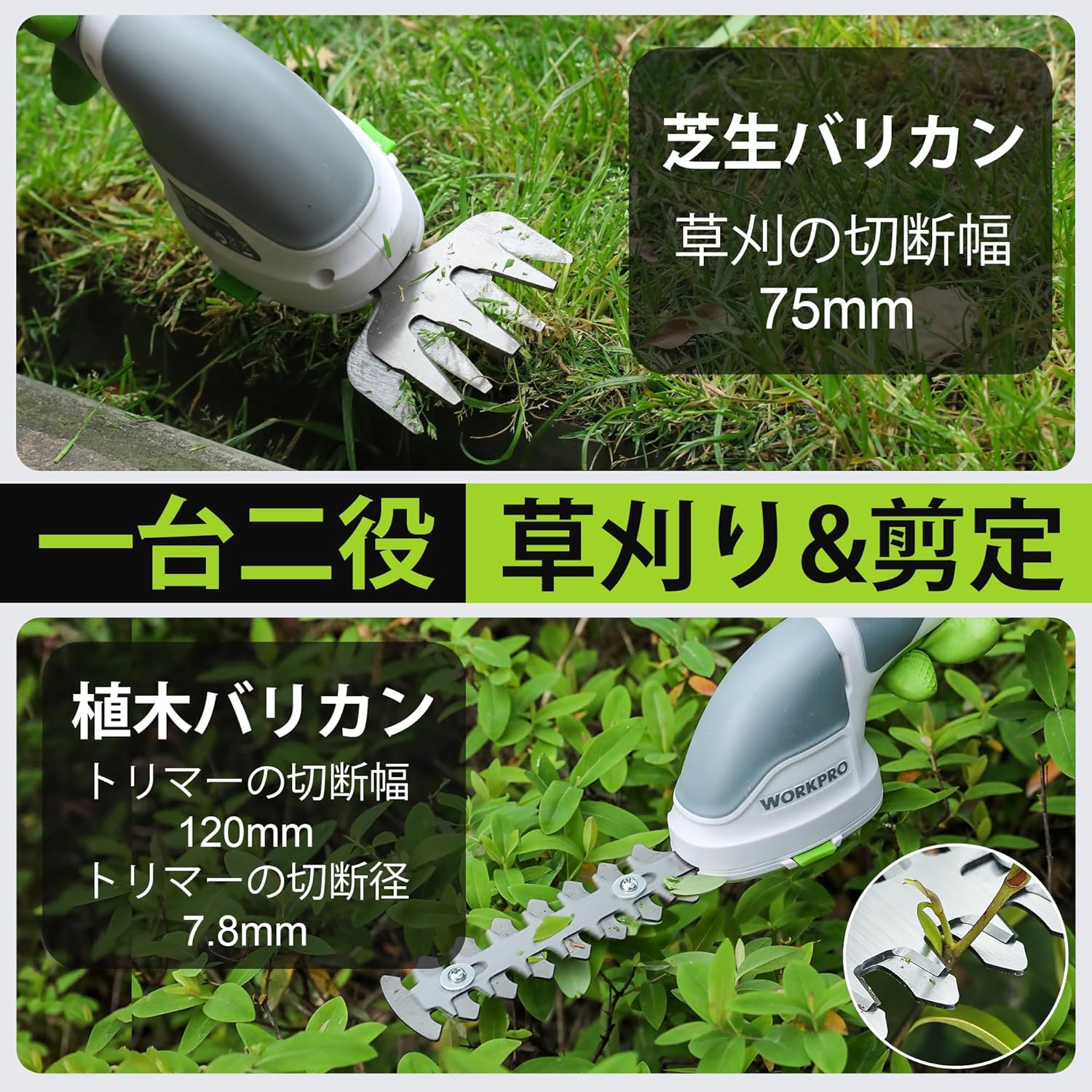
Figure 5: Grass Shearing Operation
6.3. การใช้เครื่องตัดแต่งพุ่มไม้
Attach the hedge trimmer blade for shaping shrubs and hedges. The cutting width is 120mm, and the maximum cutting diameter is 7.8mm.
- ตรวจสอบให้แน่ใจว่าใบมีดของเครื่องตัดแต่งพุ่มไม้ติดแน่นดีแล้ว
- Hold the tool firmly, ensuring a stable grip.
- Activate the tool as described in Section 6.1.
- Move the trimmer smoothly along the hedge, cutting small amounts at a time. Avoid forcing the blades through thick branches.
- The handle can rotate 180 degrees for improved ergonomics and access to different angles. To rotate the handle, press the handle rotation button (if present, otherwise manually rotate if designed for it) and adjust to the desired position.

Figure 6: Hedge Trimming Operation
Video 1: Demonstrates the WORKPRO W159025 in action, showing blade changes, safety features, and use as both a grass shear and hedge trimmer. It highlights the 180-degree handle rotation feature.
7. การบำรุงรักษา
7.1. Cleaning and Blade Care
- Always ensure the tool is switched off and the battery is removed (if applicable) before cleaning or performing maintenance.
- Clean the blades after each use to remove sap, debris, and dirt. Use a stiff brush and a damp cloth. For stubborn residue, a blade cleaner or light oil can be used.
- Periodically apply a thin layer of machine oil to the blades to prevent rust and ensure smooth operation.
- Inspect blades for sharpness and damage. Dull or damaged blades can reduce efficiency and increase strain on the motor. Replace worn blades as needed.
7.2. การจัดเก็บ
- เก็บเครื่องมือไว้ในที่แห้งและมีอากาศถ่ายเทสะดวก หลีกเลี่ยงแสงแดดโดยตรงและอุณหภูมิที่สูงหรือต่ำเกินไป
- ตรวจสอบให้แน่ใจว่าใบมีดสะอาด แห้ง และทาน้ำมันเล็กน้อยก่อนจัดเก็บ
- เก็บเครื่องมือนี้ให้พ้นมือเด็กและบุคคลที่ไม่ได้รับอนุญาต
8 การแก้ไขปัญหา
| ปัญหา | สาเหตุที่เป็นไปได้ | สารละลาย |
|---|---|---|
| เครื่องมือไม่เริ่มทำงาน | แบตเตอรี่เหลือน้อยหรือหมด Safety lock button not pressed simultaneously with operating switch ใบมีดติดขัด | ชาร์จแบตเตอรี่ให้เต็ม Ensure both buttons are pressed together Clear any obstructions from the blades (with tool off) |
| ประสิทธิภาพการตัดต่ำ | ใบมีดทื่อหรือชำรุด Excessive material being cut Blades are dirty or sticky | เปลี่ยนใบมีด Cut smaller sections at a time Clean and lubricate blades |
| แบตเตอรี่ไม่ชาร์จ | Incorrect power adapter (e.g., 5V/1A) สายชาร์จชำรุด Charging port is dirty | Use a 5V/2A USB power adapter Try a different Type-C USB cable ทำความสะอาดพอร์ตการชาร์จ |
9. ข้อมูลจำเพาะ
| คุณสมบัติ | รายละเอียด |
|---|---|
| ยี่ห้อ | เวิร์คโปร |
| หมายเลขรุ่น | W159025 |
| แหล่งพลังงาน | ใช้แบตเตอรี่ (3.6V) |
| ประเภทแบตเตอรี่ | ลิเธียมไอออน |
| พอร์ตชาร์จ | USB Type-C |
| เวลาในการชาร์จ | Approx. 2-3 hours (with 5V/2A adapter) |
| เวลาทำงานขณะไม่มีโหลด | ประมาณ 40 นาที |
| อัตราการเคลื่อนที่ขณะไม่มีภาระ | 1100 จังหวะ/นาที |
| ความกว้างในการตัดของเครื่องตัดหญ้า | 75มม. |
| ความกว้างในการตัดของเครื่องตัดแต่งพุ่มไม้ | 120มม. |
| Max Cutting Diameter (Hedge Trimmer) | 7.8มม. |
| วัสดุใบมีด | สแตนเลส |
| Product Weight (without blade) | 0.37 กก. |
| ยูพีซี | 820909687412 |
10. การรับประกันและการสนับสนุน
For warranty information, technical support, or replacement parts, please contact WORKPRO customer service or refer to the official WORKPRO webไซต์ โปรดเก็บใบเสร็จรับเงินไว้เป็นหลักฐานการซื้อ
หากต้องการความช่วยเหลือเพิ่มเติม คุณสามารถไปที่ ร้าน WORKPRO บน Amazon.