
1. บทนำ
Thank you for choosing the Havit MS1038 Programmable RGB Gaming Mouse. This manual provides essential information for setting up, operating, maintaining, and troubleshooting your new gaming mouse. Please read this guide thoroughly to ensure optimal performance and longevity of your device.
2. สินค้าหมดview
The Havit MS1038 is a high-performance wired gaming mouse designed for precision and customization. It features a high-precision optical sensor, adjustable DPI settings up to 8000, 7 programmable buttons, and dynamic RGB backlighting to enhance your gaming experience.
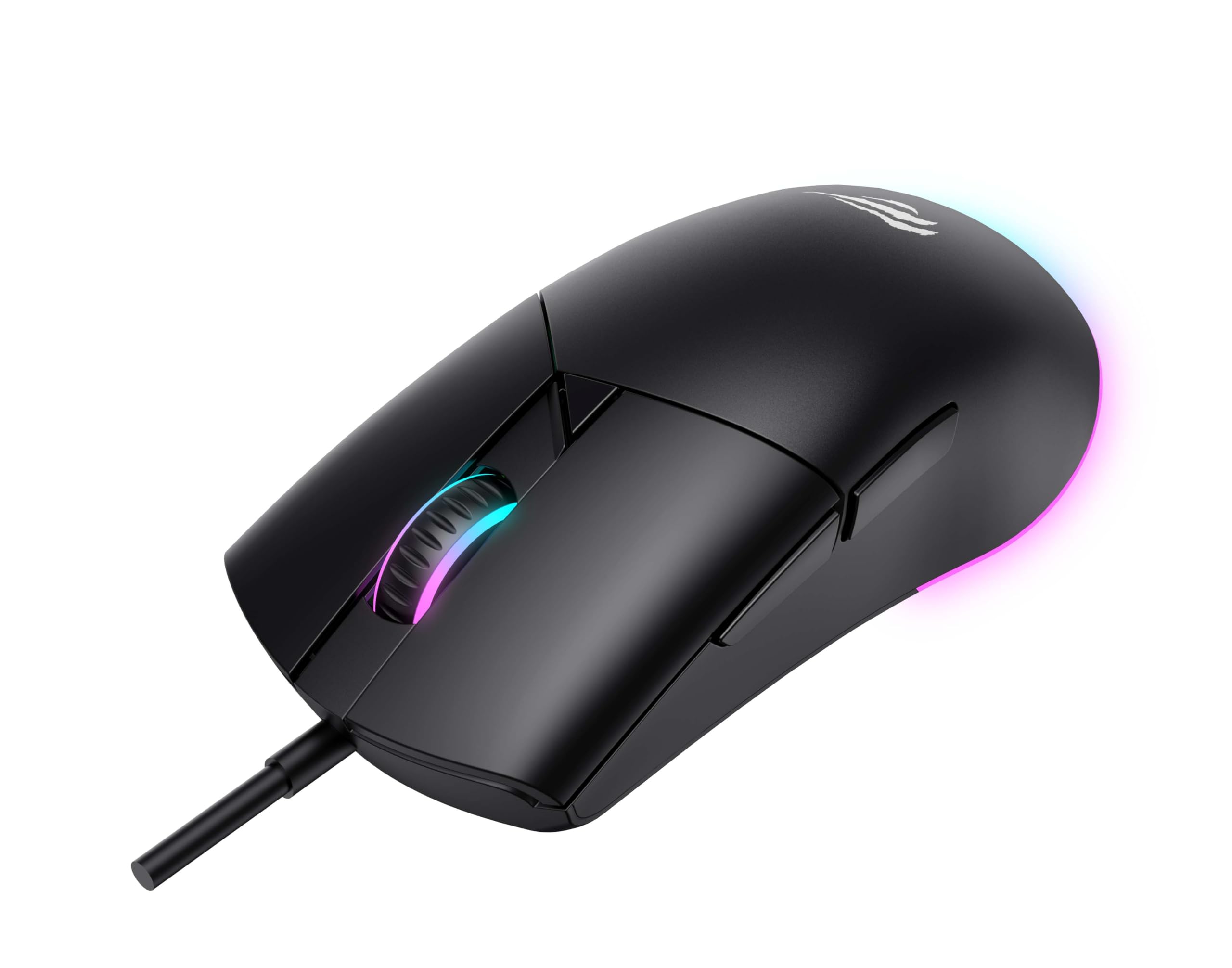
รูปที่ 1 : ด้านหน้า view of the Havit MS1038 Gaming Mouse, showcasinด้วยดีไซน์ที่คำนึงถึงหลักสรีรศาสตร์และแสงไฟ RGB
3. ข้อมูลจำเพาะ
| คุณสมบัติ | รายละเอียด |
|---|---|
| ยี่ห้อ | ฮาวิท |
| แบบอย่าง | MS1038 |
| สี | สีดำ |
| การเชื่อมต่อ | USB (แบบมีสาย) |
| คุณสมบัติพิเศษ | RGB Backlight, Programmable Buttons, High-Precision Optical Sensor |
| อุปกรณ์ที่รองรับ | พีซี แล็ปท็อป แท็บเล็ต |
| การตรวจจับการเคลื่อนไหว | ออฟติคอล |
| การตั้งค่า DPI | 1200-2400-3200-4800-6400-8000 DPI |
| จำนวนปุ่ม | 7 |
| อายุการใช้งานที่สำคัญ | 3,000,000 คลิก |
| ความยาวสายเคเบิล | 1.6 เมตร |
| ปฏิบัติการฉบับที่tage | 5V |
| กระแสไฟฟ้าที่ใช้งาน | 150มิลลิแอมป์ |
| ชิป | SPCP199C |
| ขนาด (กว้าง*ยาว*สูง) | 121 x 64 x 42 มม. |
| น้ำหนักผลิตภัณฑ์ | 82กรัม |
| แบตเตอรี่ที่จำเป็น | เลขที่ |
| แหล่งพลังงาน | แบบมีสาย |
| ระบบปฏิบัติการที่รองรับ | วินโดวส์, แมค, ลินุกซ์ |
| ประเทศต้นกำเนิด | จีน |
4. คู่มือการติดตั้ง
- แกะกล่องเมาส์: Carefully remove the Havit MS1038 mouse from its packaging.
- เชื่อมต่อกับคอมพิวเตอร์: เสียบขั้วต่อ USB ของเมาส์เข้ากับพอร์ต USB ที่มีอยู่ในคอมพิวเตอร์ของคุณ
- การติดตั้งไดร์เวอร์: The mouse is typically plug-and-play. Your operating system (Windows, Mac, Linux) should automatically detect and install the necessary drivers. Allow a few moments for the installation to complete.
- การติดตั้งซอฟต์แวร์ (ทางเลือก): For advanced customization of programmable buttons and RGB lighting, download the official Havit MS1038 software from the manufacturer's webไซต์ ทำตามคำแนะนำบนหน้าจอเพื่อการติดตั้ง
5. คู่มือการใช้งาน
5.1 ฟังก์ชั่นพื้นฐาน
- คลิกซ้าย: การดำเนินการหลัก
- คลิกขวา: การกระทำรอง มักจะเปิดเมนูบริบทขึ้นมา
- ล้อเลื่อน: Scrolls content up or down. Pressing the scroll wheel often acts as a middle click.
5.2 การปรับ DPI
The Havit MS1038 features a dedicated DPI button (usually located behind the scroll wheel) to cycle through different sensitivity settings. Each press will switch to the next DPI level, indicated by a change in the RGB lighting color or pattern.
- Available DPI settings: 1200, 2400, 3200, 4800, 6400, 8000.
- Select the DPI that best suits your preference for gaming or general use.
5.3 ปุ่มตั้งโปรแกรมได้
The mouse has 7 buttons, including the standard left/right click, scroll wheel, DPI button, and additional side buttons. These additional buttons can be customized using the Havit MS1038 software.

รูปที่ 2: ด้านข้าง view of the Havit MS1038 Gaming Mouse, highlighting the additional programmable buttons.
6. การปรับแต่ง
To unlock the full potential of your Havit MS1038 mouse, utilize the dedicated software (available for download from the Havit official web(เว็บไซต์) ซอฟต์แวร์นี้ช่วยให้คุณสามารถ:
- ปุ่มรีแมป: กำหนดฟังก์ชันที่กำหนดเอง แมโคร หรือแป้นพิมพ์ลัดให้กับปุ่มที่ตั้งโปรแกรมได้ 7 ปุ่มใดก็ได้
- Adjust DPI Stagใช่: Fine-tune the DPI levels and assign specific values to each stage.
- ควบคุมแสงไฟ RGB: Choose from various lighting effects, colors, and brightness levels to personalize your mouse's appearance.
- สร้าง Profiles: บันทึกการกำหนดค่าที่แตกต่างกันสำหรับเกมหรือแอพพลิเคชั่นต่างๆ
7. การบำรุงรักษา
การดูแลรักษาอย่างถูกวิธีจะช่วยให้เมาส์ของคุณใช้งานได้ยาวนานและมีประสิทธิภาพดี
- การทำความสะอาด: ใช้ผ้านุ่มและแห้งเช็ดพื้นผิวของเมาส์ สำหรับสิ่งสกปรกฝังแน่น ให้เช็ดเบาๆampชุบผ้าด้วยน้ำหรือน้ำยาทำความสะอาดอ่อนๆ หลีกเลี่ยงสารเคมีรุนแรง
- การดูแลเซ็นเซอร์: Keep the optical sensor on the underside of the mouse clean and free from dust or debris. Use a cotton swab if necessary.
- การจัดการสายเคเบิล: หลีกเลี่ยงการโค้งงออย่างแรงหรือการดึงสาย USB มากเกินไปเพื่อป้องกันความเสียหาย
- พื้นที่จัดเก็บ: เมื่อไม่ได้ใช้งาน ให้เก็บเมาส์ไว้ในสภาพแวดล้อมที่สะอาดและแห้ง ห่างจากอุณหภูมิที่สูงหรือต่ำเกินไป
8 การแก้ไขปัญหา
If you encounter issues with your Havit MS1038 mouse, refer to the following common solutions:
- เมาส์ไม่ตอบสนอง:
- ตรวจสอบให้แน่ใจว่าสาย USB เสียบเข้ากับพอร์ต USB ที่ใช้งานได้แน่นดีแล้ว
- ลองเสียบเมาส์เข้ากับพอร์ต USB อื่น
- รีสตาร์ทเครื่องคอมพิวเตอร์ของคุณ
- การเคลื่อนไหวของเคอร์เซอร์ที่ไม่แน่นอน:
- ทำความสะอาดเซ็นเซอร์ออปติคอลที่ด้านล่างของเมาส์
- โปรดตรวจสอบให้แน่ใจว่าคุณใช้เมาส์บนพื้นผิวที่สะอาด ไม่สะท้อนแสง หรือบนแผ่นรองเมาส์
- ตรวจสอบดูว่ามีความขัดแย้งของซอฟต์แวร์หรือไดรเวอร์ที่ล้าสมัยหรือไม่
- ไฟ RGB ไม่ทำงาน:
- ตรวจสอบให้แน่ใจว่าได้เสียบเมาส์อย่างถูกต้องแล้ว
- If using customization software, ensure lighting effects are enabled and configured correctly.
- ปุ่มใช้งานไม่ได้:
- If programmable buttons are not working as expected, check the settings in the Havit MS1038 software.
- ตรวจสอบให้แน่ใจว่าไม่มีซอฟต์แวร์อื่นใดรบกวนการกำหนดค่าปุ่มเมาส์
9. การรับประกันและการสนับสนุน
The Havit MS1038 Programmable RGB Gaming Mouse comes with a รับประกัน 1 ปี นับจากวันที่ซื้อ การรับประกันนี้ครอบคลุมถึงข้อบกพร่องจากการผลิตภายใต้การใช้งานปกติ
For technical support, warranty claims, or further assistance, please contact Havit customer service through their official website or your local retailer. Please have your proof of purchase ready when contacting support.