
DATOUBOSS DN-03-2000W24V
DATOUBOSS 24V to 230V Pure Sine Wave Power Inverter User Manual
Model: DN-03-2000W24V
1. บทนำ
This manual provides detailed instructions for the safe and efficient operation of your DATOUBOSS 24V to 230V Pure Sine Wave Power Inverter. This device converts 24V DC power from batteries or vehicles into stable 230V AC power, suitable for a wide range of household and outdoor appliances. Please read this manual thoroughly before use and retain it for future reference.
2. คำแนะนำด้านความปลอดภัย
คำเตือน: การไม่ปฏิบัติตามคำแนะนำด้านความปลอดภัยเหล่านี้ อาจส่งผลให้เกิดไฟฟ้าช็อต ไฟไหม้ การบาดเจ็บสาหัส หรือเสียชีวิตได้
- Ensure the inverter is connected to a 24V DC power source only. Connecting to an incorrect voltage may damage the unit and connected devices.
- อย่าให้อินเวอร์เตอร์โดนน้ำ ฝน หิมะ หรือสเปรย์
- Do not operate the inverter if it has been dropped or damaged.
- ตรวจสอบให้แน่ใจว่ามีการระบายอากาศที่เหมาะสมรอบอินเวอร์เตอร์ อย่าปิดกั้นช่องระบายความร้อน
- ให้เด็กอยู่ห่างจากอินเวอร์เตอร์
- ห้ามเปิดอินเวอร์เตอร์ casinก. ไม่มีชิ้นส่วนใดที่ผู้ใช้สามารถซ่อมบำรุงเองได้ภายใน
- Always connect the ground wire properly before operation.
- ถอดปลั๊กอินเวอร์เตอร์ออกจากแหล่งจ่ายไฟก่อนทำการบำรุงรักษาหรือทำความสะอาดใดๆ
The inverter is equipped with multiple protection functions for your safety and equipment protection:
- ปริมาณต่ำtagการป้องกันอี
- เล่มสูงtagการป้องกันอี
- ระบบป้องกันไฟฟ้าลัดวงจร
- ระบบป้องกันความร้อนสูงเกินไป
- ระบบป้องกันการโอเวอร์โหลด
- การป้องกันการเชื่อมต่อย้อนกลับ
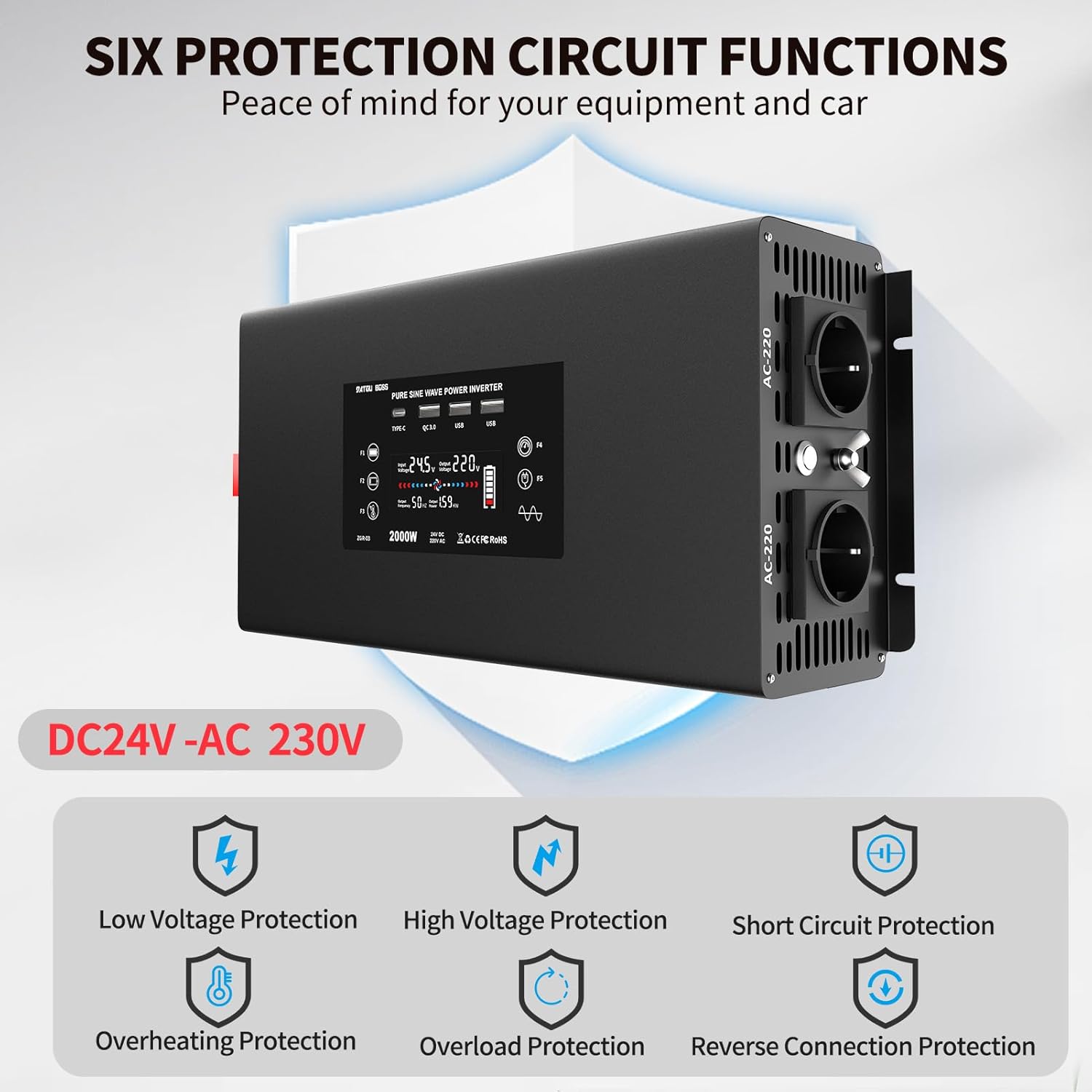
Figure 2.1: Visual representation of the six protection circuit functions.
3. อะไรอยู่ในกล่อง
เมื่อเปิดบรรจุภัณฑ์ โปรดตรวจสอบว่าส่วนประกอบทั้งหมดอยู่ครบและไม่ได้รับความเสียหาย:
- อินเวอร์เตอร์คลื่นไซน์บริสุทธิ์ 2000 วัตต์ 1 ตัว
- 2 x Connection Cables (Red for Positive, Black for Negative)
- 1 x รีโมทคอนโทรล
- 1 x คู่มือผู้ใช้ (เอกสารนี้)

Figure 3.1: The DATOUBOSS Pure Sine Wave Power Inverter and its included accessories.
4. สินค้าหมดview
The DATOUBOSS Pure Sine Wave Power Inverter is designed for efficient and stable power conversion. Key features include:
- เอาท์พุตคลื่นไซน์บริสุทธิ์: Provides clean and stable AC power, suitable for sensitive electronics.
- กำลังขับสูง: Converts 24V DC to 230V AC with a continuous output of 2000W and a peak power of 4000W.
- พอร์ตเอาต์พุตหลายพอร์ต: Equipped with 2 EU AC outlets, 2 USB 5V/2.1A ports, 1 QC3.0 fast charging port, and 1 Type-C port.
- Smart Cooling System: Features two intelligent fans that activate based on temperature and load, ensuring efficient heat dissipation and improved performance.
- รีโมทคอนโทรล: Bluetooth-enabled remote control for convenient operation from a distance.
- การป้องกันที่ครอบคลุม: Built-in safeguards against overload, short circuit, high temperature, low voltage ปริมาณสูงtage, and reverse connection.
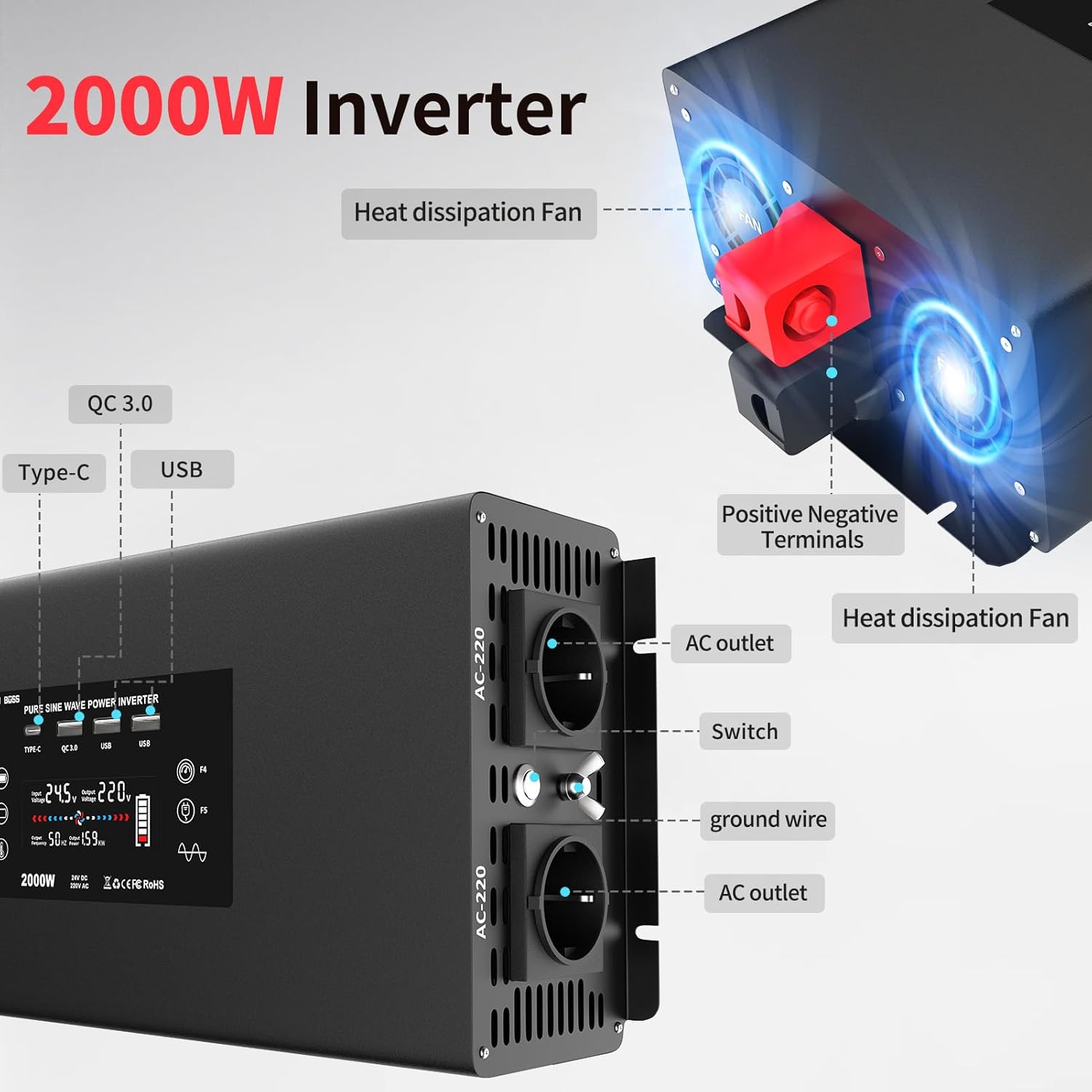
รูปที่ 4.1: ด้านหน้าและด้านข้าง view highlighting AC outlets, USB ports, and cooling fans.

Figure 4.2: Illustration of the efficient heat dissipation system with dual fans.
The inverter's display provides real-time information on input voltage, ปริมาณการส่งออกtage, power consumption, and battery status.
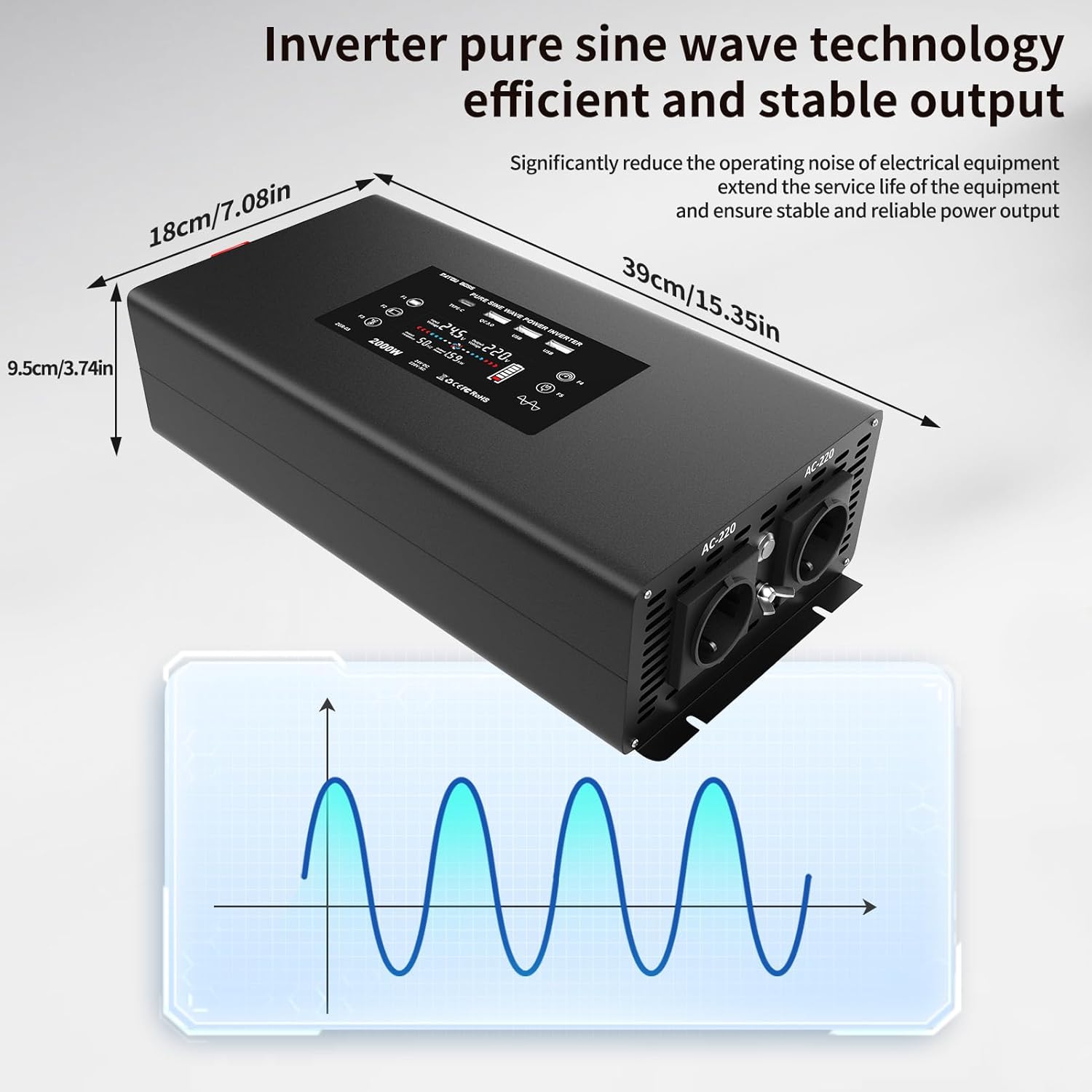
Figure 4.3: Inverter dimensions and a visual representation of pure sine wave output.
5. การตั้งค่าและการเชื่อมต่อ
Follow these steps to properly set up and connect your DATOUBOSS Power Inverter:
- เตรียมอินเวอร์เตอร์ให้พร้อม: Place the inverter on a stable, flat surface in a well-ventilated area, away from direct sunlight, heat sources, and moisture.
- Connect DC Cables to Inverter:
- Unscrew the nuts on the positive (+) and negative (-) terminals of the inverter.
- Connect the red cable lug to the positive (+) terminal and the black cable lug to the negative (-) terminal.
- Tighten the nuts securely with a wrench to ensure a firm connection.
Video 5.1: Demonstration of connecting the DC cables to the inverter terminals.
- Connect DC Cables to Battery:
- Ensure the battery is a 24V DC battery.
- Connect the other end of the red cable to the positive (+) terminal of the battery.
- Connect the other end of the black cable to the negative (-) terminal of the battery.
- กระชับการเชื่อมต่อให้แน่น
It is crucial to connect the positive to positive and negative to negative terminals correctly to avoid damage to the inverter and battery.
- เปิดเครื่อง: Once all connections are secure, press the power button on the inverter or use the remote control to turn on the unit. The display will illuminate, showing the current status.
วิดีโอ 5.2: จบview of the inverter's internal components and connection process.
6. คู่มือการใช้งาน
The DATOUBOSS inverter is designed for ease of use. Here’s how to operate it:
- Connecting AC Appliances:
- Plug your 230V AC appliances into the EU outlets on the inverter.
- Ensure the total power consumption of all connected appliances does not exceed the inverter's continuous output power (2000W).

รูปที่ 6.1: อดีตamples of devices compatible with the inverter, including laptops, coffee machines, and more.
- Using USB and Type-C Ports:
- Connect your USB-powered devices (e.g., smartphones, tablets) to the USB 5V/2.1A ports or the QC3.0 fast charging port.
- For devices supporting Type-C charging, use the dedicated Type-C port.
Video 6.2: Demonstration of charging a smartphone using the inverter's USB port and powering a heater.
- การทำงานของรีโมทคอนโทรล:
- The included remote control allows you to turn the inverter ON and OFF from a distance.
- Press the "ON" button to activate the inverter.
- Press the "OFF" button to deactivate the inverter.
The Bluetooth protocol of the remote control offers better range and penetration compared to infrared remotes.
7. การบำรุงรักษา
To ensure the longevity and optimal performance of your inverter, follow these maintenance guidelines:
- การทำความสะอาด: Regularly wipe the exterior of the inverter with a dry, soft cloth. Do not use liquid cleaners or solvents.
- การระบายอากาศ : Keep the cooling vents clear of dust and debris. Periodically check for any obstructions.
- การเชื่อมต่อ: Periodically check all electrical connections (DC cables to inverter and battery) to ensure they are tight and free from corrosion.
- พื้นที่จัดเก็บ: หากต้องเก็บรักษาอินเวอร์เตอร์เป็นเวลานาน ควรตัดการเชื่อมต่อจากแบตเตอรี่และเก็บไว้ในที่แห้งและเย็น
8 การแก้ไขปัญหา
หากคุณพบปัญหาเกี่ยวกับอินเวอร์เตอร์ โปรดดูปัญหาและวิธีแก้ไขทั่วไปต่อไปนี้:
| ปัญหา | สาเหตุที่เป็นไปได้ | สารละลาย |
|---|---|---|
| เครื่องแปลงไฟไม่ทำงาน |
|
|
| ไม่มีเอาต์พุต AC |
|
|
| Inverter beeps or shows error code. |
|
|
If the problem persists after attempting these solutions, please contact DATOUBOSS customer support.
9. ข้อมูลจำเพาะ
| คุณสมบัติ | รายละเอียด |
|---|---|
| หมายเลขรุ่น | DN-03-2000W24V |
| อินพุต Voltage | กระแสตรง 24 โวลต์ |
| ปริมาณการส่งออกtage | กระแสสลับ 230 โวลต์ |
| พลังงานต่อเนื่อง | 2000 วัตต์ |
| พลังสูงสุด | 4000 วัตต์ |
| รูปคลื่นเอาท์พุต | เพียวไซน์เวฟ |
| เอาท์พุต USB | 2x 5V/2.1A, 1x QC3.0 |
| เอาท์พุต Type-C | 1x Type-C Port |
| ขนาดสินค้า | 39 x 18 x 9.5 ซม. |
| น้ำหนัก | 3.89 กิโลกรัม |
| แอปพลิเคชั่นที่แนะนำ | Vehicle, Office, Home |
10. การรับประกันและการสนับสนุน
DATOUBOSS is committed to providing high-quality products and excellent customer service.
- การรับประกัน: ผลิตภัณฑ์นี้มาพร้อมกับการรับประกัน 24 เดือนนับจากวันที่ซื้อ
- การส่งคืน: Enjoy a 30-day unconditional return guarantee.
- การสนับสนุนลูกค้า: For any questions, technical assistance, or warranty claims, please contact our 24/7 customer support.
For further information or support, please visit the official DATOUBOSS store or contact your retailer.
Ask a question about this manual
Ask about setup, troubleshooting, compatibility, parts, safety, or missing instructions. Manuals+ will review the question and use this page’s manual context to help answer it.