
การแนะนำ
Thank you for choosing the Hodozzy 9310W 2 Din Car Stereo. This manual provides detailed instructions for installation, operation, maintenance, and troubleshooting to ensure optimal performance and user experience. Please read this manual thoroughly before using the device and keep it for future reference.
เนื้อหาแพ็คเกจ
เมื่อแกะกล่องแล้ว โปรดตรวจสอบว่าสินค้าทั้งหมดที่ระบุไว้ด้านล่างนี้มีอยู่และอยู่ในสภาพดี:
- 1 x Hodozzy 9310W Car MP5 Player
- สายไฟ 1 เส้น
- สาย USB 1 เส้น
- 1 x Antenna Head
- 1 x รีโมทคอนโทรล
- 1 x 2 Din Frame
- 1 x คู่มือผู้ใช้
- 1 x วงเล็บยึด
- สกรู 4 ตัว
- ไมโครโฟน 1 ตัว
- กล้องมองหลัง 1 ตัว
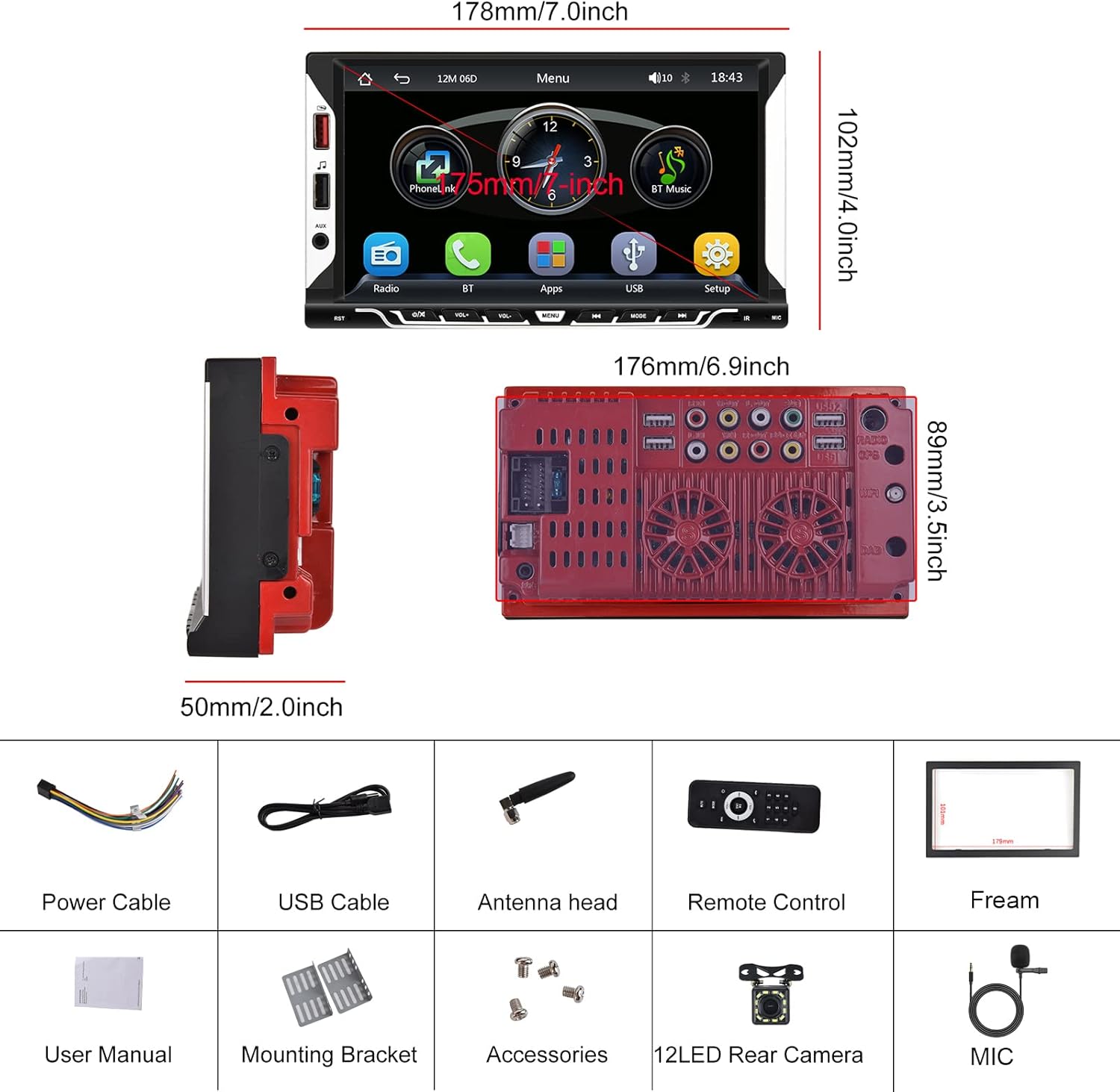
Image: Hodozzy 9310W Car Stereo package contents, showing the main unit, power cable, USB cable, antenna, remote control, frame, user manual, mounting bracket, screws, microphone, and reversing camera.
การติดตั้งและการตั้งค่า
แผนผังการเดินสายไฟ
Refer to the following diagram for proper wiring connections. Incorrect wiring can damage the device or your vehicle's electrical system. If you are unsure, consult a professional installer.
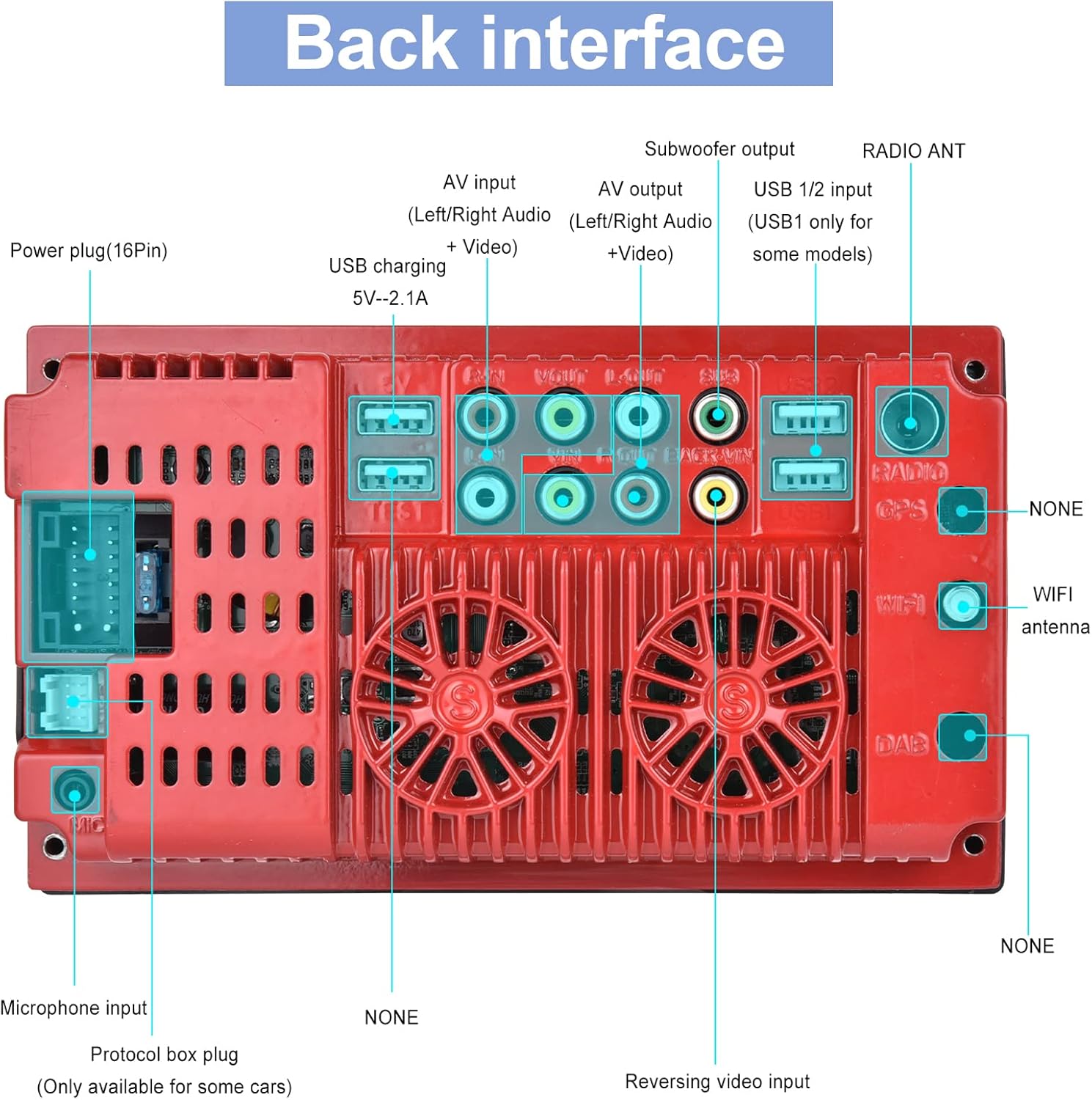
Image: Back interface of the Hodozzy 9310W Car Stereo, detailing connections for power (16-pin), AV input/output, subwoofer output, USB 1/2, radio antenna, microphone input, protocol box plug, and reversing video input.
- สายไฟ: Connect the yellow wire to the constant 12V power supply, the red wire to the accessory (ACC) 12V power supply, and the black wire to ground.
- สายลำโพง: Connect the speaker wires to your vehicle's speakers, ensuring correct polarity for each channel (Front Left, Front Right, Rear Left, Rear Right).
- อินพุตกล้องมองหลัง: Connect the reversing camera's video output to the 'Reversing Video Input' port. Connect the camera's power to the vehicle's reverse light circuit.
- พอร์ต USB: Use the USB 2.0 ports for media playback, smartphone charging, or connecting a designated USB DVR.
- อินพุต AUX: เชื่อมต่ออุปกรณ์เสียงภายนอกผ่านช่องต่อ AUX
- ไมโครโฟน: เชื่อมต่อไมโครโฟนภายนอกเพื่อคุณภาพการโทรที่ดีขึ้นขณะใช้งานแบบแฮนด์ฟรี
- เสาอากาศวิทยุ: Connect your vehicle's radio antenna to the 'RADIO ANT' port.
การติดตั้ง
Install the mounting brackets to the sides of the car stereo using the provided screws. Slide the unit into the 2 Din opening in your vehicle's dashboard until it clicks into place. Secure the unit using the mounting frame and screws.
คำแนะนำการใช้งาน
การปฏิบัติการพื้นฐาน
- เปิด/ปิดเครื่อง: กดปุ่มเปิด/ปิดที่แผงด้านหน้าหรือรีโมทคอนโทรล
- การควบคุมระดับเสียง: Use the volume knob or buttons on the front panel/remote to adjust the sound level.
- หน้าจอสัมผัส: Navigate through menus and functions by touching the 7-inch display.
CarPlay แบบไร้สายและ Android Auto
This unit supports wireless CarPlay for iPhone and wireless Android Auto for Android phones, allowing seamless integration of your smartphone's features.
- ตรวจสอบให้แน่ใจว่าได้เปิดใช้งาน Bluetooth บนสมาร์ทโฟนของคุณแล้ว
- On the car stereo, go to the CarPlay/Android Auto application.
- ค้นหา and select your car stereo's Bluetooth name on your phone.
- ยืนยันรหัสจับคู่บนอุปกรณ์ทั้งสอง
- เมื่อเชื่อมต่อแล้ว CarPlay หรือ Android Auto จะเปิดใช้งานโดยอัตโนมัติ
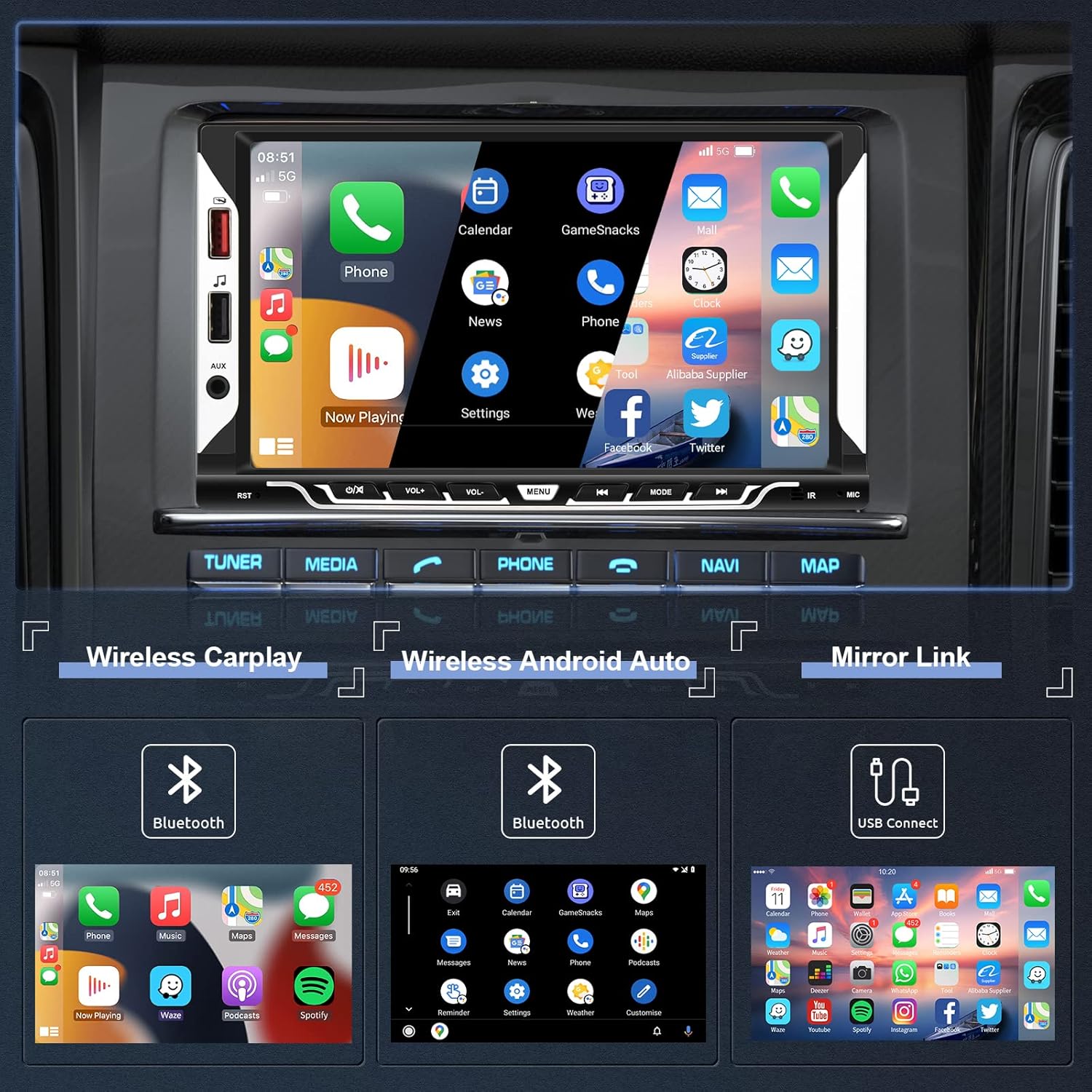
Image: The car stereo screen showing the main interface with options for Wireless CarPlay, Wireless Android Auto, and Mirror Link. Below, examples of CarPlay, Android Auto, and Mirror Link interfaces are displayed.
ฟังก์ชั่นการเชื่อมโยงกระจก
Mirror Link allows you to display your smartphone's screen directly on the car stereo's display via a USB cable.
- Connect your smartphone to the car stereo using an original USB cable.
- Follow the on-screen prompts on both your phone and the car stereo to enable screen mirroring.
การเชื่อมต่อบลูทูธ
The integrated Bluetooth 5.1 module enables hands-free calling and wireless audio streaming.
- เปิดใช้งานบลูทูธบนสมาร์ทโฟนของคุณ
- บนเครื่องเสียงรถยนต์ ให้เข้าไปที่เมนูบลูทูธ
- ค้นหา available devices and select the car stereo's Bluetooth name.
- Confirm the pairing. You can now make/receive calls and play music wirelessly.

Image: The top section shows the Bluetooth interface for pairing devices, making calls, and accessing music and address book. The bottom section displays the EQ System settings with a 10-band equalizer and preset sound modes like Jazz, Classic, Rock, Pop, and User.
วิทยุเอฟเอ็ม
Access FM radio stations with clear reception and 18 preset memory slots.
- สแกนอัตโนมัติ: The unit can automatically scan and save strong FM stations.
- การปรับด้วยตนเอง: ปรับความถี่ด้วยตนเองไปยังความถี่ที่ต้องการ
- สถานีที่ตั้งไว้ล่วงหน้า: Save your favorite stations to the 18 preset buttons for quick access.

Image: The top section illustrates the FM Radio interface, showing frequency display (87.50 MHz), signal strength, and preset station buttons (P1-P6). The bottom section shows the Steering Wheel Control (SWC) setup menu, allowing users to program various functions to their vehicle's steering wheel buttons.
ระบบควบคุมพวงมาลัย (SWC)
If your vehicle supports steering wheel controls, you can configure them to operate the car stereo for convenience and safety.
- Access the 'Steering Wheel Controls' settings menu.
- Follow the on-screen instructions to map your steering wheel buttons to specific functions (e.g., volume up/down, next/previous track, mode).
Reversing Camera Function
The included reversing camera provides a clear view of the area behind your vehicle, enhancing safety during parking and reversing maneuvers.
- When the vehicle is shifted into reverse gear, the car stereo will automatically display the camera feed on the screen.
- The display includes parking guidelines to assist with precise maneuvering.
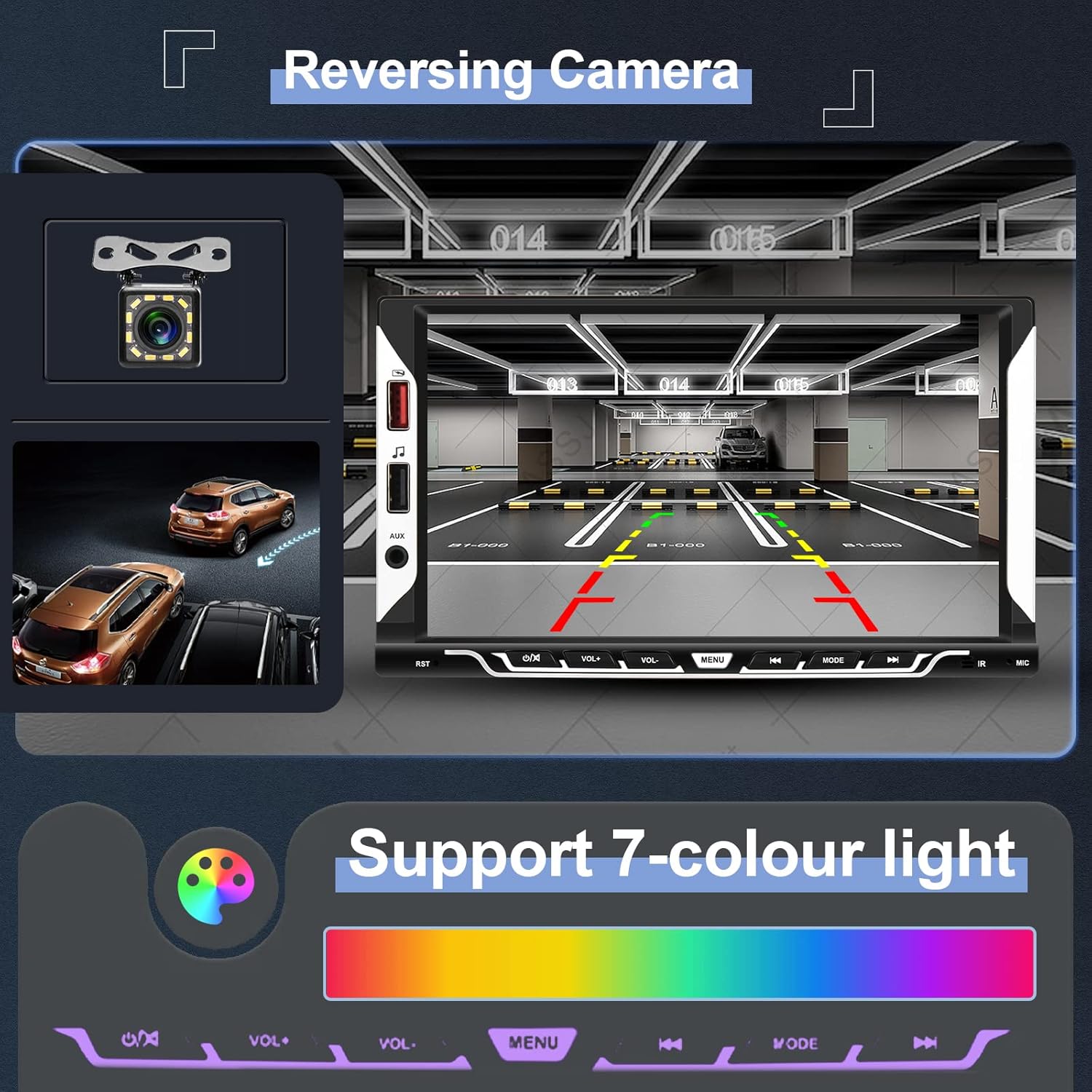
Image: The top section shows the reversing camera view on the car stereo screen, complete with parking guidelines and a clear image of the rear environment. The bottom section illustrates the 7-color light support, allowing users to customize the button illumination colors.
EQ System
Adjust the audio output to your preference using the built-in 10-band equalizer and various preset sound effects (Jazz, Classic, Rock, Pop, User).
UI Customization
Personalize your car stereo's appearance:
- การตั้งค่าแบ็คไลท์: Choose from 7 different button illumination colors or set them to cycle automatically.
- วอลเปเปอร์: Select from various themed UI wallpapers.
การซ่อมบำรุง
- การทำความสะอาดหน้าจอ: ใช้ผ้านุ่มไม่เป็นขุยเช็ดหน้าจอสัมผัสเบาๆ หลีกเลี่ยงน้ำยาทำความสะอาดหรือตัวทำละลายที่มีฤทธิ์กัดกร่อน
- การดูแลทั่วไป: Keep the unit free from dust and moisture. Do not expose it to extreme temperatures.
- การอัปเดตซอฟต์แวร์: Check the official Hodozzy webเข้าชมเว็บไซต์เพื่อตรวจสอบการอัปเดตซอฟต์แวร์ที่มีให้ใช้งาน เพื่อให้มั่นใจได้ถึงประสิทธิภาพสูงสุดและคุณสมบัติใหม่ๆ
การแก้ไขปัญหา
| ปัญหา | สาเหตุที่เป็นไปได้ | สารละลาย |
|---|---|---|
| ไม่มีไฟฟ้า | การเดินสายไฟไม่ถูกต้อง; ฟิวส์ขาด; แบตเตอรี่รถยนต์อ่อน | Check power cable connections (yellow, red, black). Inspect vehicle fuses. Ensure vehicle battery is charged. |
| ไม่มีเสียง | สายลำโพงหลุดออก ระดับเสียงเบาเกินไป ฟังก์ชันปิดเสียงทำงานอยู่ | Verify speaker wire connections. Increase volume. Check if the unit is muted. |
| บลูทูธไม่เชื่อมต่อ | ไม่ได้เปิดใช้งานบลูทูธในโทรศัพท์/เครื่องเสียง; ขั้นตอนการจับคู่ไม่ถูกต้อง | Ensure Bluetooth is active on both devices. Restart Bluetooth on both devices. Re-attempt pairing. |
| CarPlay/Android Auto ไม่เปิดใช้งาน | Incorrect Bluetooth connection; Phone software issue; USB cable issue for Mirror Link. | Ensure stable Bluetooth connection for wireless. For Mirror Link, use an original USB cable. Restart phone and stereo. |
| กล้องถอยหลังไม่แสดงผล | Camera wiring incorrect; Camera power issue; Reverse trigger wire not connected. | Check camera video input and power connections. Ensure the reverse trigger wire is correctly connected to the vehicle's reverse light. |
| เครื่องค้างหรือไม่ตอบสนอง | ซอฟต์แวร์มีปัญหาชั่วคราว | Press the reset button (usually a small hole requiring a pin) or disconnect power for a few minutes and reconnect. |
ข้อมูลจำเพาะ
| แบบอย่าง | 9310วัตต์ |
| ระบบ | เอฟ133 |
| ขนาดหน้าจอ | 7.0 นิ้ว |
| ความละเอียดหน้าจอ | 1024*600 |
| เล่มที่tage | 12โวลต์ |
| เสียง Ampชีวิต | 7388 |
| กำลังขับ | 4*45วัตต์ |
| เวอร์ชันบลูทูธ | 5.1 |
| อินเทอร์เฟซ USB | USB2.0 |
| การย้อนกลับอินพุต | ซีวีบีเอส |
| ช่วงวิทยุ | FM 87.5-108.0MHZ (ยุโรป) |
| อุณหภูมิในการทำงาน | -20℃ ~ 70℃ |
| รูปแบบเสียงที่รองรับ | MP3 / WMA / WAV / APE / FLAC |
| รูปแบบวิดีโอที่รองรับ | MKV/AVI/TS/TP/MP4/M4V (Max bitrate 50-80Mbps) |
| คุณสมบัติพิเศษ | Wireless Apple CarPlay, Wireless Android Auto, Mirror Link, Bluetooth, FM Radio, Reversing Camera Input, Steering Wheel Control |
ขนาด
Image: Diagram showing the dimensions of the Hodozzy 9310W car stereo. The front panel measures 178mm (7.0 inches) in width and 102mm (4.0 inches) in height. The main body has a width of 176mm (6.9 inches), a height of 89mm (3.5 inches), and a depth of 50mm (2.0 inches).
ข้อมูลการรับประกัน
The Hodozzy 9310W Car Stereo comes with a 2-year replacement warranty. This warranty covers manufacturing defects and ensures that your product will be replaced if it fails due to such issues within two years from the date of purchase. Please retain your proof of purchase for warranty claims.
การสนับสนุนลูกค้า
For any questions, technical assistance, or warranty claims, please contact Hodozzy customer support. We offer lifetime support for our products.
- อีเมล: hodozzyofficial@163.com
- เวลาตอบสนอง: We aim to respond to inquiries within 18 hours.