
XDUOO LINK2 BAL Max
XDUOO Link2 Bal Max Headphone Ampคู่มือการใช้งาน lifier
การแนะนำ
This manual provides detailed instructions for the XDUOO Link2 Bal Max Headphone Amplifier. It covers product features, setup, operation, maintenance, troubleshooting, and technical specifications to ensure optimal performance and user experience. The Link2 Bal Max is a high-performance portable DAC and headphone amplifier designed to deliver superior audio quality from your digital devices.
มีอะไรอยู่ในกล่อง
- XDUOO Link2 Bal Max Headphone Ampชีวิต
- สายเคเบิล USB Type-C
- คู่มือการใช้งาน (เอกสารนี้)
คุณสมบัติผลิตภัณฑ์
- Dual CS43131 DAC chips for high-fidelity audio.
- Supports PCM up to 32bit/384kHz and native DSD256.
- Features 4.4mm balanced and 3.5mm unbalanced headphone outputs.
- Utilizes TI LM27762 chip for ultra-low noise power supply.
- High SNR (Signal-to-Noise Ratio) of up to 127dB for a clean sound.
- Independent power supply for decoding chip, amplifier, and digital receiving chip to minimize distortion.
- การออกแบบที่กะทัดรัดและพกพาสะดวก
การตั้งค่า
Follow these steps to set up your XDUOO Link2 Bal Max:
- เชื่อมต่อกับอุปกรณ์ต้นทาง: Use the provided USB Type-C cable to connect the Link2 Bal Max to your smartphone, tablet, or computer. The device will draw power directly from the source.
- เลือกโหมด USB: On the rear of the device, locate the USB switch.
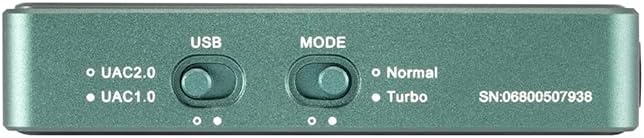
Image: Rear panel of the Link2 Bal Max, highlighting the USB and Mode selection switches. The USB switch allows selection between UAC2.0 and UAC1.0.
- UAC2.0: Recommended for most modern devices (Windows 10/11, macOS, Android, iOS) for high-resolution audio playback.
- UAC1.0: For older devices or systems that do not support UAC2.0.
- เลือกโหมดการทำงาน: Next to the USB switch, locate the Mode switch.
- ปกติ: โหมดการทำงานมาตรฐาน
- เทอร์โบ: Provides higher output power for demanding headphones. Use this mode if your headphones require more power or if you desire higher volume levels.
- เชื่อมต่อหูฟัง: Plug your headphones into either the 3.5mm unbalanced output or the 4.4mm balanced output port on the front of the device.

Image: Front panel of the Link2 Bal Max, showing the 3.5mm and 4.4mm headphone output jacks.
- ปรับระดับเสียง: Start with a low volume level on your source device and gradually increase it to a comfortable listening level.
คำแนะนำการใช้งาน
Once connected and set up, the XDUOO Link2 Bal Max operates automatically with your source device. Here are some operational guidelines:
- เปิด/ปิดเครื่อง: The device powers on automatically when connected to a powered USB source and powers off when disconnected.
- การควบคุมระดับเสียง: Adjust the playback volume directly from your connected source device (smartphone, computer, etc.).
- การเลือกโหมด: The "Normal" and "Turbo" modes can be switched based on your headphone's impedance and desired output power. "Turbo" mode provides a stronger signal for high-impedance or less sensitive headphones.
- ความเข้ากันได้ของ USB: Ensure the USB switch is set to the appropriate UAC mode (UAC1.0 or UAC2.0) for stable connection and optimal performance with your specific source device.
- ไฟแสดงสถานะ: Observe any indicator lights on the device (if present, not explicitly mentioned in specs but common) for status such as power or sampอัตรา

ภาพ: ด้านข้าง view of the Link2 Bal Max, showing a control button. This button may be used for playback control or other functions depending on the source device and software.
การซ่อมบำรุง
To ensure the longevity and optimal performance of your Link2 Bal Max, follow these maintenance guidelines:
- การทำความสะอาด: Use a soft, dry cloth to wipe the exterior of the device. Avoid using abrasive cleaners, solvents, or harsh chemicals.
- พื้นที่จัดเก็บ: เก็บอุปกรณ์ไว้ในที่แห้งและเย็น หลีกเลี่ยงแสงแดดโดยตรง อุณหภูมิที่สูงหรือต่ำเกินไป และความชื้นสูง
- การจัดการ: ใช้งานอุปกรณ์ด้วยความระมัดระวัง หลีกเลี่ยงการทำตกหรือกระแทกแรงๆ
- การเชื่อมต่อ: Ensure all cables are connected securely but avoid excessive force when plugging or unplugging.
การแก้ไขปัญหา
If you encounter issues with your XDUOO Link2 Bal Max, refer to the following common problems and solutions:
- ไม่มีเสียงออก:
- Ensure the Link2 Bal Max is properly connected to your source device via USB.
- Verify that your headphones are securely plugged into the correct output port (3.5mm or 4.4mm).
- Check the volume level on your source device; ensure it is not muted or set too low.
- Confirm that the correct audio output device is selected on your computer or smartphone (e.g., "XDUOO Link2 Bal Max" or similar).
- Try switching the USB mode (UAC1.0/UAC2.0) to see if it resolves compatibility issues with your source.
- Distorted Sound or Noise:
- ตรวจสอบให้แน่ใจว่าการเชื่อมต่อทั้งหมดปลอดภัยและปราศจากการรบกวน
- Try a different USB cable or source device to rule out cable or source issues.
- If using "Turbo" mode, try switching to "Normal" mode, especially with sensitive headphones, as excessive gain can cause distortion.
- ตรวจสอบเสียง file quality; low-quality files can sound distorted.
- Device Not Recognized by Source:
- Ensure the USB cable is fully inserted into both the Link2 Bal Max and the source device.
- Try connecting to a different USB port on your source device.
- Switch the USB mode (UAC1.0/UAC2.0) on the Link2 Bal Max.
- รีสตาร์ทอุปกรณ์ต้นทางของคุณ
- For computers, ensure necessary drivers are installed (though UAC2.0 is often plug-and-play, some systems might require specific drivers).
ข้อมูลจำเพาะ
| ชิป DAC | CS43131*2 |
| พอร์ตอินพุต | USB Type-C |
| พอร์ตเอาท์พุต | 3.5mm (unbalanced) + 4.4mm (balanced) |
| กำลังขับ (3.5 มม.) | 125mW @ 32ohm |
| กำลังขับ (4.4 มม.) | 270mW @ 32ohm |
| พีซีเอ็มเอสampเลออัตราสนับสนุน | 16-32Bit / 44.1-384kHz |
| ดีเอสดีเอสampเลออัตราสนับสนุน | DSD64-256 |
| การตอบสนองความถี่ | 20Hz~20kHz (+0.5dB) |
| THD+N (3.5 มม.) | 0.001% @ 1kHz |
| THD+N (4.4 มม.) | 0.0007% @ 1kHz |
| SNR (3.5mm) | 123เดซิเบล |
| SNR (4.4mm) | 123เดซิเบล |
| Crosstalk (3.5mm) | ≥77เดซิเบล |
| Crosstalk (4.4mm) | ≥120เดซิเบล |
| น้ำหนัก | 28กรัม |
| ขนาด | 63มม. * 23.5มม. * 13มม. |
| สี | สีเขียว |
การรับประกันและการสนับสนุน
The XDUOO Link2 Bal Max Headphone Ampเครื่องขยายเสียงมาพร้อมกับ รับประกัน 1 ปี นับจากวันที่ซื้อ การรับประกันนี้ครอบคลุมถึงข้อบกพร่องจากการผลิตและการทำงานผิดปกติภายใต้การใช้งานปกติ
หากต้องการการสนับสนุนทางเทคนิค การเรียกร้องการรับประกัน หรือความช่วยเหลือเพิ่มเติม โปรดติดต่อผู้ค้าปลีกหรือผู้ผลิตของคุณโดยตรง โปรดเก็บหลักฐานการซื้อไว้เพื่อยืนยันการรับประกัน