
1. บทนำ
This manual provides detailed instructions for the assembly, installation, operation, and maintenance of your AMANSON H07 ATX Mid Tower PC Case. Please read this manual thoroughly before beginning installation to ensure proper setup and safe operation. Keep this manual for future reference.

Figure 1.1: AMANSON H07 ATX Mid Tower PC Case with illuminated internal components.
2. ข้อมูลด้านความปลอดภัย
- ควรตัดการเชื่อมต่อสายไฟออกจากเต้ารับที่ผนังทุกครั้งก่อนทำการติดตั้งหรือบำรุงรักษาใดๆ ภายในเคสคอมพิวเตอร์
- จัดการส่วนประกอบทั้งหมดด้วยความระมัดระวังเพื่อป้องกันความเสียหาย
- สวมสายรัดข้อมือป้องกันไฟฟ้าสถิตเพื่อป้องกันความเสียหายจากประจุไฟฟ้าสถิต (ESD) ต่อชิ้นส่วนอิเล็กทรอนิกส์ที่ไวต่อประจุ
- เก็บชิ้นส่วนขนาดเล็กและวัสดุบรรจุภัณฑ์ให้ห่างจากเด็ก
- ตรวจสอบให้แน่ใจว่ามีการระบายอากาศที่เหมาะสมรอบ ๆ เคสพีซีเพื่อป้องกันความร้อนสูงเกินไป
3. เนื้อหาบรรจุภัณฑ์
ตรวจสอบว่ามีรายการทั้งหมดอยู่ในแพ็คเกจ:
- AMANSON H07 ATX Mid Tower PC Case
- กล่องอุปกรณ์เสริม (สกรู, สแตนด์ออฟ, สายรัด ฯลฯ)
- คู่มือการใช้งาน (เอกสารนี้)
4. ส่วนประกอบเกินview
The AMANSON H07 PC case features a panoramic design with tempered glass panels for full visibility of your internal components. It supports various motherboard sizes and extensive cooling configurations.

Figure 4.1: Top I/O Panel with power button, USB 3.0, USB 2.0, and audio ports.
The top I/O panel includes:
- ปุ่มเปิดปิด
- ปุ่มรีเซ็ต
- พอร์ต USB 2 2.0x
- พอร์ต USB 1 3.0x
- ช่องเสียบเสียงเข้า/ออก
5. การตั้งค่าและการติดตั้ง
5.1. การเตรียมคดี
The AMANSON H07 features tool-less hinged tempered glass side panels for easy access. Gently open the side panel by pulling it from the rear edge. The panels can also be removed by lifting them off their hinges for full access during installation.

Figure 5.1: Hinged tempered glass side panel for easy access.
5.2. การติดตั้งเมนบอร์ด
The H07 supports E-ATX, ATX, Micro-ATX, and ITX motherboards. Install the necessary standoffs for your motherboard form factor. Carefully align your motherboard with the standoffs and I/O shield, then secure it with screws.
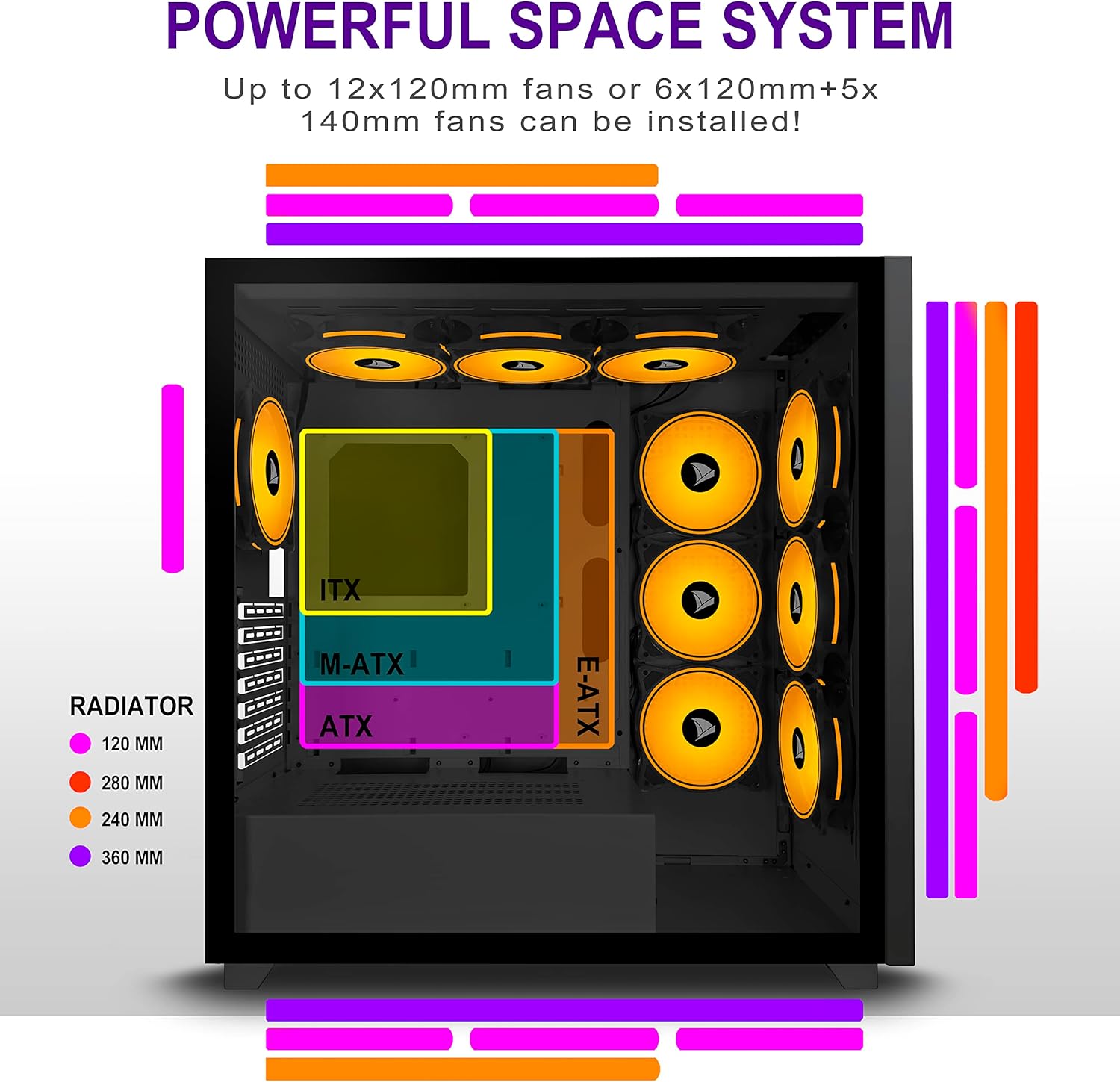
Figure 5.2: Motherboard and cooling component placement options.
5.3. การติดตั้งพาวเวอร์ซัพพลาย
Install your power supply unit (PSU) into the dedicated compartment at the bottom rear of the case. Secure it with screws from the rear of the case.
5.4. การติดตั้งอุปกรณ์จัดเก็บข้อมูล
The case provides multiple mounting points for storage devices. Install your 3.5" HDDs and 2.5" SSDs into the designated trays and mounting locations. Refer to the case diagram for specific locations.

Figure 5.3: Storage drive mounting options for HDDs and SSDs.
5.5 การติดตั้งการ์ดขยาย (GPU)
Remove the necessary PCI-E slot covers from the rear of the case. Insert your graphics card or other expansion cards into the motherboard's PCI-E slots and secure them with screws.
5.6. การจัดการสายเคเบิล
Utilize the cable routing cutouts and tie-down points behind the motherboard tray to manage cables. This improves airflow and maintains a clean aesthetic.
6. คู่มือการใช้งาน
6.1. การเปิด/ปิดเครื่อง
Press the power button located on the top I/O panel to turn on your PC. To shut down, use the operating system's shutdown function or press and hold the power button for several seconds.
6.2. Using Front I/O Ports
Connect USB devices to the USB 2.0 or USB 3.0 ports. Use the audio jacks for headphones, microphones, or speakers.
7. การบำรุงรักษา
7.1. การทำความสะอาด
ควรทำความสะอาดภายนอกเคสเป็นประจำด้วยผ้าเนื้อนุ่มและแห้งamp cloth. For internal cleaning, use compressed air to remove dust from fans and components. Ensure the PC is powered off and unplugged before cleaning.
7.2. ตัวกรองฝุ่น
The AMANSON H07 may include removable dust filters. Clean these filters periodically to maintain optimal airflow and cooling performance.
8 การแก้ไขปัญหา
- คอมพิวเตอร์เปิดไม่ติด: Check all power connections, including the PSU to the wall, the PSU to the motherboard, and the front panel power switch cable to the motherboard.
- ปัญหาความร้อนสูงเกินไป: Ensure all fans are properly installed and functioning. Verify that dust filters are clean and not obstructing airflow. Check thermal paste application on CPU cooler.
- พอร์ต USB ใช้งานไม่ได้: Confirm that the front panel USB cables are correctly connected to the motherboard headers.
- ช่องเสียบหูฟังใช้งานไม่ได้: Verify that the front panel audio cable is correctly connected to the motherboard's audio header.
9. ข้อมูลจำเพาะ
Below are the technical specifications for the AMANSON H07 PC Case:
| คุณสมบัติ | รายละเอียด |
|---|---|
| แบบอย่าง | H07 |
| ประเภทเคส | มิดทาวเวอร์ |
| ความเข้ากันได้ของเมนบอร์ด | E-ATX, ATX, Micro ATX, ITX |
| วัสดุ | กระจกนิรภัย |
| ขนาดสินค้า (กxยxส) | 19.69 x 13.78 x 19.69 นิ้ว (500 x 350 x 500 มม.) |
| น้ำหนักสินค้า | 24.2 ปอนด์ |
| จำนวนพอร์ต USB 2.0 | 2 |
| จำนวนพอร์ต USB 3.0 | 1 |
| จำนวนช่องสำหรับติดตั้งส่วนขยาย | 8 |
| วิธีการทำความเย็น | อากาศ |
| ประเภทการติดตั้งแหล่งจ่ายไฟ | การติดตั้งด้านล่าง |

Figure 9.1: AMANSON H07 PC Case dimensions (520mm height, 510mm length, 250mm width).
10. ข้อมูลการรับประกัน
Please refer to the product packaging or the official AMANSON webเพื่อดูข้อกำหนดและเงื่อนไขการรับประกันเฉพาะ โปรดเก็บหลักฐานการซื้อไว้เพื่อใช้ในการเรียกร้องการรับประกัน
11. การสนับสนุน
For technical assistance or customer support, please visit the official AMANSON website or contact their customer service department. Contact details can typically be found on the product packaging or the brand's webเว็บไซต์.