
1. บทนำ
Welcome to the VGR Beard Trimmer Kit user manual. This 7-in-1 multi-functional grooming kit is designed to provide a crisp, clean, and professional look with ease. Please read this manual thoroughly before using the device to ensure safe and effective operation. Keep this manual for future reference.
2. ข้อมูลด้านความปลอดภัย
คำเตือน: เพื่อลดความเสี่ยงจากการถูกไฟไหม้ไฟฟ้าดูดไฟไหม้หรือการบาดเจ็บต่อบุคคล:
- May cause skin irritation or eye injury. Avoid use on infants.
- Keep away from water sources. Do not use while bathing or showering.
- ปฏิบัติตามขั้นตอนการทำความสะอาดและบำรุงรักษาที่แนะนำ
- Do not use while charging. Unplug when not in use.
- Always keep the trimmer within sight while in use.
- ห้ามถอดประกอบหรือพยายามซ่อมแซมอุปกรณ์ด้วยตนเอง โปรดติดต่อเจ้าหน้าที่บริการที่ผ่านการรับรอง
- เก็บให้พ้นจากมือเด็ก
3. สินค้าหมดview & เนื้อหาแพ็คเกจ
Your VGR Beard Trimmer Kit includes a comprehensive set of tools for various grooming needs. Familiarize yourself with all components before use.

Figure 3.1: The complete VGR 7-in-1 Multi-Functional Beard Grooming Kit, including the main trimmer unit, various attachment heads, guide combs, charging stand, and cleaning accessories.

รูปที่ 3.2: รายละเอียด view of the Hair Clipper, T-Blade Trimmer, and Body Trimmer heads, illustrating the different guide comb sizes available for each.
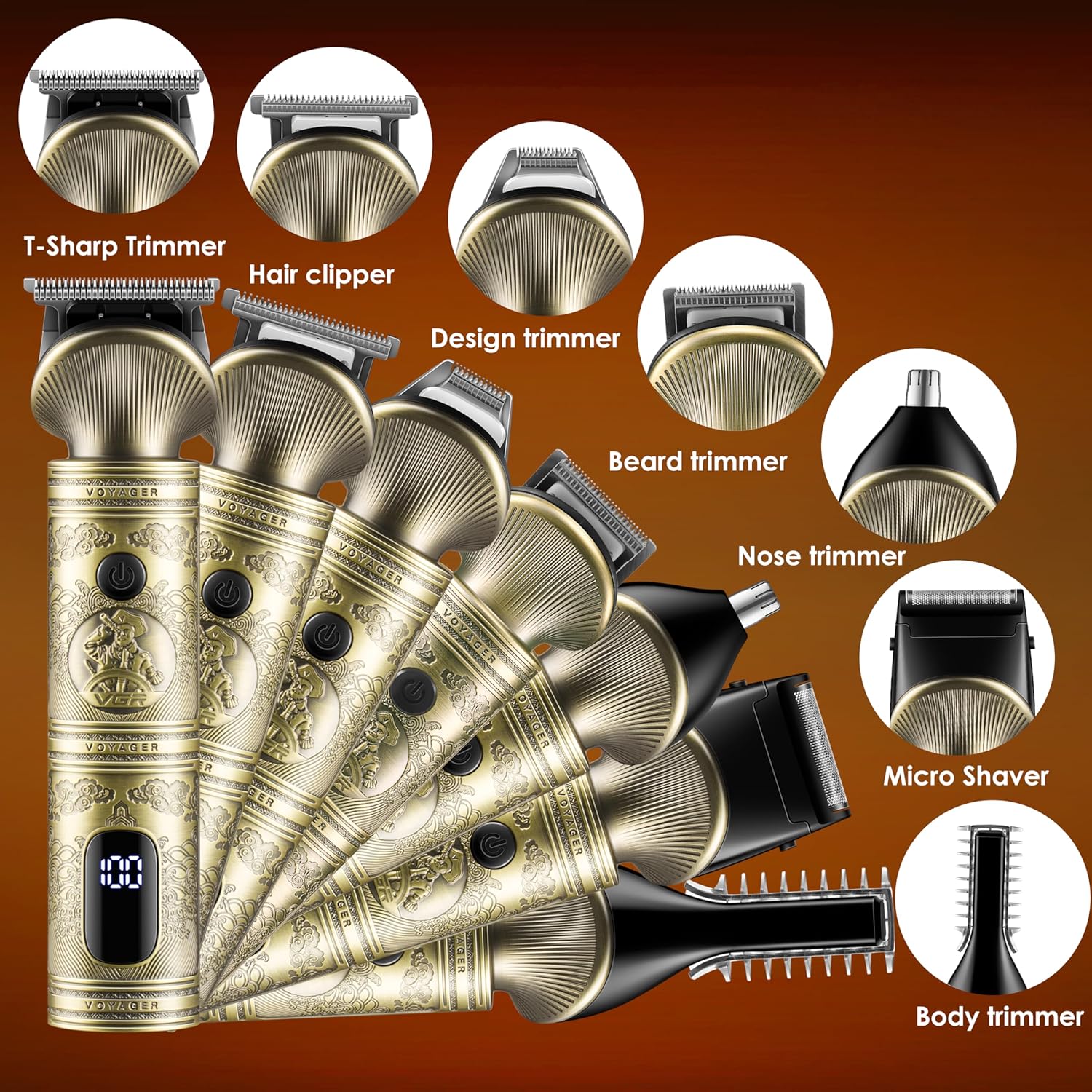
Figure 3.3: An array of VGR trimmer units showcasing the versatility of the kit with different attachment heads for various grooming tasks, including T-Sharp, Hair Clipper, Design, Beard, Nose, Micro Shaver, and Body Trimmer.
ส่วนประกอบ:
- Main Trimmer Unit (with digital display)
- T-Blade Trimmer Head
- หัวตัดตัดผม
- หัวทริมเมอร์ที่แม่นยำ
- หัวโกนแบบไมโคร
- หัวตัดขนจมูก
- หัวทริมเมอร์ลำตัว
- Multiple Guide Combs (various lengths for hair clipper and T-blade)
- แท่นชาร์จ
- สายชาร์จ USB
- แปรงทำความสะอาด
- น้ำมันหล่อลื่น
- กิ๊บติดผม 2 อัน
4. การตั้งค่า
4.1 การชาร์จเริ่มต้น
Before first use, fully charge the VGR Beard Trimmer Kit. The built-in rechargeable lithium-ion battery provides up to 180 minutes of run time on a full charge, which takes approximately 1.5 hours.
- Connect the USB charging cable to the charging port on the trimmer or the charging stand.
- เสียบปลายอีกด้านหนึ่งของสาย USB เข้ากับอะแดปเตอร์ไฟ USB ที่ใช้งานร่วมกันได้ (ไม่รวมอยู่ด้วย) หรือพอร์ต USB ของคอมพิวเตอร์
- The digital display on the trimmer will indicate the charging status.
- Once fully charged, unplug the device.

Figure 4.1: The VGR trimmer's digital display indicating battery level and the Type-C charging interface for quick and efficient charging.
4.2 Attaching and Detaching Trimmer Blades/Heads
The VGR kit features detachable and washable blades for easy cleaning and versatility. Ensure the trimmer is turned off before changing heads.
- To remove a blade/head: Gently twist or pull the current head upwards from the main unit until it detaches.
- To install a blade/head: Align the desired head with the slot on the main unit and push down firmly until it clicks into place.
- To install a guide comb: Snap the desired guide comb onto the trimmer blade until it is securely fastened.
Video 4.1: This video demonstrates how to remove and install different trimmer blades and guide combs on the VGR Beard Trimmer Kit, ensuring proper attachment for various grooming styles.
5. คู่มือการใช้งาน
The VGR Beard Trimmer Kit offers multiple functions for comprehensive grooming. Always ensure your skin and hair are clean and dry before trimming for best results.
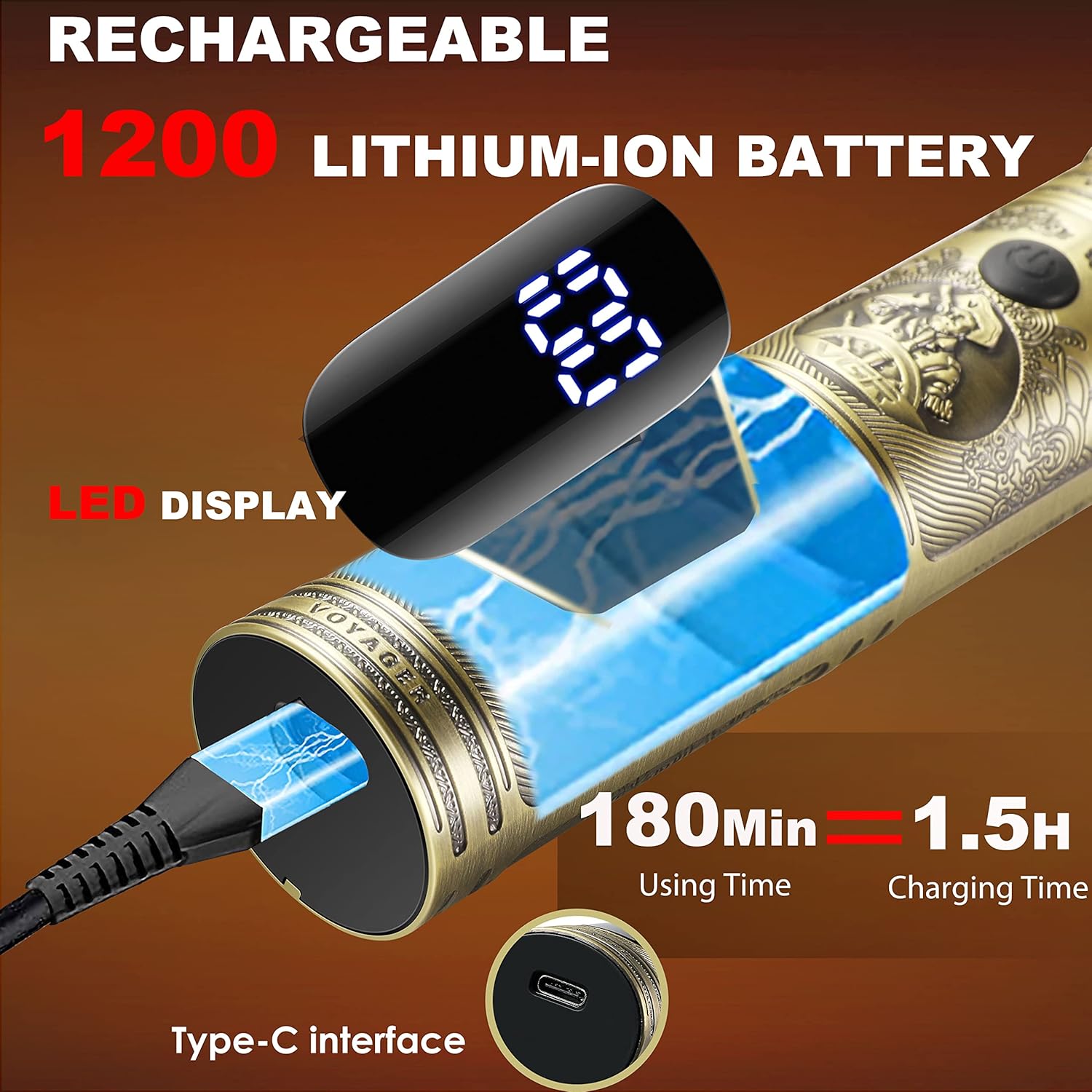
Figure 5.1: Key features of the VGR trimmer, including the durable blade, power switch, charging port, digital display for battery status, and its whole-body washable design, along with a visual of the included accessories.
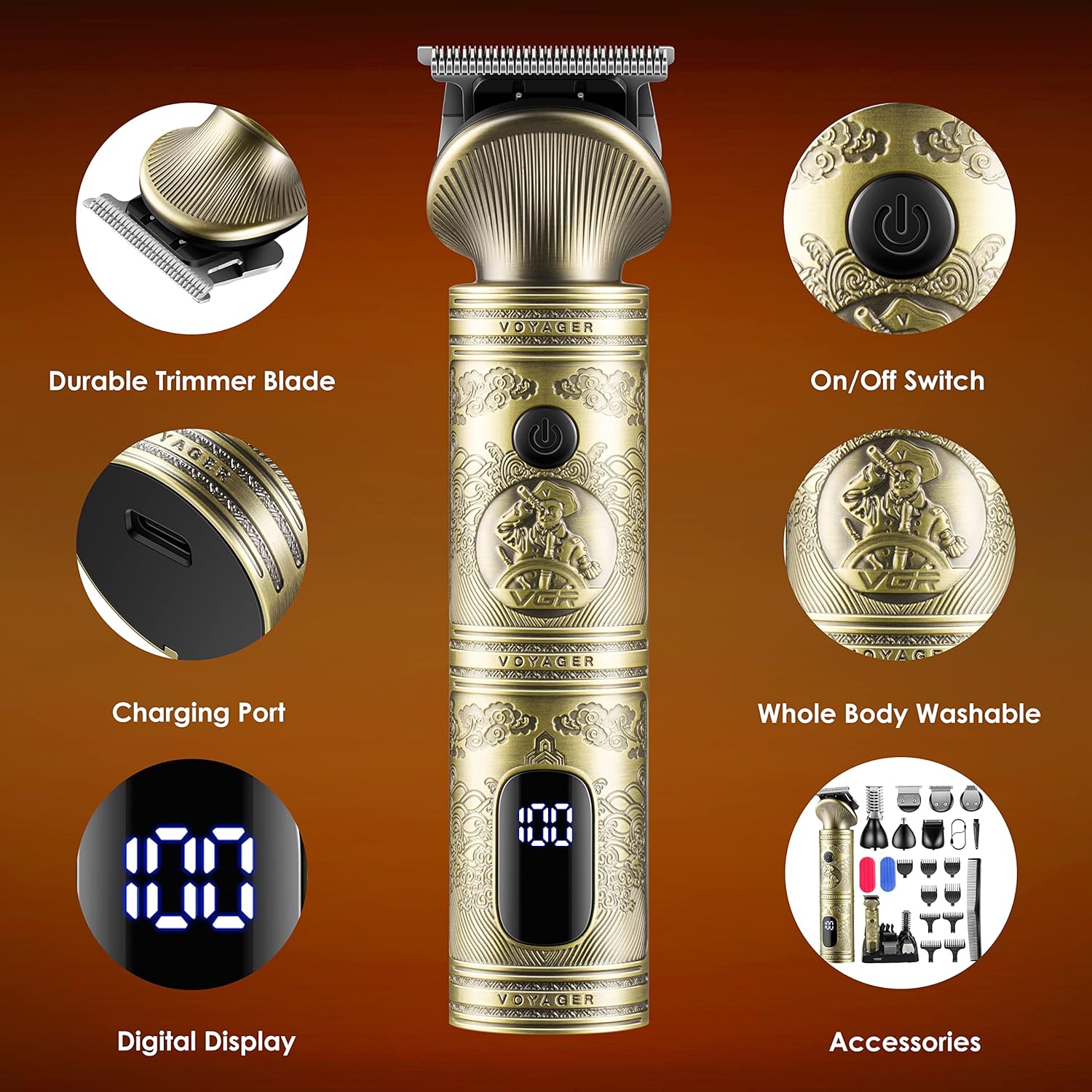
Figure 5.2: A visual guide to the different trimming functions of the VGR kit, showing the specific heads for Hair Clipping, T-blade Trimming, Design Trimming, Nose Trimming, Micro Shaving/Precision Trimming, and Body Trimming.
5.1 การตัดแต่งทั่วไป
- Select the appropriate trimmer head (e.g., T-Blade Trimmer for beard, Hair Clipper for hair).
- Attach the desired guide comb for your preferred length.
- Press the On/Off switch to turn on the trimmer.
- จับเครื่องตัดแต่งขนโดยให้ใบมีดแนบกับผิวหนัง และค่อยๆ เลื่อนไปในทิศทางตรงกันข้ามกับการเจริญเติบโตของเส้นขน
- For precise lines and artwork, use the T-Blade Trimmer without a guide comb.
5.2 การตัดแต่งขนจมูกและหู
- Attach the Nose Trimmer Head.
- ค่อยๆ สอดปลายเครื่องตัดขนเข้าไปในรูจมูกหรือช่องหูของคุณ
- ขยับเครื่องตัดขนเป็นวงกลมเพื่อตัดแต่งขนที่ไม่ต้องการ
5.3 การดูแลร่างกาย
- Attach the Body Trimmer Head.
- Use with or without a guide comb depending on desired length.
- Move the trimmer smoothly over the skin to remove body hair.
5.4 Micro Shaving / Precision Shaving
- Attach the Micro Shaver Head.
- Use for a close, smooth finish on smaller areas or for detailing.
- Hold the shaver flat against the skin and move gently.
6. การบำรุงรักษา
Regular cleaning and maintenance will ensure the longevity and optimal performance of your VGR Beard Trimmer Kit.
6.1 การทำความสะอาดใบมีด
The detachable and washable blades make cleaning simple.
- หลังการใช้งานแต่ละครั้ง ให้ปิดเครื่องเล็มและถอดหัวใบมีดออก
- Rinse the blade head under running water to remove hair clippings.
- Use the provided cleaning brush to remove any stubborn hair from the blade and inside the trimmer unit.
- ปล่อยให้หัวใบมีดแห้งสนิทก่อนที่จะประกอบกลับเข้าไปใหม่หรือเก็บรักษา
- Do not submerge the main trimmer unit in water. Only the blade heads are washable.
Video 6.1: This video demonstrates the easy cleaning process of the VGR Beard Trimmer Kit, showing how to rinse the blade head under flowing water after use.
6.2 การหล่อลื่น
- Periodically apply a small drop of the included lubricating oil to the blades to maintain smooth operation and prevent rust.
- เปิดเครื่องตัดหญ้าสักสองสามวินาทีเพื่อให้น้ำมันกระจายตัวอย่างทั่วถึง
6.3 พื้นที่จัดเก็บ
- Store the trimmer and all accessories in the charging stand or a dry, cool place away from direct sunlight and moisture.
7 การแก้ไขปัญหา
If you encounter any issues with your VGR Beard Trimmer Kit, refer to the following common problems and solutions:
| ปัญหา | สาเหตุที่เป็นไปได้ | สารละลาย |
|---|---|---|
| ทริมเมอร์ไม่เปิด | แบตเตอรี่เหลือน้อยหรือหมด | Charge the trimmer fully (refer to Section 4.1). |
| เครื่องเล็มขนดึงหรือตัดได้ไม่ดี | ใบมีดทื่อ สกปรก หรือไม่ได้รับการหล่อลื่น | Clean and lubricate the blades (refer to Section 6.1 & 6.2). Replace blades if necessary. |
| เครื่องตัดหญ้ามีเสียงดังผิดปกติ | Hair caught in blades or motor issue. | Clean blades thoroughly. If issue persists, contact customer support. |
| ไฟแสดงสถานะการชาร์จไม่ทำงาน | ปัญหาเกี่ยวกับสายชาร์จหรืออะแดปเตอร์ | ลองใช้สาย USB หรืออะแดปเตอร์แปลงไฟอื่น ตรวจสอบให้แน่ใจว่าการเชื่อมต่อแน่นหนาดี |
If the problem persists after trying these solutions, please contact VGR customer support for assistance.
8. ข้อมูลจำเพาะ
Detailed technical specifications for your VGR Beard Trimmer Kit:
| คุณสมบัติ | ข้อมูลจำเพาะ |
|---|---|
| ขนาดสินค้า | 6.3 x 1.57 x 1.18 นิ้ว |
| หมายเลขรุ่นสินค้า | V-106 Professional 6-in1 Grooming Kit |
| แบตเตอรี่ | ต้องใช้แบตเตอรี่ลิเธียมไอออน 1 ก้อน (รวมอยู่ด้วย) |
| วันที่พร้อมใช้งานครั้งแรก | 27 กุมภาพันธ์ 2023 |
| ผู้ผลิต | VGR |
| ASIN | B0BWS9J5HX |
| การใช้ที่แนะนำ | Trimming, Grooming, Professional |
| ประเภทผม | แห้ง |
| น้ำหนักสินค้า | 0.23 กรัม |
| ยี่ห้อ | VGR |
| แหล่งพลังงาน | ใช้พลังงานจากแบตเตอรี่ |
9. การรับประกันและการสนับสนุน
VGR stands behind the quality of its products. Your VGR Beard Trimmer Kit comes with a รับประกัน 1 ปี ตั้งแต่วันที่ซื้อสินค้า
9.1 ความคุ้มครองการรับประกัน
This warranty covers defects in materials and workmanship under normal use. It does not cover damage caused by misuse, accident, unauthorized modification, or failure to follow the instructions in this manual.
9.2 การสนับสนุนลูกค้า
For any questions, concerns, or warranty claims, please contact VGR customer support. You can typically find contact information on the product packaging, the official VGR webไซต์หรือผ่านผู้ค้าปลีกของคุณ
Please have your product model number (V-106 Professional 6-in1 Grooming Kit) and proof of purchase ready when contacting support.