
UNITOPSCI A3197A4
UNITOPSCI 2G+64G 9 Inch Double Din Android Car Stereo
คู่มือการใช้งาน
1. บทนำ
Thank you for choosing the UNITOPSCI 2G+64G 9 Inch Double Din Android Car Stereo. This advanced head unit is designed to enhance your driving experience with its comprehensive features, including a 9-inch capacitive touch screen, Android 13 operating system, wireless Apple CarPlay, Android Auto, Bluetooth, GPS navigation, mirror link, WiFi, FM radio, USB connectivity, steering wheel control (SWC), and DVR support. This manual provides detailed instructions for installation, operation, maintenance, and troubleshooting to ensure optimal performance and longevity of your device.

Image: The UNITOPSCI 9-inch Android Car Stereo, showcasing its user interface with navigation, music playback, and system settings.
2. อะไรอยู่ในกล่อง
Please verify that all components are present in the package before proceeding with installation.
- เครื่องเสียงติดรถยนต์ Android 1 เครื่อง
- 1 x กล้องสำรอง
- เสาอากาศ GPS 1 เส้น
- 1 x สายอินพุตกล้องด้านหลัง
- สาย 1 x RCA
- สายไฟ 1 เส้น
- สาย USB 1 เส้น
- 2 x Metal Frame
- 1 x คู่มือผู้ใช้
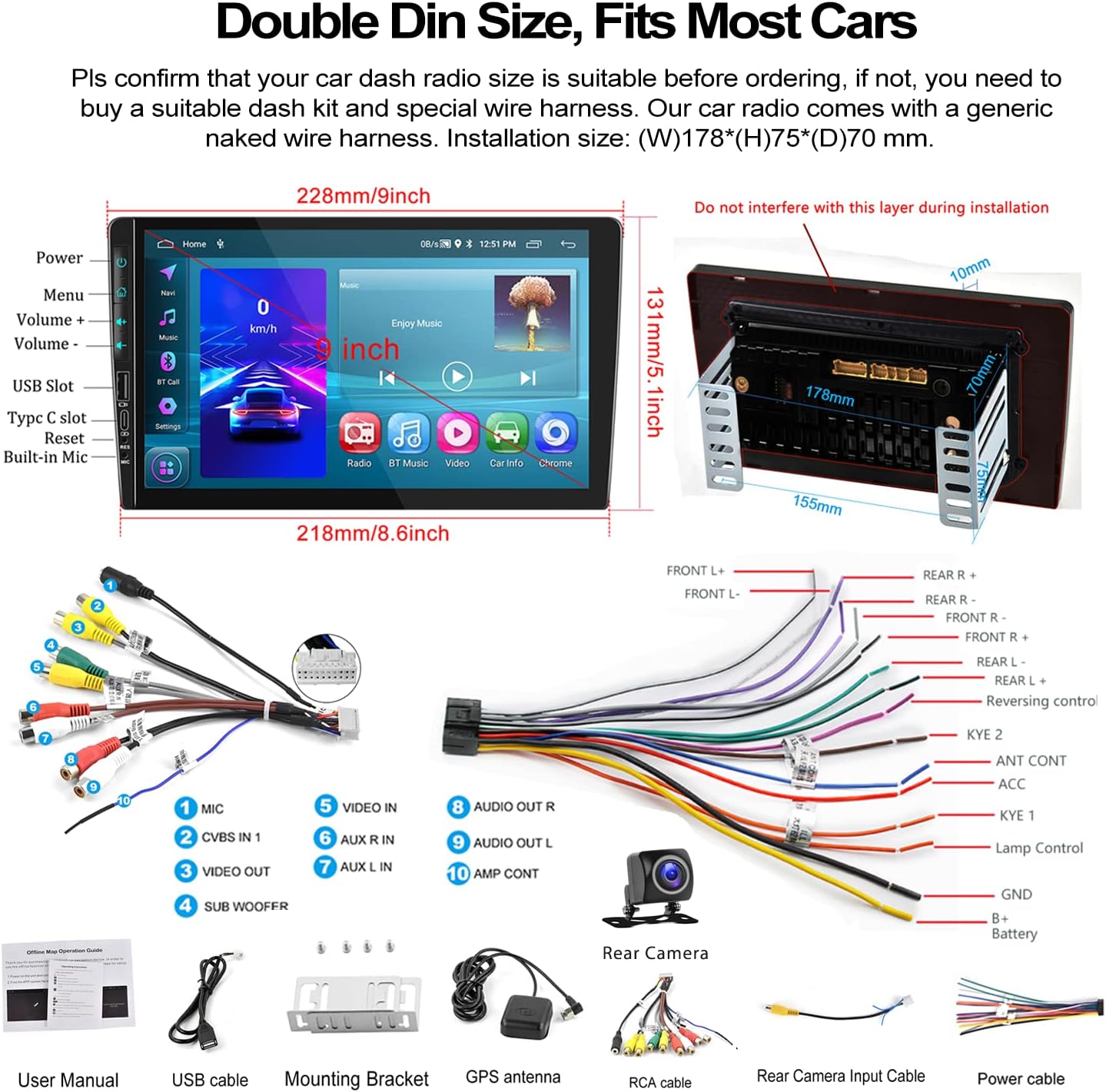
Image: A visual representation of the car stereo's dimensions, along with all the cables and accessories included in the package, such as the power cable, RCA cables, USB cable, GPS antenna, and backup camera.
3. ข้อมูลจำเพาะ
| คุณสมบัติ | คำอธิบาย |
|---|---|
| ระบบ | แอนดรอยด์ 13 |
| แรม | 2GB |
| รอม | 64GB |
| ขนาดหน้าจอ | 9 นิ้ว |
| ความละเอียดหน้าจอ | ขนาด 1024x600 |
| พลัง Ampชิปลิฟายเออร์ | 7388 |
| ชิปวิทยุ | 8035 |
| กำลังขับ | 4*45วัตต์ |
| เวอร์ชันบลูทูธ | 4.2 |
| คลื่นความถี่วิทยุ | เอฟเอ็ม/RDS |
| อุณหภูมิในการทำงาน | -40℃ ถึง 80℃ |
| ขนาดการติดตั้ง | 7 inch (W), 3.8 inch (H) / 178mm (W) x 97mm (H) |
| ขนาดสินค้า | 1.85 x 7 x 4.02 นิ้ว |
| น้ำหนักสินค้า | 2.29 ปอนด์ |
4. การตั้งค่าและการติดตั้ง
Proper installation is crucial for the performance and safety of your car stereo. It is recommended to have the installation performed by a professional if you are unsure about any steps.
4.1 การตรวจสอบก่อนการติดตั้ง
- Ensure your car's dashboard opening is compatible with the standard double din size (approximately 7 inches wide by 3.8 inches high).
- Disconnect the car battery's negative terminal before starting any wiring.
- Familiarize yourself with the wiring harness provided.
4.2 การเชื่อมต่อสายไฟ
Refer to the wiring diagram provided in the 'What's in the Box' section and the specific rear view wiring diagram below for detailed connections.
- สายไฟ: Connect the power cable to your car's power supply according to the diagram.
- สาย RCA: Connect audio and video input/output cables as needed for external devices (e.g., amplifiers, headrest monitors).
- สาย USB: Connect the dual USB interfaces for media playback, charging, or wired Android Auto.
- เสาอากาศ GPS: ติดตั้งเสาอากาศ GPS ในตำแหน่งที่มีสัญญาณชัดเจน view ของท้องฟ้าเพื่อการรับสัญญาณที่ดีที่สุด
- สายอินพุตกล้องด้านหลัง: This cable is essential for the backup camera functionality.
4.3 การเดินสายกล้องสำรอง
The included AHD backup camera requires specific wiring for proper operation:
- พลังของกล้อง: The red wire of the backup camera connects to the positive (+) back battery supply (e.g., reverse light power). The black wire connects to the negative (-) battery supply (ground).
- อินพุตวิดีโอ: The yellow RCA video output from the backup camera connects to the "CAM IN" port on the rear of the car radio.
- Trigger Wire: Locate the wire labeled "BACK" or "REVERSE" on the car radio's wire harness. This wire needs to be connected to the positive power supply of your car's reversing light. This signal tells the head unit to automatically switch to the reversing image when reverse gear is engaged.

Image: A comprehensive wiring diagram for the backup camera, showing how to connect the camera's power, video signal, and the trigger wire to the car stereo and vehicle's reverse light system.
5. คู่มือการใช้งาน
This section details the various functions and how to operate your UNITOPSCI car stereo.
5.1 Apple CarPlay ไร้สายและ Android Auto
Connect your smartphone for seamless integration of navigation, music, calls, and more.
- การเชื่อมต่อแบบไร้สาย: For both Apple CarPlay and Android Auto, connect your phone via Bluetooth and/or WiFi. Follow the on-screen prompts to establish the connection.
- การเชื่อมต่อแบบมีสาย: Alternatively, connect your Android phone via a USB data cable for wired Android Auto.
- การควบคุมด้วยเสียง: Utilize Siri (for CarPlay) or Google Assistant (for Android Auto) for hands-free operation of functions like navigation, calls, and music.
- บันทึก: The Android Auto function may not work for some Samsung phones. CarPlay supports iOS phones up to version 15.4.

Image: Displays of the car stereo showing Wireless Apple CarPlay, Wireless Android Auto, and Mirror Link in action, highlighting their respective interfaces and connection methods.
5.2 การเชื่อมโยงมิเรอร์
Mirror Link allows you to display your smartphone's screen directly onto the car stereo's display.
- Android/iOS Compatibility: Supports screen mirroring for both Android and iOS devices.
- การเชื่อมต่อ: Connect your phone via USB or WiFi as per the instructions on the stereo.

Image: The car stereo screen mirroring a smartphone, demonstrating the Mirror Link feature.
5.3 Bluetooth Hands-Free & FM Radio
Enjoy safe communication and your favorite radio stations.
- การจับคู่บลูทู ธ : Enable Bluetooth on your phone and search for the car stereo. Pair the devices to enable hands-free calling and wireless audio streaming.
- สมุดโทรศัพท์: The stereo supports automatic download of your phone book for easy access to contacts.
- วิทยุ FM: Tune into your favorite FM stations. The radio features 18 preset stations for quick access to news, sports, and music.

Image: The car stereo's display showing the Bluetooth hands-free calling interface, FM radio tuner, and options for Bluetooth music and phone book access.
5.4 ระบบนำทาง GPS และ WiFi
Navigate with ease and stay connected.
- แผนที่ออฟไลน์: The unit comes with built-in offline maps (HERE WE GO). Switch on WiFi to download map data for your region.
- แผนที่ออนไลน์: Supports various online navigation apps for real-time traffic and updates.
- การเชื่อมต่อ WiFi: Connect to a WiFi hotspot (e.g., from your phone) to access online features, download apps, and browse the internet.
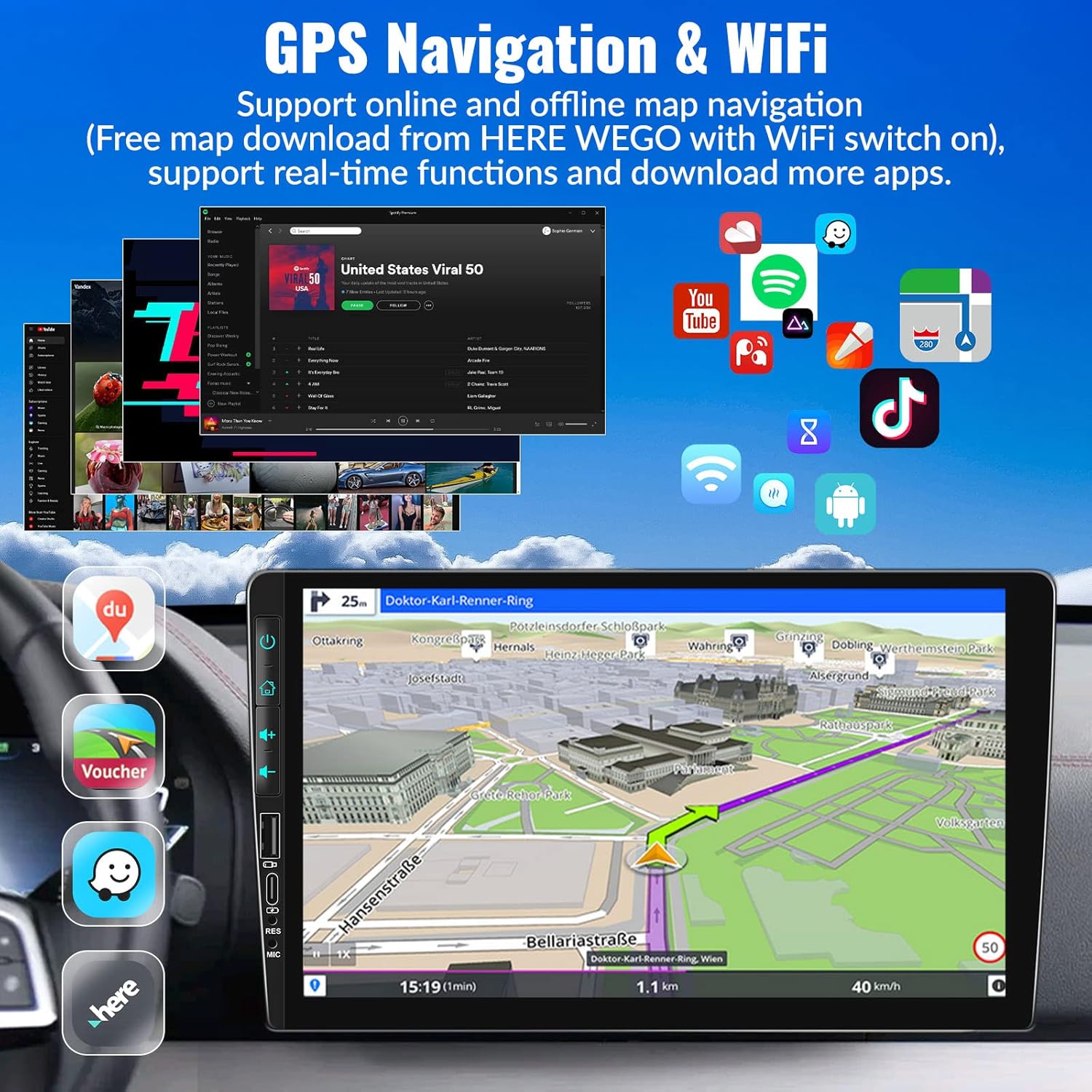
Image: The car stereo's screen showing a GPS navigation map, with various app icons floating around, illustrating the device's WiFi and app capabilities.
5.5 ระบบควบคุมพวงมาลัย (SWC)
Control your stereo without taking your hands off the wheel.
- การตั้งค่า: Access the Steering Wheel Control settings in the system menu. Follow the on-screen instructions to map your car's steering wheel buttons to the stereo's functions (e.g., volume up/down, track skip, mode).
- ความสะดวก: Easily switch songs, radio channels, and adjust volume for a safer driving experience.
5.6 การตั้งค่าเสียง EQ
ปรับแต่งประสบการณ์เสียงของคุณ
- ค่าที่ตั้งล่วงหน้า: Choose from various preset EQ modes such as Pop, Classic, Rock, Jazz, and more.
- การปรับแต่ง: Adjust individual frequency bands to create your preferred sound profile.

Image: The car stereo screen showing the AHD rear view camera display with parking lines, and a separate image illustrating the steering wheel control setup interface.
5.7 AHD ด้านหลัง View กล้อง
Enhance parking safety with the included backup camera.
- สวิตช์อัตโนมัติ: When properly wired, the stereo will automatically switch to the reversing image on the 9-inch touch screen when you engage reverse gear.
- คุณสมบัติ: The camera provides HD image quality, is waterproof, offers night vision, and has a wide-angle view.
5.8 HD Screen & UI Themes
Personalize your stereo's appearance.
- แสดง: The 1024x600 capacitive touch screen features 2.5D glass and supports HD 1080p video playback.
- ธีม UI: Choose from 28 different UI themes to customize the look and feel of your car stereo's interface.

Image: The car stereo's HD screen displaying a vibrant image, alongside a selection of 28 different desktop UI themes for personalization.
5.9 Colorful Lights
Customize the button illumination.
- ตัวเลือก: There are 7 options for button light colors, allowing you to match your car's interior lighting or your personal preference.

Image: The car stereo showcasing its customizable colorful button lights, with a spectrum of 7 color options.
6. การบำรุงรักษา
เพื่อให้เครื่องเสียงในรถยนต์ของคุณมีอายุการใช้งานยาวนานและมีประสิทธิภาพเหมาะสมที่สุด โปรดปฏิบัติตามคำแนะนำในการบำรุงรักษาดังต่อไปนี้:
- การทำความสะอาดหน้าจอ: ใช้ผ้านุ่มไม่เป็นขุยเช็ดหน้าจอสัมผัสเบาๆ สำหรับรอยเปื้อนฝังแน่น ให้เช็ดเบาๆampชุบผ้าด้วยน้ำหรือน้ำยาทำความสะอาดที่ปลอดภัยต่อหน้าจอ หลีกเลี่ยงวัสดุที่มีฤทธิ์กัดกร่อนหรือสารเคมีรุนแรง
- การทำความสะอาดทั่วไป: เก็บตัวเครื่องให้สะอาดปราศจากฝุ่นและเศษผง ใช้แปรงขนนุ่มหรือลมอัดทำความสะอาดช่องระบายอากาศและร่องปุ่มต่างๆ
- การควบคุมอุณหภูมิ: ควรหลีกเลี่ยงการวางเครื่องไว้ในที่ที่มีอุณหภูมิสุดขั้ว (ร้อนจัดหรือเย็นจัด) เป็นเวลานาน เนื่องจากอาจส่งผลต่อประสิทธิภาพและอายุการใช้งาน
- การอัปเดตซอฟต์แวร์: Periodically check for software updates from UNITOPSCI to ensure you have the latest features and bug fixes.
- การเชื่อมต่อสายเคเบิล: ตรวจสอบให้แน่ใจว่าเชื่อมต่อสายเคเบิลทั้งหมดอย่างแน่นหนา การเชื่อมต่อที่หลวมอาจทำให้เกิดปัญหาการเชื่อมต่อไม่ต่อเนื่อง
7 การแก้ไขปัญหา
If you encounter any issues with your car stereo, refer to the following common problems and solutions:
| ปัญหา | สาเหตุที่เป็นไปได้และวิธีแก้ไข |
|---|---|
| ไม่มีไฟฟ้า / เครื่องไม่เปิด |
|
| ไม่มีเสียงออก |
|
| Backup Camera Not Displaying Image |
|
| Wireless CarPlay/Android Auto Not Connecting or Laggy |
|
| การควบคุมพวงมาลัยไม่ทำงาน |
|
| Touch Screen Unresponsive or Malfunctioning |
|
หากปัญหายังคงอยู่หลังจากลองวิธีแก้ปัญหาเหล่านี้แล้ว โปรดติดต่อฝ่ายบริการลูกค้าเพื่อขอความช่วยเหลือเพิ่มเติม
8. การรับประกันและการสนับสนุน
UNITOPSCI is committed to providing high-quality products and satisfactory services.
- การรับประกัน: ผลิตภัณฑ์นี้มาพร้อมกับการรับประกัน 1 ปีนับจากวันที่ซื้อ
- บริการทดแทน: Enjoy a 12-month replacement service for eligible issues.
- การรับประกันคืนเงิน: มีบริการรับประกันคืนเงินภายใน 30 วัน
- การสนับสนุนตลอดอายุการใช้งาน: UNITOPSCI provides full-life product support, including after-sales consultation and technical assistance.
- ติดต่อฝ่ายสนับสนุน: For any product problems or inquiries, please feel free to write to us at UNITOPSCI@126.com. Our team aims for a quick response within 16 hours.

Image: Visual representation of UNITOPSCI's customer support services, including contact information.
Ask a question about this manual
Ask about setup, troubleshooting, compatibility, parts, safety, or missing instructions. Manuals+ will review the question and use this page’s manual context to help answer it.