
การแนะนำ
This manual provides essential information for the safe and efficient use of your ONN 42-Inch Full HD LED Smart TV, Model 100018254. Please read these instructions thoroughly before operating your television and retain them for future reference.
มีอะไรอยู่ในกล่อง
ตรวจสอบว่าส่วนประกอบทั้งหมดมีอยู่ก่อนดำเนินการติดตั้ง
- ONN 42-Inch Full HD LED Smart TV
- รีโมทคอนโทรล
- ชั้นวางทีวี (2 ชิ้น)
- สกรูสำหรับขาตั้งทีวี
- สายไฟ
- คู่มือเริ่มต้นใช้งานฉบับย่อ (ไม่รวมอยู่ในคู่มือนี้)

ภาพ: ด้านหน้า view of the ONN 42-inch Smart TV displaying the Roku TV home screen with various streaming app icons like Netflix, Disney+, Apple TV, Hulu, Peacock, and Roku Channel. The TV is black with slim bezels and two stand feet.
การตั้งค่า
1. การติดตั้งขาตั้งทีวี
- วางทีวีคว่ำหน้าลงบนพื้นผิวที่นุ่มและสะอาดอย่างระมัดระวังเพื่อป้องกันความเสียหาย
- จัดวางขาตั้งแต่ละชิ้นให้ตรงกับรูสกรูที่อยู่ด้านล่างของทีวี
- ยึดชิ้นส่วนขาตั้งแต่ละชิ้นด้วยสกรูที่ให้มา ตรวจสอบให้แน่ใจว่าขันแน่นสนิทแล้ว

Image: A diagram illustrating the dimensions of the ONN 42-inch TV, showing its width as 43 inches and height as 37 inches when placed on its stand.
2. การติดตั้งบนผนัง (ทางเลือก)
This TV is compatible with VESA standard wall mounts. Refer to your wall mount's instructions for proper installation. Ensure the wall mount can support the weight of the television.

ภาพ: ด้านหลัง view of the ONN 42-inch TV, highlighting the VESA mounting screw holes in a square pattern and various input ports on the side and bottom right.
3. อุปกรณ์เชื่อมต่อ
เชื่อมต่ออุปกรณ์ภายนอก เช่น กล่องเคเบิลทีวี เครื่องเล่นเกม หรือเครื่องเล่นบลูเรย์ เข้ากับพอร์ตอินพุตของทีวี
- ช่องต่อ HDMI: For high-definition audio and video. Use an HDMI cable to connect devices like set-top boxes, game consoles, or streaming sticks.
- ยูเอสบี: สำหรับเชื่อมต่ออุปกรณ์จัดเก็บข้อมูล USB เพื่อเล่นสื่อ files.
- ไวไฟ : For internet connectivity to access smart TV features and streaming services.
4. ตัวช่วยเปิดเครื่องและการตั้งค่าเบื้องต้น
- เสียบสายไฟเข้ากับทีวีแล้วเสียบเข้ากับเต้ารับที่ผนัง
- กดปุ่มเปิดปิดบนรีโมทคอนโทรลหรือบนทีวีโดยตรง
- Follow the on-screen instructions to complete the initial setup, including language selection, network connection (Wi-Fi), channel scanning, and linking to your Roku account (if applicable).
การใช้งานทีวี
1. การควบคุมระยะไกลview
รีโมทคอนโทรลช่วยให้คุณสามารถนำทางอินเทอร์เฟซของทีวีและควบคุมฟังก์ชันต่างๆ
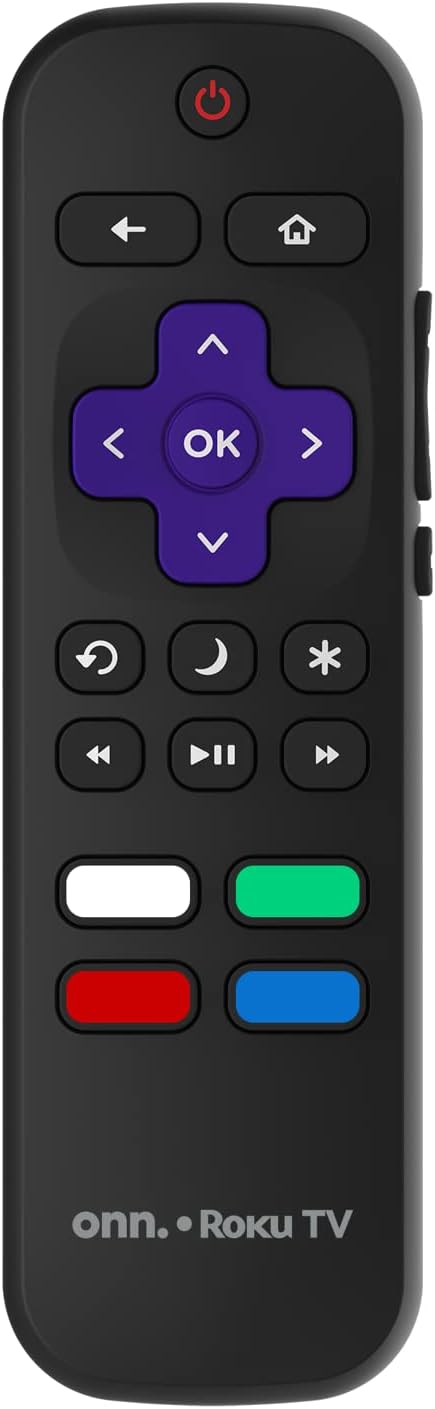
Image: The ONN Roku TV remote control, featuring a power button, directional pad, OK button, home button, back button, volume controls, and dedicated buttons for popular streaming services.
- ปุ่มเปิด/ปิด: เปิดหรือปิดทีวี
- Directional Pad (D-Pad) & OK: นำทางเมนูและยืนยันการเลือก
- ปุ่มโฮม: กลับไปยังหน้าจอหลักของ Roku TV
- ปุ่มย้อนกลับ: กลับไปที่หน้าจอหรือเมนูก่อนหน้า
- เพิ่ม/ลดระดับเสียง: ปรับระดับเสียง
- ปุ่มปิดเสียง: ปิดเสียงหรือเปิดเสียง
- ช่องขึ้น/ลง: Changes channels (for antenna/cable inputs).
- ปุ่มแอปเฉพาะ: Quick access to popular streaming services like Netflix, Hulu, etc.
2. คุณสมบัติของสมาร์ททีวี
Your ONN Smart TV provides access to a wide range of streaming content and smart functionalities.
- บริการสตรีมมิ่ง: Access pre-installed apps like Netflix, YouTube, and many more through the Roku Channel Store.
- การควบคุมด้วยเสียง: Compatible with Alexa and Google Assistant for hands-free control (requires a separate compatible voice assistant device).
- การอัปเดตซอฟต์แวร์อัตโนมัติ: The TV will automatically update its software when connected to the internet, ensuring you have the latest features and security.
3. การเลือกอินพุต
To switch between connected devices (e.g., cable box, game console), use the ป้อนข้อมูล button on your remote or select the desired input from the Roku TV home screen.
4. การตั้งค่าภาพและเสียง
Access the TV's settings menu to customize picture and sound preferences. Navigate to Settings > TV picture settings or ตั้งค่า > เสียง to adjust options like brightness, contrast, color, sound mode, and equalizer settings.
การซ่อมบำรุง
1. การทำความสะอาดหน้าจอ
- Always turn off the TV and unplug it before cleaning.
- ใช้ผ้านุ่มไม่เป็นขุยเช็ดเบาๆampเคลือบด้วยน้ำหรือน้ำยาทำความสะอาดหน้าจอโดยเฉพาะ
- อย่าฉีดน้ำยาลงบนหน้าจอโดยตรง ให้ฉีดลงบนผ้าก่อน
- หลีกเลี่ยงการใช้สารทำความสะอาดที่มีฤทธิ์กัดกร่อน แอลกอฮอล์ เบนซีน หรือทินเนอร์ เนื่องจากสารเหล่านี้อาจทำให้หน้าจอเสียหายได้
2. การอัปเดตซอฟต์แวร์
Ensure your TV is connected to the internet to receive automatic software updates. These updates improve performance, add features, and enhance security. You can manually check for updates in the การตั้งค่า > ระบบ > อัปเดตระบบ เมนู.
การแก้ไขปัญหา
หากคุณประสบปัญหาเกี่ยวกับทีวี โปรดดูวิธีแก้ไขทั่วไปต่อไปนี้:
ไม่มีไฟฟ้า
- ตรวจสอบว่าสายไฟเสียบเข้ากับทีวีและเต้ารับที่ผนังอย่างแน่นหนาหรือไม่
- ตรวจสอบว่าปลั๊กไฟใช้งานได้หรือไม่ โดยลองเสียบอุปกรณ์อื่นเข้าไป
- ลองกดปุ่มเปิดปิดบนทีวีโดยตรง ไม่ใช่แค่ที่รีโมท
ไม่มีภาพ / ภาพบิดเบี้ยว
- โปรดตรวจสอบให้แน่ใจว่าได้เลือกแหล่งสัญญาณเข้าที่ถูกต้องแล้ว (เช่น HDMI 1, HDMI 2)
- ตรวจสอบการเชื่อมต่อสายเคเบิลทั้งหมดระหว่างทีวีและอุปกรณ์ภายนอก
- ถ้าเป็นไปได้ ลองใช้สาย HDMI เส้นอื่นดูครับ
- Adjust picture settings (brightness, contrast) in the TV menu.
ไม่มีเสียง / เสียงเบา
- Check if the TV is muted or if the volume is turned down.
- Ensure external audio devices (soundbars, receivers) are properly connected and powered on.
- ตรวจสอบการตั้งค่าเสียงในเมนูทีวี
ปัญหาการเชื่อมต่อเครือข่าย
- Verify your Wi-Fi router is powered on and functioning.
- รีสตาร์ทเราเตอร์และโมเด็มของคุณ
- ไปที่ การตั้งค่า > เครือข่าย > ตรวจสอบการเชื่อมต่อ on your TV to diagnose the issue.
- ตรวจสอบให้แน่ใจว่าคุณป้อนรหัสผ่าน Wi-Fi ที่ถูกต้อง
ข้อมูลจำเพาะ
| คุณสมบัติ | รายละเอียด |
|---|---|
| หมายเลขรุ่น | 100018254 |
| ขนาดหน้าจอ | 42 นิ้ว |
| เทคโนโลยีการแสดงผล | นำ |
| ปณิธาน | 1080p (ฟูลเอชดี) |
| อัตราการรีเฟรช | 60 เฮิรตซ์ |
| การเชื่อมต่อ | ยูเอสบี, ไวไฟ |
| บริการอินเทอร์เน็ตที่รองรับ | Netflix, YouTube (and others via Roku platform) |
| วิธีการควบคุม | Voice (via Alexa & Google Assistant compatible devices), Remote Control |
| ประเภทการติดตั้ง | ติดตั้งบนผนัง (รองรับมาตรฐาน VESA) |
| สี | สีดำ |
| ยูพีซี | 671227025567 |

Image: Energy Guide label for Television Model 100018254, indicating an estimated yearly energy cost of $11 based on 12 cents per kWh and 5 hours use per day.
การรับประกันและการสนับสนุน
For warranty information and technical support, please refer to the documentation included with your purchase or visit the official ONN support webไซต์นี้ โปรดเก็บใบเสร็จรับเงินที่ซื้อไว้เพื่อใช้เรียกร้องการรับประกัน