
Della 1D4-TL+D1224
คู่มือการใช้งานเครื่องปรับอากาศแบบแยกส่วน DELLA 35K BTU สองโซน (รุ่น 1D4-TL+D1224)
Model: 1D4-TL+D1224 | Brand: Della
1. บทนำ
This manual provides comprehensive instructions for the installation, operation, and maintenance of your DELLA 35K BTU Dual Zone Mini Split Air Conditioner Heat Pump. This unit offers energy-efficient cooling and heating for up to 2050 sq. ft., featuring 19 SEER2, Wi-Fi, and Alexa compatibility. Please read this manual thoroughly before installation and operation to ensure proper use and safety.
2. ข้อมูลด้านความปลอดภัย
คำแนะนำด้านความปลอดภัยที่สำคัญ:
- This system mandates professional installation. It is not a DIY mini split AC.
- Ensure all power sources are turned off before connecting any wires or performing maintenance.
- Line-set vacuuming is required during installation. Any alteration of line-set length requires adjusting freon levels.
- Always use appropriate tools and follow local electrical and building codes.
- Do not attempt to repair or service the unit yourself. Contact qualified service personnel.
3. เนื้อหาบรรจุภัณฑ์
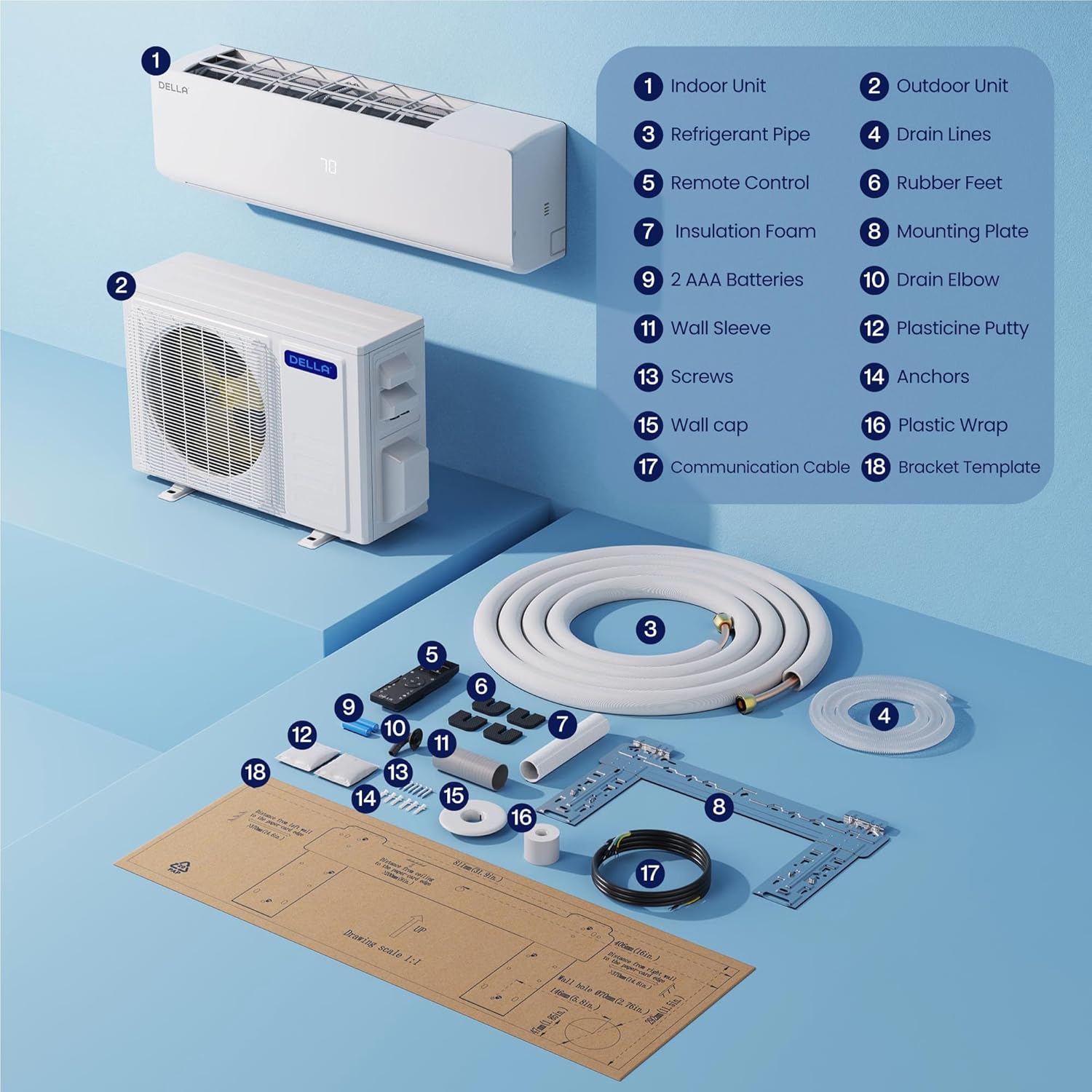
Your DELLA Dual Zone Mini Split Air Conditioner package includes the following components:
- 1 x Outdoor Condenser Unit (35,000 BTU)
- 2 x Indoor Air Handlers (12,000 BTU and 24,000 BTU)
- 2 x Remote Controls (one for each indoor unit)
- 2 x 16ft Copper Pipes (1/4"+1/2" and 1/4"+3/8")
- 2 x Installation Kits
- Drain Pipe (78.7" length)
- สายสื่อสาร
- แผ่นยึด
- ขายาง
- ฉนวนโฟม
- แขนติดผนัง
- Plasticine Putty
- สกรูและสมอ
- แม่แบบวงเล็บ

4. การตั้งค่าและการติดตั้ง
Professional installation is mandatory for this system. It is not designed for DIY installation.
- เตรียมสถานที่ติดตั้ง: Use the provided template to mark locations for the lineset wall hole and the mini split bracket.
- Install Indoor Unit Bracket: Securely attach the mini split bracket to the wall using the provided screws. Use a leveler to ensure correct alignment.
- Route Lineset and Electricals: Route the lineset, drain hose, and electrical wiring through the wall opening.
- ติดตั้งชุดภายในอาคาร: Securely mount the indoor mini split unit onto the bracket.
- Organize Linesets: Tape the drain hose and linesets together for a neat and organized installation. Use zip ties to secure electrical wires around the taped linesets and drain hose.
- Position Outdoor Condenser: Place the outdoor condenser unit in its designated location.
- Connect Linesets: Connect the unit lineset to the condenser lineset and tighten firmly. If available, use a digital torque wrench to ensure proper tightening.
- การเชื่อมต่อไฟฟ้า: Ensure all power sources are turned off. Remove the electrical compartment cover. Connect the numbered wires from the indoor unit to the corresponding numbered terminals on the outdoor condenser's electrical block. Connect the ground wire (green to green). Connect the power cables (black to 'N', red to 'L') to the condenser.
- การดูดฝุ่นระบบ: Ensure you have appropriate vacuum equipment. Connect the hose from the outdoor condenser unit to the gauge, and the hose from the vacuum to the gauge. Open valves on the gauge and turn the vacuum on. Monitor the micron reading closely and close valves once it reaches 350. Turn off the vacuum pump.
- Activate Refrigerant Flow: Restore power to the outlet. Turn the mini split unit on and set it to the lowest cold setting. Allow a few minutes for the outdoor condenser fan to start. Use a service wrench to gradually open the high side (top valve). Monitor the gauge as numbers will drop into the negative range. After opening the high side valve, quickly open the low side (bottom valve). The gauge readings will increase, which is expected.
5. คู่มือการใช้งาน
Your DELLA Mini Split system offers various modes and features for optimal comfort and energy efficiency.
5.1 ฟังก์ชั่นการควบคุมระยะไกล
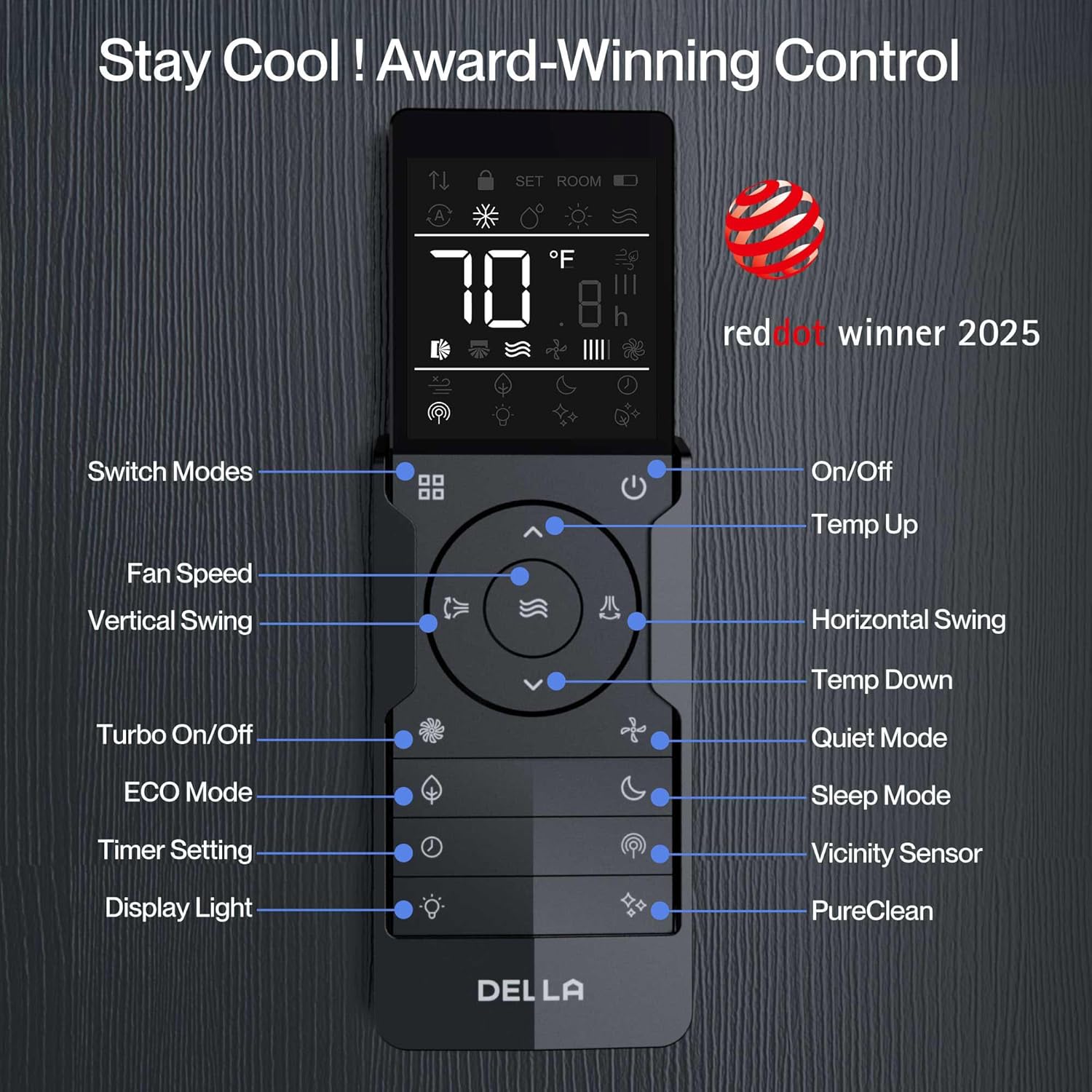
The included remote controls allow you to manage your indoor units individually. Key functions include:
- เปิด/ปิด: เปิดหรือปิดเครื่อง
- การเลือกโหมด: Choose between Heating, Cooling, Dry (dehumidifying), Fan Only, and Auto modes.
- การปรับอุณหภูมิ: Set your desired temperature (60-90°F range).
- ความเร็วพัดลม: Adjust fan speed (multiple settings available).
- การไหลเวียนของอากาศแบบ 4 มิติ: Control vertical and horizontal swing for even air distribution.
- ฟังก์ชั่นจับเวลา: ตั้งเวลาเปิดหรือปิดเครื่องให้ชัดเจน
- โหมดสลีป: ปรับอุณหภูมิและความเร็วพัดลมให้เหมาะสมเพื่อการนอนหลับสบาย
- ECO Energy Saving Mode: ลดการใช้พลังงาน
- ฟังก์ชั่นเทอร์โบ: ให้ความเย็นหรือความร้อนอย่างรวดเร็ว
- โหมดความรู้สึก: Adjusts temperature based on the remote's location for personalized comfort.
5.2 Smart Control with Della+ App (Wi-Fi & Alexa)
Control your DELLA Mini Split unit remotely using the free Della+ app, compatible with Wi-Fi and Alexa. This allows for advanced scheduling, mode selection, and geo-location features.
- การเข้าถึงระยะไกล: Control your unit from anywhere with an internet connection.
- การกำหนดตารางเวลา: Set custom schedules for your unit to turn on/off or change modes.
- Geo-Location Function: Automatically adjust AC settings based on your proximity to your home.
- การควบคุมด้วยเสียง: Integrate with Alexa for hands-free temperature adjustments.

6. การบำรุงรักษา
Regular maintenance ensures optimal performance and longevity of your DELLA Mini Split unit.
- การทำความสะอาดตัวกรอง: Regularly clean or replace air filters in the indoor units to maintain airflow and efficiency.
- การทำความสะอาดยูนิตภายนอก: Keep the outdoor condenser unit free from debris, leaves, and obstructions to ensure proper heat exchange.
- ตรวจสอบท่อระบายน้ำ: Periodically check the drain line for blockages to prevent water leakage.
- การตรวจสอบอย่างมืออาชีพ: Schedule annual professional inspections to check refrigerant levels, electrical connections, and overall system health.
7 การแก้ไขปัญหา
If you encounter issues with your DELLA Mini Split unit, refer to the following common troubleshooting tips:
- หน่วยไม่เปิด: ตรวจสอบแหล่งจ่ายไฟ เบรกเกอร์ และตรวจสอบให้แน่ใจว่าแบตเตอรี่ของรีโมทคอนโทรลใช้งานได้
- การทำความเย็น/ทำความร้อนไม่เพียงพอ: Verify temperature settings, clean air filters, and ensure no obstructions around indoor/outdoor units.
- เสียงที่ผิดปกติ: Minor operational noises are normal. Excessive or unusual noises may indicate a problem; contact professional service.
- รหัสข้อผิดพลาด: If an error code appears on the display (e.g., "EU code" as mentioned by some users), consult the full user manual or contact customer support for specific diagnostic steps.
- Wi-Fi/Alexa Connectivity Issues: Ensure your Wi-Fi network is stable and the Della+ app is updated. Re-pair the device if necessary.
8. ข้อมูลจำเพาะ
| คุณสมบัติ | รายละเอียด |
|---|---|
| หมายเลขรุ่น | 1D4-TL+D1224 |
| ความจุบีทียู | 35,000 BTU/h (Dual Zone: 12,000 BTU + 24,000 BTU) |
| เรตติ้ง SEER2 | 19 ผู้ทำนาย2 |
| เล่มที่tage | 208-230โวลต์ |
| พื้นที่ให้บริการ | Up to 2050 Sq. Ft. (550 Sq. Ft. for 12K unit, 1500 Sq. Ft. for 24K unit) |
| อุณหภูมิในการทำงาน (การทำความร้อน) | ต่ำถึง -13°F (-25°C) |
| ประเภทสารทำความเย็น | R454B (environmentally friendly) |
| ระดับเสียง (ภายในอาคาร) | 36 dBa (ultra silent) |
| คุณสมบัติพิเศษ | 4D Airflow, I Feel Mode, 24-hour Timer, Sleep Mode, ECO Mode, Multiple Fan Speeds, Turbo Function, Dehumidifier, Remote Controlled, Alexa & Wi-Fi Compatible |
| ขนาดฟิวส์สูงสุด | 35เอ |
| ขนาดสินค้า | ขนาด 8.07 นิ้ว (ลึก) x 31.92 นิ้ว (กว้าง) x 11.49 นิ้ว (สูง) (ตัวเครื่องภายใน) |
| น้ำหนักสินค้า | 224 ปอนด์ (ระบบรวม) |
| การรับรอง | ETL Listed, AHRI Certified |


9. การรับประกันและการสนับสนุน
DELLA มอบการสนับสนุนและการรับประกันที่เหนือกว่า เพื่อความอุ่นใจของคุณ
- การรับประกันตลอดอายุการใช้งานแบบจำกัด: Enjoy best-in-class warranty coverage with no additional costs.
- การสนับสนุนลูกค้า: 24/7 live chat support is available. Phone support is available from 6 AM to 4 PM PST.

Ask a question about this manual
Ask about setup, troubleshooting, compatibility, parts, safety, or missing instructions. Manuals+ will review the question and use this page’s manual context to help answer it.