
1. บทนำ
This manual provides essential information for the safe and effective operation of your SHEHDS JMS WEBB Moving Head Light LED 7x20W. This professional stage lighting fixture features RGBW 4-in-1 LEDs, offering versatile beam, wash, and zoom effects. It is designed for various applications, including stage performances, events, and parties. Please read this manual thoroughly before installation and use.
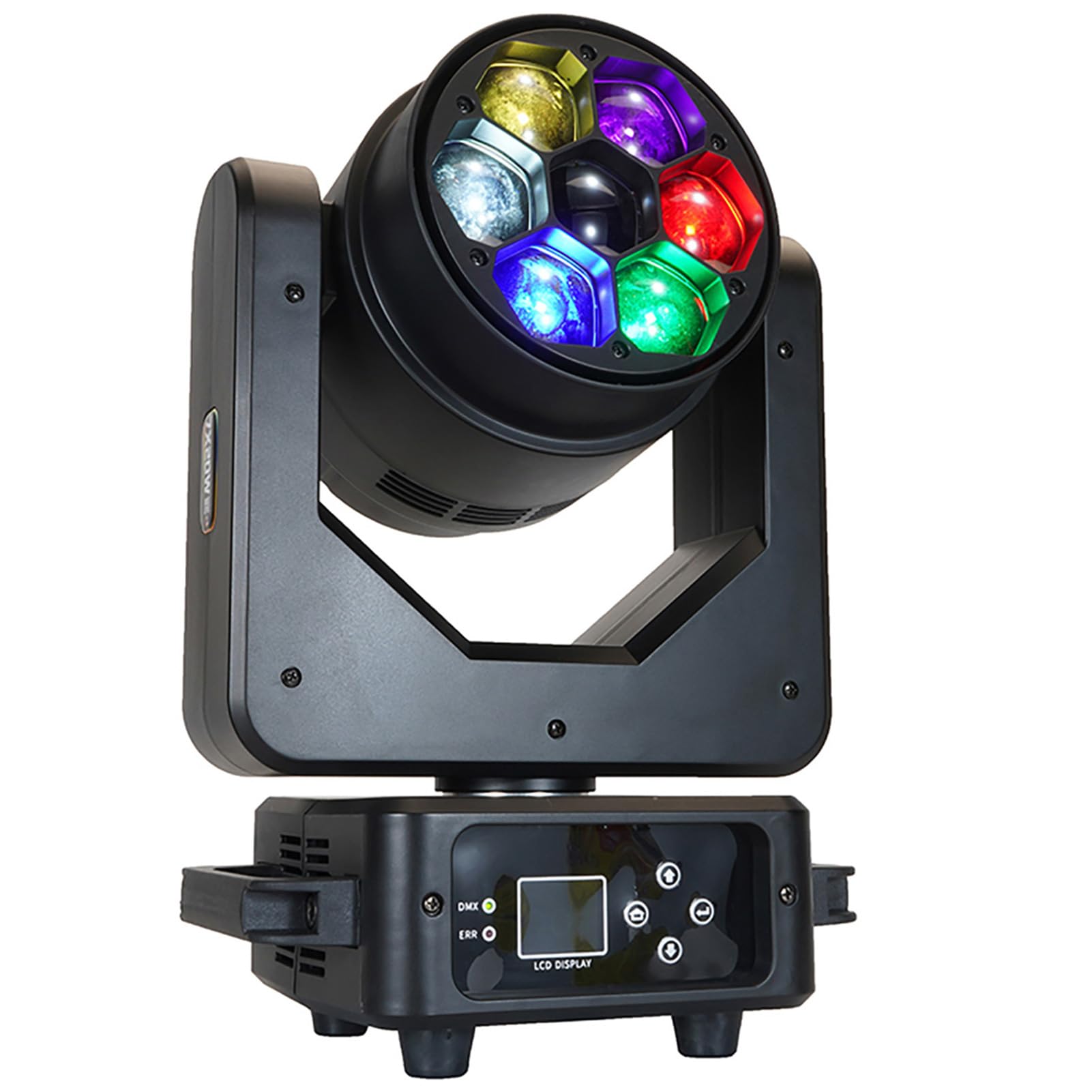
Figure 1: SHEHDS JMS WEBB Moving Head Light LED 7x20W. This image displays the front view of the moving head light, highlighting its multi-color LED array and compact base.
2. คำแนะนำด้านความปลอดภัย
- Always connect the fixture to a grounded circuit to avoid the risk of electrocution.
- ตรวจสอบให้แน่ใจว่าปริมาณพลังงานtage ตรงกับปริมาตรที่กำหนดtage ของโคม
- ห้ามใช้งานอุปกรณ์หากสายไฟชำรุด
- หลีกเลี่ยงการสัมผัสกับแหล่งกำเนิดแสงโดยตรง
- ควรจัดให้มีการระบายอากาศที่เหมาะสมรอบๆ อุปกรณ์เพื่อป้องกันความร้อนสูงเกินไป
- ห้ามเปิดฝาครอบ เนื่องจากไม่มีชิ้นส่วนใดที่ผู้ใช้สามารถซ่อมแซมได้เอง โปรดส่งต่อการซ่อมแซมทั้งหมดให้แก่ช่างผู้ชำนาญการ
- Mount the fixture securely using appropriate clampและสายนิรภัย
3. การตั้งค่า
3.1 การแกะบรรจุภัณฑ์และการตรวจสอบ
Carefully unpack the fixture and inspect it for any damage during transit. Retain the packaging materials for future transport or storage.
3.2 เนื้อหาบรรจุภัณฑ์

Figure 2: Included accessories. This image shows the moving head light alongside its accessories: a 1.2m power cable, a 1m DMX512 cable, a user manual, and a quick lock bracket.
- SHEHDS JMS WEBB Moving Head Light LED 7x20W
- 1.2m Power Cable (x1)
- 1m DMX512 Cable (x1)
- คู่มือผู้ใช้ (x1)
- Quick Lock Bracket (x1)
3.3 การติดตั้ง
The fixture can be floor-mounted or truss-mounted using the provided quick lock bracket. Ensure the mounting surface or truss can support the weight of the fixture. Always use a safety cable as a secondary attachment.
3.4 การเชื่อมต่อสายไฟ
Connect the provided power cable to the power input on the fixture and then to a suitable power outlet. Verify the voltagข้อกำหนด e ก่อนการเชื่อมต่อ
3.5 การเชื่อมต่อ DMX (ไม่บังคับ)
For DMX control, connect a DMX cable from your DMX controller to the DMX IN port of the fixture. For multiple fixtures, daisy-chain them by connecting the DMX OUT of the first fixture to the DMX IN of the next.
4. คู่มือการใช้งาน
4.1 แผงควบคุม
อุปกรณ์นี้มีจอแสดงผล LCD และปุ่มควบคุมสำหรับการนำทางเมนูและการปรับการตั้งค่า โปรดดูเมนูบนหน้าจอสำหรับการตั้งค่าพารามิเตอร์เฉพาะ
4.2 การกำหนดที่อยู่ DMX
Set the DMX address for each fixture using the control panel. Each fixture in a DMX chain requires a unique starting address. The DMX address setting is saved after a power cycle once confirmed.
4.3 Movement Control
The 3-axis motorized head allows for precise pan and tilt movements. The pan range is 540 degrees, and the tilt range is 270 degrees. Adjustable speed motor modules provide smooth and controlled motion.

Figure 3: Movement capabilities. This diagram illustrates the pan (540°) and tilt (270°) ranges of the moving head light, indicating adjustable speed motor modules for precise control.
4.4 Color Mixing (RGBW 4-in-1)
The fixture utilizes RGBW (Red, Green, Blue, White) 4-in-1 LEDs to produce a wide spectrum of colors. Individual color intensity can be adjusted via DMX or internal programs.

Figure 4: RGBW mixed color output. This image demonstrates the individual red, green, blue, and white beams, as well as their mixed color capabilities.

Figure 5: RGBW 4-in-1 capabilities. This graphic highlights the Beam, Wash, and Zoom effects achievable with the 7x20W RGBW LEDs, emphasizing the 'Big Bee Eyes' design.
4.5 Beam, Wash, and Zoom Functions
The fixture offers versatile lighting effects:
- Beam Effect: Creates sharp, focused light beams.
- Wash Effect: Produces a softer, wider spread of light for area illumination.
- ฟังก์ชั่นซูม: Allows adjustment of the beam angle from 4 to 30 degrees for both beam and wash effects. The wide beam angle is 70 degrees.

Figure 6: Beam angle demonstration. This image illustrates the adjustable beam angle from a minimum of 4 degrees to a maximum of 30 degrees, showcasing both beam and wash effects.

Figure 7: Various lighting effects. A collage of images demonstrating different beam patterns, wash effects, and color combinations achievable with the moving head light.
4.6 เอฟเฟกต์ไดนามิก
The fixture supports various dynamic effects, including strobe, color macros, and pre-programmed sequences, which can be controlled via DMX.

Figure 8: Dynamic effects. This image displays various dynamic lighting patterns and color changes, showcasing the versatility of the moving head light's output.
4.7 วิดีโอผลิตภัณฑ์อย่างเป็นทางการ
Video 1: SHEHDS Moving Head Lights LED 7X20W. This official product video from SHEHDS Lighting demonstrates the various features and lighting effects of the moving head light in action.
5. การบำรุงรักษา
5.1 การทำความสะอาด
Regularly clean the exterior of the fixture with a soft, dry cloth. For optical components, use a lint-free cloth and a specialized lens cleaning solution. Ensure the fixture is powered off and disconnected before cleaning.
5.2 Fan and Ventilation
Periodically check the cooling fans and ventilation openings for dust accumulation. Clean them using compressed air to ensure proper airflow and prevent overheating.
5.3 การตรวจสอบสายเคเบิล
Inspect all power and DMX cables for any signs of wear, cuts, or damage. Replace damaged cables immediately to ensure safe operation.
6 การแก้ไขปัญหา
- ไม่มีไฟฟ้า: Check the power cable connection and the power outlet. Ensure the fixture's power switch is on.
- ไม่มีเอาท์พุตแสง: Verify power connection. Check DMX signal if in DMX mode. Ensure internal programs are active if not using DMX.
- ไม่มีการเคลื่อนไหว: Check DMX signal and addressing. Ensure pan/tilt limits are not set to restrict movement.
- สีไม่ถูกต้อง: Verify DMX channel assignments for RGBW. Check for proper DMX signal integrity.
- Fixture Overheating: Ensure adequate ventilation. Clean fans and vents if dusty. Operate within specified ambient temperature ranges.
- ปัญหาเกี่ยวกับการควบคุม DMX: Check DMX cable connections. Verify DMX addressing. Ensure DMX controller is functioning correctly. Try a different DMX cable.
7. ข้อมูลจำเพาะ
| คุณสมบัติ | ข้อมูลจำเพาะ |
|---|---|
| หมายเลขรุ่น | Moving Head Lights LED 7X20W |
| ประเภทแหล่งกำเนิดแสง | ไดโอดเปล่งแสง (LED) |
| จำนวนแหล่งกำเนิดแสง | 7 |
| แหล่งกำเนิดแสง วัดtage | 20 watts per LED |
| รวมวัดtage | 140 วัตต์ |
| เอาท์พุตแสงสูงสุด | 11900 ลูเมน |
| สี | Multicolor (RGBW 4-in-1) |
| มุมลำแสง | 70 degrees (Zoom: 4-30 degrees) |
| แพนเคลื่อนไหว | 540 องศา |
| การเคลื่อนไหวเอียง | 270 องศา |
| โปรโตคอลควบคุม | DMX512 |
| แหล่งพลังงาน | สายไฟ |
| วัสดุ | พลาสติก |
| ประเภทการติดตั้ง | ชั้นเมา |
8. การรับประกันและการสนับสนุน
Specific warranty information is not provided within this manual. For warranty details, technical support, or service inquiries, please contact your retailer or the manufacturer directly. Keep your purchase receipt as proof of purchase.