
1. บทนำ
Thank you for choosing the Goshyda Portable Multimedia 1080P Projector. This compact and versatile device is designed to provide a personal cinema experience, supporting various multimedia inputs for entertainment, presentations, and more. Please read this manual carefully before using the projector to ensure proper operation and to maximize its lifespan.

Image 1.1: The Goshyda YG300 Mini Portable Projector in a home entertainment setting.
2. ข้อมูลด้านความปลอดภัย
- แหล่งจ่ายไฟ: Use only the specified 5V 2A power adapter or a compatible power bank. Incorrect voltagอาจทำให้เครื่องเสียหายได้
- การระบายอากาศ : อย่าปิดกั้นช่องระบายอากาศ ตรวจสอบให้แน่ใจว่ามีการระบายอากาศรอบ ๆ โปรเจ็กเตอร์อย่างเพียงพอเพื่อป้องกันความร้อนสูงเกินไป
- สิ่งแวดล้อม: Avoid exposing the projector to water, moisture, dust, or extreme temperatures. Operate in a clean, dry environment.
- การทำความสะอาด: ถอดปลั๊กไฟออกก่อนทำความสะอาด ใช้ผ้านุ่มและแห้ง ห้ามใช้น้ำยาทำความสะอาดชนิดน้ำหรือสเปรย์
- ถอดชิ้นส่วน: อย่าพยายามถอดประกอบหรือซ่อมแซมโปรเจ็กเตอร์ด้วยตนเอง โปรดติดต่อช่างผู้ชำนาญเพื่อขอรับบริการ
- การปกป้องดวงตา: อย่ามองตรงเข้าไปในเลนส์โปรเจ็กเตอร์เมื่อลamp อยู่บนแล้ว
3. เนื้อหาบรรจุภัณฑ์
กรุณาตรวจสอบสิ่งของภายในกล่องเมื่อแกะกล่อง หากมีสินค้าใดสูญหายหรือเสียหาย โปรดติดต่อตัวแทนจำหน่ายของคุณ
- Goshyda Portable Projector
- รีโมทคอนโทรล
- เคเบิ้ล AV
- อะแดปเตอร์แปลงไฟ
- คู่มือการใช้งาน (เอกสารนี้)

Image 3.1: Included accessories with the Goshyda Portable Projector.
4. สินค้าหมดview
4.1. คุณสมบัติของโปรเจคเตอร์
- รองรับความละเอียด 1080P: ให้ภาพที่คมชัดและมีรายละเอียดสูง
- การออกแบบกะทัดรัดและพกพาสะดวก: Weighing approximately 290g, it is easy to carry.
- การเชื่อมต่อแบบหลายพอร์ต: Includes USB, HDMI, AV, memory card slot, and audio output.
- ลำโพงในตัว: มีระบบเสียงในตัวเพื่อความสะดวกสบาย
- พลังที่ยืดหยุ่น: Can be powered by a 5V 2A wall charger or power bank.

Image 4.1: Visual representation of the projector's main features.
4.2. Projector Ports and Controls
Familiarize yourself with the various ports and controls on your projector.
- เลนส์: Front-facing projection lens.
- วงแหวนโฟกัส: ปรับความคมชัดของภาพ
- แหล่งจ่ายไฟเข้า (DC IN): เชื่อมต่อกับอะแดปเตอร์แปลงไฟ 5V 2A
- พอร์ต HDMI: สำหรับเชื่อมต่ออุปกรณ์ผ่านสาย HDMI
- พอร์ต USB: สำหรับเชื่อมต่ออุปกรณ์จัดเก็บข้อมูล USB
- พอร์ต AV: For connecting devices via AV cable.
- ช่องเสียบการ์ด MicroSD: สำหรับการใส่การ์ดหน่วยความจำ
- เอาต์พุตเสียง: สำหรับเชื่อมต่อลำโพงภายนอกหรือหูฟัง
- ปุ่มควบคุม: On the top panel for basic navigation and selection.

ภาพที่ 4.2: ด้านข้าง view of the projector highlighting its connectivity ports.

Image 4.3: Close-up of the projector lens.
5. การตั้งค่า
5.1. การเชื่อมต่อไฟฟ้า
- Connect the provided power adapter to the DC IN port on the projector.
- เสียบอะแดปเตอร์จ่ายไฟเข้ากับเต้ารับไฟฟ้ามาตรฐาน
- Alternatively, for portable use, connect a 5V 2A power bank to the DC IN port.

Image 5.1: Powering the projector via wall adapter or power bank.
5.2. การจัดวางและการฉายภาพ
Place the projector on a stable, flat surface. The optimal projection distance is between 1 to 2.5 meters, allowing for a screen size of up to 60 inches.
- สำหรับจอขนาด 24 นิ้ว ให้วางโปรเจคเตอร์ห่างจากจอประมาณ 0.8 เมตร
- สำหรับจอขนาด 47 นิ้ว ให้วางโปรเจคเตอร์ห่างจากจอประมาณ 1.2 เมตร
- สำหรับจอขนาด 60 นิ้ว ให้วางโปรเจคเตอร์ห่างจากจอประมาณ 1.6 เมตร
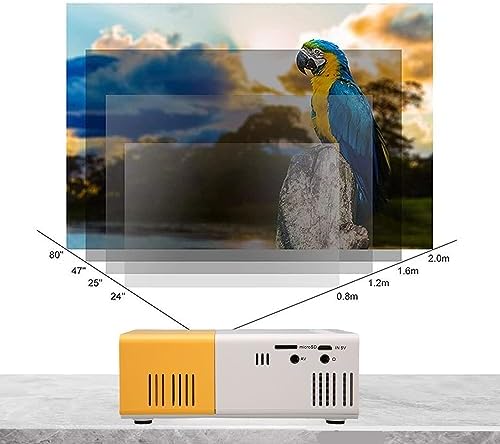
Image 5.2: Projection distance guidelines for various screen sizes. Note: Maximum recommended projection size is 60 inches.
5.3. การปรับโฟกัส
After placing the projector and powering it on, rotate the focus ring located around the lens until the projected image appears clear and sharp.
6. คู่มือการใช้งาน
6.1. เปิด/ปิดเครื่อง
- เปิดเครื่อง: กดปุ่มเปิด/ปิดบนโปรเจคเตอร์หรือรีโมทคอนโทรล
- หมดแรง: กดปุ่มเปิด/ปิดอีกครั้ง โปรเจ็กเตอร์จะปิดลง
6.2. การเลือกแหล่งอินพุต
Use the 'Source' button on the remote control or the projector's control panel to cycle through available input sources (HDMI, USB, AV, MicroSD).
6.3. การนำทางเมนู
Use the arrow buttons on the remote control or projector to navigate through menus. Press 'OK' or 'Enter' to confirm selections. Use the 'Return' or 'Back' button to go back to the previous menu.
7. การเชื่อมต่อ
The projector offers multiple connectivity options for various devices.

Image 7.1: Connectivity options for the Goshyda projector.
7.1. การเชื่อมต่อ HDMI
Connect devices such as laptops, TV Sticks, game consoles (e.g., for Xbox One), or Blu-ray players using an HDMI cable. Select 'HDMI' as the input source.
7.2. การเชื่อมต่อ USB
เสียบแฟลชไดรฟ์ USB เข้ากับพอร์ต USB เพื่อเล่นสื่อ files directly. Select 'USB' as the input source and navigate through your files.
7.3. AV Connection
Use the provided AV cable to connect older devices like DVD players. Select 'AV' as the input source.
7.4. Smartphone/Tablet Connection
To connect directly to your smartphone or tablet, you will need an appropriate adapter (e.g., Micro USB to HDMI, Type-C to HDMI, or a dedicated HD multimedia interface device), depending on your device's operating system (OS X or Android) and available ports. These adapters are sold separately.
7.5. เอาต์พุตเสียง
Connect external speakers or headphones to the audio output port for enhanced sound.
8. การบำรุงรักษา
- การทำความสะอาดเลนส์: Use a soft, lint-free cloth specifically designed for optical lenses to gently wipe the projector lens. Do not use abrasive materials or harsh chemicals.
- การทำความสะอาดภายนอก: เช็ดทำความสะอาดภายนอกของโปรเจคเตอร์ด้วยผ้าแห้งเนื้อนุ่ม
- พื้นที่จัดเก็บ: เมื่อไม่ได้ใช้งานเป็นเวลานาน ควรเก็บโปรเจคเตอร์ไว้ในที่แห้งและเย็น หลีกเลี่ยงแสงแดดโดยตรงและฝุ่นละออง
9 การแก้ไขปัญหา
| ปัญหา | สาเหตุที่เป็นไปได้ | สารละลาย |
|---|---|---|
| ไม่มีไฟฟ้า | Power adapter not connected or faulty; insufficient power supply. | Ensure the 5V 2A power adapter is securely connected and plugged into a working outlet. Try a different power source or power bank. |
| ไม่มีรูปภาพ | Incorrect input source selected; cable not connected properly; device not outputting signal. | Select the correct input source (HDMI, USB, AV). Check all cable connections. Ensure the connected device is powered on and outputting a signal. |
| ภาพเบลอ | ไม่ได้ปรับโฟกัส; โปรเจ็กเตอร์อยู่ใกล้/ไกลจากจอมากเกินไป | Rotate the focus ring to sharpen the image. Adjust the projection distance within the recommended range (1-2.5m). |
| ไม่มีเสียง | Volume too low or muted; external speakers not connected; audio format not supported. | Increase the volume on the projector and the source device. Check if external speakers are properly connected. Ensure the audio format is supported. |
10. ข้อมูลจำเพาะ
| คุณสมบัติ | รายละเอียด |
|---|---|
| ยี่ห้อ | Goshyda |
| หมายเลขรุ่น | Goshyda89pkbg17g0 |
| ความละเอียดการแสดงผล | 1920 x 1080 (1080P Support) |
| ความสว่าง | 200 ลูเมน |
| อัตราส่วนภาพ | 4:3 น. |
| ระยะฉายภาพ | 1 - 2.5 เมตร |
| ขนาดการฉายภาพ | สูงถึง 60 นิ้ว |
| เทคโนโลยีการเชื่อมต่อ | HDMI, USB, AV, MicroSD, Audio Out |
| กำลังไฟเข้า | 5V 2A |
| ประเภทจอภาพ | จอแอลซีดี |
| ขนาดสินค้า | 12L x 8.5W x 4.6H cm (Approx. 4.7 x 3.3 x 1.8 inches) |
| ฟอร์มแฟกเตอร์ | พกพาได้ |
| ประเภทการติดตั้ง | ติดตั้งบนโต๊ะ |
11. การรับประกันและการสนับสนุน
For warranty information and customer support, please refer to the documentation provided with your purchase or contact your retailer directly. Keep your proof of purchase for warranty claims.