
1. บทนำ
This manual provides instructions for the Beyution RMT-V504A replacement infrared remote control. This remote is designed to operate various Sony DVD VCR Combo Player models without requiring any programming or setup. Simply insert batteries, and it is ready for use.
รุ่นที่ใช้งานร่วมกันได้ ได้แก่:
- RMT-V501A, RMT-V501, RMT-V501C, RMT-V501D, RMT-V501E, RMT-V501F
- SLV-D100, SLV-D281P, SLV-D380P, YSP-4000BL, HT-V1000D, HT-V1000DP, HT-V3000DP
- SLV-D201, SLV-D201P, SLV-D251, SLV-D251P, SLV-D261, SLV-D261P, SLV-D271, SLV-D271P
- SLV-D281, SLV-D300, SLV-D300P, SLV-D350, SLV-D350P, SLV-D360P, SLV-D370P, SLV-D380
- SLV-D550P, SLV-D560P, SLV-D570H, SLVD-100, SLVD100, SLVD281P, SLVD380P, YSP4000BL
- SLVD271P, SLVD500P, SLVD506P, SLV-D500, SLV-D506P, SLVD560P, SLVD570H, SLVD360
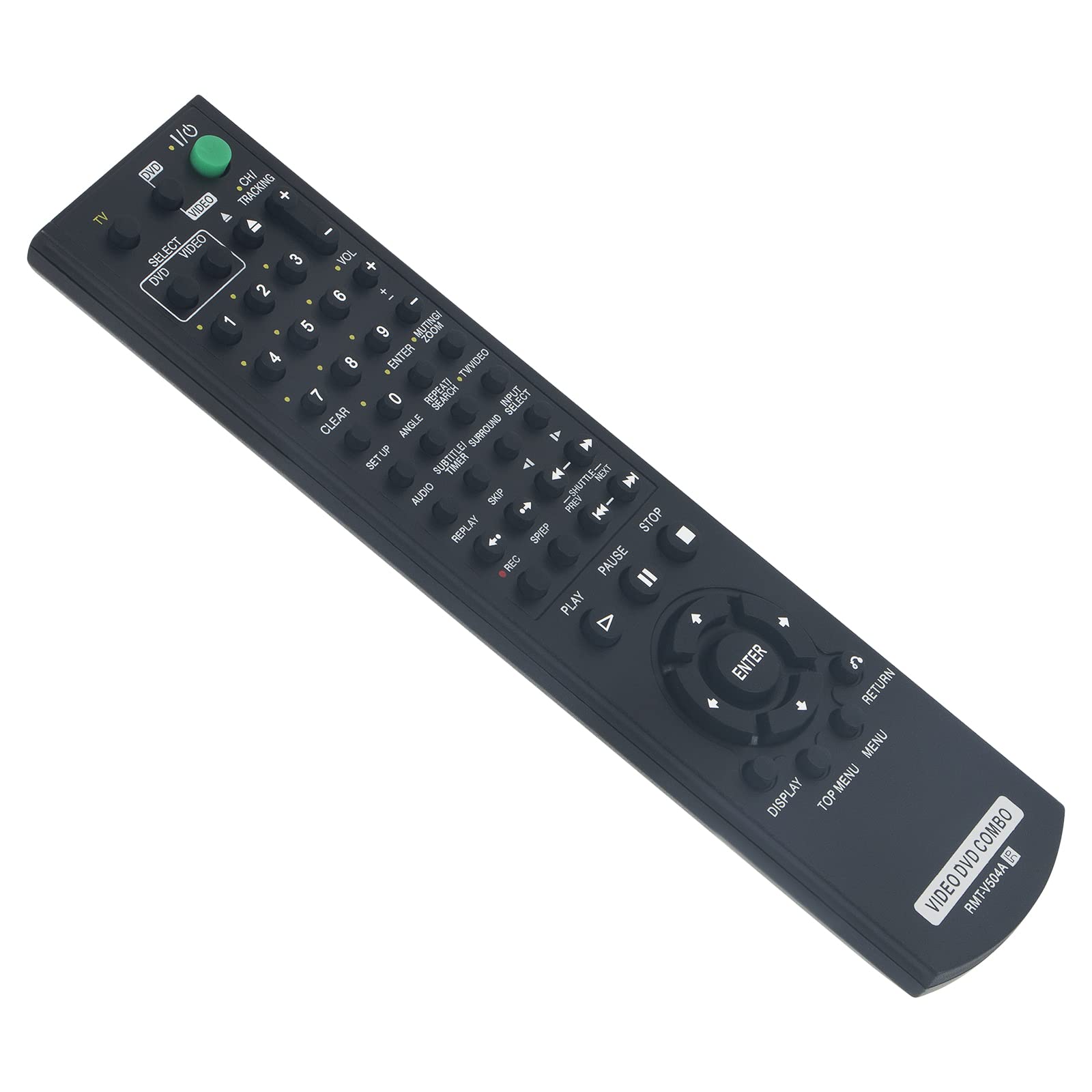
Figure 1: Beyution RMT-V504A Replacement Remote Control
2. การตั้งค่า
2.1 การติดตั้งแบตเตอรี่
The Beyution RMT-V504A remote control requires two (2) AAA batteries (not included) for operation.
- ค้นหาฝาปิดช่องใส่แบตเตอรี่ที่ด้านหลังของรีโมทคอนโทรล
- เลื่อนฝาครอบลงหรือกดที่สลัก (ถ้ามี) เพื่อเปิดช่อง
- Insert two new AAA alkaline batteries, ensuring the positive (+) and negative (-) terminals match the diagrams inside the compartment.
- ปิดฝาช่องใส่แบตเตอรี่กลับเข้าที่โดยเลื่อนกลับเข้าที่จนกระทั่งล็อคเข้าที่อย่างแน่นหนา

รูปที่ 2: การติดตั้งแบตเตอรี่
2.2 การใช้งานเบื้องต้น
This replacement remote control is pre-programmed and does not require any additional setup or coding. Once batteries are installed, it is ready to operate your compatible Sony DVD VCR Combo Player.
3. คู่มือการใช้งาน
Point the remote control directly at the infrared receiver on your Sony DVD VCR Combo Player. The effective operating distance is approximately 8 to 10 meters (26 to 33 feet).

รูปที่ 3: คุณสมบัติของรีโมทคอนโทรล
3.1 ฟังก์ชั่นที่สำคัญ
- POWER (TV I/O): เปิดหรือปิดอุปกรณ์ที่เชื่อมต่อ
- SELECT DVD/VIDEO: สลับระหว่างโหมด DVD และ VCR
- ปุ่มตัวเลข (0-9): Used for direct track/chapter selection or channel input.
- ปริมาณ (+/-): ปรับระดับเสียง
- CH/TRACKING (+/-): Changes channels or adjusts VCR tracking.
- เล่น (►): เริ่มเล่น
- PAUSE (▮▮): หยุดการเล่นชั่วคราว
- หยุด (■): หยุดการเล่น
- บันทึก (●): เริ่มการบันทึก (ฟังก์ชัน VCR)
- REW/FF (◀◀ / ►►): กรอไปข้างหน้าหรือกรอถอยหลัง
- SKIP (◀► / ►►): Skips tracks/chapters.
- เข้า: ยืนยันการเลือกในเมนู
- การแสดงผล: แสดงข้อมูลที่แสดงบนหน้าจอ
- เมนูหลัก/เมนู: Accesses the main menu or disc menu.
- กลับ: กลับไปยังหน้าจอหรือเมนูที่แล้ว
- Other buttons (SET UP, ANGLE, SUBTITLE, AUDIO, TIME, SEARCH, etc.) function according to your specific player's capabilities.
4. การบำรุงรักษา
4.1 การทำความสะอาด
ในการทำความสะอาดรีโมทคอนโทรล ให้ใช้ผ้านุ่มและแห้ง ห้ามใช้น้ำยาทำความสะอาด สเปรย์ หรือวัสดุที่มีฤทธิ์กัดกร่อน เพราะอาจทำให้พื้นผิวหรือส่วนประกอบภายในของรีโมทคอนโทรลเสียหายได้
4.2 การเปลี่ยนแบตเตอรี่
Replace batteries when the remote's response becomes sluggish or it stops functioning. Always replace both batteries at the same time with new AAA alkaline batteries. Do not mix old and new batteries or different types of batteries.
4.3 พื้นที่จัดเก็บ
เก็บรีโมทคอนโทรลไว้ในที่แห้งและเย็น หลีกเลี่ยงแสงแดดโดยตรงและอุณหภูมิที่สูงหรือต่ำเกินไป หากไม่ได้ใช้งานรีโมทคอนโทรลเป็นเวลานาน ควรถอดแบตเตอรี่ออกเพื่อป้องกันการรั่วไหล
5 การแก้ไขปัญหา
- รีโมตไม่ตอบสนอง:
- Ensure batteries are correctly inserted with the correct polarity.
- เปลี่ยนแบตเตอรี่เก่าด้วยแบตเตอรี่อัลคาไลน์ AAA ใหม่
- Check for any obstructions between the remote control and the device's infrared receiver.
- Ensure you are within the effective operating range (8-10 meters) and pointing the remote directly at the device.
- Some functions are not working:
- Verify that your Sony DVD VCR Combo Player model is listed as compatible. While this remote is designed for broad compatibility, some specific functions may vary depending on the original remote's layout and your player's capabilities.
- Clean the remote's infrared emitter (the LED at the front) to ensure a clear signal.
- Remote received damaged or not working upon arrival:
- ติดต่อฝ่ายสนับสนุนลูกค้าทันทีเพื่อขอความช่วยเหลือ
6. ข้อมูลจำเพาะ
| หมายเลขรุ่น | RMT-V504A |
| เทคโนโลยีการเชื่อมต่อ | อินฟาเรด (IR) |
| วัสดุ | พลาสติก ABS |
| ระยะการทำงานสูงสุด | ประมาณ 10 เมตร (33 ฟุต) |
| แบตเตอรี่ที่จำเป็น | 2 x AAA (ไม่รวม) |
| ขนาดสินค้า | 6.3 x 1.57 x 0.39 นิ้ว (16 x 4 x 1 ซม.) |
| น้ำหนักสินค้า | 2.82 ออนซ์ (80 กรัม) |

Figure 4: Remote Control Dimensions and Material
7. การรับประกันและการสนับสนุน
7.1 ข้อมูลการรับประกัน
This Beyution RMT-V504A remote control comes with a ระยะเวลาการรับประกัน 6 เดือน นับจากวันที่ซื้อ การรับประกันนี้ครอบคลุมถึงข้อบกพร่องจากการผลิตและการทำงานผิดปกติภายใต้การใช้งานปกติ
7.2 การสนับสนุนลูกค้า
If you encounter any issues with your remote control, have questions about compatibility, or require assistance, please contact our customer service team. We aim to provide a satisfactory solution within 24 hours.
วิธีการติดต่อ: Please refer to your purchase documentation or the seller's contact information provided at the time of purchase (e.g., via email).