
1. บทนำ
The Nobsound VFD253 is a versatile audio device that integrates multiple functions into a single unit. It serves as an audio spectrum analyzer, a Bluetooth receiver, an audio switcher, and a high-precision clock. This manual provides essential information for setting up, operating, and maintaining your VFD253 to ensure optimal performance.

ภาพที่ 1.1: The Nobsound VFD253 Audio Spectrum Analyzer Receiver displaying the time.
2. คุณสมบัติหลัก
- การออกแบบแบบหลายฟังก์ชั่น: Combines an audio spectrum analyzer, Bluetooth 5.0 receiver, 3.5mm AUX audio switcher, and a high-precision clock.
- High-Resolution VFD Display: Features a 25x15 dedicated green VFD display for accurate visualization of audio frequency bands.
- อินพุตเสียงอเนกประสงค์: Includes a built-in microphone pickup, Bluetooth 5.0 connectivity, and two 3.5mm AUX inputs for compatibility with various audio sources like smartphones, PCs, game players, amplifiers และลำโพง
- Adjustable Display Modes & Brightness: Offers 5 decorative music spectrum display modes and 2 clock display modes. The VFD backlight brightness can be adjusted manually (3 levels) or automatically to suit different environments.
- นาฬิกาความแม่นยำสูง: Equipped with an RX8025T built-in crystal oscillator, providing a clock accuracy of ±3ppm, resulting in an annual error of less than 1 minute.
- ช่วงความถี่กว้างและการแสดงผล AGC: Supports an 80Hz-16KHz frequency sweep. A special Automatic Gain Control (AGC) algorithm and customized output curve ensure optimal visual effects across a wide range of input signal levels, preventing under-display for low inputs and over-display for high inputs.
- Customizable Display Effects: Individual adjustments for gain, brightness, main light column fall speed, hold time, and peak fall speed.
- หน่วยความจำเมื่อปิดเครื่อง: All settings are saved automatically and retained after power cycling, eliminating the need for re-configuration.
- การควบคุมระยะไกลที่สะดวก: Allows easy adjustment of all settings from a distance.

ภาพที่ 2.1: เกินview of the VFD253's multi-functional capabilities, including audio spectrum analysis, Bluetooth, and AUX inputs.

ภาพที่ 2.2: The VFD253 displaying an audio spectrum in a typical home audio environment, highlighting its wide frequency range and AGC display.
3. เนื้อหาบรรจุภัณฑ์
กรุณาตรวจสอบแพ็คเกจสำหรับรายการต่อไปนี้:
- 1 × Nobsound VFD253 Audio Spectrum Analyzer Receiver
- 1 × สาย USB Type-C
- 1 × รีโมทคอนโทรล (ไม่รวมแบตเตอรี่)

ภาพที่ 3.1: The Nobsound VFD253 package contents: the main unit, a USB Type-C cable, and a remote control.
4. สินค้าหมดview (ปุ่มควบคุมและพอร์ต)
Familiarize yourself with the various controls and connection ports on your VFD253 unit.

ภาพที่ 4.1: Front panel buttons and rear panel connections of the VFD253. Front buttons include 'Mode -', 'Mode +', and 'Audio source selection / Power switch'. Rear ports include 3.5mm AUX output, microphone pickup, 3.5mm AUX input (IN1), 3.5mm AUX input (IN2), and DC IN (Type-C).
- ปุ่มที่แผงด้านหน้า:
- โหมด -: Decreases display mode or setting value.
- โหมด +: Increases display mode or setting value.
- การเลือกแหล่งสัญญาณเสียง / สวิตช์เปิด/ปิด: Short press to cycle through audio inputs; long press to power on/off.
- พอร์ตแผงด้านหลัง:
- เอาต์พุต AUX 3.5 มม.: เชื่อมต่อกับ an ampลำโพงขยายหรือลำโพงแอคทีฟ
- การรับไมโครโฟน: Built-in microphone for ambient sound analysis.
- ช่องต่อ AUX 3.5 มม. (IN1): Connects to an audio source via 3.5mm cable.
- ช่องต่อ AUX 3.5 มม. (IN2): Connects to a second audio source via 3.5mm cable.
- อินพุต DC (ชนิด C): แหล่งจ่ายไฟเข้าสำหรับอุปกรณ์นี้
5. การตั้งค่า
- การเชื่อมต่อไฟฟ้า: Connect the provided USB Type-C cable to the DC IN port on the rear of the VFD253 and plug the other end into a suitable USB power adapter (5V DC, not included).
- เปิดเครื่อง: Long press the 'Audio Source Selection / Power Switch' button on the front panel or press the power button on the remote control to turn on the unit.
- การเชื่อมต่ออินพุตเสียง:
- บลูทูธ: Select Bluetooth input using the front panel button or remote. Enable Bluetooth on your audio source (e.g., smartphone, PC) and pair with 'VFD253'.
- อินพุต AUX: Connect your audio source (e.g., CD player, PC) to either the IN1 or IN2 3.5mm AUX input port using a 3.5mm audio cable. Select the corresponding AUX input.
- ไมโครโฟน: Select the microphone input to analyze ambient sound.
- ช่องต่อสัญญาณเสียงออก (ไม่บังคับ): If using the VFD253 as an audio switcher, connect the 3.5mm AUX Output port to your ampลำโพงขยายหรือลำโพงแอคทีฟ
6. คู่มือการใช้งาน
6.1. การทำงานพื้นฐาน
- เปิด/ปิดเครื่อง: Long press the 'Audio Source Selection / Power Switch' button on the front panel or press the พลัง ปุ่มบนรีโมต
- การเลือกอินพุต: Short press the 'Audio Source Selection / Power Switch' button on the front panel or use the ป้อนข้อมูล button on the remote to cycle through AUX1, AUX2, Bluetooth, and Microphone inputs.
- การเลือกโหมดการแสดงผล: ใช้ โหมด button on the remote to switch between the 5 music spectrum display modes and 2 clock display modes.
- การปรับความสว่าง: ใช้ ความสว่าง button on the remote to adjust the VFD display brightness manually (3 levels). The unit also supports automatic brightness adjustment.
6.2. Advanced Settings (via Remote Control)
The remote control provides access to various advanced settings for customizing the display effects.
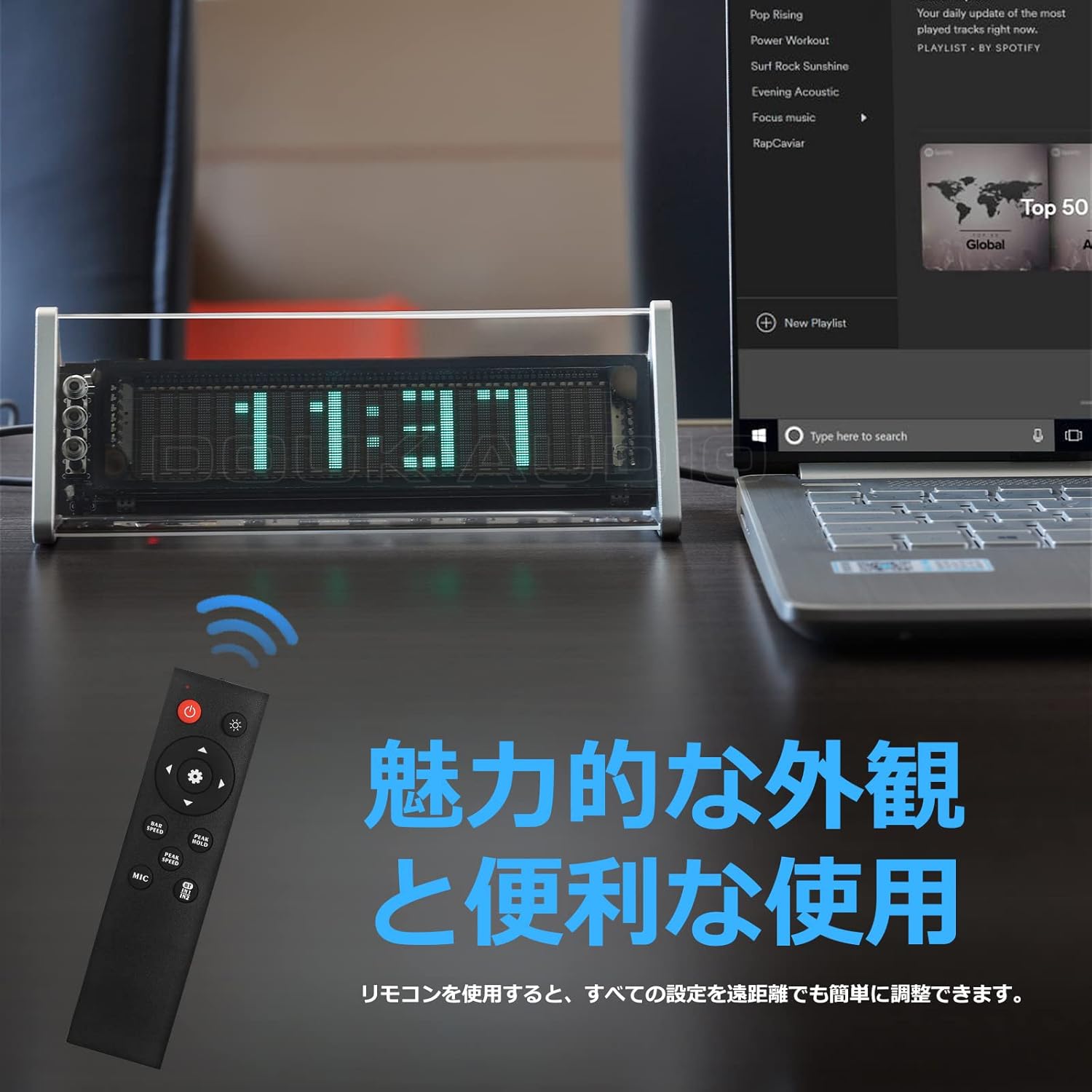
ภาพที่ 6.1: The remote control for the Nobsound VFD253, showing buttons for power, input, mode, brightness, gain, and speed adjustments.
- การปรับค่าเกน: ใช้ Gain +/- buttons to adjust the input sensitivity, affecting the height of the spectrum display.
- Fall Speed Adjustment: ใช้ ความเร็ว +/- buttons to adjust the fall speed of the main light column and peak indicators.
- Hold Time Adjustment: Adjust the duration for which peak indicators remain on screen.
- MIC Input Toggle: ใช้ ไมค์ button to enable or disable the built-in microphone input.
- การตั้งค่าหน่วยความจำ: All adjustments are automatically saved thanks to the power-off memory function.
7. โหมดการแสดงผล
The VFD253 offers a variety of visual display options to enhance your audio experience or provide time information.
7.1. Music Spectrum Display Modes (5 Types)
These modes visualize the audio input in different dynamic patterns on the VFD screen.

ภาพที่ 7.1: Examples of various music spectrum display modes available on the VFD253.

ภาพที่ 7.2: รายละเอียด view of one of the music spectrum display modes.
7.2. Clock Display Modes (2 Types)
When no audio signal is detected for a period, or when manually selected, the unit can display the time.

ภาพที่ 7.3: รายละเอียด view of one of the clock display modes.
8. ข้อมูลจำเพาะ
| คุณสมบัติ | ข้อมูลจำเพาะ |
|---|---|
| ยี่ห้อ | นอบซาวน์ |
| แบบอย่าง | VFD253 |
| ประเภทจอภาพ | Digital VFD (25 × 15 resolution) |
| ช่วงความถี่ | 80Hz - 16KHz |
| ความแม่นยำของนาฬิกา | ±3ppm (annual error < 1 minute) |
| การเชื่อมต่อ | Bluetooth 5.0, 2 × 3.5mm AUX Input, 1 × 3.5mm AUX Output |
| กำลังไฟเข้า | ไฟฟ้ากระแสตรง 5V (USB Type-C) |
| ขนาด (ยาว × สูง × ลึก) | 184mm × 66mm × 75mm (approx. 7.24in × 2.60in × 2.95in) |
| น้ำหนักสุทธิ | 322กรัม (0.71ปอนด์) |
| วัสดุกรอบ | เอบีเอส |
9 การแก้ไขปัญหา
If you encounter any issues with your VFD253, please refer to the following common problems and solutions:
- ไม่มีจอแสดงผล:
- Ensure the USB Type-C power cable is securely connected and receiving power.
- Press the power button on the unit or remote to ensure it is turned on.
- No Audio Output (when using AUX Out):
- Verify that the correct input source (AUX1, AUX2, or Bluetooth) is selected.
- Check all 3.5mm audio cable connections between the source, VFD253, and your ampเครื่องขยายเสียง/ลำโพง
- ให้แน่ใจว่าคุณ ampเครื่องขยายเสียง/ลำโพงเปิดใช้งานอยู่และตั้งค่าอินพุตถูกต้องแล้ว
- Display Not Reacting to Audio:
- Ensure an audio source is playing and connected correctly.
- If using microphone input, ensure the MIC input is enabled and there is ambient sound.
- ปรับแต่ง ได้รับ setting via the remote control to increase sensitivity.
- ปัญหาการจับคู่บลูทูธ:
- Ensure the VFD253 is set to Bluetooth input mode.
- Disable and re-enable Bluetooth on your audio source device.
- Move the audio source closer to the VFD253 to ensure a strong signal.
- รีโมทคอนโทรลไม่ทำงาน:
- ตรวจสอบและเปลี่ยนแบตเตอรี่ในรีโมทคอนโทรล
- Ensure there is a clear line of sight between the remote and the VFD253.
10. การบำรุงรักษา
To ensure the longevity and proper functioning of your Nobsound VFD253, follow these maintenance guidelines:
- การทำความสะอาด: Use a soft, dry cloth to wipe the unit. Avoid using abrasive cleaners, solvents, or chemical sprays, as these can damage the finish or internal components.
- สิ่งแวดล้อม: Place the unit in a dry, well-ventilated area away from direct sunlight, high temperatures, humidity, and strong magnetic fields.
- การจัดการ: โปรดใช้งานด้วยความระมัดระวัง หลีกเลี่ยงการทำตกหรือการกระแทกอย่างแรง
- ถอดชิ้นส่วน: Do not attempt to disassemble or modify the unit. This will void the warranty and may cause damage or injury.
11. การรับประกันและการสนับสนุน
Nobsound products are designed for reliability and performance. For warranty information, technical support, or service inquiries, please refer to the official Nobsound webไซต์หรือติดต่อตัวแทนจำหน่ายที่ได้รับอนุญาตของคุณ
- การสนับสนุนทางออนไลน์: Visit the official Nobsound website for FAQs, product updates, and contact information.
- บริการลูกค้า: If you require further assistance, please contact Nobsound customer support with your product model and purchase details.