
การแนะนำ
This manual provides instructions for the Beyution RC877S replacement infrared remote control. This remote is designed to be a direct replacement for various Onkyo Audio Soundbar and Home Theater Systems, including models LS-T10, LS-B50, LSB50, LST10, 24140877, RC-877S, and RC877. It operates using infrared technology and typically requires no programming or setup for compatible devices.
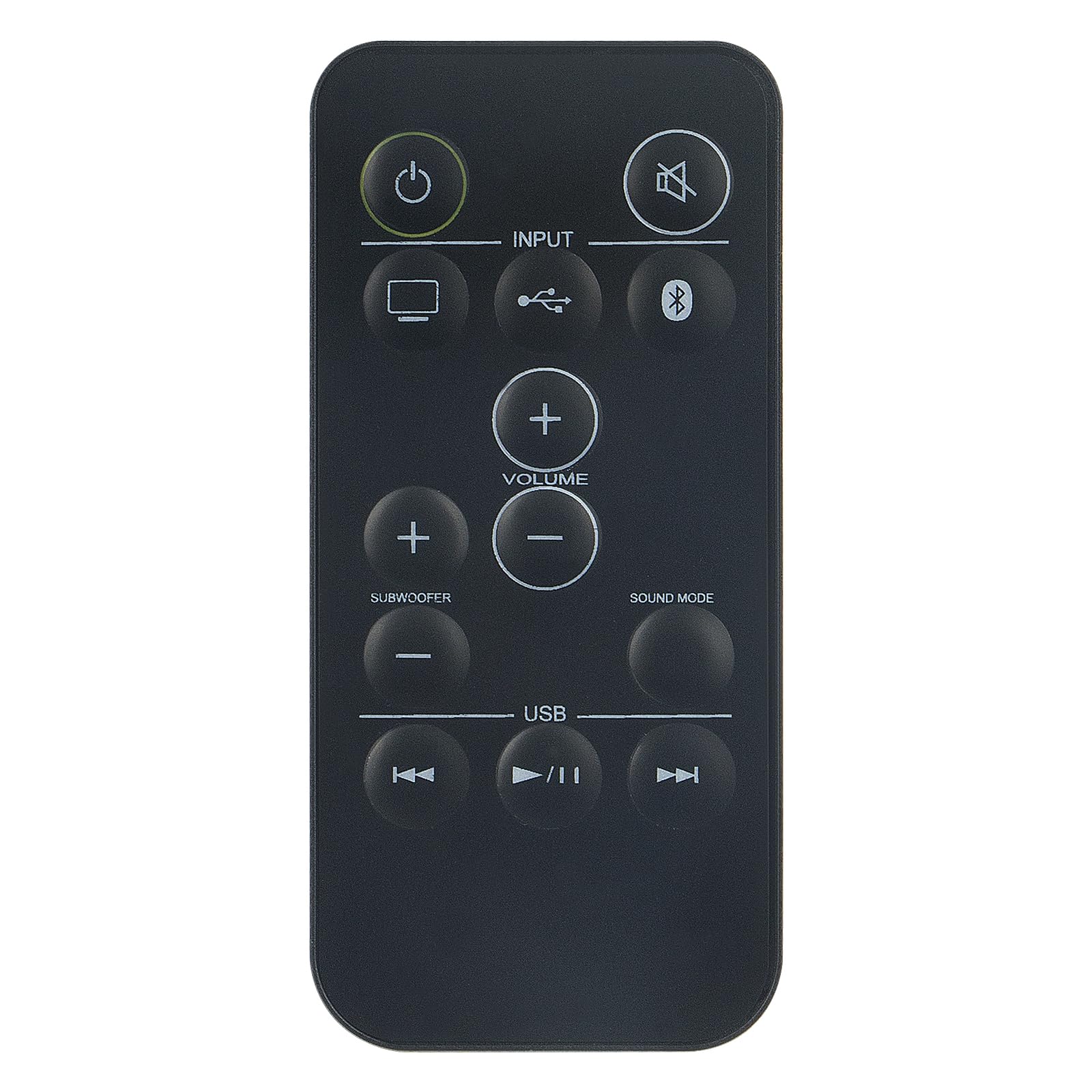
ภาพ: ด้านหน้า view of the Beyution RC877S remote control, showing all buttons clearly labeled.
การตั้งค่า
การติดตั้งแบตเตอรี่
The RC877S remote control requires two AAA batteries for operation. Follow these steps to install the batteries:
- ค้นหาฝาปิดช่องใส่แบตเตอรี่ที่ด้านหลังของรีโมทคอนโทรล
- เลื่อนฝาครอบลงหรือกดที่สลัก (ถ้ามี) เพื่อเปิดช่อง
- ใส่แบตเตอรี่ AAA สองก้อน โดยตรวจสอบให้แน่ใจว่าขั้วบวก (+) และขั้วลบ (-) ตรงกับเครื่องหมายภายในช่อง
- ปิดฝาช่องใส่แบตเตอรี่กลับเข้าที่โดยเลื่อนกลับเข้าที่จนกระทั่งล็อคเข้าที่อย่างแน่นหนา
บันทึก: This remote control is designed to work immediately with compatible devices without any additional programming. If the remote does not respond, ensure batteries are installed correctly and have sufficient charge.

ภาพ: มุมเอียง view of the Beyution RC877S remote control, highlighting its ergonomic design.
คำแนะนำการใช้งาน
Point the remote control directly at your Onkyo audio soundbar or home theater system. The maximum effective operating distance is approximately 10 meters (33 feet).
ปุ่มฟังก์ชั่น:
- พลังงาน (⏻): เปิดหรือปิดอุปกรณ์
- ปิดเสียง (🔇): ปิดเสียงหรือเปิดเสียงเอาต์พุตเสียง
- ป้อนข้อมูล: Cycles through available input sources (e.g., TV, USB, Bluetooth).
- ปริมาณ (+/-): Increases or decreases the main volume level.
- Subwoofer (+/-): ปรับระดับเสียงของซับวูฟเฟอร์
- โหมดเสียง: Changes the audio sound mode or preset.
- ยูเอสบี: Selects the USB input source.
- Previous Track (⏮): Skips to the beginning of the current track or the previous track during media playback.
- Play/Pause (⏸/⏸): เล่นหรือหยุดการเล่นสื่อชั่วคราว
- Next Track (⏭): Skips to the next track during media playback.

Image: A person comfortably using the remote control to operate a home theater system, demonstrating typical usage.
การซ่อมบำรุง
เพื่อให้รีโมทคอนโทรลของคุณมีอายุการใช้งานยาวนานและมีประสิทธิภาพเหมาะสมที่สุด โปรดปฏิบัติตามคำแนะนำการบำรุงรักษาดังต่อไปนี้:
- การทำความสะอาด: เช็ดรีโมทคอนโทรลด้วยผ้าแห้งนุ่มๆ สำหรับคราบสกปรกฝังแน่น ให้เช็ดด้วยน้ำสะอาดเล็กน้อยampชุบผ้าด้วยน้ำหรือน้ำยาทำความสะอาดอ่อนๆ แล้วเช็ดให้แห้งทันที หลีกเลี่ยงการใช้สารทำความสะอาดที่มีฤทธิ์กัดกร่อนหรือตัวทำละลาย
- การเปลี่ยนแบตเตอรี่: ควรเปลี่ยนแบตเตอรี่เมื่อรีโมททำงานช้าลงหรือหยุดทำงาน ควรเปลี่ยนแบตเตอรี่ทั้งสองก้อนพร้อมกันด้วยแบตเตอรี่ชนิดเดียวกัน (AAA) เสมอ
- พื้นที่จัดเก็บ: เก็บรีโมทคอนโทรลไว้ในที่แห้งและเย็น หลีกเลี่ยงแสงแดดโดยตรง อุณหภูมิที่สูงหรือต่ำเกินไป และความชื้นสูง หากไม่ได้ใช้งานรีโมทคอนโทรลเป็นเวลานาน ควรถอดแบตเตอรี่ออกเพื่อป้องกันการรั่วไหล
- หลีกเลี่ยงการหยด: ปกป้องรีโมตจากแรงกระแทก เพราะการตกอาจทำให้ส่วนประกอบภายในเสียหายได้
การแก้ไขปัญหา
If you experience issues with your RC877S remote control, refer to the following common solutions:
- รีโมตไม่ตอบสนอง:
- ตรวจสอบว่าได้ติดตั้งแบตเตอรี่อย่างถูกต้องโดยหันขั้ว (+/-) ให้ถูกต้องหรือไม่
- เปลี่ยนแบตเตอรี่เก่าด้วยแบตเตอรี่ AAA ใหม่
- Ensure there is a clear line of sight between the remote control and the device's infrared receiver. Obstructions can block the signal.
- Make sure you are within the effective operating range (approximately 10 meters).
- ปุ่มเฉพาะไม่ทำงาน:
- ทำความสะอาดรีโมทคอนโทรล โดยเฉพาะบริเวณรอบปุ่ม เพื่อขจัดสิ่งสกปรกหรือเศษต่างๆ ที่อาจอุดตันอยู่
- หากปุ่มบางปุ่มไม่ตอบสนอง อาจเป็นไปได้ว่ารีโมทเสียหาย
- Device not compatible:
- Verify that your Onkyo audio system model is listed as compatible (LS-T10, LS-B50, LSB50, LST10, 24140877, RC-877S, RC877).
- This remote is an infrared replacement and does not require programming. If your original remote used a different technology (e.g., RF), this replacement may not be suitable.
หากขั้นตอนเหล่านี้ไม่สามารถแก้ไขปัญหาได้ โปรดดูส่วนการรับประกันและการสนับสนุนเพื่อขอความช่วยเหลือเพิ่มเติม
ข้อมูลจำเพาะ
| ยี่ห้อ | เบยูชั่น |
| ชื่อรุ่น | อาร์ซีทูเอส |
| หมายเลขรุ่น | WY-RC877S-US |
| เทคโนโลยีการเชื่อมต่อ | อินฟราเรด |
| ระยะสูงสุด | 10 เมตร (33 ฟุต) |
| จำนวนแบตเตอรี่ที่ต้องการ | 2 |
| ประเภทแบตเตอรี่ | อัลคาไลน์ AAA |
| วัสดุ | พลาสติก ABS |
| สี | สีดำ |
| ขนาดรายการ (ยาว x กว้าง x สูง) | 5" x 1" x 0.5" |
การรับประกันและการสนับสนุน
ข้อมูลการรับประกัน
This Beyution RC877S remote control comes with a รับประกัน 1 ปี นับจากวันที่ซื้อ การรับประกันนี้ครอบคลุมข้อบกพร่องจากการผลิตและรับรองว่าผลิตภัณฑ์ทำงานได้ตามที่ตั้งใจไว้ภายใต้การใช้งานปกติ โปรดเก็บหลักฐานการซื้อไว้เพื่อใช้ในการเรียกร้องการรับประกัน
การสนับสนุนลูกค้า
For any questions, concerns, or issues regarding your remote control, including damage or malfunction, please contact our customer service team. We are committed to providing a satisfactory solution within 24 hours.
ติดต่อ: Please refer to the seller's contact information on your purchase platform for direct assistance.