
การแนะนำ
This manual provides detailed instructions for the Fastrack Reflex Nitro smartwatch, Model 38085PP01. It covers device setup, operational procedures, maintenance guidelines, and troubleshooting tips to ensure optimal performance and user experience. Please read this manual thoroughly before using your device.
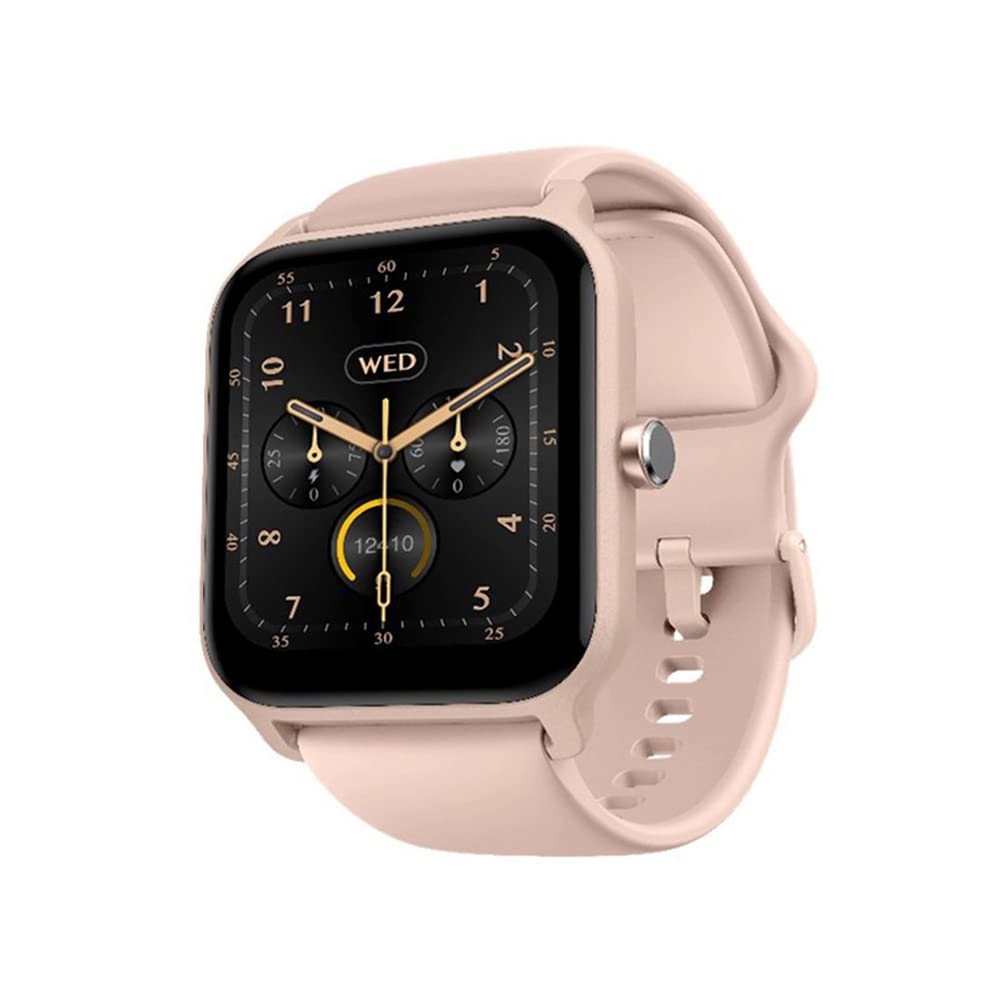
Image: Fastrack Reflex Nitro Smartwatch, showcasing การแสดงผลและการออกแบบ
มีอะไรอยู่ในกล่อง
Upon unboxing your Fastrack Reflex Nitro, verify that all the following components are present:
- Watch Head: The main unit of the smartwatch.
- สายนาฬิกา: The band for wearing the smartwatch.
- สายชาร์จแม่เหล็ก: สำหรับการชาร์จอุปกรณ์
- คู่มือเริ่มต้นอย่างรวดเร็ว: A brief guide for initial setup.
- ใบรับประกัน: Contains warranty information.
ตรวจสอบให้แน่ใจว่ามีส่วนประกอบทั้งหมดอยู่ก่อนดำเนินการตั้งค่า
การตั้งค่า
1. การชาร์จสมาร์ทวอทช์
- เชื่อมต่อสายชาร์จแม่เหล็กเข้ากับอะแดปเตอร์แปลงไฟ USB (ไม่ได้รวมอยู่ในชุด) หรือพอร์ต USB ของคอมพิวเตอร์
- Align the magnetic end of the cable with the charging contacts on the back of the smartwatch. The magnets will snap it into place.
- หน้าจอแสดงผลของนาฬิกาจะแสดงสถานะการชาร์จ ใช้เวลาประมาณ 2 ชั่วโมงสำหรับการชาร์จจนเต็ม
Use only the provided magnetic charging cable to prevent damage.
2. การติดตั้งและการจับคู่แอป
- ดาวน์โหลดแอป: ค้นหา "Fastrack Reflex World" in the ร้านค้า Google Play (สำหรับอุปกรณ์ Android) หรือ แอปสโตร์ของแอปเปิล (for iOS devices) and install it.
- สร้างบัญชี: เปิดแอปและทำตามคำแนะนำบนหน้าจอเพื่อสร้างบัญชีผู้ใช้ใหม่หรือเข้าสู่ระบบหากคุณมีบัญชีผู้ใช้อยู่แล้ว
- เปิดใช้งานบลูทูธ: ตรวจสอบให้แน่ใจว่าได้เปิดใช้งาน Bluetooth บนสมาร์ทโฟนของคุณแล้ว
- จับคู่อุปกรณ์: In the Fastrack Reflex World app, navigate to the device pairing section. Select "Fastrack Reflex Nitro" from the list of available devices.
- ยืนยันการจับคู่: A pairing request will appear on your smartwatch and smartphone. Confirm the pairing on both devices.
Maintain your smartphone close to the smartwatch during the pairing process.
คำแนะนำการใช้งาน
การนำทางพื้นฐาน
- ปัดขึ้น/ลง: เข้าถึงการแจ้งเตือนหรือการตั้งค่าด่วน
- ปัดไปทางซ้าย/ขวา: Navigate through widgets and features like activity tracking, heart rate, and music control.
- แตะ: เลือกรายการหรือเปิดแอปพลิเคชัน
- กดปุ่มด้านข้าง: กลับไปที่หน้าจอหลักหรือเข้าถึงเมนูแอป
Bluetooth Calling (SingleSync BT Calling)
The Fastrack Reflex Nitro supports direct calling from your wrist after initial setup.
- ตรวจสอบให้แน่ใจว่าสมาร์ทวอทช์ของคุณเชื่อมต่อกับสมาร์ทโฟนผ่านบลูทูธแล้ว
- Access the call function on your watch (usually by swiping or through the app menu).
- You can dial numbers directly or select contacts from your synced phonebook.
- รับสายเรียกเข้าโดยตรงบนนาฬิกา
Sports Modes and AI Coach
The device offers over 100 sports modes with an integrated AI Coach.
- เข้าไปที่ส่วน "กีฬา" หรือ "ออกกำลังกาย" บนนาฬิกาของคุณ
- Select your desired activity (e.g., Running, Cycling, Walking, Badminton, Basketball).
- The AI Coach provides guidance and tracks your performance metrics during the activity.
- Review your workout data in the Fastrack Reflex World app after completion.
การติดตามสุขภาพ
The Fastrack Reflex Nitro provides comprehensive health tracking features:
- เครื่องวัดอัตราการเต้นของหัวใจ: Continuous 24x7 heart rate monitoring. Access data on the watch or in the app.
- เครื่องตรวจวัด SpO2: Measures blood oxygen levels. Initiate a measurement from the watch.
- เครื่องตรวจวัดความเครียด: ติดตามระดับความเครียดตลอดทั้งวัน View insights in the app.
- Automatic Sleep Recognition: Monitors sleep patterns, including REM sleep. Data is available in the Fastrack Reflex World app.
Health monitoring features are for general wellness and fitness purposes only and are not intended for medical diagnosis or treatment.
การควบคุมเพลง
ควบคุมการเล่นเพลงบนสมาร์ทโฟนของคุณโดยตรงจากนาฬิกา
- Ensure music is playing on your connected smartphone.
- Access the music control widget on your watch (swipe left/right from the home screen).
- คุณสามารถเล่น หยุดชั่วคราว ข้ามเพลง และปรับระดับเสียงได้
การควบคุมกล้อง
ใช้สมาร์ทวอทช์ของคุณเป็นรีโมทชัตเตอร์สำหรับกล้องสมาร์ทโฟน
- Open the camera function within the Fastrack Reflex World app on your smartphone.
- Navigate to the camera control feature on your smartwatch.
- Tap the screen on your watch to remotely trigger your phone's camera shutter.
การแจ้งเตือนและคุณสมบัติอัจฉริยะ
Receive notifications and manage smart features directly on your wrist.
- การแจ้งเตือน: ปัดลงจากหน้าจอหลักไปที่ view สายเรียกเข้า ข้อความ และการแจ้งเตือนจากแอป
- สัญญาณเตือนและตัวจับเวลา: Set and manage alarms and timers directly from the watch interface.
- ค้นหาโทรศัพท์ของฉัน: Use this feature on your watch to locate your paired smartphone.
หน้าปัดนาฬิกา
Customize your watch's appearance with over 100 available watch faces.
- Long-press on the current watch face to enter the watch face selection mode.
- Swipe left or right to browse through pre-installed watch faces.
- For more options, open the Fastrack Reflex World app on your smartphone and navigate to the watch face store.
การซ่อมบำรุง
การทำความสะอาด
- เช็ดหน้าจอนาฬิกาและสายนาฬิกาเป็นประจำด้วยผ้าเนื้อนุ่มและแห้งampผ้าที่ไม่เป็นขุย
- หลีกเลี่ยงการใช้สารเคมีรุนแรง น้ำยาทำความสะอาดที่มีฤทธิ์กัดกร่อน หรือตัวทำละลาย
- ตรวจสอบให้แน่ใจว่าหน้าสัมผัสการชาร์จสะอาดและแห้งก่อนชาร์จ
ความต้านทานต่อน้ำ (IP68)
The Fastrack Reflex Nitro is IP68 water-resistant, meaning it can withstand immersion in water up to 1.5 meters for 30 minutes.
- เหมาะสำหรับใช้ในชีวิตประจำวัน เช่น ล้างมือ ฝนตก และว่ายน้ำในน้ำตื้น
- Not suitable for hot showers, saunas, diving, or high-pressure water activities.
- After exposure to water, dry the watch thoroughly before charging or operating.
การดูแลแบตเตอรี่
- หลีกเลี่ยงการปล่อยแบตเตอรี่จนหมดบ่อยครั้ง
- ชาร์จอุปกรณ์เป็นประจำเพื่อรักษาสุขภาพแบตเตอรี่
- เก็บนาฬิกาไว้ในที่แห้งและเย็นเมื่อไม่ได้ใช้งานเป็นเวลานาน
การแก้ไขปัญหา
| ปัญหา | วิธีแก้ปัญหาที่เป็นไปได้ |
|---|---|
| นาฬิกาเปิดไม่ติด | ตรวจสอบให้แน่ใจว่านาฬิกาชาร์จเต็มแล้ว เสียบเข้ากับที่ชาร์จอย่างน้อย 30 นาที |
| ไม่สามารถจับคู่กับสมาร์ทโฟนได้ |
|
| ข้อมูลสุขภาพที่ไม่ถูกต้อง | Ensure the watch is worn snugly on your wrist, about one finger-width above the wrist bone. Clean the sensor area regularly. |
| อายุการใช้งานแบตเตอรี่สั้น | ลดความสว่างหน้าจอ ปิดการแจ้งเตือนที่ไม่จำเป็น และจำกัดการตรวจสอบอัตราการเต้นของหัวใจอย่างต่อเนื่องหากไม่จำเป็น |
| ปัญหาการโทรบลูทูธ | Ensure the watch is within Bluetooth range of your phone. Check phone's audio output settings. |
ข้อมูลจำเพาะ
| คุณสมบัติ | รายละเอียด |
|---|---|
| ชื่อรุ่น | Fastrack Reflex Nitro |
| หมายเลขรุ่น | 38085PP01 |
| แสดง | 1.8" UltraVU LCD, 360 x 360 Resolution |
| ชิปเซ็ต | ATS Chipset |
| การเชื่อมต่อ | บลูทูธ |
| ประเภทแบตเตอรี่ | ลิเธียมโพลีเมอร์ |
| ความจุของแบตเตอรี่ | 300 มิลลิแอมป์ |
| อายุการใช้งานแบตเตอรี่ | ใช้งานได้นานสูงสุด 10 วัน (โดยเฉลี่ย) |
| ความต้านทานต่อน้ำ | IP68 (1.5 เมตร เป็นเวลา 30 นาที) |
| ขนาด (กxยxส) | 46 x 38 x 11 มม. |
| น้ำหนัก | 38 กรัม |
| เซ็นเซอร์ | Heart Rate Monitor, SpO2 Monitor, Stress Monitor |
| โหมดกีฬา | 100+ with AI Coach |
| ระบบปฏิบัติการที่รองรับ | แอนดรอยด์, ไอโอเอส |
| ส่วนประกอบที่รวมอยู่ | Watch Head, Watch Strap, Magnetic Charging Cable, Quick Start Guide, Warranty Card |
การรับประกันและการสนับสนุน
Your Fastrack Reflex Nitro smartwatch comes with a การรับประกันจากผู้ผลิต 1 ปี from the date of purchase. Please retain your purchase receipt and warranty card for any claims.
For technical assistance, troubleshooting, or warranty claims, please contact Fastrack customer support:
- หมายเลขดูแลลูกค้า: 1800-266-0123
- อีเมล: ฝ่ายบริการลูกค้า@titan.co.in
- ผู้ผลิต / ผู้นำเข้า: Imported by Titan Company Limited 3 Sipcot Industries complex, Hosur- 635126
For the most up-to-date support information, visit the official Fastrack webเว็บไซต์.