
1. บทนำ
This manual provides instructions for the safe and efficient use of your Displays2go D2G52039 Battery-Powered LED Display Case Accent Lights. These lights are designed to illuminate display cases, curio cabinets, and retail showcases, highlighting items with 120-lumen white LED light. Please read this manual thoroughly before use and retain it for future reference.
2. เนื้อหาบรรจุภัณฑ์
- (2) Displays2go D2G52039 Display Case Accent Lights (Silver)
- คู่มือการใช้งาน
Note: 3 AAA batteries per light are required and not included.
3. ข้อมูลด้านความปลอดภัย
- อย่าผสมแบตเตอรี่เก่ากับใหม่
- ห้ามผสมแบตเตอรี่อัลคาไลน์ แบตเตอรี่มาตรฐาน (คาร์บอน-สังกะสี) หรือแบตเตอรี่ชาร์จไฟได้ (นิกเกิล-แคดเมียม)
- ใส่แบตเตอรี่ที่มีขั้วที่ถูกต้อง (+ และ -)
- ถอดแบตเตอรี่ออกหากไม่ได้ใช้งานผลิตภัณฑ์เป็นเวลานาน
- เก็บแบตเตอรี่ให้พ้นจากมือเด็ก
- Do not expose the lights to water or excessive moisture. This product is for indoor use only.
- Do not attempt to disassemble or modify the lights.
4. การตั้งค่า
4.1 การติดตั้งแบตเตอรี่
- Locate the battery compartment cover on the underside of the light base.
- บิดหรือเลื่อนฝาเพื่อเปิดช่องเก็บของ
- Insert three (3) AAA batteries into the compartment, ensuring correct polarity (+ and -) as indicated inside.
- ใส่ฝาปิดช่องใส่แบตเตอรี่กลับเข้าที่อย่างแน่นหนา

Figure 1: Underside of the light base, indicating the battery compartment for AAA batteries.
4.2 การจัดวาง
Place the accent lights on a flat, stable surface within your display case or desired area. The light head is adjustable, allowing you to tilt it to direct the light beam onto specific items.

Figure 2: The accent light with its adjustable head, ready for placement.
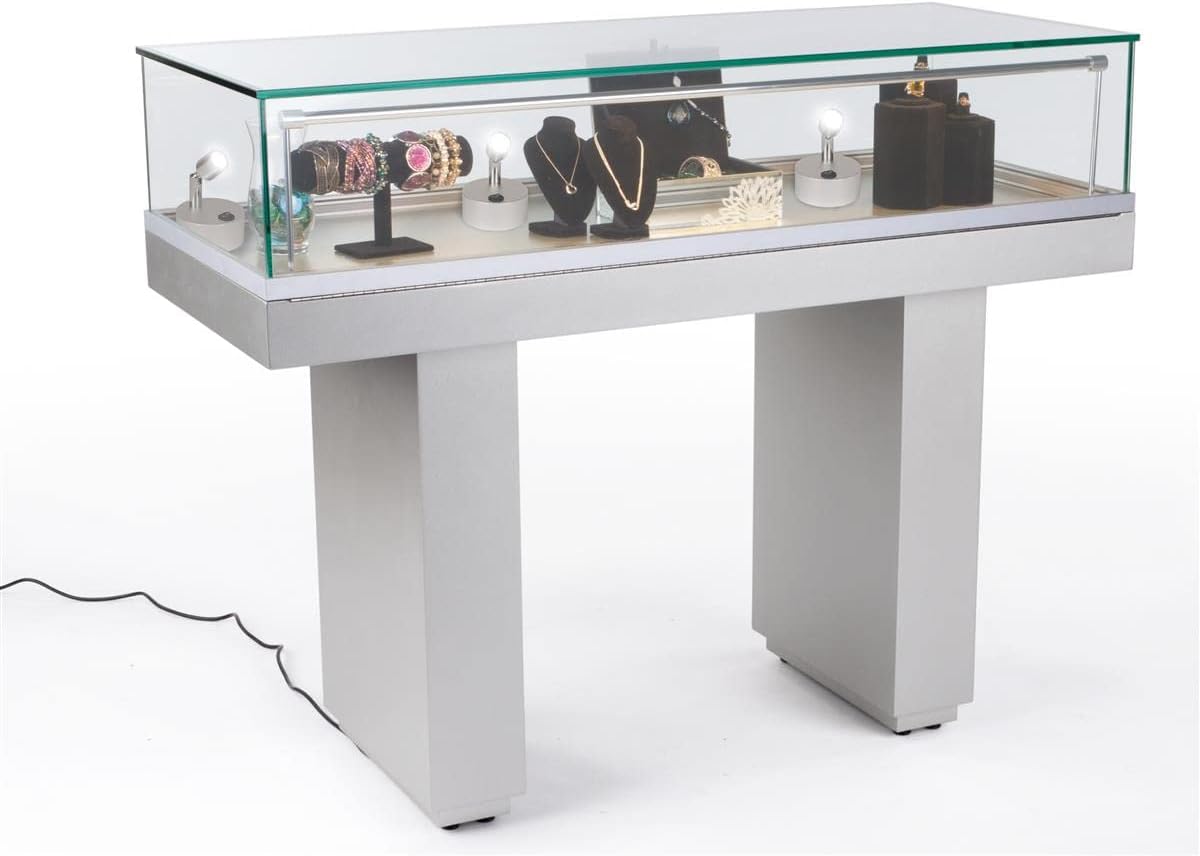
รูปที่ 3: อดีตample of accent lights used within a display case to highlight various items.
5. คู่มือการใช้งาน
Each accent light features a simple on/off switch located on its base.
- To turn the light ON, press the "I" side of the rocker switch.
- To turn the light OFF, press the "O" side of the rocker switch.

รูปที่ 4: ระยะใกล้ view of the rocker switch for turning the light on or off.
6. การบำรุงรักษา
6.1 การทำความสะอาด
Wipe the lights with a soft, dry cloth. Do not use abrasive cleaners or solvents, as these may damage the finish or electronic components.
6.2 การเปลี่ยนแบตเตอรี่
When the light output diminishes, it is time to replace the batteries. Follow the battery installation steps in Section 4.1 to replace the three (3) AAA batteries. Dispose of used batteries responsibly according to local regulations.
7 การแก้ไขปัญหา
| ปัญหา | สาเหตุที่เป็นไปได้ | สารละลาย |
|---|---|---|
| ไฟไม่เปิด | แบตเตอรี่หมดหรือติดตั้งไม่ถูกต้อง | ตรวจสอบขั้วแบตเตอรี่ เปลี่ยนแบตเตอรี่ AAA ใหม่ |
| แสงสว่างสลัวๆ | แบตเตอรี่เหลือน้อย | เปลี่ยนด้วยแบตเตอรี่ AAA ใหม่ |
| ไฟกะพริบ | ขั้วต่อแบตเตอรี่หลวม หรือแบตเตอรี่เหลือน้อย | Ensure batteries are securely seated. Replace with fresh AAA batteries. |
8. ข้อมูลจำเพาะ
| คุณสมบัติ | รายละเอียด |
|---|---|
| หมายเลขรุ่น | D2G52039 |
| ยี่ห้อ | จอแสดงผล2go |
| ประเภทไฟ | นำ |
| เอาท์พุตแสง | 120 ลูเมน |
| อุณหภูมิสี | 6000-6500K (แสงสีขาว) |
| แหล่งพลังงาน | แบตเตอรี่ AAA 3 ก้อน (ไม่รวม) |
| วัดtage | 1W |
| เล่มที่tage | 3.7โวลต์ |
| วัสดุ | อลูมิเนียม |
| สี | เงิน |
| ขนาด (โดยรวม) | ยาว 3.0 นิ้ว x กว้าง 3.0 นิ้ว x สูง 3.9 นิ้ว |
| น้ำหนัก (ต่อชิ้น) | 0.28 ปอนด์ (ประมาณ 4.5 ออนซ์) |
| คุณสมบัติ | Tilting head, Portable, Touch switch |
| การใช้งานภายใน/ภายนอกอาคาร | ในร่มเท่านั้น |
9. การรับประกันและการสนับสนุน
For warranty information or technical support, please contact Displays2go customer service. Refer to your purchase documentation for specific warranty terms and contact details.
You can also visit the official Displays2go webเว็บไซต์นี้มีแหล่งข้อมูลและข้อมูลสนับสนุนเพิ่มเติม