
1. บทนำ
ขอบคุณสำหรับการซื้อasing the Klipsch Reference Premiere RP-1400SW 14-inch High Excursion Subwoofer. This subwoofer is designed to deliver powerful and accurate low-frequency sound, enhancing your home theater or music listening experience. This manual provides essential information for proper setup, operation, and care of your new subwoofer.

Figure 1.1: Klipsch Reference Premiere RP-1400SW Subwoofer (Grille Removed)
2. ข้อมูลด้านความปลอดภัยที่สำคัญ
Please read all safety instructions before operating this product. Keep these instructions for future reference.
- แหล่งพลังงาน: Connect the subwoofer only to a power supply of the type described in the operating instructions or as marked on the appliance.
- การระบายอากาศ : ตรวจสอบให้แน่ใจว่ามีการระบายอากาศที่เหมาะสม อย่าปิดกั้นช่องระบายอากาศใดๆ ติดตั้งตามคำแนะนำของผู้ผลิต
- ความร้อน: ห้ามติดตั้งใกล้แหล่งความร้อน เช่น หม้อน้ำ เครื่องทำความร้อน เตา หรืออุปกรณ์อื่น ๆ (รวมถึง ampเครื่องให้ความร้อน) ที่ผลิตความร้อน
- น้ำและความชื้น: ห้ามใช้อุปกรณ์นี้ใกล้น้ำหรือความชื้น
- การทำความสะอาด: ทำความสะอาดด้วยผ้าแห้งเท่านั้น
- การบริการ: แจ้งบริการทั้งหมดให้ช่างที่ผ่านการรับรองทราบ จำเป็นต้องให้บริการเมื่ออุปกรณ์ได้รับความเสียหายในลักษณะใดก็ตาม เช่น สายไฟหรือปลั๊กชำรุด ของเหลวหกหรือมีวัตถุตกลงไปในอุปกรณ์ อุปกรณ์โดนฝนหรือความชื้น ไม่สามารถทำงานได้ตามปกติ หรือตกหล่น
- วัตถุหนัก: This subwoofer is heavy (85 lbs). Exercise caution when moving to prevent injury.
3. อะไรอยู่ในกล่อง
ตรวจสอบว่ามีส่วนประกอบทั้งหมดอยู่:
- Klipsch Reference Premiere RP-1400SW Subwoofer
- สายไฟ
- คู่มือการใช้งาน (เอกสารนี้)
4. การตั้งค่า
4.1 ตำแหน่งซับวูฟเฟอร์
The Klipsch RP-1400SW features a front-firing driver and Aerofoil front slot port, allowing for flexible placement within your room. Experiment with different locations to find the optimal bass response for your listening environment. Generally, corner placement can enhance bass output, while placement along a wall can provide a more balanced sound. The shock-absorbing rubber feet help isolate the subwoofer from the floor.

Figure 4.1: Front-Firing Driver and Aerofoil Front Slot Port

Figure 4.2: Subwoofer Design Features (Rounded Corners, Shock-Absorbing Feet)
4.2 การเชื่อมต่อ
Your RP-1400SW subwoofer offers both wired and wireless connectivity options.

Figure 4.3: Subwoofer Rear Panel Connections and Controls
- Wired Connection (RCA/LFE):
Connect an RCA cable from the LFE output of your AV receiver to the LFE input on the subwoofer's rear panel. If your receiver does not have an LFE output, use a standard RCA stereo cable to connect the receiver's pre-out (subwoofer output) to both the left and right RCA inputs on the subwoofer.
- Wireless Connection (Optional WA-2 Kit):
For wireless operation, you can connect your subwoofer with a Klipsch WA-2 Wireless Subwoofer Kit (sold separately). This allows for flexible placement without the need for long RCA cables. Refer to the WA-2 kit's instructions for pairing and setup.

Figure 4.4: Wireless Connectivity with Optional WA-2 Kit
- การเชื่อมต่อไฟฟ้า:
Once audio connections are made, plug the supplied power cord into the subwoofer's power inlet and then into a suitable wall outlet.
5. การใช้งานซับวูฟเฟอร์ของคุณ
5.1 การควบคุมมากกว่าview
The rear panel of your subwoofer features several controls to fine-tune its performance:

Figure 5.1: Easy-to-Use Controls on Rear Panel
- GAIN (Volume): ปรับระดับเอาต์พุตของซับวูฟเฟอร์ เริ่มต้นด้วยการตั้งค่าต่ำ และค่อยๆ เพิ่มระดับเสียงเบสให้กลมกลืนกับลำโพงหลักของคุณ
- LOW-PASS (Crossover): This control sets the upper frequency limit for the subwoofer. If using an AV receiver with LFE output, set this to LFE (or bypass if available on your receiver). If connecting via stereo RCA, adjust this to blend with your main speakers' low-frequency cutoff.
- เฟส (0°/180°): ปรับเฟสของสัญญาณเสียงซับวูฟเฟอร์เทียบกับลำโพงหลักของคุณ ลองทดสอบทั้งสองการตั้งค่าเพื่อหาค่าที่ให้เสียงเบสที่ทรงพลังและกลมกลืนที่สุด
- POWER (ON/AUTO/OFF):
- บน: Subwoofer remains continuously on.
- อัตโนมัติ: Subwoofer automatically turns on when an audio signal is detected and enters a low-power standby mode after a period of inactivity.
- ปิด: ซับวูฟเฟอร์ปิดอยู่
The 1/2-watt standby mode in AUTO setting ensures exceptional efficiency and reduces energy costs.
5.2 การเปิดเครื่องครั้งแรกและการปรับ
- ตรวจสอบให้แน่ใจว่าการเชื่อมต่อทั้งหมดมีความปลอดภัย
- Set the GAIN control to its minimum position.
- Set the LOW-PASS control to LFE if using an AV receiver, or to a suitable frequency (e.g., 80Hz) if connecting via stereo RCA.
- Set the PHASE switch to 0°.
- Set the POWER switch to AUTO.
- Play some audio with significant bass content. Gradually increase the GAIN control until the subwoofer output blends with your main speakers.
- Experiment with the PHASE switch (0° vs. 180°) to determine which setting provides the most impactful and seamless bass response in your listening position.
For optimal performance, consider using your AV receiver's automatic room correction system (if available) after initial setup.
5.3 Product Video: Reference Premiere Subwoofers
Video 5.1: An official Klipsch video showcasing the features and design of the Reference Premiere Subwoofers, including the RP-1400SW. This video highlights advanced acoustics, balanced performance, front-firing Cerametallic woofers, high-efficiency Class D amplifier, front-firing slot port, detailed design, and easy-to-use controls.
6. การบำรุงรักษา
To ensure the longevity and optimal performance of your Klipsch RP-1400SW subwoofer, follow these simple maintenance guidelines:
- การทำความสะอาด: Dust the cabinet regularly with a dry, soft cloth. Avoid using abrasive cleaners, solvents, or strong detergents, as these can damage the ebony vinyl finish.
- การจัดวาง: Avoid placing the subwoofer in direct sunlight or near heat sources, which can cause discoloration or damage to the cabinet.
- การระบายอากาศ : รับรองว่าด้านหลัง amplifier panel has adequate airflow. Do not block the heat sink.
- ตะแกรง: The durable woven cloth grille can be gently cleaned with a soft brush or vacuum cleaner attachment to remove dust.
7 การแก้ไขปัญหา
If you experience issues with your subwoofer, consult the following table for common problems and solutions:
| ปัญหา | สาเหตุที่เป็นไปได้ | สารละลาย |
|---|---|---|
| ไม่มีเสียงจากซับวูฟเฟอร์ |
|
|
| เสียงเบสอ่อนหรือผิดเพี้ยน |
|
|
| เสียงหึ่งๆ หรือเสียงดังรบกวนจากซับวูฟเฟอร์ |
|
|
If the problem persists after trying these solutions, please contact Klipsch customer support.
8. ข้อมูลจำเพาะ
Key technical specifications for the Klipsch Reference Premiere RP-1400SW Subwoofer:
| คุณสมบัติ | รายละเอียด |
|---|---|
| หมายเลขรุ่น | RP-1400SW |
| ยี่ห้อ | คลิปช์ |
| ประเภทลำโพง | ซับวูฟเฟอร์ |
| เส้นผ่านศูนย์กลางวูฟเฟอร์ | 14 นิ้ว |
| ประเภทไดร์เวอร์เสียง | Dynamic Driver (Cerametallic) |
| กำลังขับสูงสุดของลำโพง | 600 วัตต์ |
| กำลัง RMS | 500 วัตต์ |
| การตอบสนองความถี่ | 20Hz - 1kHz (approximate, based on A+ content) |
| เทคโนโลยีการเชื่อมต่อ | Wired RCA, LFE, and WA-2 Wireless Port |
| โหมดเอาต์พุตเสียง | สเตอริโอ, เสียงรอบทิศทาง |
| ประเภทการติดตั้ง | ชั้นยืน |
| วัสดุของตู้หุ้ม | ไม้ |
| สี | ไม้มะเกลือ |
| แหล่งพลังงาน | สายไฟ |
| ขนาดสินค้า (ลึก x กว้าง x สูง) | ลึก 25.67 นิ้ว x กว้าง 20 นิ้ว x สูง 21.34 นิ้ว |
| น้ำหนักสินค้า | 85 ปอนด์ |
| ยูพีซี | 743878047424 |
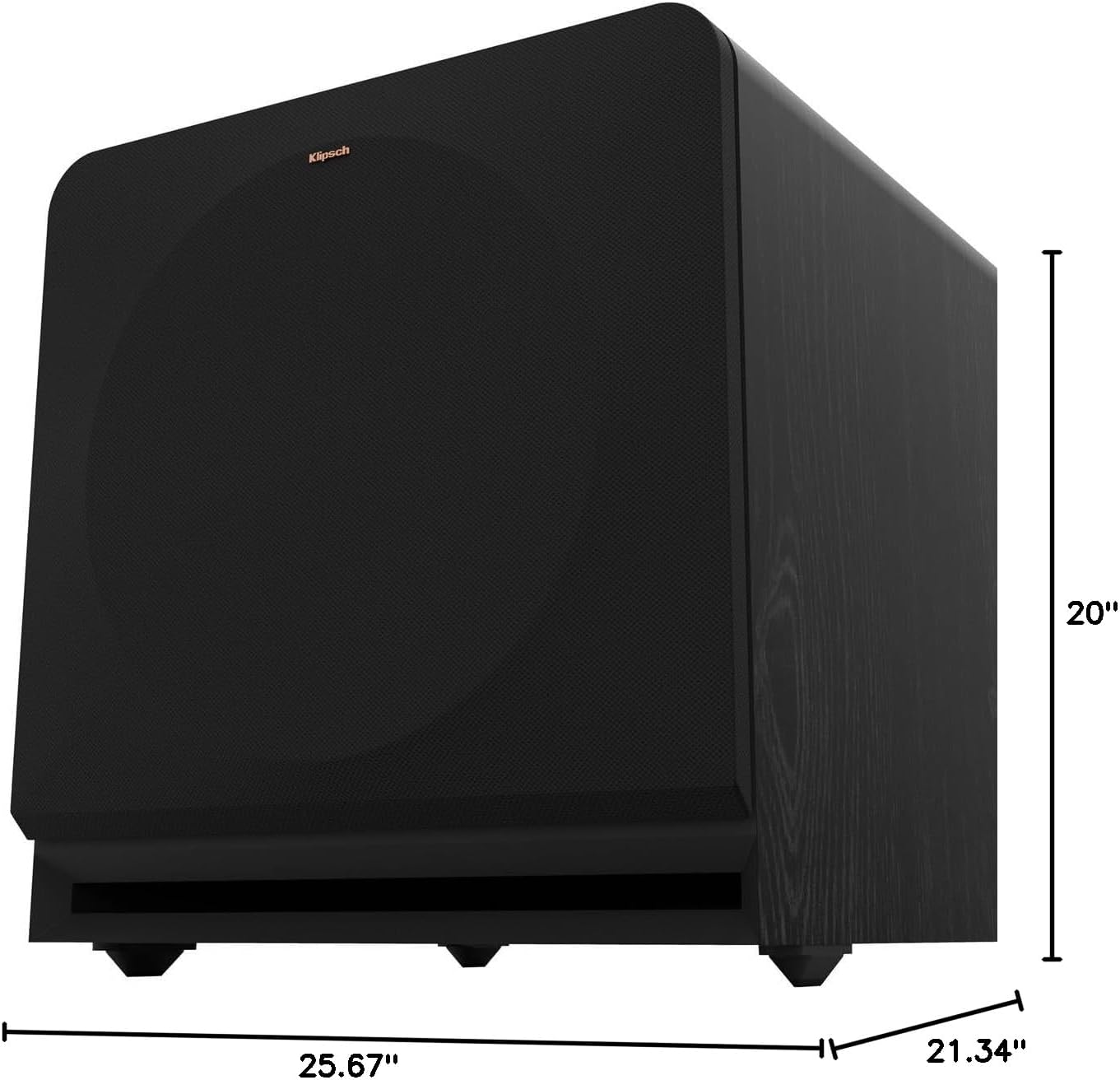
Figure 8.1: Subwoofer Dimensions
9. การรับประกันและการสนับสนุน
9.1 ข้อมูลการรับประกัน
The Klipsch Reference Premiere RP-1400SW Subwoofer comes with a limited warranty:
- อิเล็กทรอนิกส์: สอง (2) ปี
- Woofer, Cabinet, and Non-Electrical Mechanics: ห้า (5) ปี
Please retain your proof of purchase for warranty claims. For full warranty terms and conditions, refer to the official Klipsch webไซต์หรือติดต่อฝ่ายสนับสนุนลูกค้า
9.2 การสนับสนุนลูกค้า
For further assistance, technical support, or warranty inquiries, please visit the official Klipsch website or contact their customer service department. Contact details can typically be found on the Klipsch webเข้าไปที่เว็บไซต์ในส่วน "การสนับสนุน" หรือ "ติดต่อเรา"