
Unitech TS100
Unitech TS100 2D Hands-Free Presentation Barcode Scanner
คู่มือการใช้งาน
การแนะนำ
This manual provides essential information for the proper setup, operation, and maintenance of your Unitech TS100 2D Hands-Free Presentation Barcode Scanner. Please read this manual thoroughly before using the device to ensure optimal performance and to prevent damage.
The Unitech TS100 is an omnidirectional USB wired desktop barcode reader designed for efficient and intuitive scanning of 1D and 2D barcodes, including PDF417 and Data Matrix, in retail and other point-of-sale environments.
ข้อมูลด้านความปลอดภัย
- อย่าวางเครื่องสแกนไว้ในที่ที่มีอุณหภูมิสูง ความชื้นสูง หรือแสงแดดโดยตรง
- ควรหลีกเลี่ยงการทำเครื่องสแกนตก หรือการกระแทกอย่างรุนแรง
- ห้ามถอดประกอบหรือดัดแปลงเครื่องสแกนเนอร์ การกระทำดังกล่าวจะทำให้การรับประกันเป็นโมฆะ
- ใช้เฉพาะสาย USB ที่ให้มาเพื่อเชื่อมต่อ
- Keep the scanning window clean to ensure accurate barcode reading.
เนื้อหาแพ็คเกจ
กรุณาตรวจสอบเนื้อหาในแพ็คเกจเพื่อให้แน่ใจว่ามีสินค้าครบทั้งหมด:
- Unitech TS100 2D Presentation Barcode Scanner
- สาย USB
- คู่มือเริ่มต้นใช้งานฉบับย่อ (ถ้ามี)
สินค้าเกินview
The Unitech TS100 features a compact design with a large scan window for easy barcode presentation. Its omnidirectional scanning capability allows for quick and efficient data capture.
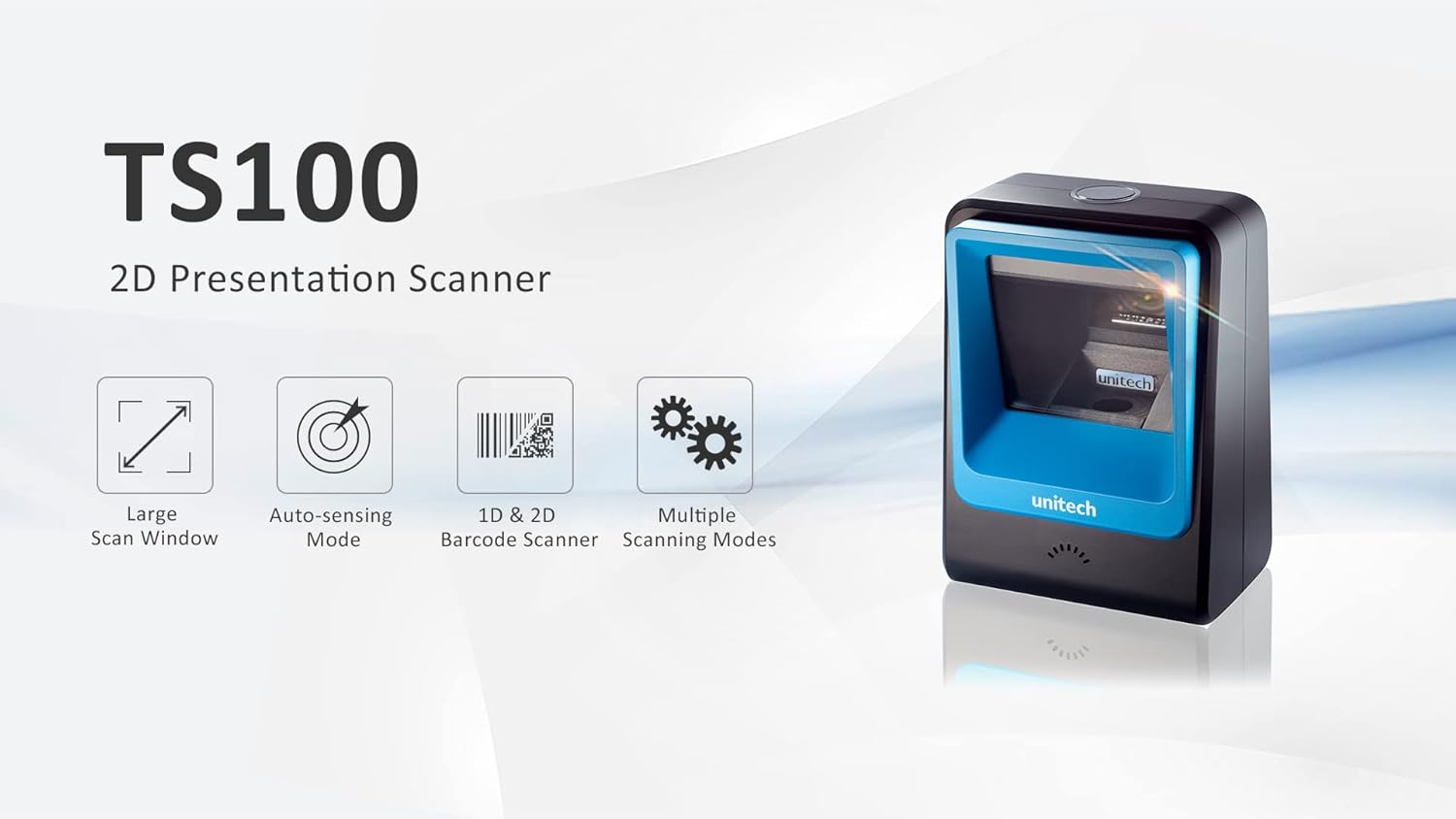
Figure 1: Unitech TS100 2D Presentation Scanner highlighting its large scan window, auto-sensing mode, 1D & 2D barcode scanning, and multiple scanning modes.

รูปที่ 2 : ด้านหน้า view of the Unitech TS100 scanner, showing the blue scanning window and the Unitech logo.

รูปที่ 3: ย้อนกลับ view of the Unitech TS100 scanner, displaying the product label with model number TS100-SUCB00-SG and power specifications.
การตั้งค่า
Follow these steps to set up your Unitech TS100 barcode scanner:
- แกะเครื่องสแกนเนอร์: Carefully remove the TS100 scanner and its accessories from the packaging.
- เชื่อมต่อสาย USB: Insert the USB cable into the port at the back of the scanner.
- เชื่อมต่อกับอุปกรณ์โฮสต์: Plug the other end of the USB cable into an available USB port on your computer, laptop, or POS system.
- การติดตั้งไดร์เวอร์: โดยทั่วไปแล้วสแกนเนอร์จะเป็นแบบ plug-and-play ระบบปฏิบัติการของคุณควรตรวจจับและติดตั้งไดรเวอร์ที่จำเป็นโดยอัตโนมัติ รอให้การติดตั้งเสร็จสมบูรณ์
- เปิดเครื่อง: The scanner will power on automatically once connected to a powered USB port. A beep and/or LED indicator will confirm it is ready for use.
คำแนะนำการใช้งาน
The Unitech TS100 is designed for hands-free operation, offering multiple scanning modes for various applications.
การสแกนขั้นพื้นฐาน
- Place the barcode within the scanner's field of view, facing the scanning window.
- The scanner will automatically detect the barcode and emit a successful scan indication (e.g., a beep and/or green LED).
- The scanned data will be transmitted to your connected host device as keyboard input.
โหมดการสแกน
The TS100 supports multiple scanning modes to optimize performance for different barcode types and environments:
- โหมดปกติ: Standard scanning for most 1D and 2D barcodes.
- Smartphone Mode: Optimized for reading barcodes displayed on smartphone screens, which can sometimes be reflective.
- โหมดเร็ว: Designed for faster scanning of multiple barcodes in quick succession.
Refer to the full programming manual (available on the Unitech website) for instructions on how to switch between these modes using configuration barcodes.
การซ่อมบำรุง
Proper maintenance ensures the longevity and performance of your scanner:
- การทำความสะอาดหน้าต่างการสแกน: ใช้ผ้านุ่มไม่เป็นขุยค่อยๆ งampล้างออกด้วยน้ำหรือน้ำยาทำความสะอาดอ่อนๆ ที่ไม่ทำให้เกิดรอยขีดข่วน ห้ามใช้สารเคมีรุนแรงหรือวัสดุที่มีฤทธิ์กัดกร่อน
- การทำความสะอาดภายนอก: เช็ดทำความสะอาดภายนอกเครื่องสแกนด้วยผ้าแห้งเนื้อนุ่ม
- พื้นที่จัดเก็บ: เมื่อไม่ใช้งาน ควรเก็บเครื่องสแกนไว้ในที่สะอาดและแห้ง หลีกเลี่ยงแสงแดดโดยตรงและอุณหภูมิที่สูงหรือต่ำเกินไป
การแก้ไขปัญหา
If you encounter issues with your TS100 scanner, refer to the table below for common problems and solutions:
| ปัญหา | สาเหตุที่เป็นไปได้ | สารละลาย |
|---|---|---|
| เครื่องสแกนเนอร์ไม่สามารถเปิดเครื่องได้ | USB cable not properly connected or host device USB port is not powered. | Ensure the USB cable is securely connected to both the scanner and the host device. Try a different USB port or host device. |
| เครื่องสแกนไม่สามารถอ่านบาร์โค้ดได้ | Barcode is damaged, poorly printed, or not supported. Scanning window is dirty. Incorrect scanning mode. | Ensure the barcode is clear and undamaged. Clean the scanning window. Verify the barcode symbology is supported. Try switching scanning modes (e.g., Smartphone Mode for screen barcodes). |
| ข้อมูลที่สแกนไม่ถูกต้องหรือไม่สมบูรณ์ | Poor barcode quality. Scanner configuration issues. | Ensure the barcode is clear. Refer to the programming manual for advanced configuration settings. |
| เครื่องสแกนส่งเสียงดัง แต่ไม่มีการส่งข้อมูลใดๆ | Host device not recognizing the scanner as a keyboard input. | Ensure the cursor is in a text field on your host device. Reconnect the USB cable. Restart the host device. |
ข้อมูลจำเพาะ
Detailed technical specifications for the Unitech TS100 scanner:
| คุณสมบัติ | ข้อมูลจำเพาะ |
|---|---|
| เซ็นเซอร์ | Image Sensor with 1280x800 pixels |
| การส่องสว่าง | 650nm RED LED |
| อัตราการสแกน | 60 เฟรมต่อวินาที |
| มุมเฉียง | Horizontal Angle: 50°; Vertical Angle: 35° |
| มุมสนาม | ±65° |
| มุมม้วน | 360° |
| ความละเอียดออฟติคัล | 1D: 4 mil; 2D: 6.7 mil |
| Printing Contrast Scale | 25% |
| อินเตอร์เฟซโฮสต์ | ยูเอสบี |
| ขนาด (กว้าง x ยาว x สูง) | 4.1 นิ้ว x 5.7 นิ้ว x 2.7 นิ้ว (105 มม. x 146 มม. x 70 มม.) |
| น้ำหนัก | 12.1 oz / 345g (without cable) |
| 1D Symbologies Supported | UPC-A/E, EAN-8/13, UPC/EAN Supplementals, EAN-8 Extend, Code 128, Code 39, Code 93, Code 11, Interleaved 2 of 5, Matrix 2 of 5, Codabar, MSI Plessey, GS1 DataBar, China Postal, Korean Postal, etc. |
| 2D Symbologies Supported | PDF417, MicroPDF417, DataMatrix, DataMatrix-Inverse, Maxicode, QRcode, MicroQR, Aztec, Aztec Inverse, Han Xin, Han Xin Inverse |
| ตัวบ่งชี้ | ไฟ LED, บัซเซอร์ |
| อุณหภูมิในการทำงาน | 32°F ถึง 122°F (0°C ถึง 50°C) |
| อุณหภูมิในการจัดเก็บ | -40°F ถึง 158°F (-40°C ถึง 70°C) |
| ความชื้นสัมพัทธ์ | 0% ถึง 95% ไม่มีการควบแน่น |
การรับประกันและการสนับสนุน
The Unitech TS100 barcode scanner main unit comes with a รับประกัน 1 ปี ตั้งแต่วันที่ซื้อ การรับประกันนี้ครอบคลุมถึงข้อบกพร่องในวัสดุและฝีมือการผลิตภายใต้การใช้งานปกติ
For technical support, warranty claims, or further assistance, please contact Unitech customer service or visit the official Unitech webไซต์ โปรดเก็บใบเสร็จรับเงินไว้เป็นหลักฐานการซื้อสำหรับบริการรับประกัน
Unitech America Webเว็บไซต์: www.unitechamerica.com
Ask a question about this manual
Ask about setup, troubleshooting, compatibility, parts, safety, or missing instructions. Manuals+ will review the question and use this page’s manual context to help answer it.