
สินค้าเกินview
The UMLIFE Ultra-mini USB Type C Lithium Battery Charger Board is designed for charging 3.7V lithium batteries. It features a compact design, a Type-C USB input for power supply, and integrated protection circuits to ensure safe charging. This module is compatible with most PD fast charging heads and provides a 1A linear charging current.
คุณสมบัติที่สำคัญ ได้แก่:
- Ultra-small form factor for integration into various projects.
- USB Type-C input for convenient power connection.
- 1A high current linear charging for 3.7V lithium batteries.
- Integrated protection circuit for over-voltage, over-discharge, and over-current protection.
- LED indicators for charge status.
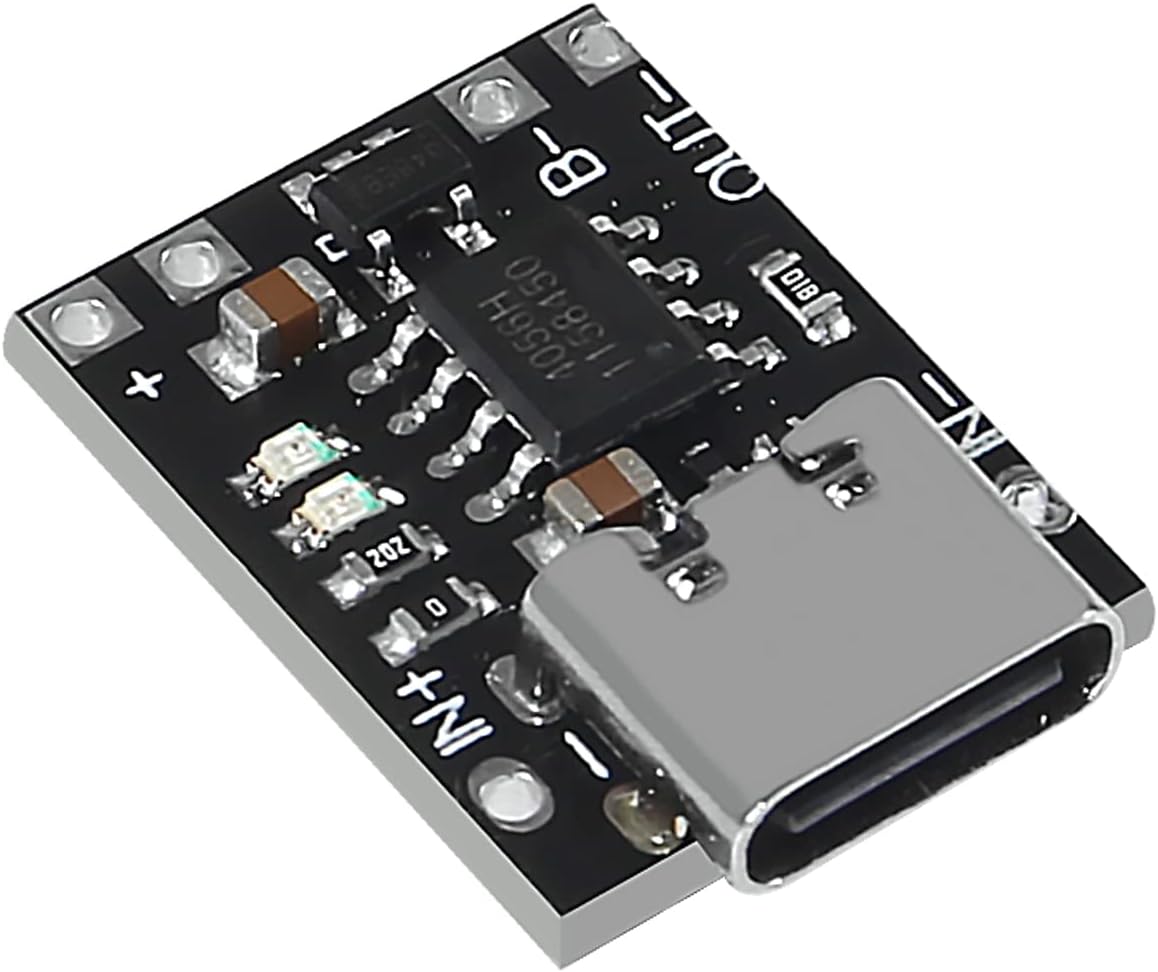
ภาพ: มุมเอียง view of the UMLIFE Ultra-mini USB Type C Lithium Battery Charger Board. This image highlights the compact size and the Type-C USB input port, along with the various electronic components on the board.
คำแนะนำการตั้งค่า
Follow these steps to set up your UMLIFE charger board:
- ระบุจุดเชื่อมต่อ: Locate the IN+, IN-, B+, B-, OUT+, and OUT- pads on the charger board.

ภาพ: จากบนลงล่าง view of the charger board. This image clearly shows the input (IN+, IN-), battery (B+, B-), and output (OUT+, OUT-) connection points, which are crucial for proper wiring.
- เชื่อมต่อแบตเตอรี่: Connect your 3.7V lithium battery to the B+ and B- pads. Ensure correct polarity: B+ to the positive terminal of the battery, and B- to the negative terminal.
- Connect Load (Optional): If you intend to power a device directly from the charger board while charging, connect your load to the OUT+ and OUT- pads. Note that the "Battery+" and "Output+" terminals are electrically bonded together. The "Output-" and "Battery-" terminals are electrically isolated.
- เชื่อมต่อพาวเวอร์ซัพพลาย: Insert a USB Type-C cable into the board's Type-C port. Connect the other end of the cable to a 5V to 6V USB power source, such as a mobile phone charger or a compatible PD fast charging head.
- Activate Protection Board: For the first use, it is necessary to connect the power supply to activate the integrated protection board.
คำแนะนำการใช้งาน
Once connected, the charger board will begin charging the lithium battery. Observe the LED indicators for charge status:
- ไฟแสดงสถานะการชาร์จ: A red LED typically indicates that the battery is currently charging.
- Charged Indicator: A green or blue LED typically indicates that the battery is fully charged.
Charging Cycle Behavior:
- The charging cycle automatically terminates when the charging current drops to 100mA after reaching the final float voltagอี (4.2V)
- หากแบตเตอรี่มีประจุtage drops below 4.05V (approximately 80% to 90% of capacity), the charging cycle will automatically restart.
- For batteries with voltage below 2.9V, the board initiates a pre-charge phase with a current of 100mA.
คุณสมบัติการป้องกัน:
The board includes an integrated protection circuit to safeguard the battery and the module:
- เกินปริมาณtagการป้องกันอี: ป้องกันไม่ให้แบตเตอรี่ถูกชาร์จเกินระดับที่ปลอดภัยtagอี จำกัด
- การป้องกันการคายประจุเกิน: Prevents the battery from discharging below 2.4V, extending battery life.
- การป้องกันกระแสเกิน: Limits the output current to 4A to prevent damage from excessive load.
การซ่อมบำรุง
To ensure the longevity and proper functioning of your charger board:
- Keep the board clean and free from dust and debris.
- ควรหลีกเลี่ยงการวางแผ่นวงจรไว้ในที่ชื้นหรืออุณหภูมิที่สูงหรือต่ำเกินไป
- ตรวจสอบให้แน่ใจว่าการเชื่อมต่อทั้งหมดมีความปลอดภัยและมีฉนวนป้องกันอย่างเหมาะสมเพื่อป้องกันไฟฟ้าลัดวงจร
- ไม่เกินปริมาณอินพุตที่ระบุtage range (5V-6V) or output current (1A charging, 4A protection limit).
การแก้ไขปัญหา
| ปัญหา | สาเหตุที่เป็นไปได้ | สารละลาย |
|---|---|---|
| แบตเตอรี่ไม่ชาร์จ / ไม่มีไฟ LED แสดงสถานะ |
|
|
| Board gets excessively hot |
|
|
| Battery not reaching full charge |
|
|
ข้อมูลจำเพาะทางเทคนิค
| คุณสมบัติ | ข้อมูลจำเพาะ |
|---|---|
| อินพุต Voltagอี เรนจ์ | 5V ถึง 6V |
| ปริมาณการส่งออกtage (การชาร์จ) | 4.2โวลต์ |
| กระแสไฟชาร์จ | 1A (linear) |
| Over-discharge Protection Value | 2.4โวลต์ |
| ค่าการป้องกันกระแสเกิน | 4A |
| Board Dimensions (L x W x H) | 18mm x 14mm x 5mm (Type-C port protrudes ~1.5mm) |
| น้ำหนัก | Approximately 0.528 ounces (per 10-pack) |
| อินเทอร์เฟซ | ยูเอสบี ไทป์ ซี |
| การรับรอง | UL, FCC, CE |
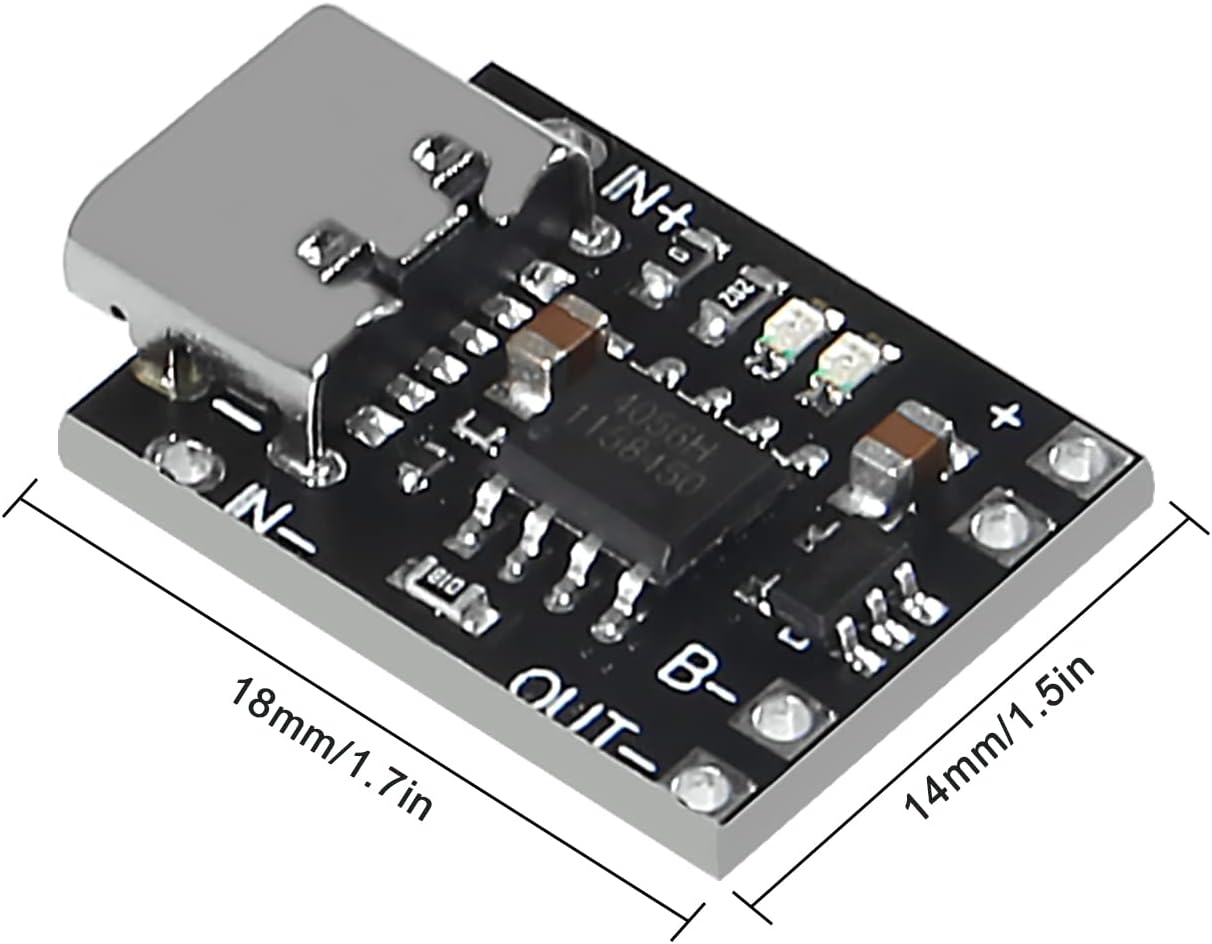
Image: Dimensions of the charger board. This image provides a visual reference for the physical size of the module, indicating its length and width.

ภาพ: ด้านล่าง view of the charger board. This view confirms the key electrical specifications printed on the board itself, specifically the 4.2V output voltage and 1A charging current.
ข้อมูลการรับประกัน
UMLIFE products are manufactured to high-quality standards. For specific warranty details, please refer to the purchase documentation or contact the seller directly. General return policies typically allow for returns or replacements within 30 days of purchase for defective items.
การสนับสนุนลูกค้า
For technical assistance, questions, or support regarding your UMLIFE Ultra-mini USB Type C Lithium Battery Charger Board, please contact the manufacturer or seller through the platform where the product was purchased.
You can also visit the official UMLIFE Store for more information: UMLIFE Store on Amazon