
SOWO Shower Speaker
คู่มือการใช้งานลำโพงบลูทูธไร้สายแบบพกพาขนาดเล็กกันน้ำ SOWO
Model: Shower Speaker
1. บทนำ
ขอบคุณสำหรับการซื้อasing the SOWO Small Waterproof Bluetooth Portable Wireless Speaker. This manual provides essential information for the safe and efficient operation of your device. Please read it thoroughly before use and retain it for future reference.
This speaker is designed for portability and durability, featuring a waterproof design, powerful bass, colorful LED lights, and a lightweight build, making it suitable for various indoor and outdoor environments.
2. ข้อมูลด้านความปลอดภัย
- อย่านำลำโพงไปวางไว้ในที่ที่มีอุณหภูมิสูงหรือต่ำเกินไป
- Keep the charging port rubber plug securely closed when using the speaker near water to maintain its waterproof rating.
- ห้ามถอดประกอบหรือดัดแปลงลำโพงโดยเด็ดขาด การกระทำดังกล่าวอาจทำให้การรับประกันเป็นโมฆะและก่อให้เกิดความเสียหายได้
- ใช้เฉพาะสายชาร์จที่ให้มาหรือที่เทียบเท่าที่ได้รับการรับรองเท่านั้น
- หลีกเลี่ยงการทำตกหรือให้ลำโพงได้รับแรงกระแทกรุนแรง
- ทำความสะอาดลำโพงด้วยผ้าแห้งนุ่มๆ ห้ามใช้สารเคมีรุนแรงหรือวัสดุที่มีฤทธิ์กัดกร่อน
3. เนื้อหาบรรจุภัณฑ์
ตรวจสอบว่ามีรายการทั้งหมดอยู่ในแพ็คเกจ:
- SOWO Small Waterproof Bluetooth Portable Wireless Speaker
- สายชาร์จ
- Buckle (Carabiner)
- คู่มือการใช้งาน (เอกสารนี้)

Image: The SOWO speaker, charging cable, and carabiner buckle as included in the package.
4. สินค้าหมดview
ทำความคุ้นเคยกับส่วนประกอบและการควบคุมของลำโพง
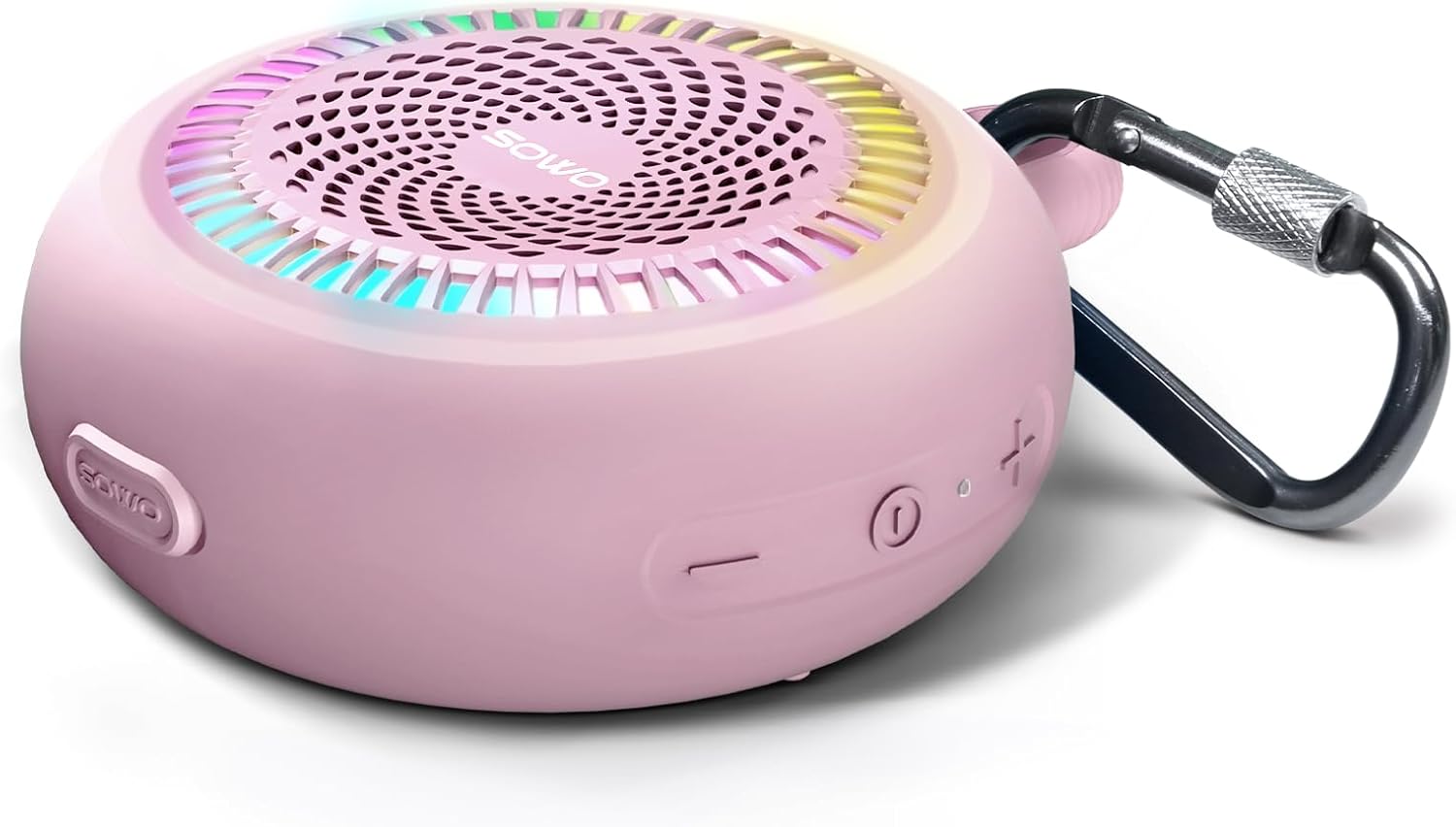
Image: A pink SOWO speaker showing the power button, volume controls, and carabiner attachment point.
การควบคุมและตัวบ่งชี้:
- ปุ่มเปิด/ปิด: กดค้างไว้เพื่อเปิด/ปิด กดสั้นๆ เพื่อเล่น/หยุดชั่วคราว
- เพิ่มระดับเสียง (+): กดสั้นเพื่อเพิ่มระดับเสียง กดยาวเพื่อเล่นเพลงถัดไป
- ลดเสียงลง (-): กดสั้นเพื่อลดระดับเสียง กดยาวเพื่อเล่นเพลงก่อนหน้า
- ปุ่มไฟ: Short press to cycle through light modes. Long press to turn off lights.
- พอร์ตชาร์จ: USB-C port for charging. Ensure rubber plug is sealed when not charging.
- ไฟแสดงสถานะ LED: แสดงสถานะพลังงาน สถานะการชาร์จ และสถานะการจับคู่บลูทูธ
5. การตั้งค่า
5.1 การชาร์จลำโพง
Before first use, fully charge the speaker. The battery capacity is 1500 mAh, and a full charge takes approximately 2.5 hours.
- เปิดฝาครอบยางของพอร์ตการชาร์จ
- เชื่อมต่อสายชาร์จ USB ที่ให้มาเข้ากับพอร์ตชาร์จของลำโพง
- ต่อปลายอีกด้านของสาย USB เข้ากับอะแดปเตอร์แปลงไฟ USB (5V) หรือพอร์ต USB ของคอมพิวเตอร์
- ไฟแสดงสถานะ LED จะแสดงสถานะการชาร์จ (เช่น สีแดงขณะชาร์จ ปิดเมื่อชาร์จเต็ม)
- Once fully charged, disconnect the charging cable and securely close the rubber cover to maintain waterproof integrity.
5.2 การเปิด/ปิดเครื่อง
- การเปิดเครื่อง: กดปุ่มเปิด/ปิดค้างไว้ประมาณ 2-3 วินาที จนกว่าคุณจะได้ยินเสียงแจ้งเตือนและไฟแสดงสถานะ LED สว่างขึ้น
- วิธีปิดเครื่อง: กดปุ่มเปิด/ปิดค้างไว้ประมาณ 2-3 วินาที จนกว่าจะได้ยินเสียงแจ้งเตือนและไฟแสดงสถานะ LED ดับลง
6. คู่มือการใช้งาน
6.1 การจับคู่บลูทูธ
The speaker will automatically enter pairing mode when powered on for the first time or if no device is connected.
- Ensure the speaker is powered on and the LED indicator is flashing, indicating it's in pairing mode.
- เปิดใช้งานบลูทูธบนอุปกรณ์ของคุณ (สมาร์ทโฟน แท็บเล็ต คอมพิวเตอร์)
- ค้นหา "SOWO" in the list of available Bluetooth devices.
- Select "SOWO" to connect. Once connected, you will hear an audible confirmation, and the LED indicator will stop flashing and remain solid.
- The speaker will automatically reconnect to the last paired device when powered on, if the device is within range.

Image: A smartphone screen displaying Bluetooth settings, showing the SOWO speaker as a discoverable device.
6.2 การเล่นเสียง
- เล่น/หยุดชั่วคราว: กดปุ่มเปิดปิดสั้น ๆ
- ปรับระดับเสียงขึ้น: กดปุ่ม '+' สั้นๆ
- ลดเสียงลง: กดปุ่ม '-' สั้นๆ
- เพลงถัดไป: กดปุ่ม '+' ค้างไว้
- แทร็กก่อนหน้า: กดปุ่ม '-' ค้างไว้
6.3 โหมดไฟ LED
The speaker features built-in LED lights with multiple modes.
- เปลี่ยนโหมดแสง: Short press the Light button to cycle through available light patterns.
- ปิดไฟ: Long press the Light button to turn off the LED lights.
6.4 การจับคู่สเตอริโอไร้สาย (ฟังก์ชัน TWS)
You can pair two SOWO speakers together for a stereo sound experience.
- Ensure both SOWO speakers are powered off.
- Power on both speakers. They will enter Bluetooth pairing mode.
- On one of the speakers (this will be the primary speaker), double-press the Power button. The speakers will attempt to connect to each other.
- Once successfully paired, you will hear an audible confirmation. The LED indicator on the primary speaker will flash, and the secondary speaker's LED will be solid.
- ทีนี้ ให้เชื่อมต่ออุปกรณ์ของคุณกับลำโพงหลักผ่านบลูทูธ ตามที่อธิบายไว้ในหัวข้อ 6.1
- หากต้องการตัดการเชื่อมต่อ TWS ให้กดปุ่มเปิด/ปิดสองครั้งที่ลำโพงตัวใดตัวหนึ่ง

Image: Two SOWO speakers placed on a blanket, illustrating wireless stereo pairing for an enhanced audio experience.
7. การบำรุงรักษา
- การทำความสะอาด: เช็ดลำโพงด้วย d . นุ่มๆamp ผ้า ห้ามใช้สารทำความสะอาดที่มีฤทธิ์กัดกร่อนหรือตัวทำละลาย
- พื้นที่จัดเก็บ: เก็บลำโพงไว้ในที่แห้งและเย็น หลีกเลี่ยงแสงแดดโดยตรงและอุณหภูมิที่สูงหรือต่ำเกินไปเมื่อไม่ได้ใช้งานเป็นเวลานาน
- ซีลกันน้ำ: Always ensure the charging port's rubber plug is fully sealed when the speaker is exposed to water to maintain its IP67 waterproof rating.
8 การแก้ไขปัญหา
| ปัญหา | สาเหตุที่เป็นไปได้ | สารละลาย |
|---|---|---|
| ลําโพงไม่เปิดขึ้น | แบตเตอรี่อ่อน | ชาร์จลำโพงให้เต็ม |
| ไม่สามารถจับคู่กับอุปกรณ์บลูทูธได้ | Bluetooth is off on your device; speaker is too far; speaker is already connected to another device. | Ensure Bluetooth is enabled on your device. Move speaker closer. Disconnect from other devices. Restart speaker and device. |
| ไม่มีเสียงหรือเสียงเบา | Volume too low on speaker or device; speaker not connected properly. | Increase volume on both speaker and device. Re-pair the Bluetooth connection. |
| ความผิดเพี้ยนของเสียง | ระดับเสียงสูงเกินไป, แบตเตอรี่อ่อน, มีสัญญาณรบกวน | ลดระดับเสียง ชาร์จลำโพง วางให้ห่างจากอุปกรณ์อิเล็กทรอนิกส์อื่นๆ |
| ไฟ LED ไม่ทำงาน | Lights turned off; malfunction. | Short press the Light button to cycle modes. Long press to turn on if off. If issue persists, contact support. |
| Power button failed. | ความล้มเหลวของส่วนประกอบภายใน | This indicates a potential defect. Contact SOWO customer support for assistance or warranty claim. |
If the problem persists after trying these solutions, please contact SOWO customer support.
9. ข้อมูลจำเพาะ
| คุณสมบัติ | รายละเอียด |
|---|---|
| ชื่อรุ่น | SOWO Shower Speaker |
| เทคโนโลยีการเชื่อมต่อ | บลูทูธ |
| เทคโนโลยีการสื่อสารไร้สาย | บลูทูธ |
| ช่วงบลูทูธ | 40 ฟุต |
| ประเภทลำโพง | พกพาได้ |
| กำลังขับสูงสุดของลำโพง | 12 วัตต์ |
| โหมดเอาต์พุตเสียง | โมโน (สเตอริโอเมื่อจับคู่กับหูฟัง TWS) |
| การตอบสนองความถี่ | ความถี่ 20 กิโลเฮิรตซ์ |
| อัตราส่วนสัญญาณต่อเสียงรบกวน | 72 เดซิเบล |
| อิมพีแดนซ์ | 3 โอห์ม |
| ความจุของแบตเตอรี่ | ลิเธียมโพลีเมอร์ 1500 mAh |
| เวลาในการชาร์จ | 2.5 ชั่วโมง |
| น้ำหนักสินค้า | 6.4 ออนซ์ |
| ขนาดสินค้า | ลึก 1 นิ้ว x กว้าง 4 นิ้ว x สูง 5 นิ้ว |
| ระดับความต้านทานต่อน้ำ | กันน้ำระดับ IP67 |
| วิธีการควบคุม | ระบบสัมผัส (ปุ่มกด) |
| วัสดุ | Plastic and PCB |
| ส่วนประกอบที่รวมอยู่ | Charging cable, buckle |
10. การรับประกันและการสนับสนุน
SOWO products come with a limited warranty. For specific warranty details and duration, please refer to the warranty card included with your product or visit the official SOWO webเว็บไซต์.
For technical support, troubleshooting assistance, or warranty claims, please contact SOWO customer service through the following channels:
- อีเมล: [Insert SOWO Support Email Here, if available]
- Webเว็บไซต์: SOWO Official Store on Amazon
- โทรศัพท์: [Insert SOWO Support Phone Number Here, if available]
Please have your product model number (Shower Speaker) and purchase date ready when contacting support.
Ask a question about this manual
Ask about setup, troubleshooting, compatibility, parts, safety, or missing instructions. Manuals+ will review the question and use this page’s manual context to help answer it.