
1. บทนำ
The Walfront CHLT-63 is a 3-phase DIN rail mounted device designed to monitor voltage and current, and provide automatic overvoltage and overcurrent protection for electrical systems. It features a digital display for real-time monitoring and an automatic reset function to ensure continuous operation within specified parameters. This manual provides essential information for the safe installation, operation, and maintenance of the device.
2. ข้อมูลด้านความปลอดภัย
โปรดอ่านและทำความเข้าใจคำแนะนำด้านความปลอดภัยทั้งหมดก่อนติดตั้งหรือใช้งานอุปกรณ์นี้ การไม่ปฏิบัติตามคำแนะนำเหล่านี้อาจส่งผลให้เกิดไฟฟ้าช็อต ไฟไหม้ หรือการบาดเจ็บร้ายแรงได้
- การติดตั้งและบำรุงรักษาควรทำโดยช่างไฟฟ้าที่ผ่านการรับรองเท่านั้น
- โปรดตรวจสอบให้แน่ใจว่าได้ตัดกระแสไฟแล้วก่อนทำการติดตั้ง เดินสายไฟ หรือบำรุงรักษาใดๆ
- ตรวจสอบให้แน่ใจว่าระดับเสียงของอุปกรณ์ถูกต้องtage and current ratings match your electrical system specifications.
- ห้ามใช้งานอุปกรณ์หากอุปกรณ์ชำรุดหรือทำงานผิดปกติ
- ควรหลีกเลี่ยงการวางอุปกรณ์ไว้ในที่ที่มีความชื้น อุณหภูมิสูง หรือสภาพแวดล้อมที่มีฤทธิ์กัดกร่อน
3. สินค้าหมดview
3.1 คุณสมบัติหลัก
- ติดตั้งง่าย: Designed for standard 35mm DIN rail mounting.
- การป้องกันอัตโนมัติ: Automatically cuts off power during overvoltage, อันเดอร์โวลtage, or overcurrent conditions.
- ตอบสนองอย่างรวดเร็ว: Sensitive internal components ensure rapid response to electrical anomalies.
- จอแสดงผลดิจิตอล: แสดงระดับเสียงการทำงานแบบเรียลไทม์tage and current for each phase (L1, L2, L3).
- รีเซ็ตอัตโนมัติ: Features an automatic reset function to restore power once conditions return to normal, preventing prolonged outagใช่
3.2 ส่วนประกอบและตัวชี้วัด

รูปที่ 1: เค้าโครงแผงด้านหน้า
This image displays the front panel of the Walfront CHLT-63 protector. It clearly shows three pairs of digital displays for Voltage (V) and Current (A) for phases L1, L2, and L3. Below the displays are four control buttons: a Manual switch (power symbol), a Menu key (M), and two Adjustment keys (up and down arrows). To the right of the buttons, various indicator symbols are labeled: Output indication, Over-voltage indication, Under-voltage indication, Over-current indication, and Voltage unbalance indication.
- เล่มที่tagหน้าจอแสดงผล: แสดงปริมาณแบบเรียลไทม์tage สำหรับแต่ละเฟส (L1, L2, L3)
- หน้าจอแสดงผลปัจจุบัน: Shows the real-time current for each phase (L1, L2, L3).
- สวิตช์แบบแมนนวล: Power button to manually turn the device on/off.
- Menu Key (M): Used to access and navigate the device's settings menu.
- ปุ่มปรับ (ขึ้น/ลง): Used to adjust parameter values within the settings menu.
- Output Indication (-): ระบุสถานะเอาต์พุต
- เกินปริมาณtage ข้อบ่งชี้ (>U): Lights up when an overvoltagตรวจพบเงื่อนไข e
- ภายใต้ฉบับtage Indication (
- สัญญาณกระแสไฟเกิน (>I): Lights up when an overcurrent condition is detected.
- เล่มที่tage Unbalance Indication (Asy): Lights up when voltage unbalance is detected.
4. ข้อมูลจำเพาะ
| พารามิเตอร์ | ค่า |
|---|---|
| แบบอย่าง | CHLT-63 |
| หมายเลขรุ่นสินค้า | WALFRONT9kh62i4ya0-11 |
| วัสดุ | PC |
| กระแสโหลด | 1-63ก |
| โอเวอร์โวลtage ช่วงการตั้งค่า | ไฟ AC230-300V |
| อันเดอร์โวลtage ช่วงการตั้งค่า | AC120V-210V |
| Power Off Time (Voltage) | 1-600 วินาที |
| Power Off Time (Current) | 1-600 วินาที |
| การติดตั้ง | Approx. 35mm DIN rail |
| ขนาดแพ็คเกจ | 4.09 x 3.98 x 2.87 นิ้ว |
| น้ำหนักสินค้า | 14.3 ออนซ์ |
5. การตั้งค่าและการติดตั้ง
The CHLT-63 protector is designed for easy installation on a standard 35mm DIN rail. Ensure all power is disconnected before proceeding with installation.
5.1 การติดตั้ง
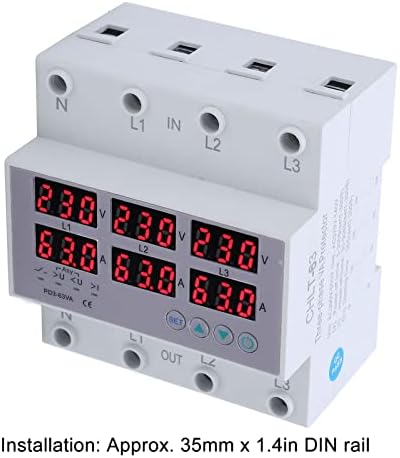
รูปที่ 2: การติดตั้งราง DIN
ภาพนี้แสดงด้านข้าง view of the Walfront CHLT-63 protector, highlighting its compatibility with a 35mm DIN rail. The text overlay confirms the installation method: "Installation: Approx. 35mm x 1.4in DIN rail."
- ค้นหาราง DIN ขนาด 35 มม. ที่เหมาะสมภายในแผงไฟฟ้าของคุณ
- Align the protector's mounting clips with the DIN rail.
- Press firmly until the device clicks securely into place on the rail.
5.2 การเดินสายไฟ

รูปที่ 3: ขั้วต่อสายไฟ
มุมนี้ view of the Walfront CHLT-63 protector clearly shows the input (IN) and output (OUT) terminals. The terminals are labeled for Neutral (N) and three phases (L1, L2, L3) at both the top (IN) and bottom (OUT) of the device, indicating where the main power supply and protected load should be connected.
- Identify the input (IN) and output (OUT) terminals on the device. The input terminals are typically at the top, labeled N, L1, L2, L3 IN. The output terminals are at the bottom, labeled N, L1, L2, L3 OUT.
- Connect the incoming 3-phase power supply (Neutral, L1, L2, L3) to the corresponding IN terminals.
- Connect the load (the circuit or equipment to be protected) to the corresponding OUT terminals.
- Ensure all connections are secure and properly tightened to prevent loose contacts and overheating.
- ตรวจสอบสายไฟทั้งหมดอีกครั้งก่อนเปิดไฟ
6. การดำเนินการ
6.1 Powering On and Real-time Monitoring
Once installed and wired, restore power to the circuit. The device will power on, and the digital display screens will show the real-time voltage and current for each phase (L1, L2, L3).
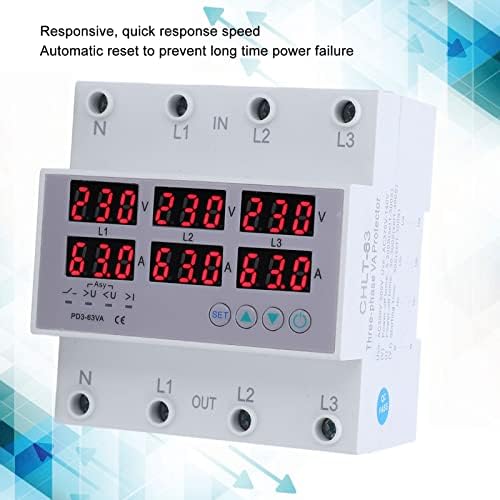
Figure 4: Real-time Display and Responsiveness
This image shows the Walfront CHLT-63 protector with its digital displays active, showing voltage and current readings for all three phases. The accompanying text highlights its "Responsive, quick response speed" and "Automatic reset to prevent long time power failure," indicating its operational efficiency.
- The top row of displays indicates voltage (V) for L1, L2, and L3.
- The bottom row of displays indicates current (A) for L1, L2, and L3.
- Observe these readings to ensure the system is operating within normal parameters.
6.2 การตั้งค่าพารามิเตอร์การป้องกัน
The device allows you to set specific thresholds for overvoltage, อันเดอร์โวลtage, and power-off times. Refer to Figure 1 for button identification.
- กดปุ่ม Menu key (M) เพื่อเข้าสู่โหมดการตั้งค่า
- ใช้ Adjustment keys (Up/Down) to navigate through the different parameters (e.g., Overvoltage Setting Value, Undervoltage Setting, Power Off Time).
- When the desired parameter is displayed, press the Menu key (M) again to select it for editing.
- ใช้ Adjustment keys (Up/Down) เพื่อเปลี่ยนค่า
- กดปุ่ม Menu key (M) to confirm the new value and move to the next parameter or exit the settings.
- โอเวอร์โวลtage Setting Value: Adjustable from AC230-300V.
- อันเดอร์โวลtage การตั้งค่า: Adjustable from AC120V-210V.
- Power Off Time (Voltage/ปัจจุบัน): Adjustable from 1-600 seconds. This setting determines how long the device waits before cutting power after a fault, and how long it waits before automatically resetting after conditions normalize.
6.3 ฟังก์ชั่นการป้องกัน
เมื่อตรวจสอบฉบับtage or current exceeds the set thresholds, the protector will automatically cut off the power supply to the load. The corresponding indicator light (e.g., >U for overvoltage) will illuminate.
After the fault condition is resolved and the system returns to normal operating parameters, the device's automatic reset function will restore power to the load after the set power-off time delay. This prevents long-term power failure and ensures system stability.
7. การบำรุงรักษา
The Walfront CHLT-63 protector is designed for minimal maintenance. However, regular checks can help ensure its longevity and reliable operation.
- การตรวจสอบเป็นระยะ: Visually inspect the device and its wiring connections periodically for any signs of damage, loose connections, or discoloration.
- การทำความสะอาด: If necessary, gently clean the exterior of the device with a dry, soft cloth. Do not use abrasive cleaners or solvents. Ensure power is disconnected before cleaning.
- สภาพแวดล้อม : ตรวจสอบให้แน่ใจว่าสภาพแวดล้อมในการทำงานอยู่ในช่วงอุณหภูมิและความชื้นที่แนะนำ เพื่อป้องกันความเสียหายก่อนกำหนด
8 การแก้ไขปัญหา
If you encounter issues with your Walfront CHLT-63 protector, refer to the following common troubleshooting steps:
| ปัญหา | สาเหตุที่เป็นไปได้ | สารละลาย |
|---|---|---|
| อุปกรณ์ไม่เปิดเครื่อง | No power supply; incorrect wiring; device fault. | Check incoming power supply. Verify wiring connections. If power is present and wiring is correct, the device may be faulty and require replacement. |
| Power cuts off frequently. | Frequent overvoltage/อันเดอร์โวลtage/overcurrent conditions; incorrect protection settings. | Monitor the display for fault indicators. Check the actual voltage and current of your system. Adjust protection thresholds if they are set too sensitively for your application. Investigate the cause of power fluctuations. |
| หน้าจอแสดงผลไม่ถูกต้อง | Loose wiring connections; device fault. | Ensure all wiring terminals are securely tightened. If readings remain inaccurate, the device may be faulty. |
| Device does not reset automatically. | Fault condition persists; automatic reset function disabled (if applicable); device fault. | ตรวจสอบเงื่อนไขความผิดพลาด (แรงดันไฟฟ้าเกิน)tage, etc.) has truly cleared. Check the power-off time setting. If the issue persists, the device may require service or replacement. |
For issues not covered here, or if troubleshooting steps do not resolve the problem, contact qualified personnel or Walfront customer support.
9. การรับประกันและการสนับสนุน
Walfront products are manufactured to high-quality standards. While specific warranty details are not provided in this manual, please retain your proof of purchase for any warranty claims. For technical support, service, or inquiries regarding your Walfront CHLT-63 protector, please refer to the contact information provided with your purchase or visit the official Walfront webเว็บไซต์.