
1. บทนำ
This manual provides comprehensive instructions for the safe and efficient operation of your Walfront RF Signal Generator, Model Walfront493bt51fvu. This device is designed to generate radio frequency (RF) signals with audio modulation capabilities, covering a frequency range of 0.5MHz to 470MHz. Its compact design and robust construction make it suitable for various applications in aviation, wireless communication, automotive electronics, and manufacturing.
โปรดอ่านคู่มือนี้อย่างละเอียดก่อนใช้งานอุปกรณ์ เพื่อให้มั่นใจได้ว่าการติดตั้ง การใช้งาน และการบำรุงรักษาเป็นไปอย่างถูกต้อง
2. ข้อมูลด้านความปลอดภัย
โปรดปฏิบัติตามข้อควรระวังด้านความปลอดภัยต่อไปนี้เพื่อป้องกันการบาดเจ็บและความเสียหายต่ออุปกรณ์:
- ตรวจสอบแหล่งจ่ายไฟ voltage ตรงตามข้อกำหนดของอุปกรณ์ (12 โวลต์)
- ห้ามใช้งานอุปกรณ์ในสภาพเปียกหรืองamp เงื่อนไข.
- หลีกเลี่ยงการให้อุปกรณ์สัมผัสกับอุณหภูมิที่ร้อนจัดหรือโดนแสงแดดโดยตรง
- ห้ามเปิดหรือดัดแปลงอุปกรณ์ด้วยตนเอง โปรดส่งต่ออุปกรณ์ดังกล่าวให้ช่างผู้ชำนาญการเป็นผู้ดำเนินการซ่อมแซม
- Disconnect power before cleaning or when the device is not in use.
- ใช้งานอุปกรณ์ด้วยความระมัดระวังเพื่อป้องกันความเสียหายทางกายภาพ
3. สินค้าหมดview
The Walfront RF Signal Generator features a user-friendly interface with a clear display and tactile controls. Its durable ABS casing ensures longevity and resistance to environmental factors.
3.1. เค้าโครงแผงด้านหน้า

รูปที่ 1: ด้านหน้า view of the Walfront RF Signal Generator, showing the display, keypad, RF output, and power button.

รูปที่ 2: ภาพระยะใกล้ view of the front panel, highlighting the LCD display, numeric keypad (0-9, F1-F4), RF OUT BNC connector, and the red power button.
- ปุ่มเปิด/ปิด: Red button on the left for turning the device on/off.
- RF OUT Connector: BNC connector for RF signal output.
- จอแสดงผล LCD: Shows current frequency, modulation status, and other operational parameters.
- แผงปุ่มกดตัวเลข (0-9): Used for entering frequency values.
- ปุ่มฟังก์ชั่น (F1-F4): Specific functions for modulation, frequency steps, or presets (refer to display for exact function).
- Arrow Keys (∧, ∨): For adjusting values or navigating menus.
3.2 ด้าน View
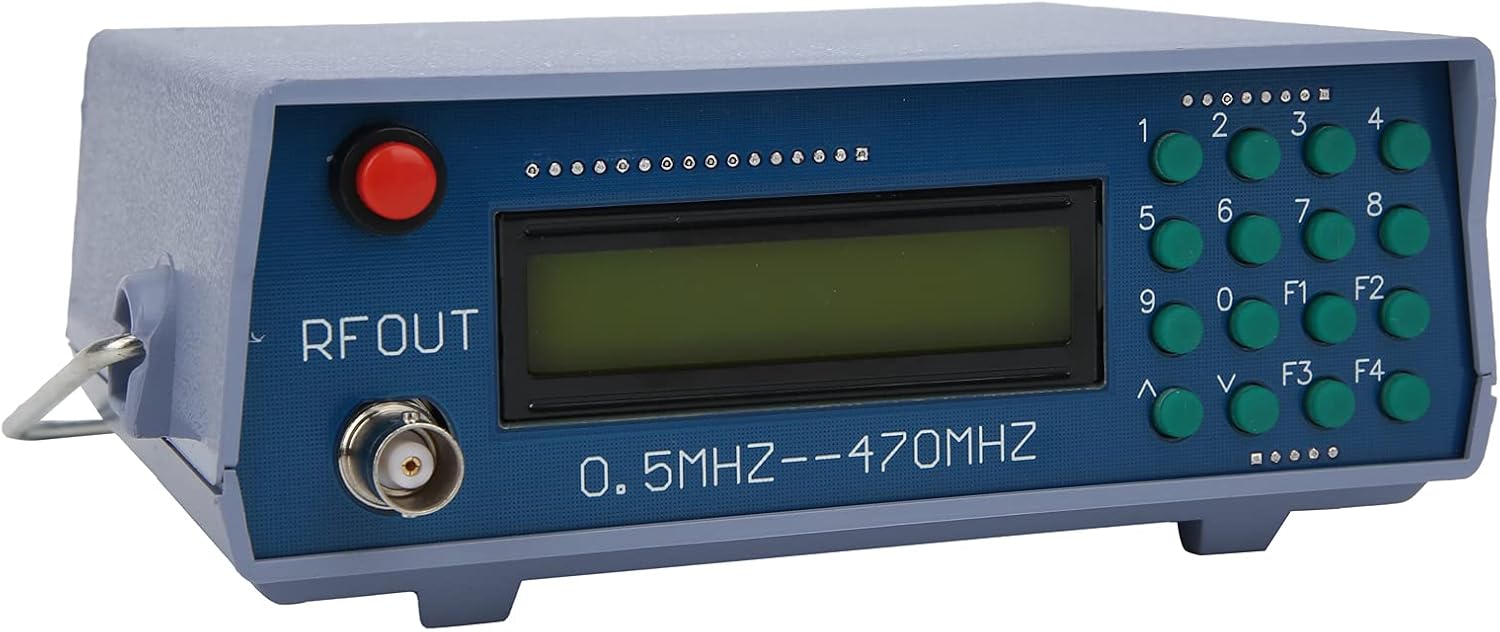
รูปที่ 3: มุม view of the device, illustrating its compact form factor and side panel design.

รูปที่ 4: ด้านข้าง view of the RF signal generator, showing the ventilation slots and overall casing structure.
4. การตั้งค่า
- การแกะกล่อง: Carefully remove the RF Signal Generator from its packaging. Inspect for any signs of damage.
- การเชื่อมต่อไฟฟ้า: Connect a 12V DC power adapter (not included) to the power input port on the rear or side of the device. Ensure the adapter's polarity is correct.
- การเชื่อมต่อเอาท์พุต: Connect a BNC cable (not included) to the "RF OUT" connector on the front panel. Connect the other end of the cable to your receiving device (e.g., spectrum analyzer, radio receiver).
- เปิดเครื่อง: Press the red power button on the front panel to turn on the device. The LCD display should illuminate.
5. คู่มือการใช้งาน
This section outlines basic operation. Specific functions of F1-F4 keys may vary based on firmware version; observe the display for context.
- การตั้งค่าความถี่:
- Use the numeric keypad (0-9) to enter the desired frequency. The display will show the entered digits.
- Press a function key (e.g., F1, F2) or an arrow key (∧, ∨) to confirm the entry or select the frequency unit (MHz, kHz).
- The device supports frequencies from 0.5MHz to 470MHz.
- การปรับความถี่:
- Use the ∧ and ∨ arrow keys to fine-tune the frequency in small increments.
- Some function keys (F1-F4) might allow for larger step adjustments or direct frequency presets.
- Audio Modulation:
- The device supports audio modulation. Look for a function key (e.g., F3 or F4) that activates or adjusts modulation settings.
- The display will indicate the modulation status (e.g., AM, FM, or audio tone frequency).
- The internal audio modulation frequency is 800Hz.
- หมดแรง: Press the red power button again to turn off the device.
6. การบำรุงรักษา
- การทำความสะอาด: ใช้ผ้าแห้งเนื้อนุ่มเช็ดทำความสะอาดภายนอกของอุปกรณ์ ห้ามใช้น้ำยาทำความสะอาดหรือสารละลายใดๆ
- พื้นที่จัดเก็บ: เก็บอุปกรณ์ไว้ในที่แห้งและเย็น หลีกเลี่ยงแสงแดดโดยตรงและอุณหภูมิที่สูงหรือต่ำเกินไป
- การตรวจสอบ: Periodically check cables and connectors for wear or damage.
7 การแก้ไขปัญหา
| ปัญหา | สาเหตุที่เป็นไปได้ | สารละลาย |
|---|---|---|
| อุปกรณ์ไม่เปิดเครื่อง | No power, incorrect adapter, faulty power button. | ตรวจสอบการเชื่อมต่ออะแดปเตอร์แปลงไฟและระดับเสียงtage. Ensure the power outlet is functional. |
| No RF signal output. | Incorrect frequency setting, faulty BNC cable, receiving device issue. | Verify frequency setting on the display. Check BNC cable for proper connection and integrity. Ensure the receiving device is correctly configured. |
| หน้าจอว่างเปล่าหรือไม่สามารถอ่านได้ | ปัญหาเกี่ยวกับระบบไฟ ความผิดพลาดภายใน | Cycle power. If the problem persists, contact customer support. |
8. ข้อมูลจำเพาะ
| ยี่ห้อ | Walfront |
| แบบอย่าง | Walfront493bt51fvu |
| หมายเลขชิ้นส่วน | Walfront493bt51fvu |
| ช่วงความถี่ | 0.5MHz - 470MHz |
| Audio Modulation Frequency | 800เฮิรตซ์ |
| เล่มที่tage | 12 โวลต์ |
| Casinวัสดุ g | เอบีเอส |
| ขนาดแพ็คเกจ | 20 x 14.3 x 10.7 ซม. |
| น้ำหนัก | 350 กรัม |
| รวมแบตเตอรี่ | เลขที่ |
| ใช้แบตเตอรี่ | เลขที่ |
| ASIN | B0BPSCC6ND |
9. การรับประกันและการสนับสนุน
Walfront products are manufactured to high-quality standards. For warranty information, technical support, or service inquiries, please refer to the documentation included with your purchase or contact your retailer. Keep your purchase receipt as proof of purchase.
For further assistance, you may visit the Walfront store on Amazon: Walfront Store