
การแนะนำ
This instruction manual provides essential information for the safe and efficient operation of your ALLVIEW 40ATC6000-F 40-inch Full HD TV. Please read this manual thoroughly before using the television and retain it for future reference. Following these instructions will ensure optimal performance and extend the lifespan of your device.
ข้อมูลด้านความปลอดภัยที่สำคัญ
ปฏิบัติตามข้อควรระวังด้านความปลอดภัยต่อไปนี้เสมอเพื่อป้องกันไฟฟ้าช็อต ไฟไหม้ หรือการบาดเจ็บ:
- อย่าให้ทีวีโดนฝนหรือความชื้น
- อย่าเปิดทีวีasinง. ส่งต่อการบริการทั้งหมดให้กับบุคลากรที่มีคุณสมบัติ
- ตรวจสอบให้แน่ใจว่ามีการระบายอากาศที่เหมาะสม อย่าปิดกั้นช่องระบายอากาศ
- ปกป้องสายไฟจากการถูกเหยียบหรือถูกหนีบ
- ถอดปลั๊กทีวีในระหว่างที่มีพายุฝนฟ้าคะนองหรือเมื่อไม่ได้ใช้งานเป็นเวลานาน
- เก็บทีวีให้ห่างจากแสงแดดโดยตรง แหล่งความร้อน และสนามแม่เหล็กแรงสูง
เนื้อหาแพ็คเกจ
Before installation, check that all items listed below are included in your package:
- ทั้งหมดVIEW 40ATC6000-F 40-inch Full HD TV
- รีโมทคอนโทรล
- สายไฟ
- ชั้นวางทีวี (2 ชิ้น)
- สกรูสำหรับขาตั้งทีวี
- คู่มือการใช้งาน (เอกสารนี้)
การตั้งค่า
1. การติดตั้งขาตั้งทีวี
- วางทีวีคว่ำหน้าลงบนพื้นผิวที่นุ่มและเรียบอย่างระมัดระวังเพื่อป้องกันไม่ให้หน้าจอเสียหาย
- จัดวางขาตั้งแต่ละชิ้นให้ตรงกับรูสกรูที่อยู่ด้านล่างของทีวี
- ยึดชิ้นส่วนขาตั้งแต่ละชิ้นด้วยสกรูที่ให้มา ตรวจสอบให้แน่ใจว่าขันแน่นสนิทแล้ว
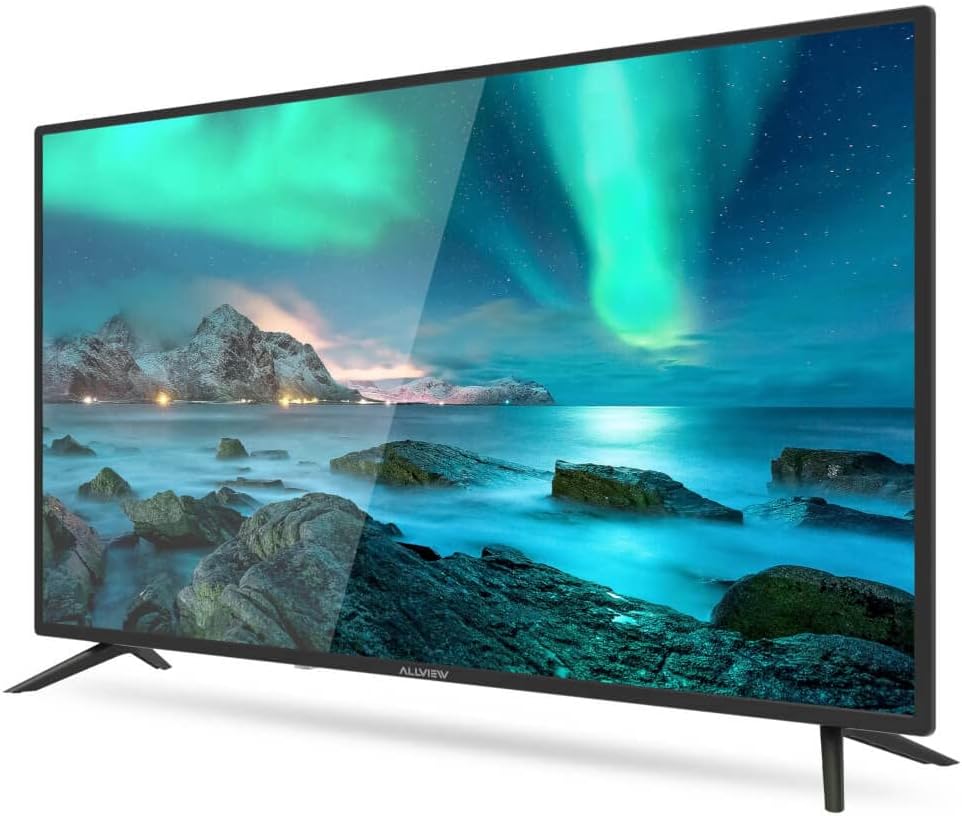
รูปที่ 1 : ด้านหน้า view of the ALLVIEW 40ATC6000-F TV with stand.
2. การติดตั้งบนผนัง (ทางเลือก)
If you choose to wall mount your TV, remove the stand first. Use a VESA-compatible wall mount kit (not included) that matches the TV's VESA mounting pattern. Consult a professional for wall mounting to ensure safety and proper installation.
3. การเชื่อมต่ออุปกรณ์ภายนอก
The rear panel of your TV provides various ports for connecting external devices.

Figure 2: Rear panel connections of the ALLVIEW 40ATC6000-F TV.
- พลัง: เชื่อมต่อสายไฟเข้ากับช่องรับไฟของทีวี จากนั้นจึงเชื่อมต่อกับเต้ารับที่ผนัง
- ช่องต่อ HDMI: Use HDMI cables to connect devices like Blu-ray players, game consoles, or set-top boxes.
- เสาอากาศ/สายเคเบิล: Connect an antenna or cable TV feed to the ANT/CABLE input for broadcast channels.
- ยูเอสบี: เสียบอุปกรณ์ USB เพื่อเล่นสื่อ
- เสียงออก: เชื่อมต่อระบบเสียงภายนอกหรือหูฟัง
4. ตัวช่วยการตั้งค่าครั้งแรก
Upon first power-on, the TV will guide you through an initial setup process. This includes selecting your language, country, time zone, and scanning for available channels. Follow the on-screen prompts to complete the setup.
การใช้งานทีวี
1. การควบคุมระยะไกลview
รีโมทคอนโทรลนี้ช่วยให้คุณเข้าถึงฟังก์ชั่นทั้งหมดของทีวีได้ ใส่แบตเตอรี่ AAA สองก้อน (ไม่ได้รวมอยู่ในชุด) ลงในรีโมทคอนโทรล โดยตรวจสอบให้แน่ใจว่าขั้วถูกต้อง

Figure 3: ALLVIEW TV Remote Control.
- ปุ่มเพาเวอร์ (⏻): เปิดหรือปิดทีวี
- เพิ่ม/ลดระดับเสียง (VOL +/-): ปรับระดับเสียง
- เปลี่ยนช่องขึ้น/ลง (CH +/-): เปลี่ยนช่องทีวี
- Source Button (SOURCE): เลือกแหล่งสัญญาณเข้า (HDMI, AV, TV)
- Menu Button (MENU): เปิดเมนูหลักสำหรับการตั้งค่า
- ปุ่มนำทาง (▲ ▼ ◀ ▶): นำทางผ่านเมนูและตัวเลือก
- ปุ่มตกลง/เข้าสู่ระบบ: ยืนยันการเลือก
- Exit Button (EXIT): Closes the current menu or returns to the previous screen.
2. ฟังก์ชั่นพื้นฐาน
- เปิด/ปิดเครื่อง: Press the Power button on the remote or the TV's control panel.
- การปรับระดับเสียง: Use VOL +/- buttons.
- การเลือกช่อง: Use CH +/- buttons or the numeric keypad.
- การเลือกแหล่งสัญญาณเข้า: Press the SOURCE button repeatedly to cycle through available inputs, or press it once and use navigation buttons to select.
3. การนำทางเมนูและการตั้งค่า
Press the MENU button to access the TV's main settings. Use the navigation buttons to move between categories and options, and the OK button to confirm. Common settings include:
- การตั้งค่ารูปภาพ: Adjust brightness, contrast, color, sharpness, and picture mode (e.g., Standard, Dynamic, Movie).
- การตั้งค่าเสียง: Adjust volume, bass, treble, balance, and sound mode (e.g., Standard, Music, Movie). This model supports Dolby Digital.
- การตั้งค่าช่อง: ค้นหาช่องและแก้ไขรายการช่อง
- การตั้งเวลา: ตั้งเวลาปัจจุบัน, ตัวตั้งเวลาปิดเครื่องอัตโนมัติ, และการปิดเครื่องอัตโนมัติ
- การตั้งค่าระบบ: Language, factory reset, software update.
การซ่อมบำรุง
การทำความสะอาดทีวี
- ควรถอดปลั๊กทีวีทุกครั้งก่อนทำความสะอาด
- ใช้ผ้าแห้งนุ่มและไม่ขุยเช็ดหน้าจอและตู้
- สำหรับรอยฝังแน่น ให้เช็ดเบาๆampชุบผ้าด้วยน้ำหรือน้ำยาทำความสะอาดหน้าจอโดยเฉพาะ ห้ามฉีดของเหลวลงบนทีวีโดยตรงเด็ดขาด
- หลีกเลี่ยงการใช้สารทำความสะอาดที่มีฤทธิ์กัดกร่อน ขี้ผึ้งหรือตัวทำละลาย
การแก้ไขปัญหา
ก่อนติดต่อฝ่ายสนับสนุนลูกค้า ให้ลองใช้วิธีแก้ปัญหาทั่วไปดังต่อไปนี้:
| ปัญหา | สาเหตุที่เป็นไปได้ | สารละลาย |
|---|---|---|
| ไม่มีไฟฟ้า | สายไฟไม่ได้เชื่อมต่อ เต้าเสียบไม่ทำงาน | ตรวจสอบให้แน่ใจว่าเสียบสายไฟแน่นดีแล้ว ทดสอบเต้ารับกับอุปกรณ์อื่น |
| ไม่มีภาพแต่มีเสียง | เลือกแหล่งอินพุตไม่ถูกต้อง มีปัญหาไฟแบ็คไลท์ | Press the SOURCE button to select the correct input. Check if the TV is in a power-saving mode. |
| ไม่มีเสียงแต่มีภาพ | ปิดเสียงหรือเสียงเบาเกินไป; การตั้งค่าเอาต์พุตเสียงไม่ถูกต้อง | Unmute the TV or increase volume. Check audio settings in the menu. |
| รีโมตคอนโทรลไม่ทำงาน | แบตเตอรี่หมดหรือใส่ไม่ถูกต้อง; มีสิ่งกีดขวาง | เปลี่ยนแบตเตอรี่ ตรวจสอบให้แน่ใจว่าขั้วถูกต้อง นำสิ่งกีดขวางระหว่างรีโมทและทีวีออกให้หมด |
| คุณภาพของภาพไม่ดี | สัญญาณอ่อน; การตั้งค่าภาพไม่ถูกต้อง | ตรวจสอบการเชื่อมต่อเสาอากาศ/สายเคเบิล ปรับการตั้งค่าภาพ (ความสว่าง ความคมชัด ความละเอียด) |
ข้อมูลจำเพาะ
| คุณสมบัติ | รายละเอียด |
|---|---|
| หมายเลขรุ่น | 40ATC6000-F |
| ขนาดหน้าจอ | 40 นิ้ว (101 ซม.) |
| ปณิธาน | ฟูลเอชดี |
| ยี่ห้อ | ทั้งหมดVIEW |
| คุณสมบัติพิเศษ | ระบบดอลบี้ ดิจิตอล |
| ขนาด (กว้าง x ยาว x สูง) | 24 x 69 x 2.5 centimeters (Note: This dimension seems unusually small for a 40-inch TV, likely referring to a component or packaging. User should refer to actual product for full dimensions.) |
| ASIN | B0BPMKJVTC |
| ผู้ผลิต | ทั้งหมดview |
การรับประกันและการสนับสนุน
For warranty information, technical support, or service inquiries, please refer to the warranty card included with your product or visit the official ALLVIEW website. Do not attempt to repair the TV yourself, as this may void your warranty and cause further damage.