
การแนะนำ
ขอบคุณสำหรับการซื้อasing the Andoer D2 Handheld RGB LED Video Light Wand. This manual provides detailed instructions for the safe and effective use of your new light wand. Please read this manual thoroughly before operation and retain it for future reference.
ข้อมูลด้านความปลอดภัย
- อย่าให้เครื่องโดนน้ำหรือความชื้นสูง
- หลีกเลี่ยงการสัมผัสกับแหล่งกำเนิดแสงโดยตรง
- ห้ามถอดประกอบหรือดัดแปลงอุปกรณ์ การซ่อมแซมควรดำเนินการโดยบุคลากรที่ได้รับอนุญาตเท่านั้น
- เก็บให้พ้นจากมือเด็ก
- ใช้เฉพาะสายชาร์จที่ให้มาหรือได้รับการรับรองเท่านั้น
- ห้ามใช้งานในบริเวณที่มีก๊าซหรือของเหลวไวไฟ
เนื้อหาแพ็คเกจ
กรุณาตรวจสอบสิ่งของภายในบรรจุภัณฑ์เมื่อเปิดออก หากมีสินค้าใดสูญหายหรือเสียหาย โปรดติดต่อผู้ค้าปลีกของคุณ
- Andoer D2 Handheld RGB LED Video Light Wand
- สายชาร์จแบบ USB Type-C
- คู่มือการใช้งาน (เอกสารนี้)
สินค้าเกินview
Familiarize yourself with the components and controls of the Andoer D2 light wand.
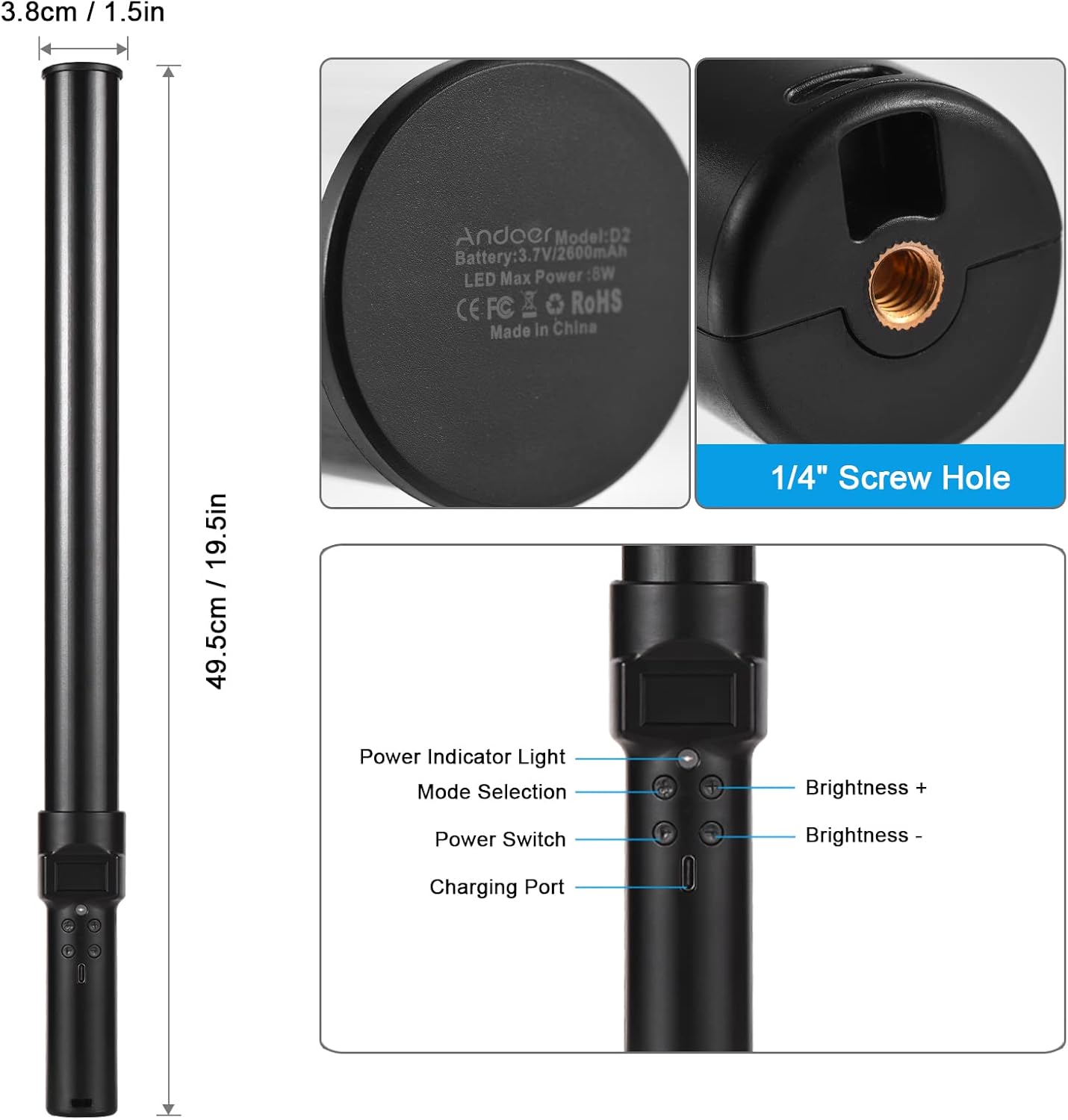
ภาพ: เกินview of the Andoer D2 light wand, showing its dimensions (approximately 49.5cm / 19.5in long and 3.8cm / 1.5in diameter) and control panel. The control panel includes a Power Indicator Light, Mode Selection button, Power Switch, Brightness + button, Brightness - button, and a Charging Port.
ฟังก์ชั่นแผงควบคุม:
- สวิตช์ไฟ: Turns the light wand on or off.
- การเลือกโหมด: Cycles through different lighting modes (e.g., CCT mode, RGB color effects).
- ความสว่าง +: Increases the light brightness.
- ความสว่าง -: Decreases the light brightness.
- ไฟแสดงสถานะเพาเวอร์: Shows the power status and charging status.
- พอร์ตชาร์จ (Type-C): ใช้สำหรับชาร์จแบตเตอรี่ภายใน
การตั้งค่า
ค่าใช้จ่ายเริ่มต้น:
Before first use, fully charge the light wand. Connect the provided USB Type-C cable to the charging port on the device and the other end to a USB power adapter (not included) or a computer USB port. The power indicator light will show charging status.

ภาพ: ภาพระยะใกล้ view of the Type-C charging port, indicating where to connect the charging cable.

ภาพ: The Andoer D2 light wand shown alongside its USB Type-C charging cable, illustrating the charging setup.
ตัวเลือกการติดตั้ง:
The Andoer D2 light wand can be used handheld for flexible lighting or mounted for stable positioning. It features a standard 1/4-inch screw hole at the bottom.

ภาพ: รายละเอียด view of the 1/4-inch screw hole located at the base of the light wand, demonstrating how it can be attached to a light stand or tripod for stable use. Note that the light stand/tripod is sold separately.
- การใช้แบบพกพา: Simply hold the light wand to direct light as needed.
- Tripod/Light Stand Mounting: Screw the 1/4-inch thread at the bottom of the light wand onto a compatible tripod or light stand. Ensure it is securely fastened before use.
คำแนะนำการใช้งาน
เปิด/ปิดเครื่อง:
กดปุ่มค้างไว้ สวิตซ์ไฟฟ้า ปุ่มสำหรับเปิดหรือปิดแท่งไฟ
การปรับความสว่าง:
The light wand offers 12 levels of adjustable brightness. Use the ความสว่าง+ ปุ่มเพื่อเพิ่มความสว่างและ ความสว่าง - ปุ่มเพื่อลดมัน

ภาพ: Illustration of the 12 levels of adjustable brightness, demonstrating the range from dim to bright light output.
การปรับอุณหภูมิสี (โหมด CCT):
In CCT mode, you can adjust the color temperature between 2500K (warm light), 5500K (neutral/daylight), and 8500K (cold light). Press the การเลือกโหมด button to cycle to CCT mode, then use the ความสว่าง+ และ ความสว่าง - buttons to adjust the color temperature.

ภาพ: Visual representation of the adjustable color temperatures, ranging from warm (2500K) to neutral (5500K) to cool (8500K) light.
Activating Colorful Light Effects (RGB Mode):
The light wand features 7 colorful light effects: red, green, blue, orange, purple, light blue, and red & blue flash. Press the การเลือกโหมด button to cycle through these RGB effects. Brightness can still be adjusted in these modes using the ความสว่าง+ และ ความสว่าง - ปุ่ม
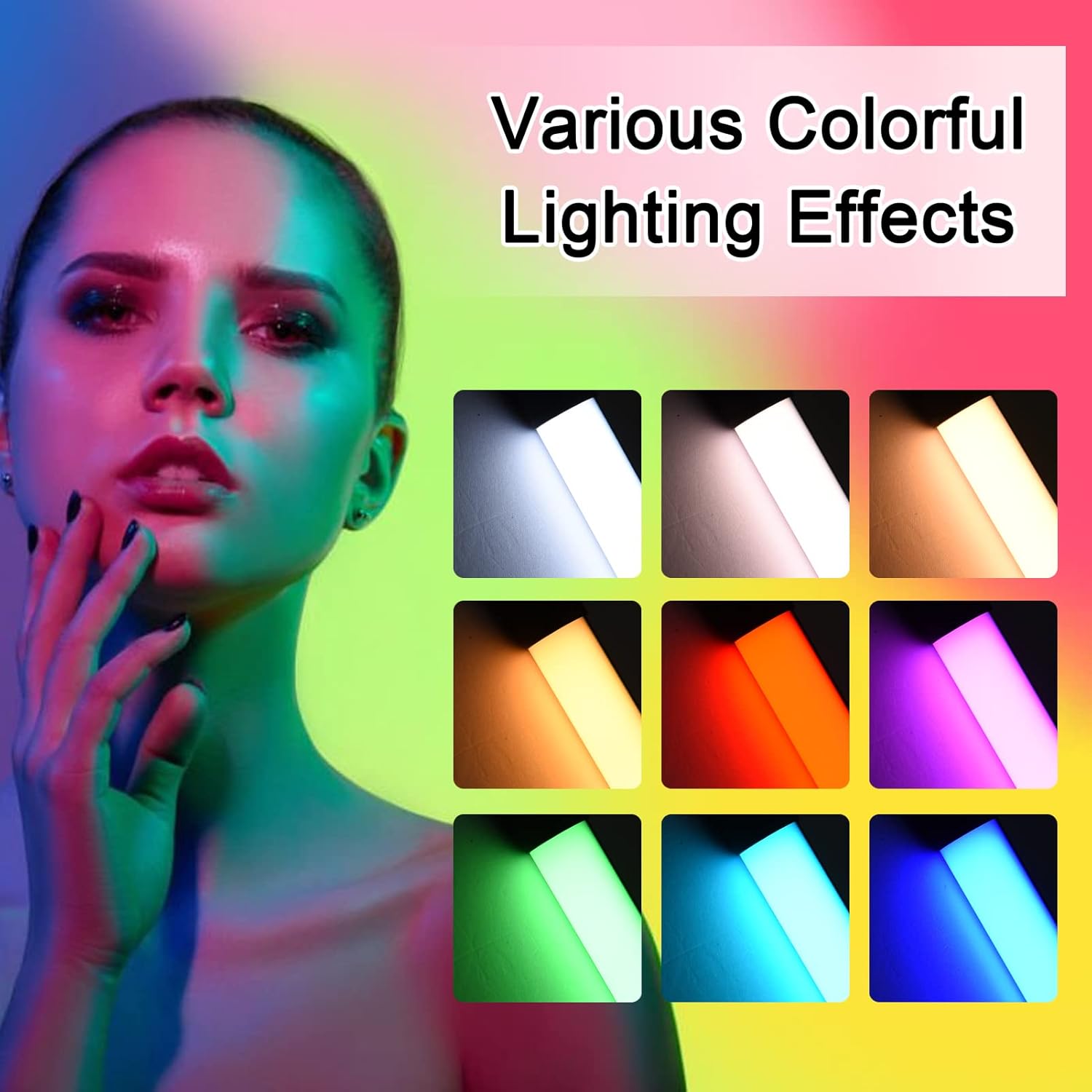
ภาพ: A visual guide to the 7 colorful light effects available, showcasing the vibrant range of colors the light wand can produce.
การชาร์จไฟ
The Andoer D2 light wand has a built-in 2600mAh rechargeable lithium battery. When the battery is low, the power indicator light will signal. To charge:
- Connect the small end of the USB Type-C charging cable to the charging port on the light wand.
- Connect the standard USB end of the cable to a USB power source (e.g., wall adapter, power bank, computer USB port).
- The power indicator light will illuminate or change color to indicate charging. It will change again or turn off when fully charged.
A full charge provides approximately 2.5 hours of continuous use at maximum brightness.
การซ่อมบำรุง
- Clean the light wand with a soft, dry cloth. Do not use abrasive cleaners or solvents.
- เก็บอุปกรณ์ไว้ในที่แห้งและเย็น หลีกเลี่ยงแสงแดดโดยตรงและอุณหภูมิที่สูงหรือต่ำเกินไป
- If not used for extended periods, charge the battery every 3 months to maintain battery health.
การแก้ไขปัญหา
| ปัญหา | สาเหตุที่เป็นไปได้ | สารละลาย |
|---|---|---|
| ไฟไม่เปิด | แบตเตอรี่หมด | Charge the light wand using the provided USB Type-C cable. |
| แสงสลัวหรือกระพริบ | แบตเตอรี่อ่อน | ชาร์จอุปกรณ์ใหม่ |
| Cannot change color or mode. | กดปุ่มผิด หรือเกิดความผิดพลาดชั่วคราวของซอฟต์แวร์ | Ensure you are pressing the Mode Selection button. Try turning the device off and on again. |
| อุปกรณ์ไม่ชาร์จ | Faulty cable, power adapter, or charging port. | Try a different USB Type-C cable or power adapter. Ensure the cable is fully inserted. |
ข้อมูลจำเพาะ
| คุณสมบัติ | รายละเอียด |
|---|---|
| แบบอย่าง | D2 (SJI3033515989406YA) |
| ยี่ห้อ | อันโดเออร์ |
| อุณหภูมิสี | 2500K / 5500K / 8500K (ปรับได้) |
| ระดับความสว่าง | 12 ระดับ |
| เอฟเฟกต์แสงสีสันสดใส | 7 effects (Red, Green, Blue, Orange, Purple, Light Blue, Red & Blue Flash) |
| ความจุของแบตเตอรี่ | แบตเตอรี่ลิเธียม 2600mAh |
| พอร์ตชาร์จ | ยูเอสบี ไทป์ ซี |
| อายุการใช้งานแบตเตอรี่ (ความสว่างสูงสุด) | ประมาณ 2.5 ชั่วโมง |
| การติดตั้ง | 1/4-inch screw hole |
| ขนาด | Approx. 49.5cm (19.5in) length, 3.8cm (1.5in) diameter |
การรับประกันและการสนับสนุน
Andoer products are designed and manufactured to the highest quality standards. For warranty information or technical support, please refer to the warranty card included with your purchase or visit the official Andoer webไซต์ โปรดเก็บหลักฐานการซื้อไว้เพื่อใช้ในการเรียกร้องการรับประกัน
Andoer Official Webเว็บไซต์: ร้าน Andoer บน Amazon