
การแนะนำ
This manual provides instructions for the Beyution RM-STHC60J replacement remote control. This remote is designed to function as a direct replacement for the original JVC RM-STHC60J remote, offering full functionality for compatible JVC DVD Digital Cinema Systems without requiring any programming or setup.
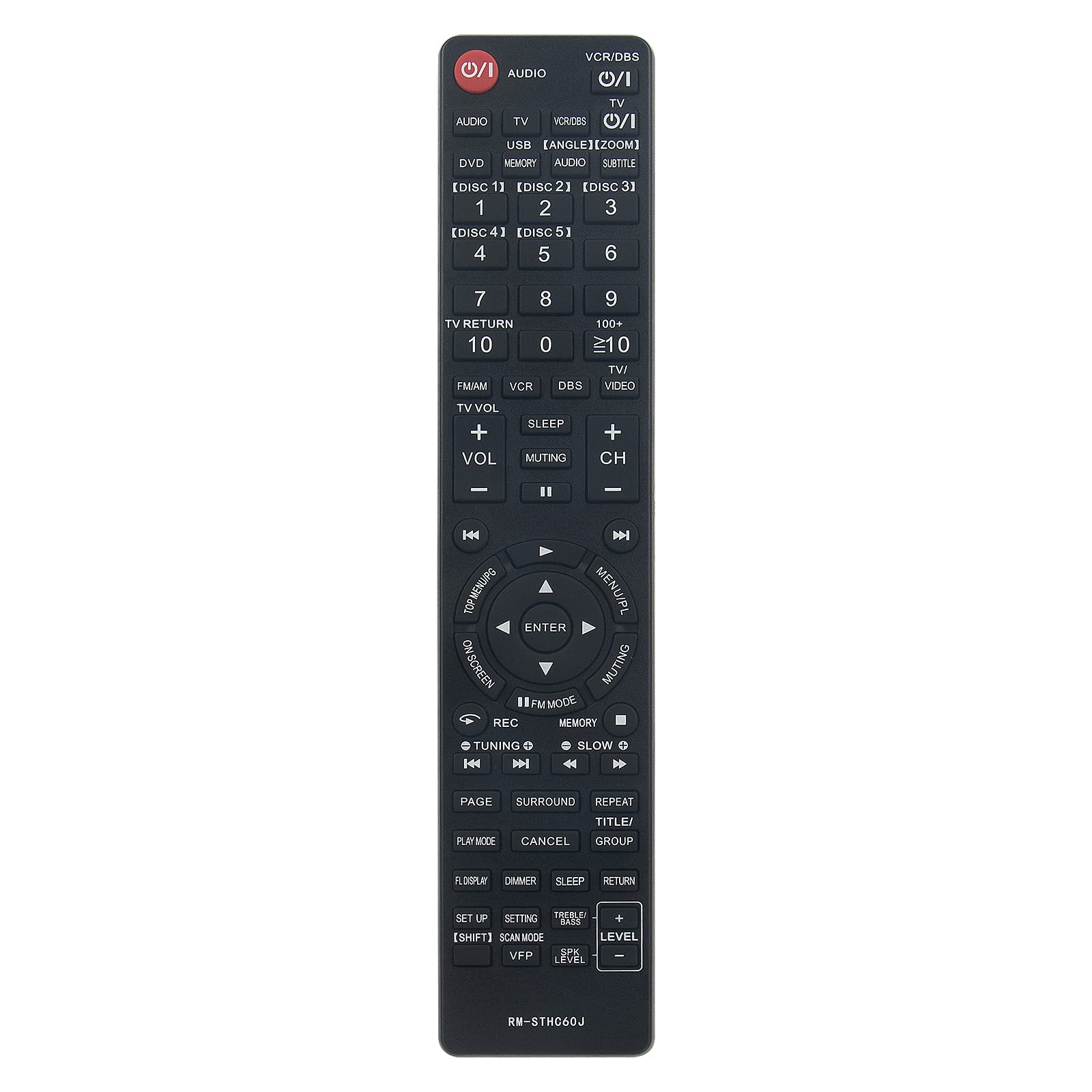
Image: Comparison showing the original JVC remote control on the right and the Beyution RM-STHC60J replacement remote control on the left, with a red arrow indicating replacement.
การตั้งค่า
1. การติดตั้งแบตเตอรี่
The Beyution RM-STHC60J remote control requires two (2) AAA batteries (not included) for operation. Follow these steps to install the batteries:
- ค้นหาช่องใส่แบตเตอรี่ที่ด้านหลังของรีโมทคอนโทรล
- กดแถบลงแล้วเลื่อนฝาครอบแบตเตอรี่ลงด้านล่างเพื่อเปิดออก
- ใส่แบตเตอรี่ AAA สองก้อน โดยตรวจสอบให้แน่ใจว่าขั้วบวก (+) และขั้วลบ (-) ตรงกับเครื่องหมายภายในช่อง
- เลื่อนฝาครอบแบตเตอรี่กลับเข้าที่จนกระทั่งคลิกเข้าที่
No programming or pairing is required. The remote is ready for use once batteries are installed.
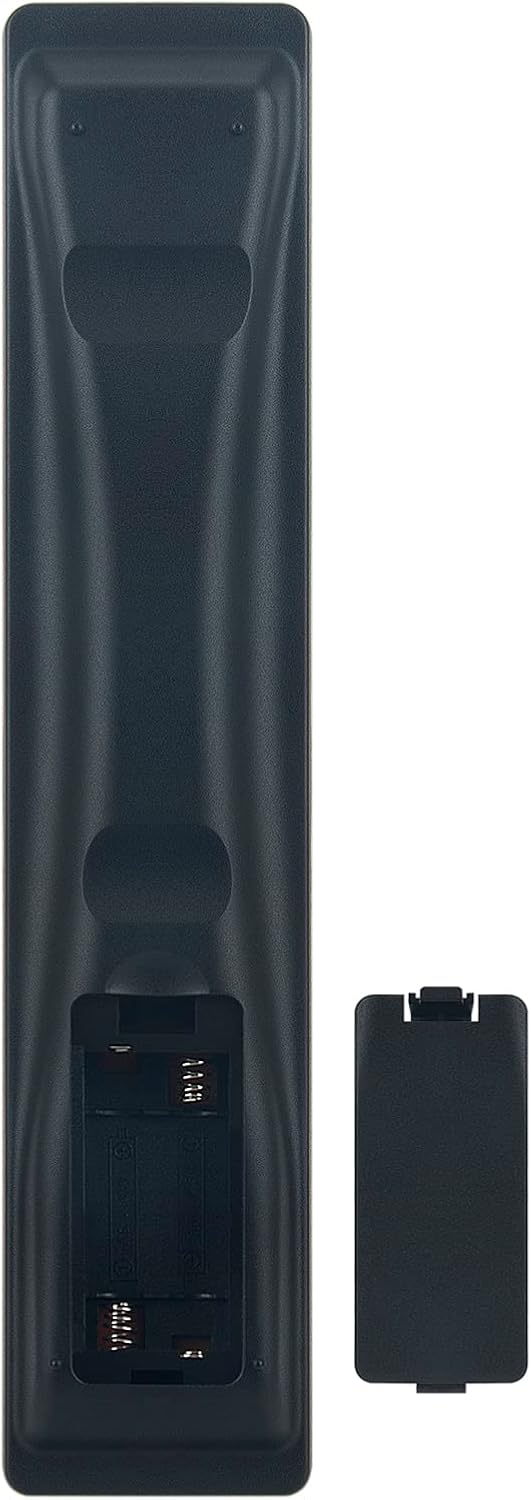
Image: The back of the Beyution RM-STHC60J remote control with the battery compartment open, showing the slots for two AAA batteries.
คำแนะนำการใช้งาน
This remote control provides full functionality for your compatible JVC DVD Digital Cinema System. Point the remote directly at the system's infrared receiver for optimal performance.

ภาพ: ด้านหน้าที่ใส view of the Beyution RM-STHC60J replacement remote control, displaying all buttons and their labels.
ฟังก์ชั่นหลัก:
- Power (①/I): เปิดหรือปิดระบบ
- เสียง: Selects audio input.
- VCR/DBS, TV, DVD, USB: เลือกแหล่งอินพุต
- Number Buttons (0-9, 10+, ≥10): For direct track/chapter selection or channel input.
- DISC [1]-[5]: Selects specific discs in a multi-disc changer.
- VOL +/-, CH +/-, Muting: Adjusts volume, changes channels, or mutes sound.
- ปุ่มควบคุมทิศทาง (ขึ้น, ลง, ซ้าย, ขวา, ENTER): นำทางเมนูและยืนยันการเลือก
- MENU/PL, TOP MENU/PG: Accesses system menus.
- Play, Pause, Stop, Fast Forward, Rewind, Skip: ควบคุมการเล่นสื่อ
- บันทึก: Initiates recording (if supported by the system).
- ติดตั้ง: Accesses setup menu.
- SUBTITLE, ANGLE, ZOOM: Controls specific DVD playback features.
ความเข้ากันได้:
This remote control is compatible with the following JVC DVD Digital Cinema System models:
- TH-C60, TH-C20, TH-C43C, TH-C40, TH-C50, TH-C30, TH-C30U
- THC30, XVTHC20, THC50, XVTHC50, XVTHC40, THC30J, THC20
- THC40, THC60, XVTHC60, SPTHC60F
การซ่อมบำรุง
การทำความสะอาด:
ในการทำความสะอาดรีโมทคอนโทรล ให้ใช้ผ้านุ่มและแห้ง สำหรับคราบสกปรกฝังแน่น ให้เช็ดเบาๆampen the cloth with water or a mild, non-abrasive cleaner. Avoid using harsh chemicals or solvents, as these can damage the remote's finish or internal components.
การดูแลแบตเตอรี่
- ควรเปลี่ยนแบตเตอรี่เมื่อรีโมททำงานลดลงหรือหยุดตอบสนอง
- ควรเปลี่ยนแบตเตอรี่ทั้งสองก้อนพร้อมกันด้วยแบตเตอรี่ใหม่ชนิดเดียวกัน (AAA) เสมอ
- อย่าใช้แบตเตอรี่เก่าและใหม่ผสมกัน หรือแบตเตอรี่ประเภทต่างๆ
- ถอดแบตเตอรี่ออกหากจะไม่ได้ใช้งานรีโมทคอนโทรลเป็นเวลานาน เพื่อป้องกันการรั่วไหลและความเสียหาย
การแก้ไขปัญหา
รีโมตไม่ตอบสนอง:
- ตรวจสอบแบตเตอรี่: ตรวจสอบให้แน่ใจว่าใส่แบตเตอรี่ถูกต้องตามขั้ว (+/-) และแบตเตอรี่ไม่หมด หากจำเป็นให้เปลี่ยนเป็นแบตเตอรี่ AAA ใหม่
- แนวสายตา: Make sure there are no obstructions between the remote control and the infrared sensor on your JVC DVD Digital Cinema System. The remote requires a clear line of sight to operate.
- ระยะทาง: The maximum effective range is approximately 10 meters (33 feet). Ensure you are within this range.
- การรบกวนจากรังสีอินฟราเรด: Bright sunlight or other strong infrared sources can interfere with the remote's signal. Try operating the remote in a different lighting condition.
ฟังก์ชันการทำงานไม่ถูกต้อง:
- Verify that your JVC DVD Digital Cinema System model is listed in the compatibility section. This remote is a direct replacement for specific models.
- If your model is not listed, or if the remote still does not function correctly after troubleshooting, please contact customer support.
ข้อมูลจำเพาะ
| คุณสมบัติ | รายละเอียด |
|---|---|
| แบบอย่าง | RM-STHC60J |
| วัสดุ | พลาสติก ABS |
| เทคโนโลยีการเชื่อมต่อ | อินฟราเรด |
| ระยะทางสูงสุด | 10 เมตร (ประมาณ 33 ฟุต) |
| ขนาด (กว้าง x ยาว x สูง) | 6.3 x 1.57 x 0.39 นิ้ว |
| น้ำหนักสินค้า | 2.47 ออนซ์ |
| แบตเตอรี่ที่จำเป็น | 2 x AAA (ไม่รวม) |
| สี | สีดำ |
| คุณสมบัติพิเศษ | การออกแบบตามหลักสรีรศาสตร์ |
ข้อมูลการรับประกัน
This Beyution RM-STHC60J replacement remote control comes with a ระยะเวลาการรับประกัน 6 เดือน from the date of purchase. This warranty covers manufacturing defects and ensures the remote functions as intended under normal use.
โปรดเก็บหลักฐานการซื้อไว้เพื่อใช้ในการเคลมประกัน การรับประกันไม่ครอบคลุมความเสียหายที่เกิดจากการใช้งานผิดวิธี อุบัติเหตุ การดัดแปลงโดยไม่ได้รับอนุญาต หรือการสึกหรอตามปกติ
การสนับสนุนลูกค้า
If you encounter any issues with your Beyution RM-STHC60J remote control that cannot be resolved using the troubleshooting guide, or if you have questions regarding compatibility or warranty, please contact our customer service team.
For assistance, please reach out via email. Our customer service staff will provide a satisfactory solution within 24 hours.
Note: If you find that your device model is not included in our compatibility list, please contact us to verify compatibility before purchasing.